Reduced video file size after processing

Am using Topaz labs for video to correct/deblur video footage, HD h264 in an MOV container. The file is 4 gb and the output is set at ProRes HQ or higher and the net result file size is 2 GB.

While Topaz video may be efficient, I do not think it is THAT efficient.

Here is mediainfo:

Format : MPEG-4
Format profile : QuickTime
Codec ID : qt 2011.07 (qt /pana)
File size : 3.50 GiB
Duration : 7 min 0 s
Overall bit rate mode : Variable
Overall bit rate : 71.5 Mb/s
Frame rate : 23.976 FPS
Encoded date : 2017-06-19 15:58:43 UTC
Tagged date : 2017-06-19 15:58:43 UTC

Video
ID : 1
Format : AVC
Format/Info : Advanced Video Codec
Format profile : High@L5
Format settings : 2 Ref Frames
Format settings, CABAC : No
Format settings, Reference frames : 2 frames
Format settings, GOP : N=1
Codec ID : avc1
Codec ID/Info : Advanced Video Coding
Duration : 7 min 0 s
Bit rate mode : Variable
Bit rate : 70.0 Mb/s
Maximum bit rate : 71.7 Mb/s
Width : 1 920 pixels
Height : 1 080 pixels
Display aspect ratio : 16:9
Frame rate mode : Constant
Frame rate : 23.976 (24000/1001) FPS
Color space : YUV
Chroma subsampling : 4:2:0
Bit depth : 8 bits
Scan type : Progressive
Bits/(Pixel*Frame) : 1.407
Stream size : 3.42 GiB (98%)
Encoded date : 2017-06-19 15:58:43 UTC
Tagged date : 2017-06-19 15:58:43 UTC
Color range : Full
Color primaries : BT.709
Transfer characteristics : BT.709
Matrix coefficients : BT.709
Codec configuration box : avcC

Audio
ID : 2
Format : PCM
Format settings : Big / Signed
Codec ID : twos
Duration : 7 min 0 s
Bit rate mode : Constant
Bit rate : 1 536 kb/s
Channel(s) : 2 channels
Channel layout : L R
Sampling rate : 48.0 kHz
Bit depth : 16 bits
Stream size : 77.0 MiB (2%)
Encoded date : 2017-06-19 15:58:43 UTC
Tagged date : 2017-06-19 15:58:43 UTC

Other
ID : 3
Type : Time code
Format : QuickTime TC
Duration : 7 min 0 s
Bit rate mode : Constant
Frame rate : 23.976 (24000/1001) FPS
Time code of first frame : 09:41:12:03
Time code of last frame : 09:48:12:02
Time code, stripped : No
Encoded date : 2017-06-19 15:58:43 UTC
Tagged date : 2017-06-19 15:58:43 UTC

Which filter you are using?

If you’re reducing noise it’s normal that the file size is reduced even if the videos quality is superior.

Noise is the death of about every compression.

1 Like

@TPX Which filter?

I am using a deblur. I shot at 11 fps but I really wanted 23.967 fps

Which enhancement model do you use in Topaz Video?

They all do some kind of noise reduction…

You’ve posted the MediaInfo for the source file, which looks reasonable, but not the ProRes output file, which you have the issue with.

ProRes HQ usually exports with a bit rate over 200 Mb/s (at 1080p). A test file I exported from TV just now had a bit rate of 250 Mb/s.

ProRes Proxy has a typical bit rate lower than your source file.

Can’t say much without more info.

The model used is ‘Themis’, will get the mediainfo soonish….

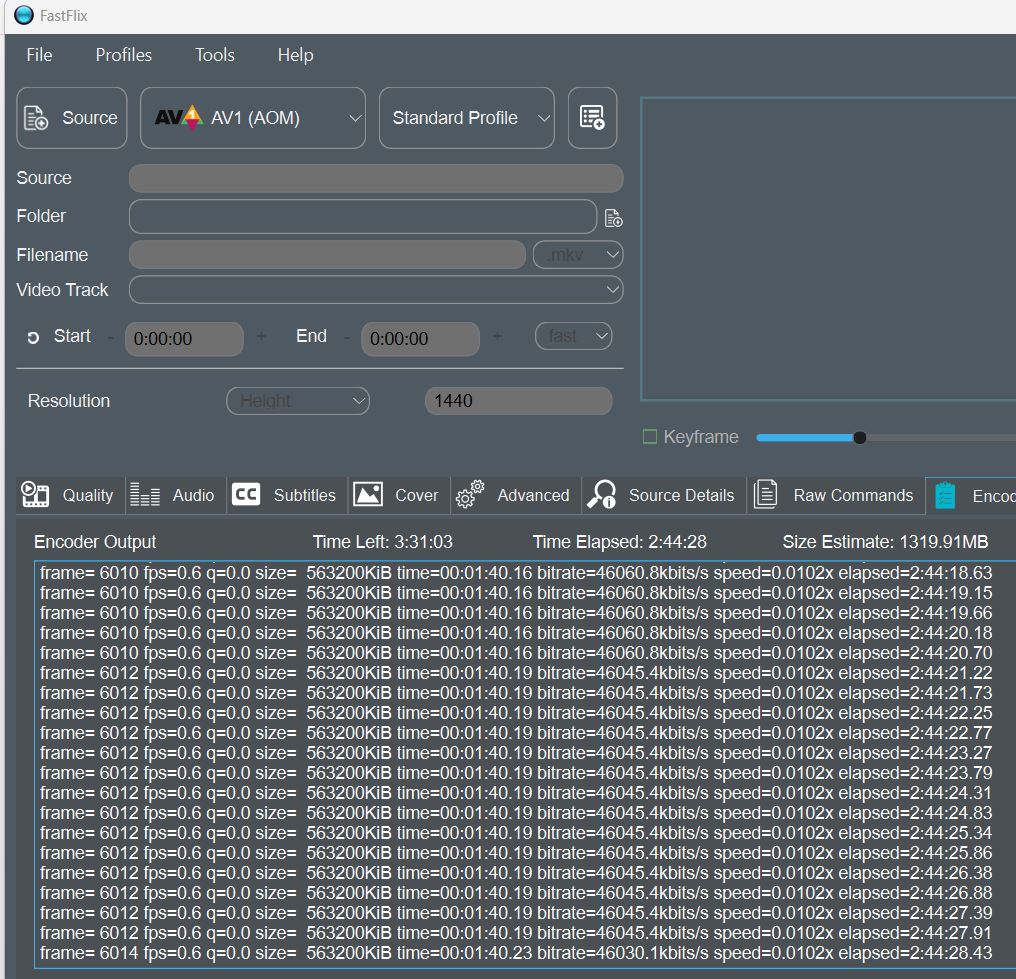
It gets less large with AV1 and preserve grain, I do know some tests with AOMedia codec, it’s impressive, but encoding time is on Starlight level :zany_face:

ok here gets larger I have set CFR very low to 8, source is FFV1 141GB, predicted AV1 result: 13.2GB

@developer-2519 maybe check output film duration is the same as in source. I had already aborts and then wondered why the output file was so small :wink:

Here is an example of the media info post processing:

Complete name : /home/fathomstory/Videos/HeartOSC/Don Cooper and Anson Finlay/P1150788_449826089.mov
Format : MPEG-4
Format profile : QuickTime
Codec ID : qt 0000.02 (qt )
File size : 1.39 GiB
Duration : 7 min 47 s
Overall bit rate mode : Variable
Overall bit rate : 25.5 Mb/s
Frame rate : 23.976 FPS
Encoded date : 2017-06-19 15:50:46 UTC
Tagged date : 2017-06-19 15:50:46 UTC
major_brand : qt
minor_version : 537986816
compatible_brands : qt pana
creation_time : 2017-06-19T15:50:46.000000Z
videoai : Motion blur removed using thm-2. Processed using apo-8 replacing duplicate frames
encoder : Lavf61.3.103
IsTruncated : Yes

Video
ID : 1
Format : AVC
Format/Info : Advanced Video Codec
Format profile : High@L4
Format settings : CABAC / 3 Ref Frames
Format settings, CABAC : Yes
Format settings, Reference frames : 3 frames
Format settings, GOP : M=1, N=30
Codec ID : avc1
Codec ID/Info : Advanced Video Coding
Duration : 7 min 46 s
Bit rate mode : Variable
Bit rate : 24.0 Mb/s
Maximum bit rate : 16.0 Mb/s
Width : 1 800 pixels
Height : 1 010 pixels
Display aspect ratio : 16:9
Frame rate mode : Constant
Frame rate : 23.976 (24000/1001) FPS
Color space : YUV
Chroma subsampling : 4:2:0
Bit depth : 8 bits
Scan type : Progressive
Bits/(Pixel*Frame) : 0.551
Stream size : 1.31 GiB (94%)
Encoded date : 2017-06-19 15:50:46 UTC
Tagged date : 2017-06-19 15:50:46 UTC
Color range : Limited
Color primaries : BT.709
Transfer characteristics : BT.709
Codec configuration box : avcC

Audio
ID : 2
Format : PCM
Format settings : Big / Signed
Codec ID : twos
Duration : 7 min 47 s
Bit rate mode : Constant
Bit rate : 1 536 kb/s
Channel(s) : 2 channels
Channel layout : L R
Sampling rate : 48.0 kHz
Bit depth : 16 bits
Stream size : 85.5 MiB (6%)
Default : Yes
Alternate group : 1
Encoded date : 2017-06-19 15:50:46 UTC
Tagged date : 2017-06-19 15:50:46 UTC

Other
ID : 3
Type : Time code
Format : QuickTime TC
Duration : 1 s 251 ms
Frame rate : 23.976 (24000/1001) FPS
Time code of first frame : 09:33:14:15
Time code, stripped : Yes
Language : English
Default : No
Encoded date : 2017-06-19 15:50:46 UTC
Tagged date : 2017-06-19 15:50:46 UTC


Pre processing:

P1150788.MOV
Format : MPEG-4
Format profile : QuickTime
Codec ID : qt 2011.07 (qt /pana)
File size : 3.98 GiB
Duration : 7 min 57 s
Overall bit rate mode : Variable
Overall bit rate : 71.5 Mb/s
Frame rate : 23.976 FPS
Encoded date : 2017-06-19 15:50:46 UTC
Tagged date : 2020-03-29 15:23:01 UTC

Video
ID : 1
Format : AVC
Format/Info : Advanced Video Codec
Format profile : High@L5
Format settings : 2 Ref Frames
Format settings, CABAC : No
Format settings, Reference frames : 2 frames
Format settings, GOP : N=1
Codec ID : avc1
Codec ID/Info : Advanced Video Coding
Duration : 7 min 57 s
Bit rate mode : Variable
Bit rate : 70.0 Mb/s
Maximum bit rate : 71.7 Mb/s
Width : 1 920 pixels
Height : 1 080 pixels
Display aspect ratio : 16:9
Frame rate mode : Constant
Frame rate : 23.976 (24000/1001) FPS
Color space : YUV
Chroma subsampling : 4:2:0
Bit depth : 8 bits
Scan type : Progressive
Bits/(Pixel*Frame) : 1.408
Stream size : 3.89 GiB (98%)
Encoded date : 2017-06-19 15:50:46 UTC
Tagged date : 2020-03-29 15:23:01 UTC
Color range : Full
Color primaries : BT.709
Transfer characteristics : BT.709
Matrix coefficients : BT.709
Codec configuration box : avcC

Audio
ID : 2
Format : PCM
Format settings : Big / Signed
Codec ID : twos
Duration : 7 min 57 s
Bit rate mode : Constant
Bit rate : 1 536 kb/s
Channel(s) : 2 channels
Channel layout : L R
Sampling rate : 48.0 kHz
Bit depth : 16 bits
Stream size : 87.5 MiB (2%)
Encoded date : 2017-06-19 15:50:46 UTC
Tagged date : 2020-03-29 15:23:01 UTC

Other
ID : 3
Type : Time code
Format : QuickTime TC
Duration : 7 min 57 s
Bit rate mode : Constant
Frame rate : 23.976 (24000/1001) FPS
Time code of first frame : 09:33:14:15
Time code of last frame : 09:41:12:02
Time code, stripped : No
Encoded date : 2017-06-19 15:50:46 UTC
Tagged date : 2020-03-29 15:23:01 UTC

Your output file isn’t ProRes. It’s just H.264 at a lower bit rate (and a slightly lower resolution) than the source file. So no surprise it’s a smaller file.

The source file is using a much higher bit rate because all frames are intra-coded (GOP length of 1). I’m guessing that’s the format used by your camera for ease of editing.

1 Like

Hello,

What settings would you suggest because even at the highest settings the files are still smaller.

Use ProRes 422 Standard or HQ. FFV1 is another option. There’s also DNxHR SQ or HQ.

This assumes you’re going to edit the footage in a NLE.

I have used Topaz Video on my machine, which is modestly powered and a relative, who has a more powerful machine also used Topaz for video to deblur my footage. From my end, I adjusted all settings (Apple Pro res, HD as desired result) and the output is still proxy. The relative, who shared screenshots, is still getting proxy, no matter what the output settings are.

This means either:

  1. there is a glitch

  2. there is a less obvious way to NOT get proxy as a result.

Can someone share screenshots, step by step to take H264 HD footage, deblur and output as Apple Pro Res HD? Please and thanks.

Actually, now that I think about it , why the fuck does Topaz offer Proxy AT ALL?!?! It is up to the NLE to produce proxies. So it makes no sense this is even an option in the software. I wasted a lot of hours and computing power for NOTHING because these guys make a priority of outputting shit over what users actually need. Therefore, the software is by default, shit and you need to do an awful lot of tweaking to get something that is not shit.

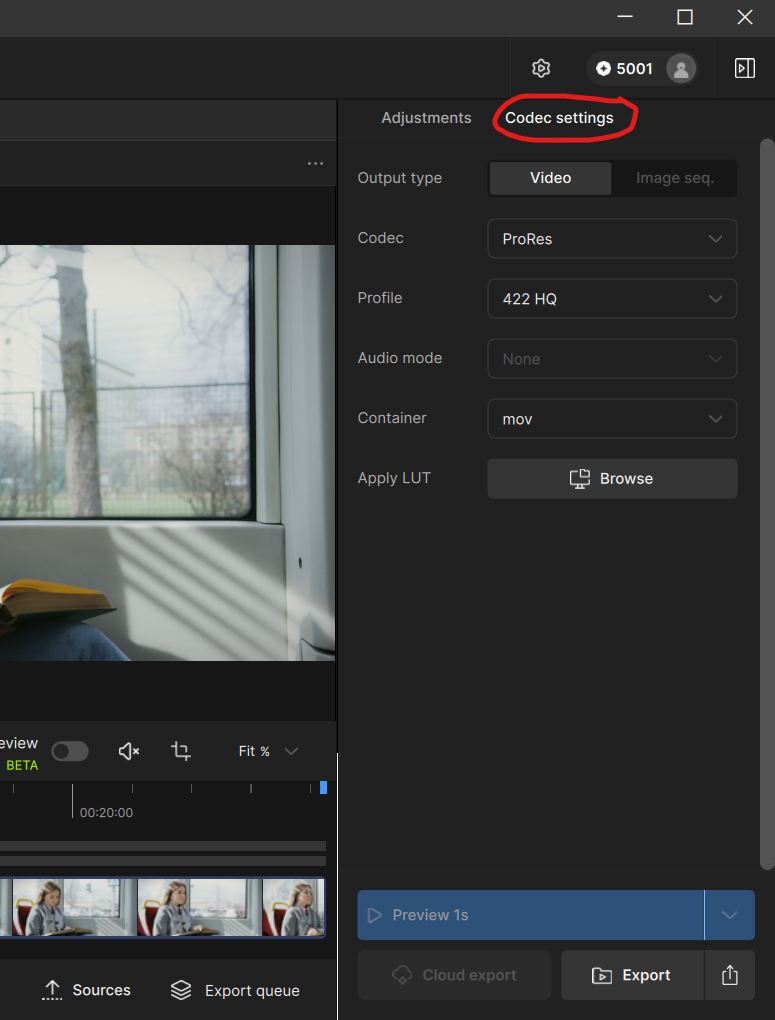
All you have to do is check the codec settings before you hit the export button. You can even export without applying any adjustments, and it will simply transcode the source file.

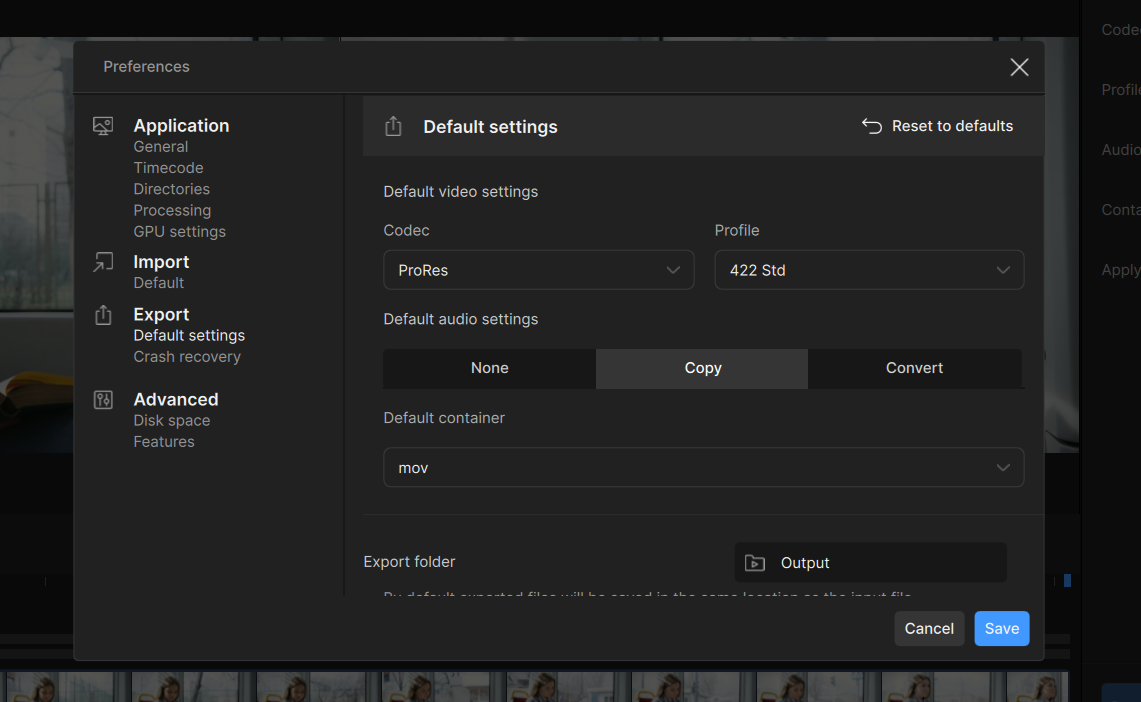
If you go into the app preferences you can also set the default codec settings for export, so you don’t need to adjust them everytime.

Yep, that’s what I did.

I am now going to save myself further money, time and grief. That is tuition paid on lessons on what NOT to invest in. I am now done with Topaz. Thanks for your help.

I mean, @alanhusband-677420 did write that your file has a smaller res after processing.

And you did use a compressed file, processed it , and did save it in a compressed format again.

So the has already compressed 2 times in this process.

Every time you compress you will loose data and just choosing an uncompressed file format will not save your file from loosing data because it did already.


That’s one thing about the internet that I don’t understand.

Everywhere you look, you see the most amazing camera systems with all kinds of features.

But in the end, hardly anyone knows how to edit & record videos or images without losing quality.

Very few people know what bit depth means either.

3 Likes

Yessssss, what on earth would I want with regular resolution when I can get nothing but proxies no matter what settings I use. I give it to someone else and he only gets proxies. Proxies! Proxies Proxies! Screw me to the sidewalk nothing but proxies! Who the hell needs anything but proxies. Good thing Topaz outputs proxies by default! That’s all you need are proxies! Proxies! Proxies! Nothing but proxies!

That’s one thing I don’t understand are people like you who do not want to understand that I do not want proxies. THAT is the issue. My camera outputs H264. You *can* correct the footage and output it at pro res.

@TPX Thomas K. Now go buy yourself a red and please beat yourself to death with it. One that has a high bit depth.

Within those 4 days of posting an testing, did you ever reach out to the support?


I do film in 12bit but compressed.