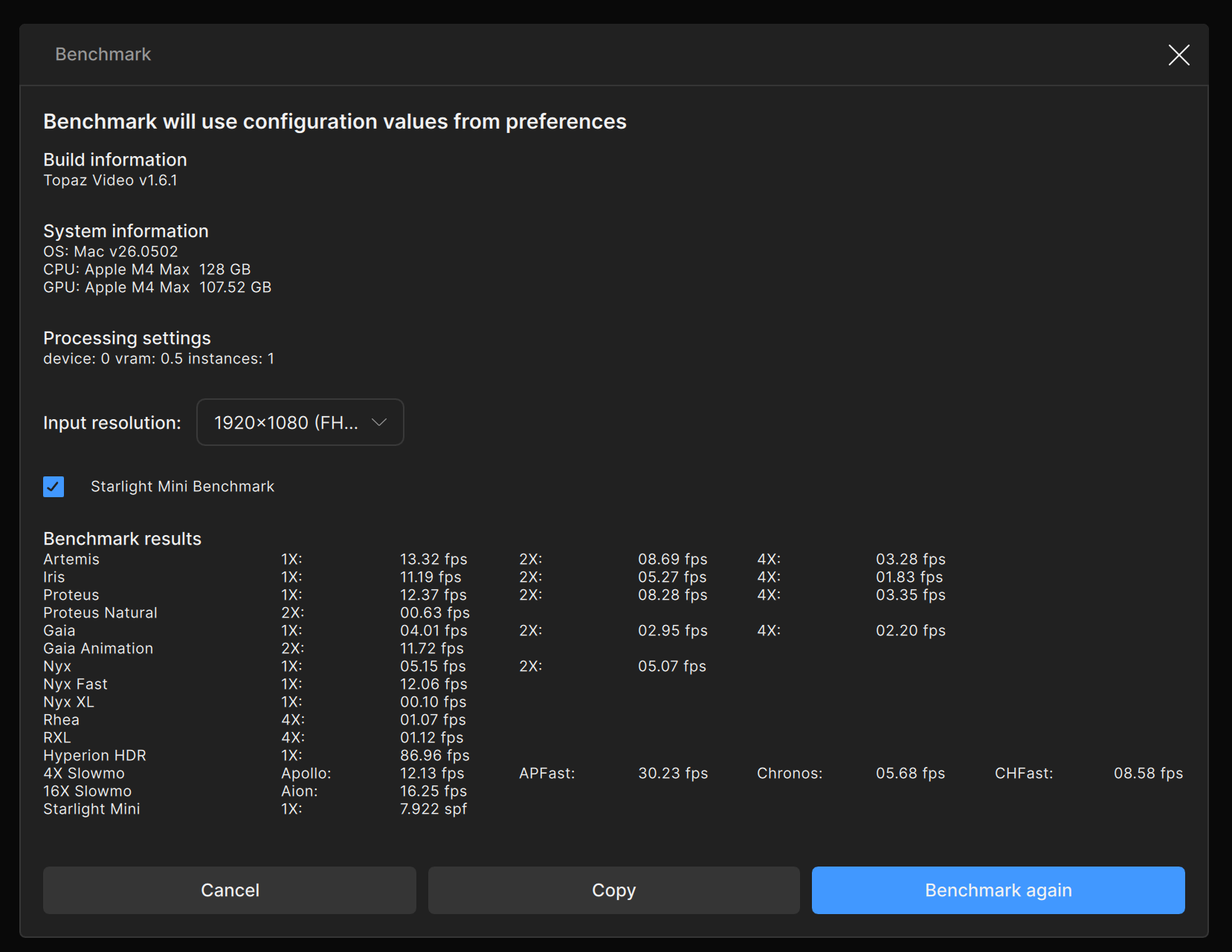
Proteus Natural is not working and always gives the error code on my Mac studio M1 Ultra 64 Core GPU 128 GB Ram Machine but it works on my other machine which has Mac studio M4 Max 40 core GPU with 128 GB Ram
I had the same problem. This forum solved it. Have you tried setting the max memory to 10% in the app’s settings? (per Chamberhouse ) [RESOLVED macOS 26.3] Grid-RGB artifacts with Starlight on macOS 26 (Apple silicon) - #39 by Ted-Leeds
BTW, how is the M4 studio compared to the M1 Ultra speedwise with Topaz?, the figures look very similar.
Can you share the logs from the app for the support team to review what is going on here? As Ted-Leeds mentioned we aw some users be able to run the model when setting the max memory lower. You can attach them here or email them to the support team directly, help@topazlabs.com.
To gather logs, please select Help > Logging > Get Logs for Support and attach the zip file to your reply.
Here is a video to help with the steps of how to collect the logs.
I tried 50 percent memory and it still doesn’t work on my M1 ultra. Also I had no other apps running at that time. I will try again with 10 percent memory but than what is the whole point of having that much RAM on my machine if I have to just utilize the 10 percent of it, right?
Hi Kyle, No the 10 percent trick didn’t work on my machine. 
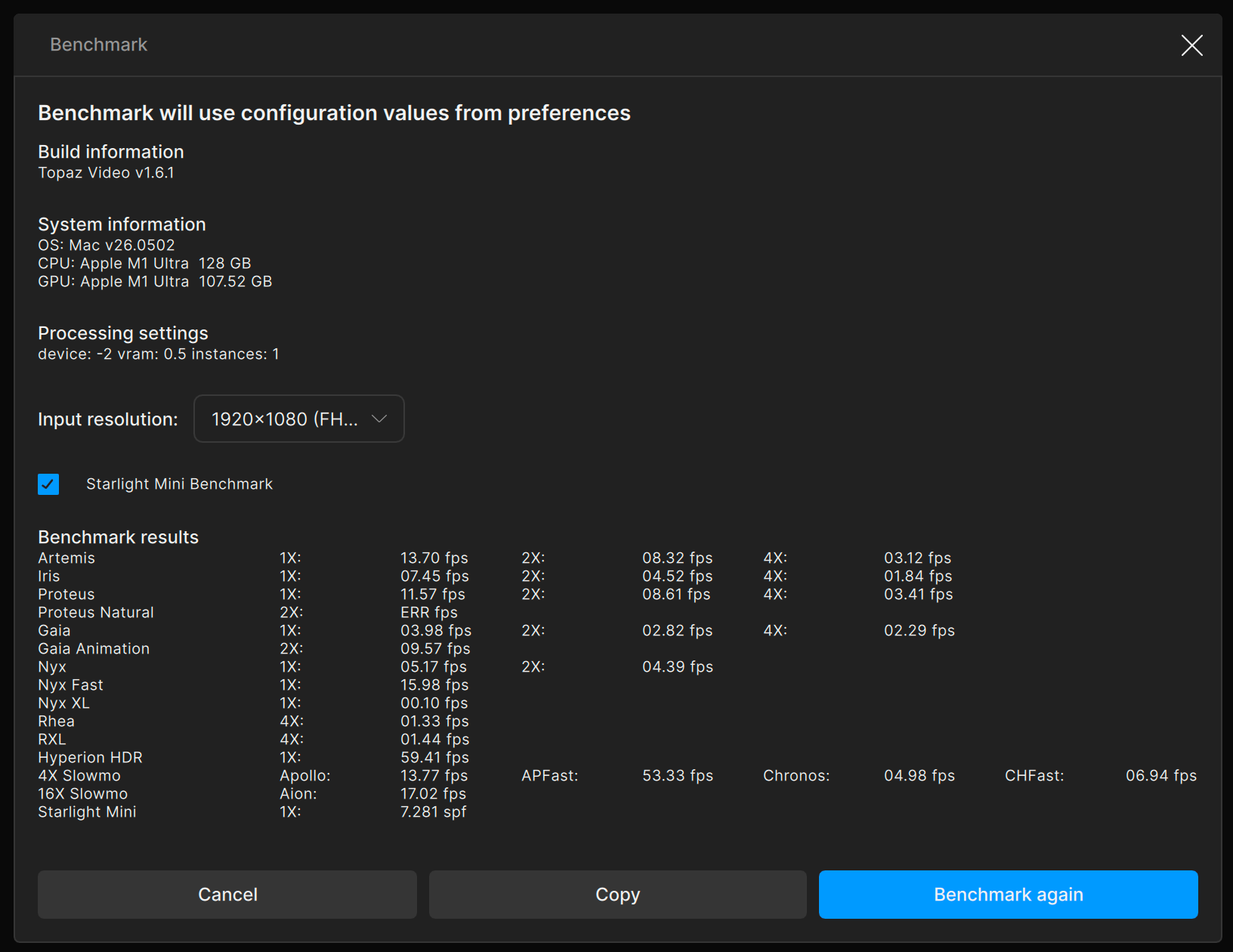
Looking at the benchmark tests, one is showing as -2 and the other as 0 for the device in the processing settings. The -2 is the auto setting, the only way to reset that is to clear the plist files.
Please, Kyle - NO - there is another way to change the -2 to 0 without deleting the plist file and hence losing the other data.
I’ve previously given exact instructions on how to do this and I’ll see if I can find the link, unless someone else gets there first.
Also really annoying is that Topaz should have fixed this -2 / auto bug ages ago but evidently they haven’t.
Andy
Here is the original post with instructions for TVAI:
However, because we are now on Topaz Video, not Topaz Video AI the following needs to be changed instead:
“com.topazlabs.topaz video.plist”
rather than
“com.topazlabs.topaz video ai.plist”
Regards
Andy
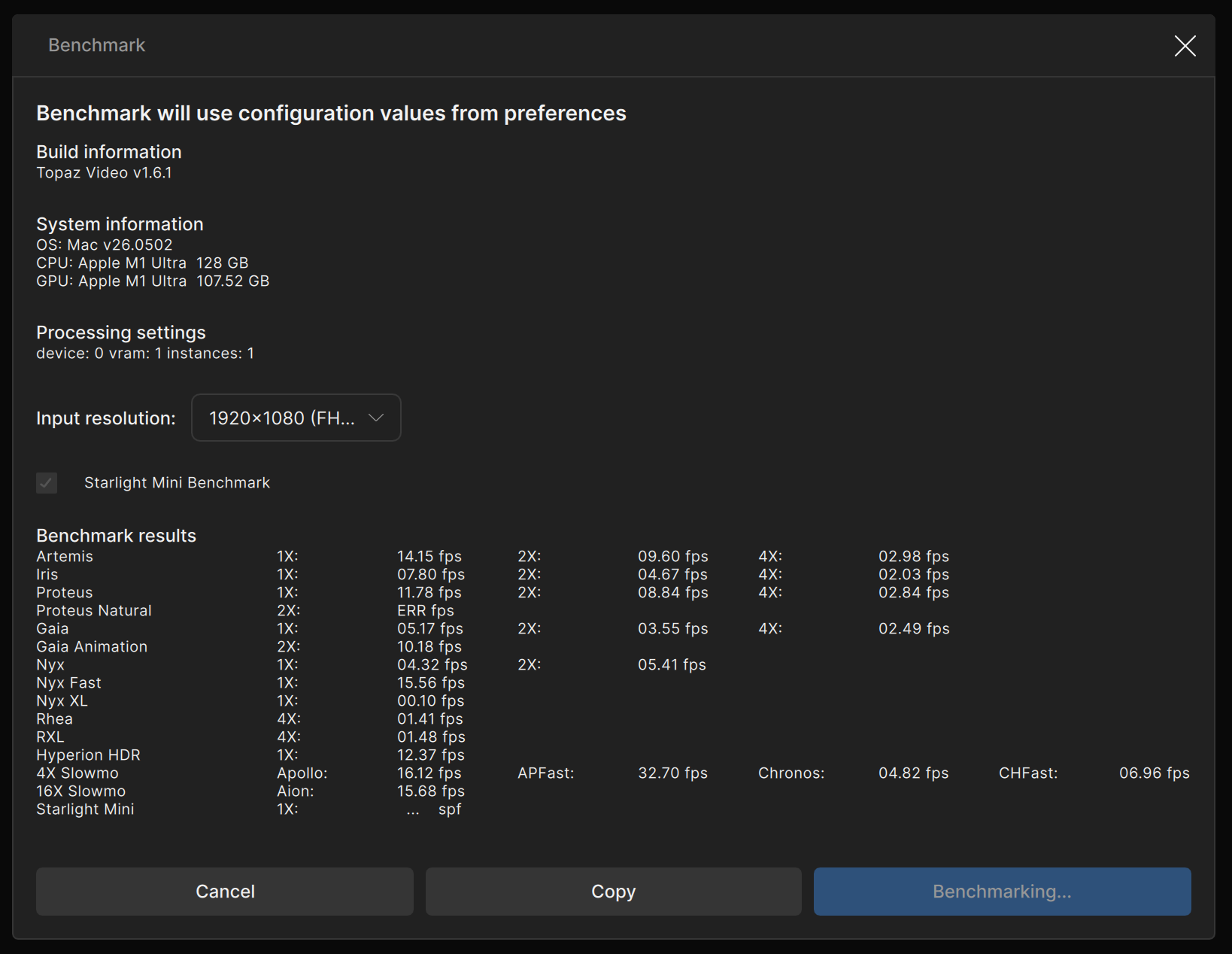
I was successfully abel to delete the old plists from my Mac Studio, and Now when I did the benchmark test it does show
device: 0 vram: 1 instances:1
but even after that it still gives me error when processing Proteus Natural
Also some of the Benchmarks got worse like the HyperionHDR was 59.41fps and new is 12.37fps and many others also changed and went down.
I am attaching the old and the new results screenshots below
OLDER -
NEWER after the fix
I can also confirm that Proteus Natural fails on my Mac Studio M1 Max 32GB - UNLESS I set the max memory to 10%.
Topaz Video v1.6.1
macOS 26.5.2
I think the problem is that Proteus Natural doesn’t like the M1 Neural Engine (ANE). (My M3 Ultra works fine.)
Here’s what I think is the relevant part of the log:
2026-07-22 15-58-57.591 Thread: 0x1f71f9d80 Info FF Process Output: 10 ANE inference operation failed with error message = Error Domain=com.apple.appleneuralengine Code=8 "processRequest:model:qos:qIndex:modelStringID:options:returnValue:error:: ANEProgramProcessRequestDirect() Failed with status=0x16 : statusType=0x9: Program Inference error" UserInfo={NSLocalizedDescription=processRequest:model:qos:qIndex:modelStringID:options:returnValue:error:: ANEProgramProcessRequestDirect() Failed with status=0x16 : statusType=0x9: Program Inference error} @ EvaluateANERequestANE inference operation failed with error message = Error Domain=com.apple.appleneuralengine Code=8 "processRequest:model:qos:qIndex:modelStringID:options:returnValue:error:: ANEProgramProcessRequestDirect() Failed with status=0x16 : statusType=0x9: Program Inference error" UserInfo={NSLocalizedDescription=processRequest:model:qos:qIndex:modelStringID:options:returnValue:error:: ANEProgramProcessRequestDirect() Failed with status=0x16 : statusType=0x9: Program Inference error} @ EvaluateANERequestANE inference operation failed with error message = Error Domain=com.apple.appleneuralengine Code=8 "processRequest:model:qos:qIndex:modelStringID:options:returnValue:error:: ANEProgramProcessRequestDirect() Failed with status=0x16 : statusType=0x9: Program Inference error" UserInfo={NSLocalizedDescription=processRequest:model:qos:qIndex:modelStringID:options:returnValue:error:: ANEProgramProcessRequestDirect() Failed with status=0x16 : statusType=0x9: Program Inference error} @ EvaluateANERequestANE inference operation failed with error message = Error Domain=com.apple.appleneuralengine Code=8 "processRequest:model:qos:qIndex:modelStringID:options:returnValue:error:: ANEProgramProcessRequestDirect() Failed with status=0x16 : statusType=0x9: Program Inference error" UserInfo={NSLocalizedDescription=processRequest:model:qos:qIndex:modelStringID:options:returnValue:error:: ANEProgramProcessRequestDirect() Failed with status=0x16 : statusType=0x9: Program Inference error} @ EvaluateANERequestANE inference operation failed with error message = Error Domain=com.apple.appleneuralengine Code=8 "processRequest:model:qos:qIndex:modelStringID:options:returnValue:error:: ANEProgramProcessRequestDirect() Failed with status=0x16 : statusType=0x9: Program Inference error" UserInfo={NSLocalizedDescription=processRequest:model:qos:qIndex:modelStringID:options:returnValue:error:: ANEProgramProcessRequestDirect() Failed with status=0x16 : statusType=0x9: Program Inference error} @ EvaluateANERequestANE inference operation failed with error message = Error Domain=com.apple.appleneuralengine Code=8 "processRequest:model:qos:qIndex:modelStringID:options:returnValue:error:: ANEProgramProcessRequestDirect() Failed with status=0x16 : statusType=0x9: Program Inference error" UserInfo={NSLocalizedDescription=processRequest:model:qos:qIndex:modelStringID:options:returnValue:error:: ANEProgramProcessRequestDirect() Failed with status=0x16 : statusType=0x9: Program Inference error} @ EvaluateANERequestANE inference operation failed with error message = Error Domain=com.apple.appleneuralengine Code=8 "processRequest:model:qos:qIndex:modelStringID:options:returnValue:error:: ANEProgramProcessRequestDirect() Failed with status=0x16 : statusType=0x9: Program Inference error" UserInfo={NSLocalizedDescription=processRequest:model:qos:qIndex:modelStringID:options:returnValue:error:: ANEProgramProcessRequestDirect() Failed with status=0x16 : statusType=0x9: Program Inference error} @ EvaluateANERequest

2026-07-22 15-58-57.592 Thread: 0x1f71f9d80 Info FF Process Output: 10 2026-07-22 15:58:57 0x170cd7000  CRITICAL:  Unable to run model with index  0  it had error:
2026-07-22 15:58:57 0x170cd7000  CRITICAL:  Caught exception in tile processing thread and stopped it msg: unable to run model with index 01libc++abi: terminating due to uncaught exception of type std::exception: std::exception
Regards
Andy
Back in February, Topaz provided me with a replacement pnat-1.json file which I believe was intended to be a temporary fix or work-around.
I’ve just tried that file again and it does still work on my M1 Max, “fixing” the issue. Actually what is does is to bypass the ANE and forces processing on the GPU cores instead. There are other changes as well such as the tile size and precision.
To be on the safe side, I don’t think I should try and upload that file, but I’m sure Topaz can email it to you like they did for me.
Regards
Andy
I am surprised. If something like that Topaz can solve by providing an extra add-on file then they should put that up on their site. It should be publicly described with instructions and downloadable for everyone. Why do people need to reach out to the forums!
Unfortunately, knowing Topaz, I am not at all surprised.
All this stuff regarding max memory is for one purpose only - to force the processing onto the GPU cores rather than the Neural Engine (ANE). That’s until Topaz come up with a permanent fix.
Now you have the -2 / “auto” processor fixed to 0, I’d recommend you try the 10% max memory again, unless you already have? I recall from a few years back that the “auto” setting overrode the 10% max memory work-around.
Regards
Andy
If setting a 10% memory limit worked on a 32gb Mac, set it to 2% or 3% on a 128gb Mac (to get the same 4gb memory limit).
I came up with a solution myself. Purchased a windows pc laptop with nvidia gpu and now I wish not to get disappointed this time once I do a fresh install of topaz video on it. Thank you all for the suggestions. God bless!
I have this project and I need to get it done since I am running out of time. Thanks to Topaz, now I am back to windows for a short time being. Maybe I will save this windows laptop for such challenging times with Topaz.
You said it works on the M4 .
Couldn’t you just have done the rendering there?
