Problems when using ProRes, DNxHRX or FFV1 for export due to exorbitant continuous read terror with larger files

TOPAZ: Model IRIS; Input: 4K - H264, Output: 4K - ProRes 422 or LT (both tested)

Computer: i9 11900 (OC 4.5 GHz), RTX 5080, 32GB RAM 4400MT/s, PCIe4,

HD source is a Samsung SSD EVO Plus 4TB on PCIe4,
HD destination is a Samsung SSD EVO Plus 2TB on PCIe3,

Computer utilization at start: CPU 75 - 95%; GPU 55 - 75%

Problem description:

The computer starts up with normal/good parameters, but after a few minutes it gradually slows down and after 20, 40, or 60 minutes, a reading frenzy occurs on the disk, which is Topaz’s output target.

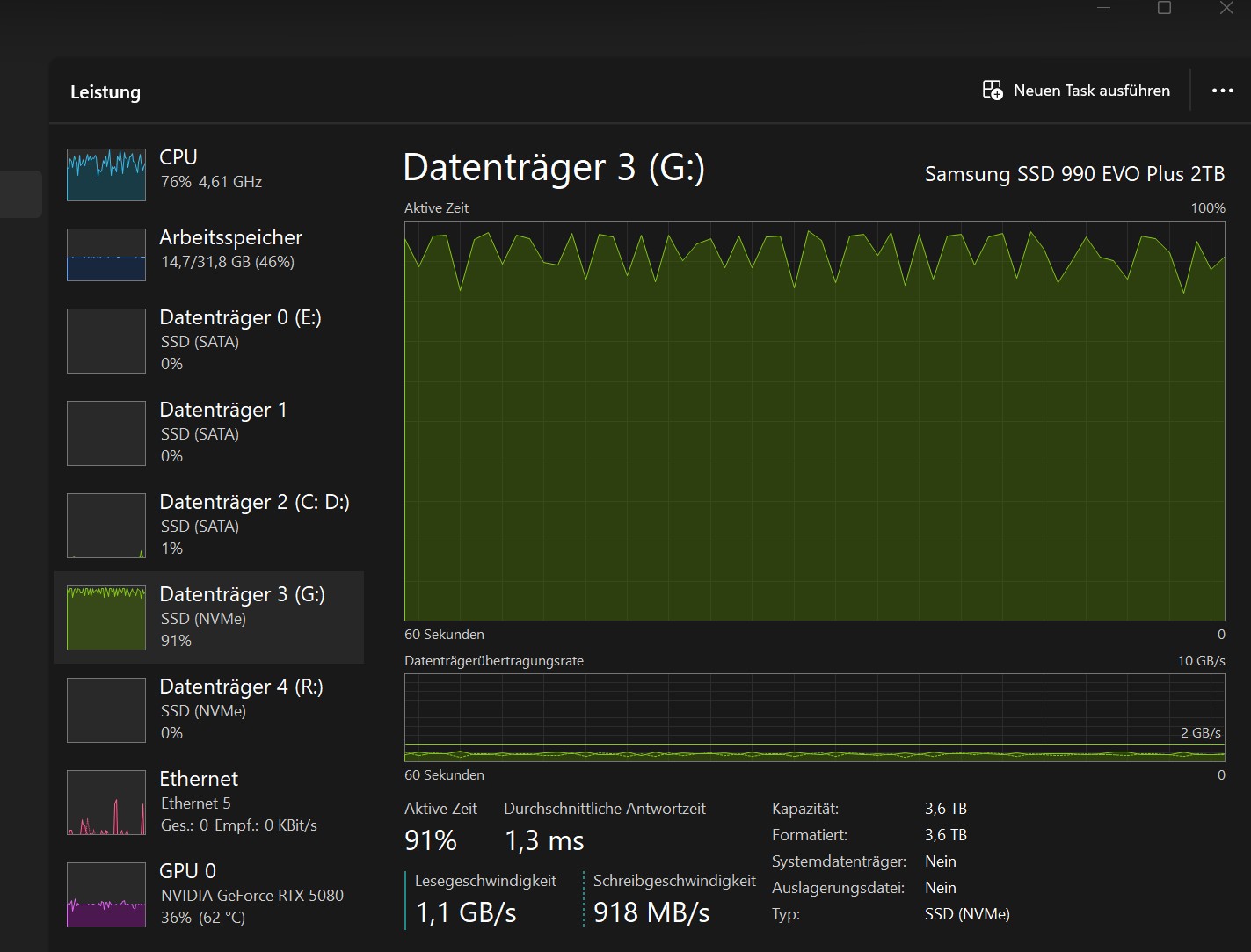
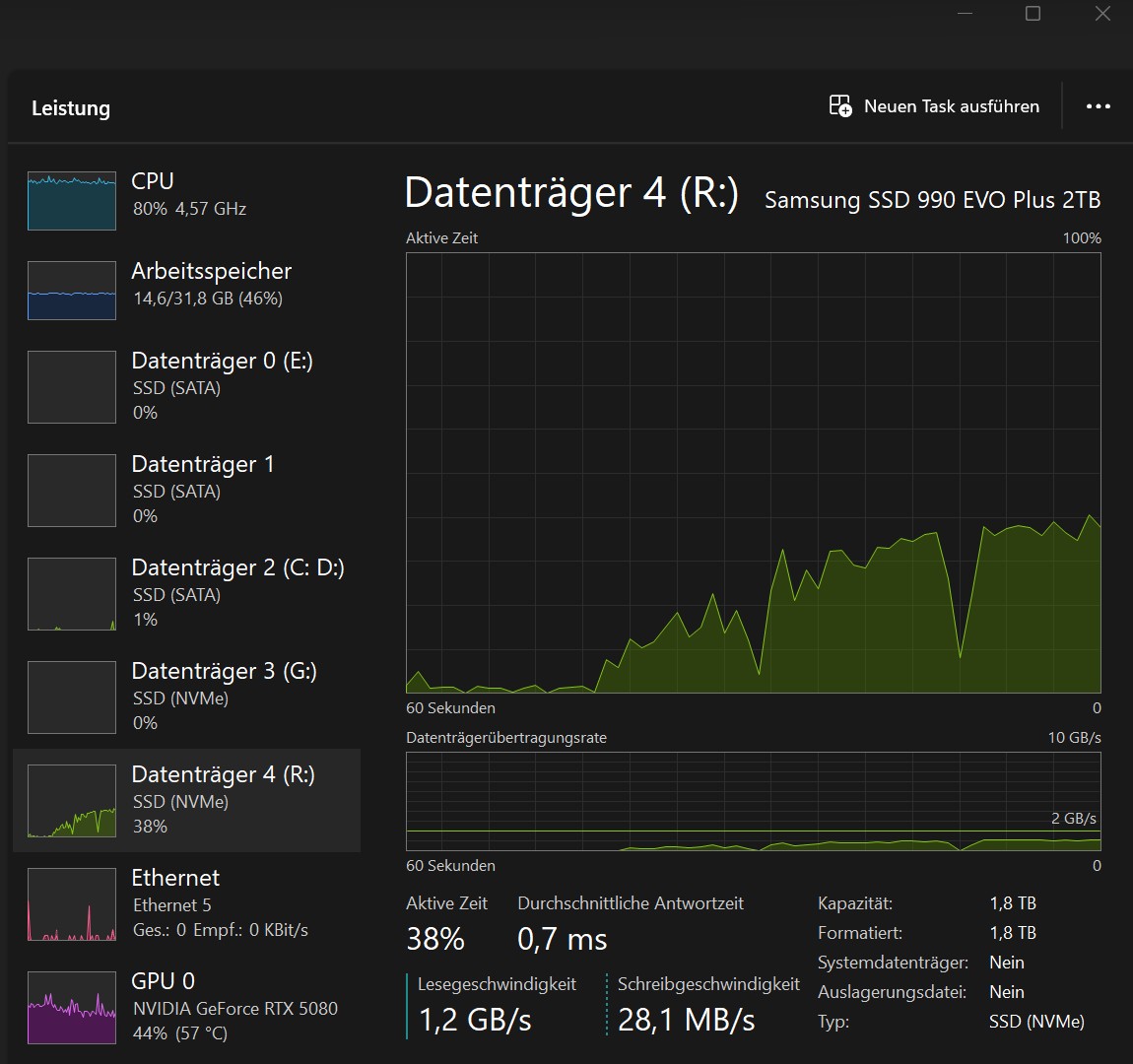
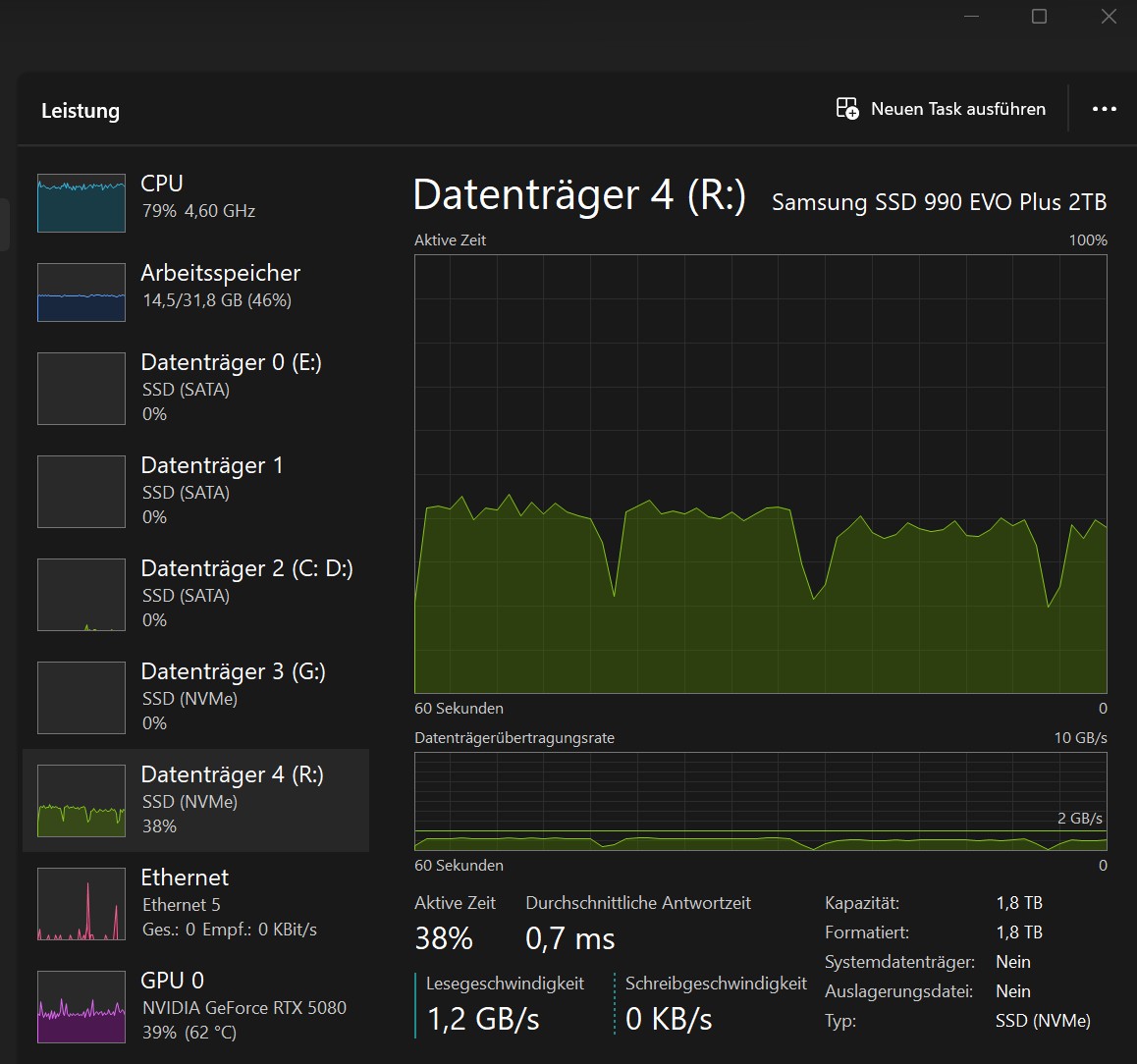
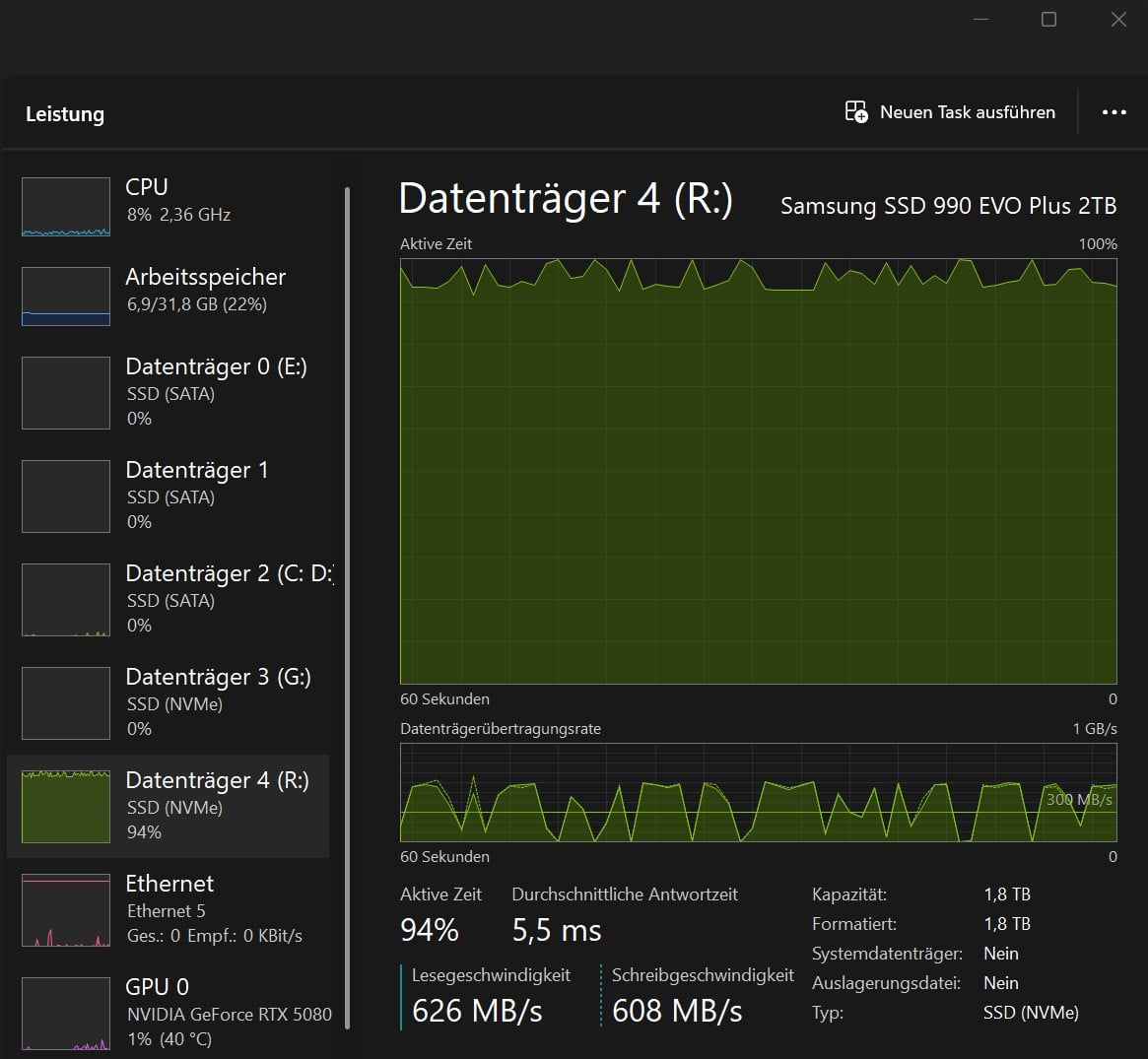
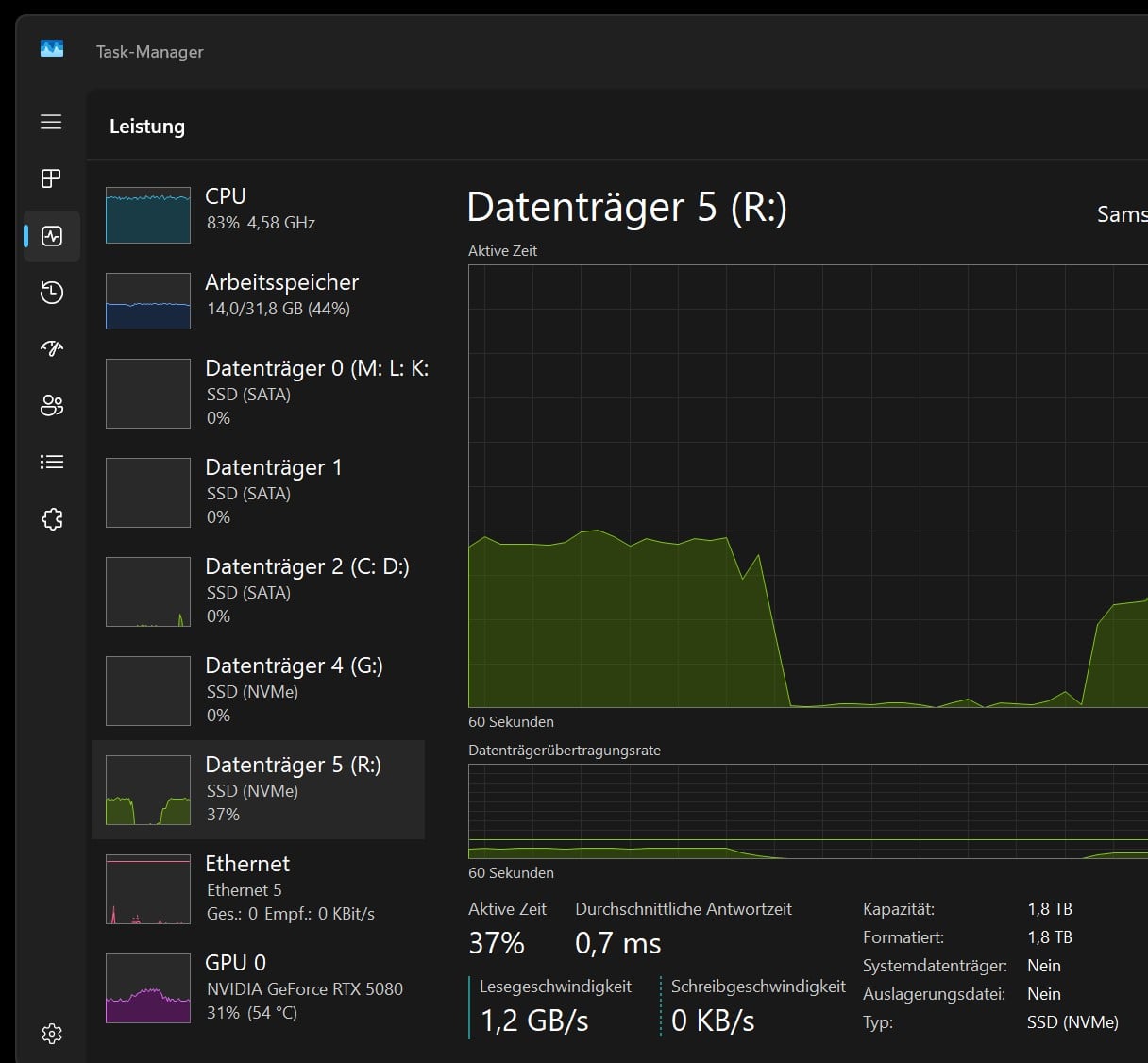
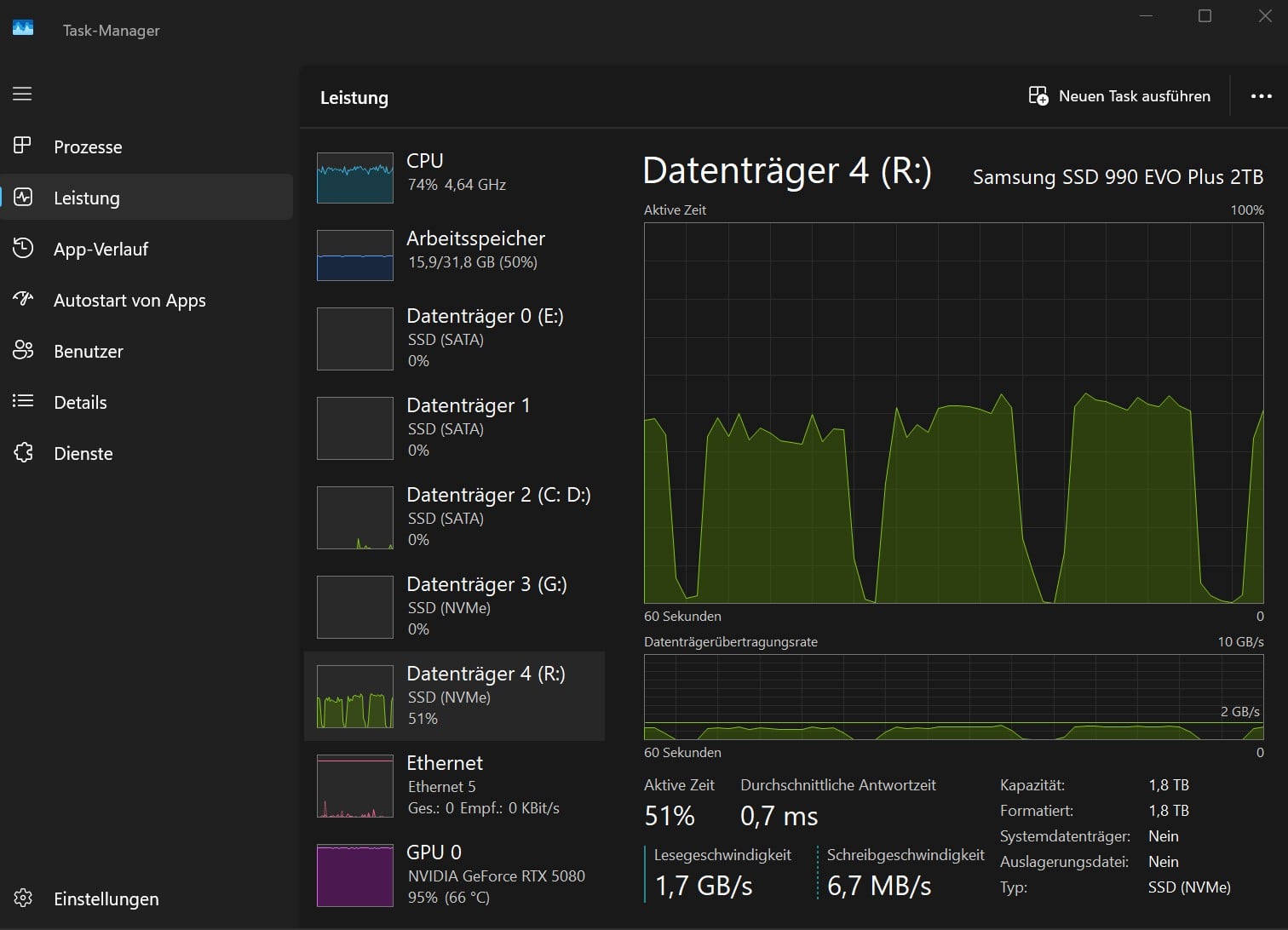
The file is read billions of times, with over 10 Gbit/sec as a permanent state.
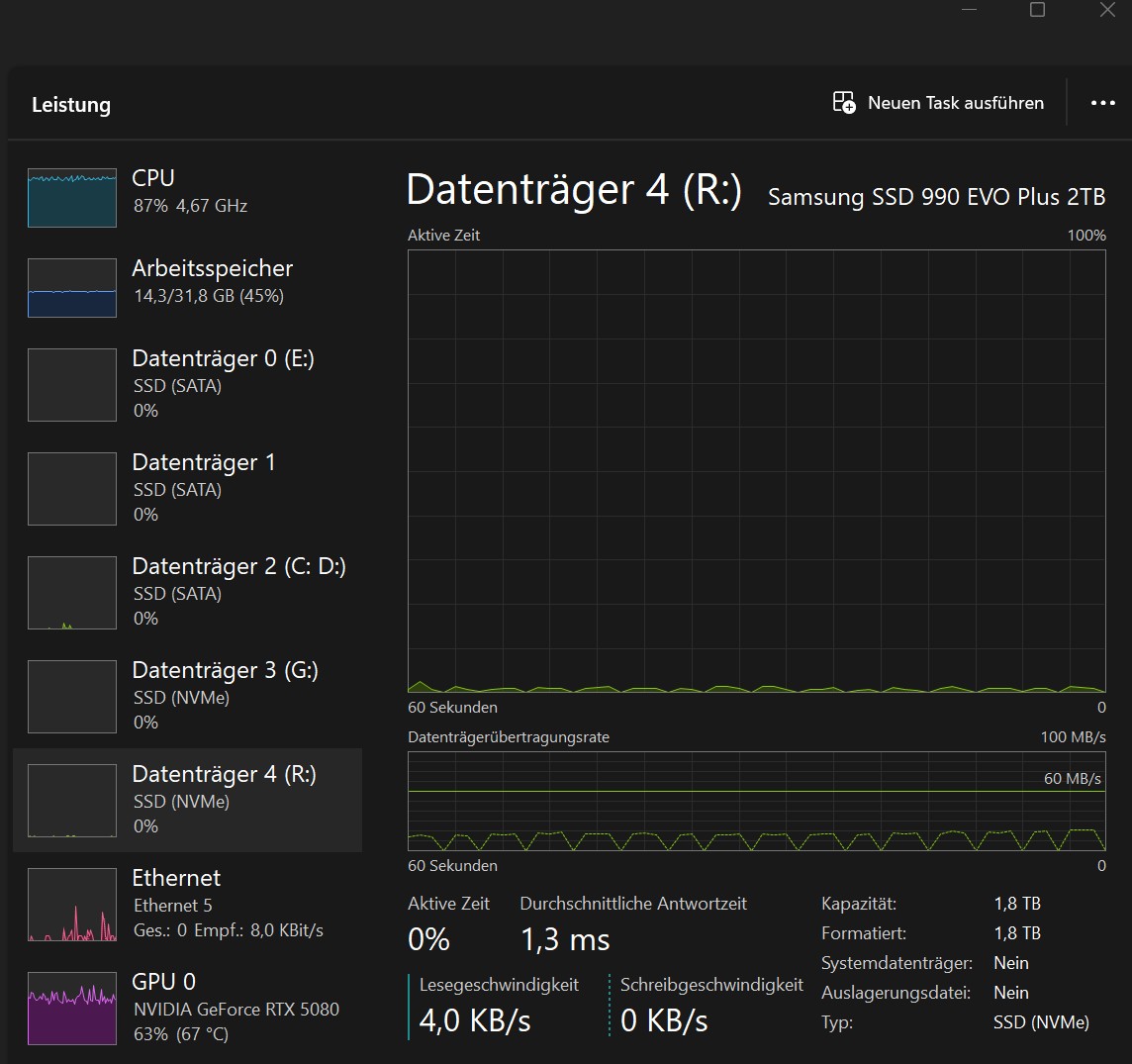
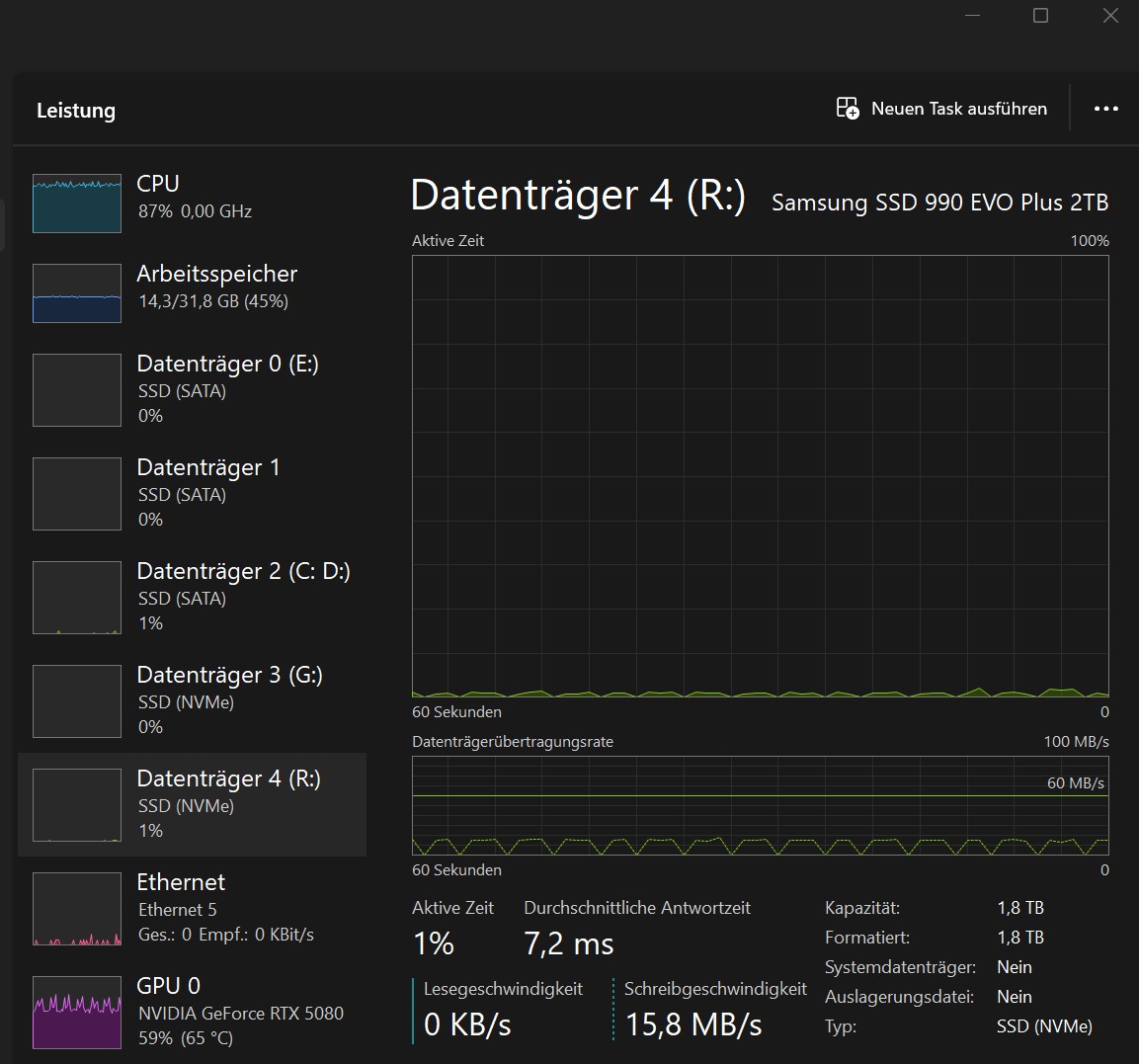
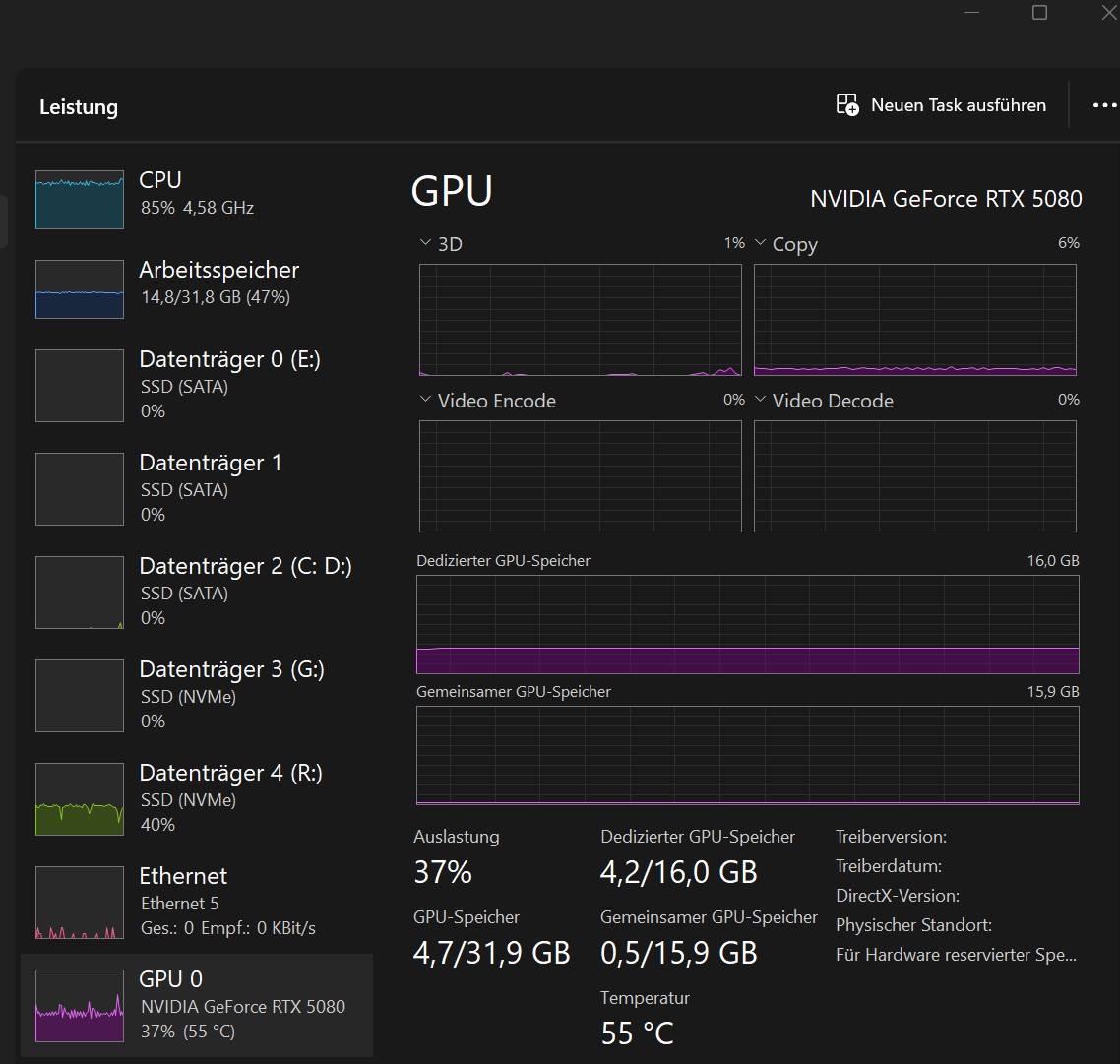
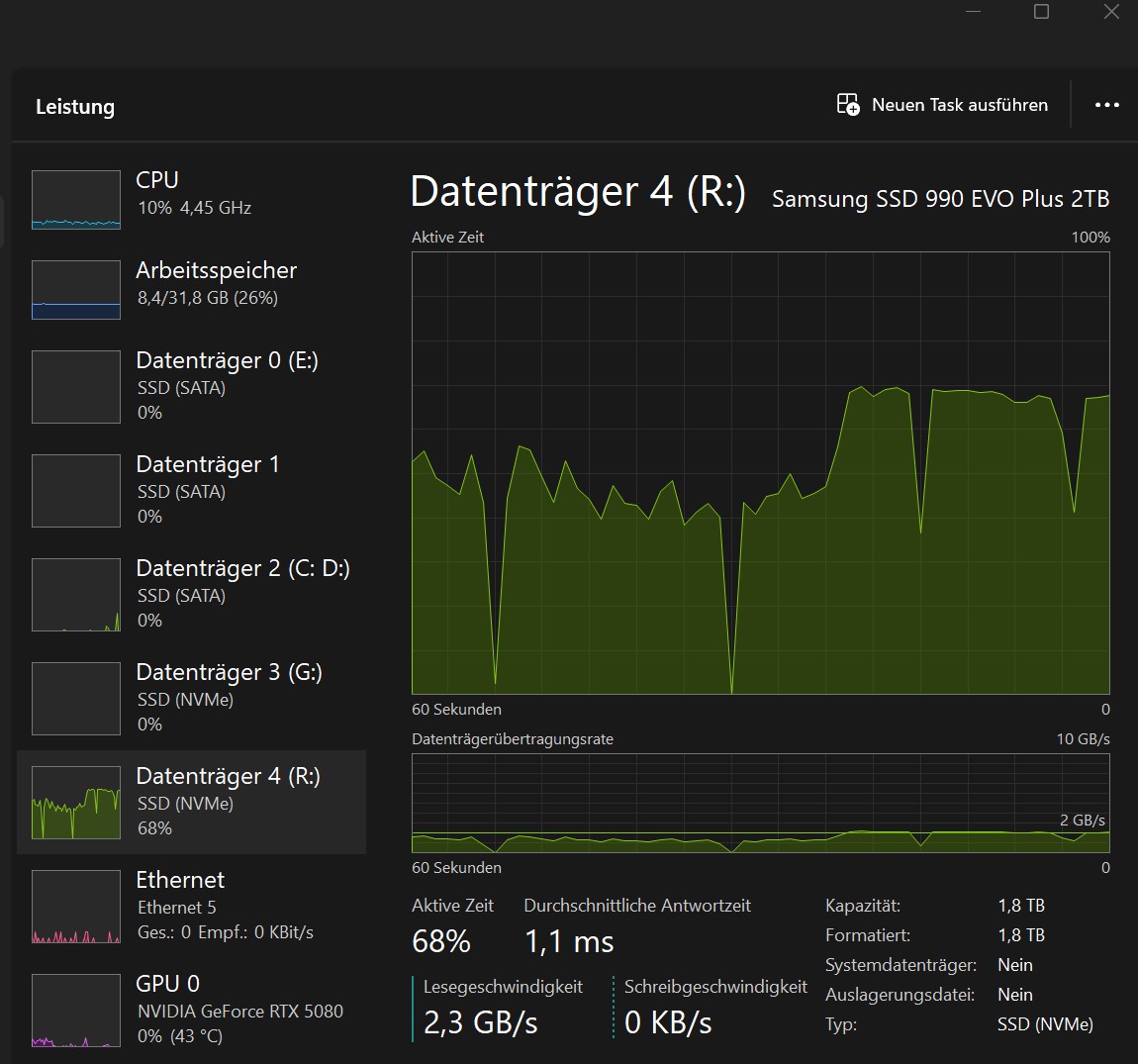
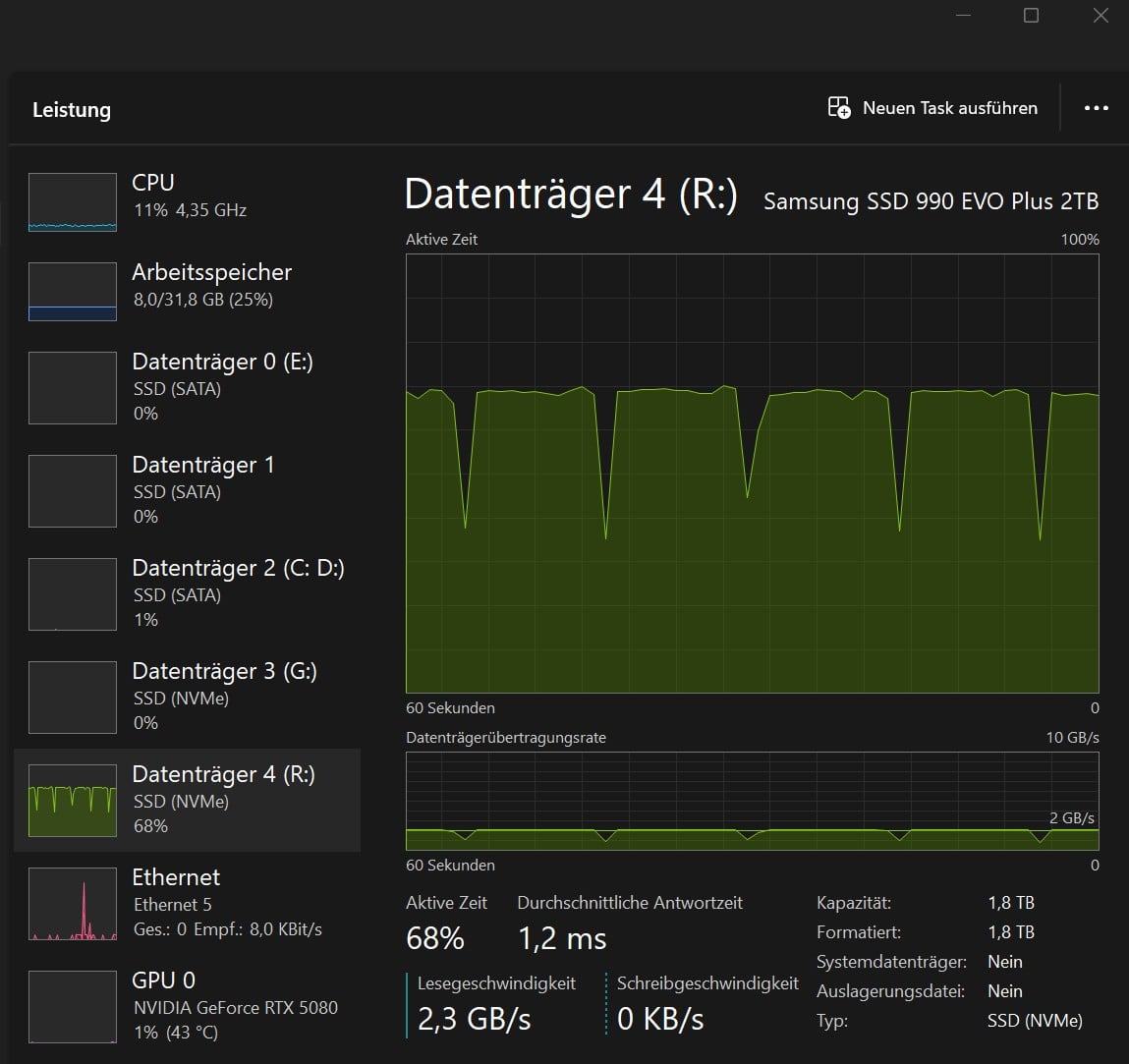
See screenshots.

As a result, the computer has now slowed down by 15 to 22% on average!
This is unacceptable given the computing times that are to be expected with video AI today.
For a job that takes many hours, the computer is only working at about 83% of what it could actually do without this bug.

The ā€˜read terror’ occurs on the disk where the file to be written by Topaz is located.
It is read billions of times at 1 to 1.7 GB/s.

Here is a description of the process in terms of time:

1st test: ProResLT output

Start speed: 5.9 fps – cyclic read approx. 100–300 Kbytes/s (H264) – cyclic write: 8 Mbytes/s (ProResLT) – everything great
After 10 min: 5.8 fps
After 15 min: 5.7 fps
After 25 min: 5.6 fps
After 40 min: 5.5 fps - Cyclical reading - in blocks lasting approx. 20% of the time - from 1.2 to 1.4 GB/s begins! (visible in Task Manager)
After 50 min: 5.4 fps - during the ā€˜meaningless’ read operations, GPU utilization drops below 45%
After 65 min: 5.3 fps
After 75 min: 5.2 fps
After 90 min: 5.1 fps – frequency of ā€˜pointless’ read operations increases
After 100 min: 4.9 fps – frequency of read operations continues to increase
After 130 min: 4.8 fps – pointless read operations now occur continuously
→ CPU utilization as at the beginning, BUT: GPU only 40 - 55 % !
→ Note: sometimes the ā€˜read terror’ only starts after 50 or 60 minutes (with Apollo), but usually after about 40 minutes …

2nd test: ProResStd output

Basically everything as above, except that now the ā€˜read mania’ / ā€˜read terror’ starts after only 18 or 22 minutes around !

3rd test: JPEG output

Everything runs smoothly and without errors or problems!
→ I no longer have 10 bits, and 16-bit formats create monster files that nobody needs!

4rd test: DNxHR - Output

To get 10 bits, you have to select the HQX quality level, which I did.
The file runs through the task without any problems.
→ But I don’t need a format that generates an output of 60 gigabytes for a 5.5-minute 4K video file!
Even though it ran smoothly, I can’t afford a million expensive NVMEs…
… AVID is just crazy that only the two highest standards support 10 bits … SCNR

Summary:

I hope that Topaz can fix this bug soon so that our computers can work at a good capacity and I can work semi-professionally with ProRes in 10 bit.
Furthermore, SSDs are certainly less susceptible than mechanical hard drives, but they also have a statistical failure rate, and that becomes uselessly close in such a devilish scenario.

kind regards

A few words about the two images.

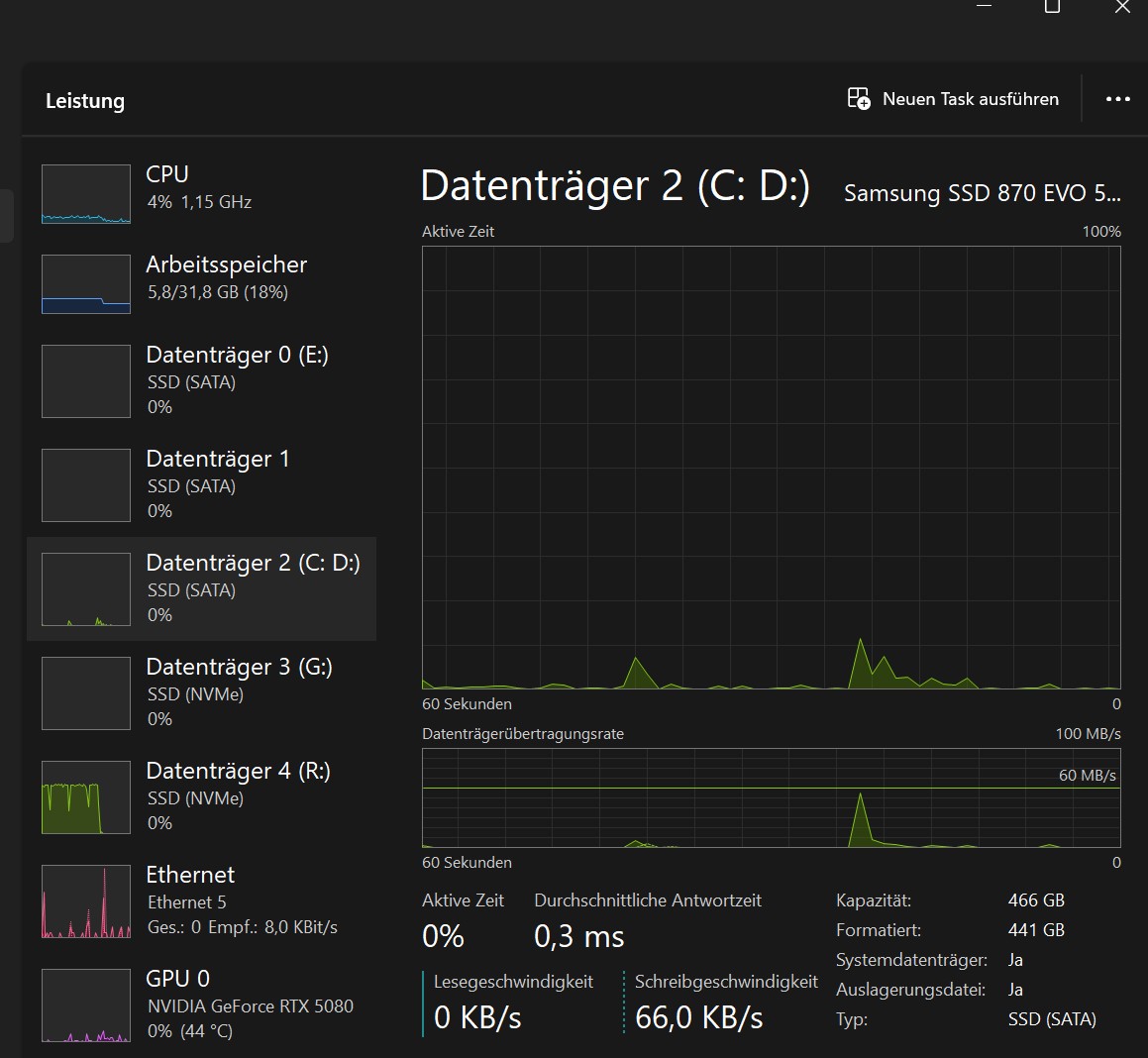
In the first image, the source and target files are on separate NVMe drives.
( 3 is source, 4 is target - booth are the same type, sorce on PCIe4, Target on PCIe3)

The system runs much more smoothly, and the GPU is better utilized.

The second image shows the state before I made this separation.
The computer is virtually at its limit when it has to read and write these exorbitant data rates (ProResLT or Std) simultaneously from one and the same NVMe…
Although, in my opinion, these data rates should not be too much for these NVMe’s, but well, that’s theory, and this is practice. :slight_smile:

But you can probably see in both pictures that Topaz is literally to go on a rampage with the discs.

So if high data rates such as ProRes or similar occur in 4K, we definitely recommend having separate NVMe drives for the source and destination!

I spent several days here testing with the AI to narrow down the cause: stress, stress, and lots of energy, because the error only occurs with longer files, and here in Germany we have the most expensive electricity in the world. … :slight_smile:

Can you share the logs from the app as well for review? You can attach them here, or send directly to the support team at help@topazlabs.com

To gather logs, please select Help > Logging > Get Logs for Support and attach the zip file to your reply.

Here is a video to help with the steps of how to collect the logs.

Hi,

logs sent from Topaz app

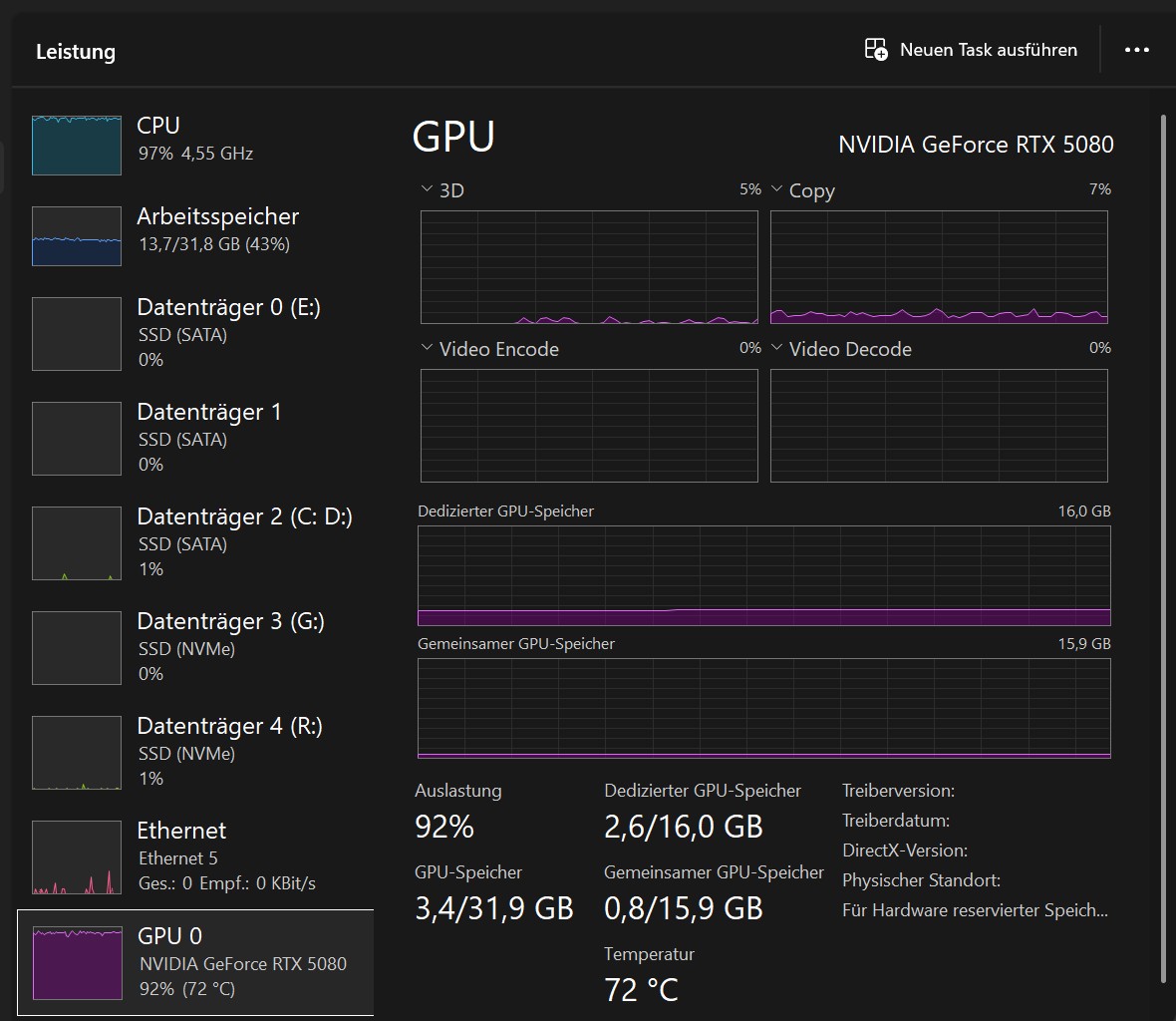
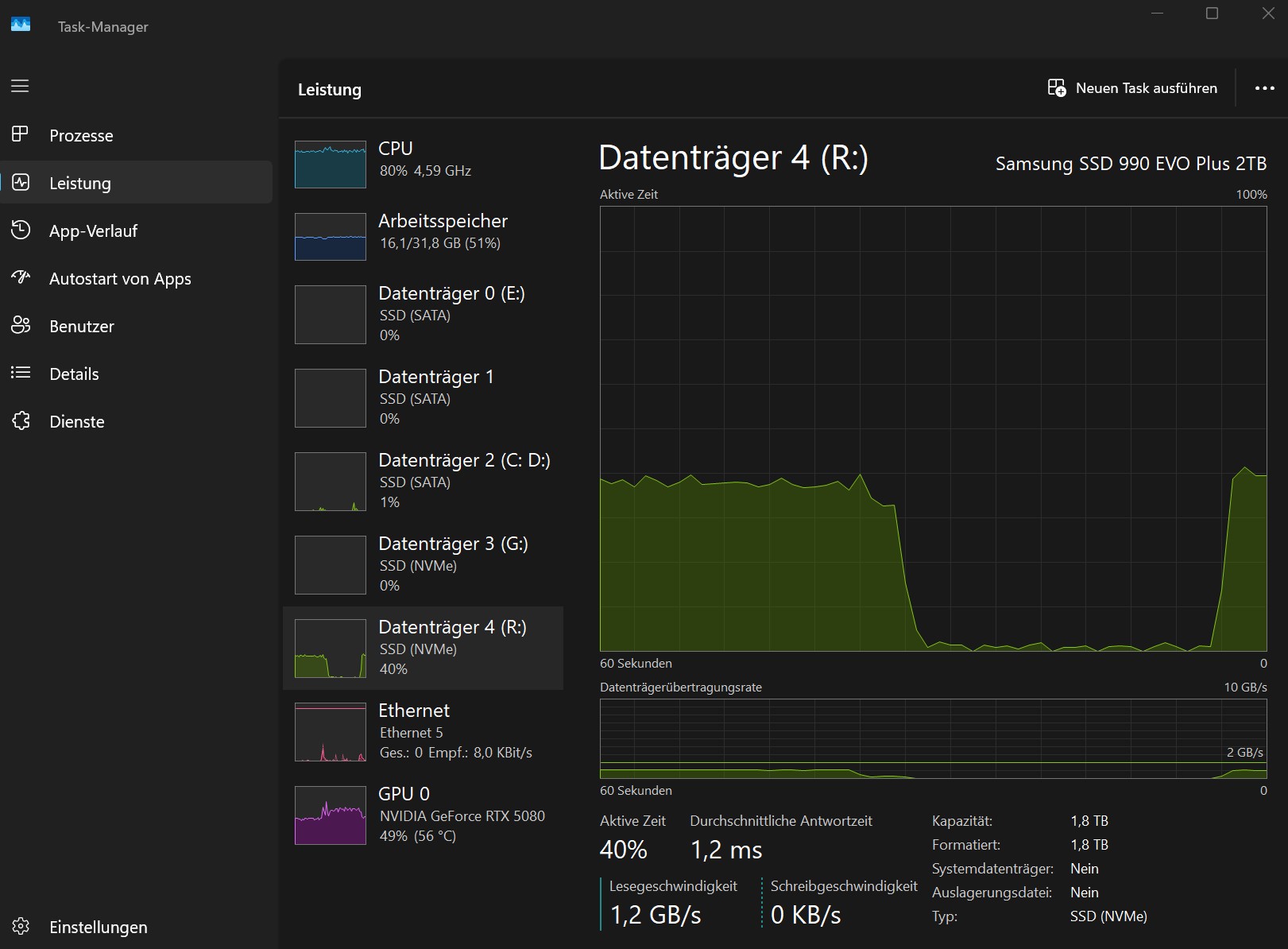
Here are some screenshots of the timeline again. The clip was 4:40 min long and took 28 min to render.


It’s easy to see how the GPU gets less and less ā€œworkā€ due to the ā€œread terror.ā€
GPU utilization drops from over 60% at the beginning to below 40% at the end.

And as I said, this only applies to ProRes files.

kind regards

Yesterday, another run with 4K:
Iris and Apollo simultaneously, output 4K ProResLT.
Started at 3,1 fps. OK. (GPU 90%)

After about 45 minutes, the reading terror began again.
The speed dropped to 2.7 fps.
The graphics card utilization decreases.

Then I had an idea !

Just quit Topaz in Task Manager.
And lo and behold, the useless read load disappeared immediately, and ffmpeg ran smoothly.

The graphics card utilization rises above 92% again.

The job took 6 hours; with the read terror brake, it would certainly have taken 7 or 7.5 hours.

Now there is no progress bar, and the final file has no file header. :frowning:

(This means that most players cannot read it (crash), especially if it is large/long).

Bandicut takes care of this: file in, and out again as SmartRenderer.
Duration for 125 gigabytes approx. 3 min.
(Unfortunately not measured, only estimated).

PS: I get the best graphics card utilization when the source and destination files are located on different system buses and Topaz does not interfere. :slight_smile:

That’s how you want your graphics card to be utilized!

Is there actually a Topaz wiki where users can look up how a Topaz computer should be structured?

Best regards

Hi,

Does anyone here work with ProRes and can comment on my problem?
If so, please specify which version of ProRes you are using and whether the files are small or large.
(Topaz processing takes longer than 30 or 60 minutes.)

Best regards

I make prores files and have problems making large files. I have not done anything like the testing above but when have noticed when I have done a long render, making ProRes HQ, and it fails the ā€œunfinishedā€ prores file causes problems - ages to just open the folder in which it sits, very hard to delete etc.
As Topaz is adding to an ā€œunfinishedā€ file as it renders I am guessing this is why it slows the render as the file gets bigger.
My guess is that the problem is QuickTime rather than Topaz. If I try to access an unfinished file on Linux it causes not disk problems and I can delete easily (an unfinished file is never playable).

As a results if I have to do a long clip I will chop it into 10 minute segments and stitch them back together afterwards. The alternative is making a different format like MP4 - which I do not want to do as it will not be as good quality - or making a series of stills. The latter will use far more disk space than Avid files.
I don’t render to NVMEs either - I just use normal drives which are not too expensive for the very large files that get made if rendering as stills.
All of this is a PITA but it has been like this for ages and I really have no idea if it is a Topaz or QuickTime problem. All I do know is I can’t fix it so I look for workarounds.

Hi,

Yes, I also think ProRes is the best solution if the files are going to be edited further afterwards.
(10 bit, no GOPs, works great in DaVinci)

Yes, Topaz logically writes a file successively during rendering.

(This often saves the day (if Topaz doesn’t delete it, which they have fortunately changed now) if Topaz crashes during the final stage, which often happened to me with Apollo).

And it reads and reads this file over and over again, eventually permanently during long rendering processes, which causes total data stress that slows down the entire system.

The funny thing is that when I close the Topaz app in Task Manager, the ffmpeg rendering process continues without any stress!

Of course, you don’t end up with a finalized file, but BandiCut takes care of that for me (SmartRenderer – just pop it in and pop it out again).

But it’s good to hear that I’m not the only one. :-)…

and … so far, I’ve only encountered this bug with ProRes …

PS: … of course it’s possible to share files … but it’s not exactly ideal …
I think I’ll just close the app in future … :slight_smile:

Best regards

Hi,
By the way, I have to correct myself.

I’m currently running a project, 4K - IRIS - 5.2 fps in DNxHRX (10 bit).
The read terror is also occurring here. (screenshot after 50 min)

This causes the GPU utilization to drop from approx. 64% to below 50%…
I then closed the Topaz app in the Task Manager again … and everything is running smoothly …

Best regards

Hi,

Are there so few amateurs/professionals here who work with ProRes or DNxHRX? :frowning:
(intraframe-based 10-bit codecs)

Best regards

On the support side, most of the logs I see from users use H.264 or H.265 as the codec. Some do run AV1 with MKV containers, though.

Hi,…

that doesn’t sound good to me …
so no one is going to take care of these issues, okay, the AI already predicted that :slight_smile:

… and it still says that there are only a few professionals here?
… because, of course, the best way to spruce up old material is to first run it through Topaz, using all the models I deem necessary, and then finalize it in the editing program … and put the finishing touches on it …

And for that, I don’t want to have a highly compressive codec for the intermediate steps!

That only means loss and also an unnecessary load (clearly noticeable from 4K upwards) for decoding in the editing software…

ok, so I’ll continue to work around this by switching off the Topaz GUI in the Task Manager after starting FFMPEG.EXE … (for all files where the render time is significantly longer than 30 minutes)

… you just don’t have a remaining time display anymore, and depending on the file size, you need 5 to 20 minutes to create a file header with Bandicut, for example …

Best regards

There are many professionals who use the app in various workflows; some use uncompressed formats, and others run other options. Everyone has a different workflow.

The team has your information that you have shared, and they are reviewing everything to see what is going on when writing out the files. Once they have more information on the situation I can update further.

1 Like

ok, THX

Hi,

By the way, I just tested VideoAI 7, and it behaves exactly the same way.
It takes 20 to 40 minutes (until ā€œsome mysteriousā€ memory is full; the exact duration depends on how data-intensive the selected codec is, i.e., whether it’s ProResLT or 4:2:2, etc.), then the read-related issues begin.

Has there been a statement from the developers regarding this yet?
A preliminary response would be nice, for example:

  • We were able to reproduce this error
  • We cannot reproduce this error

Because even if the NVMe (if I’m to believe the AI) doesn’t mind the octillion-fold senseless reading, the GPU’s performance still drops by 20% or more.

Sure, I can close the Topaz app, and then ffmpeg.exe runs perfectly fine; the only problem for me then is that I can’t perform batch processing if I’m away for a while…

Regards, seifenchef

I mostly use FFV1 in an MKV container. Just have to use optimized media in Resolve Studio to make it play back smoothly in the timeline…. ProRes is good, but it is still a lossy format, and the one in Topas Video is MAX 4:2:2, while FFV1 can do 4:4:4 and 12-bit even. I would try it out just to check how it works, and if it gives you the same drive terror issues. :wink:

1 Like

Hi,
Please keep in mind that the error only occurs during sufficiently long rendering processes.

Depending on the high-end format selected — ProRes, DXnHR, or FFV1
(i.e., the selected data stream size: 8 or 10 bit; 4:2:2 or 4:4:4:4 etc etc)
—the error occurs for me mostly after 20 to 45, sometimes 60 minutes.

→ The higher the selected data rate, the sooner the phenomenon occurs.

→ 4K footage !

Best regards, seifenchef

1 Like

I can do a test to see if it shows up here. With ProRes and FFV1. I only do Starlight these days, and Mini at least pauses frequently due to how the model works… And that might alleviate the drive terror.

Will do some testing with IRIS.

EDIT! I can already see that my Workstation does not reach the speeds for any possible drive terror. I am getting only 5.6fps with IRIS (reasons might be lack of dual-CPU optimization in Topaz Video, the GPU running at PCI-e 3.0, not having the fastest RAM, or something else bottlenecking…) PC is great with Starlight, not that fast with anything else….

So unfortunately I am not the right guy to do testing of this for you…. :stuck_out_tongue:

OK, too bad, thanks

1 Like