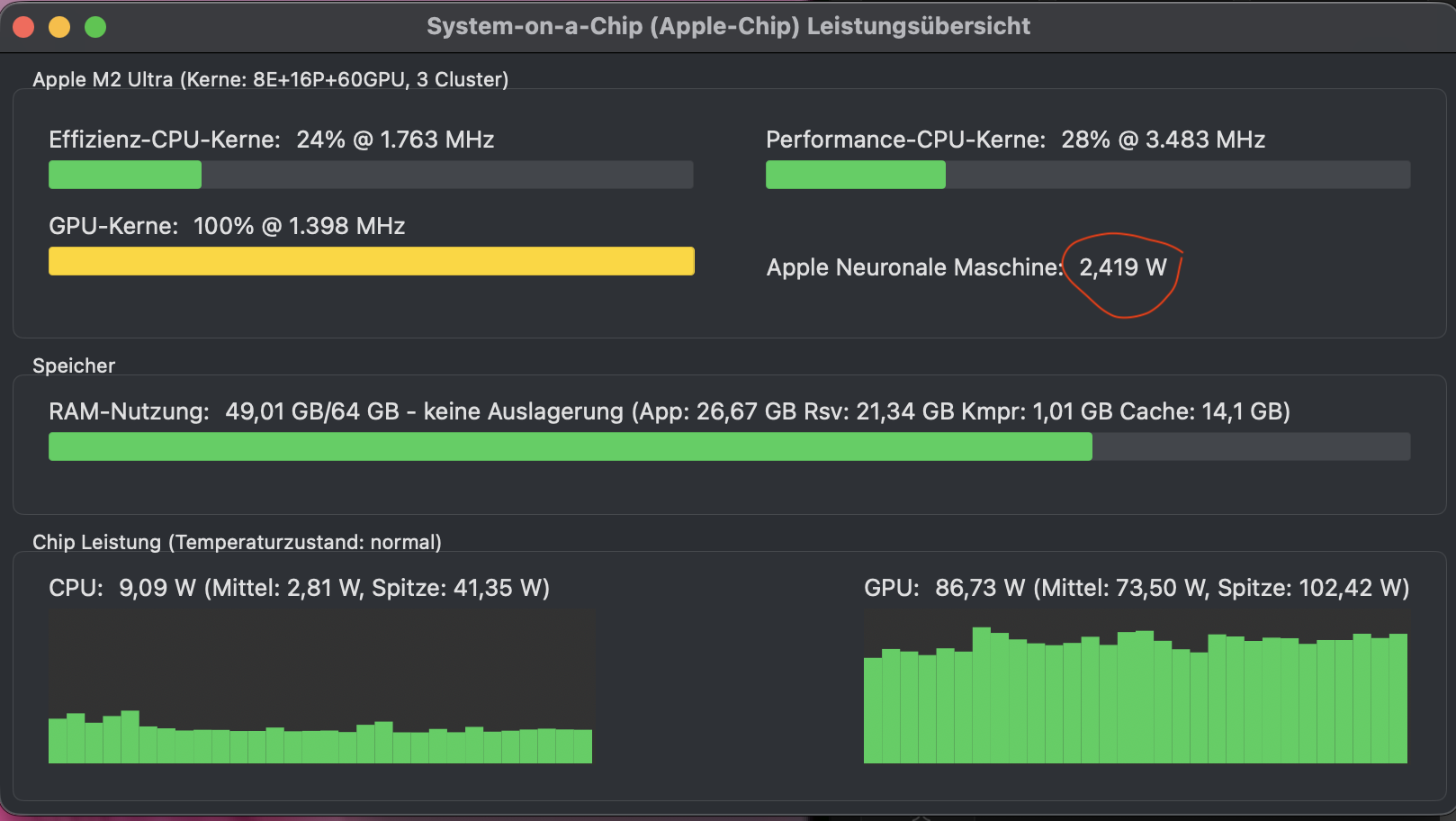
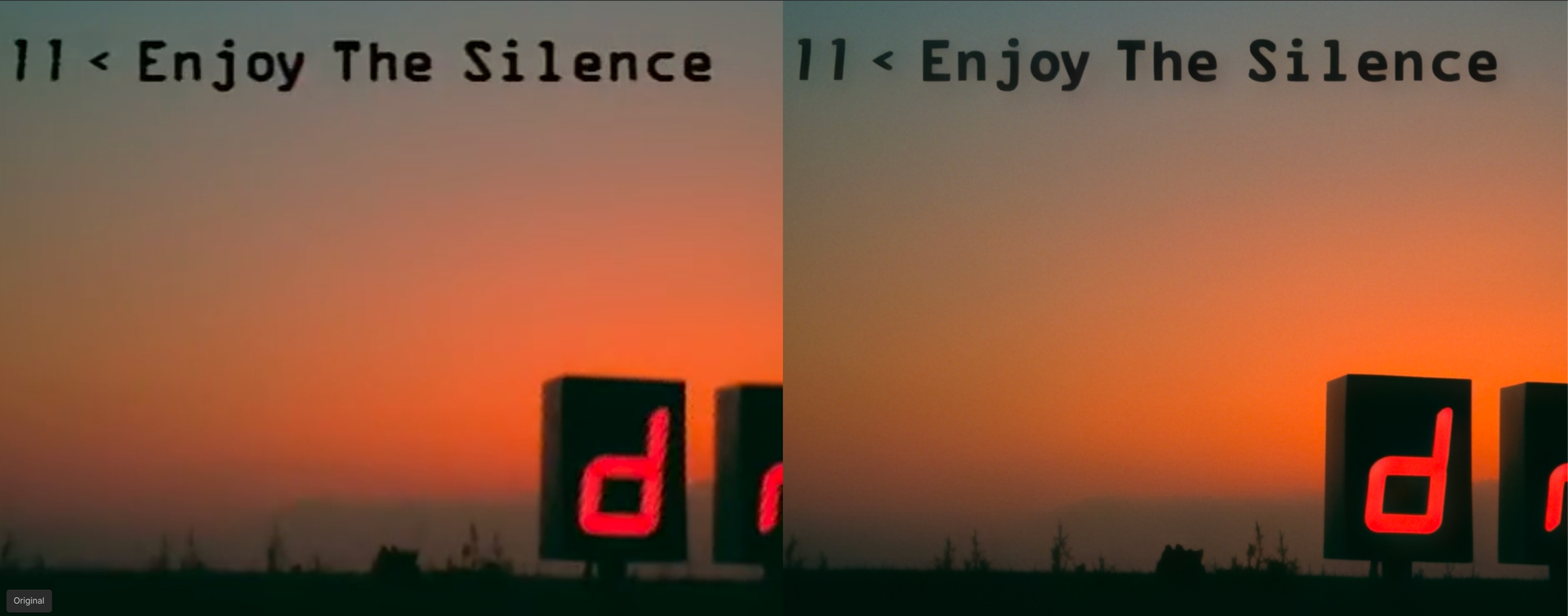
Here the quality was quite fantastic in first short tests on my M2 Ultra without artifacts, maybe even better than NVidia on 7.0.2 (at least for 1x) - but that might also depend on the source of course.
Unfortunately the speed is extremely low, less than half the speed of the last TVAI Beta version.
Thanks Chamberhouse, that 10% max memory trick worked on my M1 Ultra for the Proteus Natural model. I was hoping to pre-process in Proteus Natural before Starlight, but in my case (film restoration) it emphasises the flecks of dirt, which I obviously don’t want. I have started reading more of the forum and laughed out loud at JoVo’s comment about the speed comparison to the Amiga, So true. Starlight on a Mac is VERY slow, about 1 frame per minute (yes, per minute, if you are only doing a handful of frames). I’m now getting about 1 frame every 5 seconds (0.2 frames a second) on 50fps SD upscaled x2. I would be interested in other Mac results particularly the M5. At that rate it would take a week to do a 24fps 90 minute SD film. Don’t forget that the Amiga Video toaster WAS 30 years ago though!
One thing that I didn’t realise (and thanks to TopazLabs for this), the Starlight beta model in Topaz Video is tuneable (with the ability to add noise or grain and even use the focus fix option), and can be saved in any format including ProRES. It is so much easier than using Starlight on the cloud, which whenever I used was restricted to a heavily compressed mp4 format which I then had to process again (using Proteus) to eliminate the compression artefacts. The overall results are very similar: a revolution for improving SD footage, as others have reported in this last year.
After the initial “setting up” period of about 6 minutes, I’m getting a new batch of 16 frames about every 54 seconds on the M3 Ultra, so 3.375 spf. That’s for a 2x upscale of 768x576 source of Star Trek Voyager: Eye of the Needle (one of my favourite episodes).
I used handbrake to de-interlace and make into square pixels first, in preparation for Starlight.
Regarding the problems:
There are errors output from FFmpeg and written to the log file, one of which is:
Error: command buffer exited with error status
The Metal Performance Shaders operations encoded on it may not have completed.
Error:
(null)
Discarded (victim of GPU error/recovery) (00000005:kIOGPUCommandBufferCallbackErrorInnocentVictim)
<AGXG15XFamilyCommandBuffer: 0xa3e2f9f80>
label = slme-v1-1fr-fp16-720x1280-mlp_main__Op0_MpsGraphInference+++++++++++++++++++++++++++++++++++++++
device = <AGXG15DDevice: 0xa213d4000>
    name = Apple M3 Ultra
commandQueue = <AGXG15XFamilyCommandQueue: 0xa213cb200>
    label = <none>
    device = <AGXG15DDevice: 0xa213d4000>
        name = Apple M3 Ultra
retainedReferences = 1
A little while later, all output frames were blank. And as before, a few of the frames contained the tiling issues and a few frames had large blank areas.
So unless there is a problem with my M3 Ultra which is causing these errors, there are still issues to overcome, which perhaps the Topaz and Apple devs are currently working on.
Did you have RAM set to 10% when using Starlight? As I tested and while Starlight happily ignores the low power setting it did download a new model after setting RAM to 10%.
OH, and another thing: performance is really down by a big margin compared to the 7..2.0.3 beta (2.5 spf vs. 5.x spf for the same task)- and the Beta did use the Neural Engine to some extend and also CPU besides hogging the GPU 100%- while the actual Starlight only runs on GPU.
I had the max memory set to 100%, but good question!
I will have to try out 7.2.0.3 beta. It will be interesting to see how well it works in combination with MacOS 26.3 beta in terms of speed and hopefully without the errors and artefacts.
As said, here it’s MUCH faster (and also runs again - it had the same pixel garbage under 26.2 as the studio versions) - but quality unfortunately is quite a bit higher here with the new versions.
Setting RAM to 10% lead to a consumption of about 35-38GB compared to roughly uo to 48GB when set to 100% - and 10% seemed a little bit faster. IQ maybe slightly worse. But I didn’t really thoroughly test this.
Maybe they can reintroduce usage of the NE together with the GPU again and thus gain some speed in the future. Especially. on the M5 using the NE should bring an advantage.
It seems they also did something to better render texts. But, while being MUCH better than earlier Starlight versions by not crazily distorting text it now exchanges the font :-/
2026-01-28 23-30-44.342 Thread: 0x1f5903000 Info FF Process Output: 6 Error: command buffer exited with error status.
The Metal Performance Shaders operations encoded on it may not have completed.
Error:
(null)
Discarded (victim of GPU error/recovery) (00000005:kIOGPUCommandBufferCallbackErrorInnocentVictim)
<AGXG15XFamilyCommandBuffer: 0xc30835880>
label = slme-v1-1fr-fp16-720x1280-mlp_main__Op13_MpsGraphInference+
device = <AGXG15DDevice: 0xc62e60000>
name = Apple M3 Ultra
commandQueue = <AGXG15XFamilyCommandQueue: 0xc306b3700>
label =
device = <AGXG15DDevice: 0xc62e60000>
name = Apple M3 Ultra
retainedReferences = 1
2026-01-28 23-30-44.430 Thread: 0x1f5903000 Info FF Process Output: 6 2026-01-28 23:30:44.429 ffmpeg[3175:250688] MLModel Error: 0 The model is not found at URL: file:///Applications/Topaz%20Video%20AI%20BETA.app/Contents/MacOS/../Resources/models/coreMLCache//slme-v1-1fr-fp16-720x1280-mlp/ path: /Applications/Topaz Video AI BETA.app/Contents/MacOS/../Resources/models/coreMLCache//slme-v1-1fr-fp16-720x1280-mlp
2026-01-28 23:30:44.429 ffmpeg[3175:250688] Deleting model cache directory: /Applications/Topaz Video AI BETA.app/Contents/MacOS/../Resources/models/coreMLCache//slme-v1-1fr-fp16-720x1280-mlp
2026-01-28 23:30:44.429 ffmpeg[3175:250688] Unable to delete model cache at /Applications/Topaz Video AI BETA.app/Contents/MacOS/../Resources/models/coreMLCache//slme-v1-1fr-fp16-720x1280-mlp
2026-01-28 23:30:44.429 ffmpeg[3175:250688] MLModel Error: 0 The model is not found at URL: file:///Applications/Topaz%20Video%20AI%20BETA.app/Contents/MacOS/../Resources/models/coreMLCache//slme-v1-1fr-fp16-720x1280-mlp/ path: /Applications/Topaz Video AI BETA.app/Contents/MacOS/../Resources/models/coreMLCache//slme-v1-1fr-fp16-720x1280-mlp
2026-01-28 23:30:44.429 ffmpeg[3175:250688] Deleting model cache directory: /Applications/Topaz Video AI BETA.app/Contents/MacOS/../Resources/models/coreMLCache//slme-v1-1fr-fp16-720x1280-mlp
2026-01-28 23-30-44.431 Thread: 0x1f5903000 Info FF Process Output: 6 2026-01-28 23:30:44.429 ffmpeg[3175:250688] Unable to delete model cache at /Applications/Topaz Video AI BETA.app/Contents/MacOS/../Resources/models/coreMLCache//slme-v1-1fr-fp16-720x1280-mlp
2026-01-28 23:30:44.429 ffmpeg[3175:250688] Output Err: Unable to compute the prediction using ML Program. It can be an invalid input data or broken/unsupported model.
2026-01-28 23:30:44.429 ffmpeg[3175:250688] Deleting model cache directory: /Applications/Topaz Video AI BETA.app/Contents/MacOS/../Resources/models/coreMLCache//slme-v1-1fr-fp16-720x1280-mlp
2026-01-28 23:30:44.429 ffmpeg[3175:250688] Unable to delete model cache at /Applications/Topaz Video AI BETA.app/Contents/MacOS/../Resources/models/coreMLCache//slme-v1-1fr-fp16-720x1280-mlp
2026-01-28 23:30:44 0x16d1b3000 CRITICAL: Unable to run model with index 0 it had error:
2026-01-28 23:30:44 0x16d127000 CRITICAL: Unable to run model with index 0 it had error:
2026-01-28 23:30:44 0x16d00f000 CRITICAL: Unable to run model with index 0 it had error:
2026-01-28 23:30:44 0x16cf83000 CRITICAL: Unable to run model with index 0 it had error:
2026-01-28 23:30:44 0x16d09b000 CRITICAL: Unable to run model with index 0 it had error:
2026-01-28 23:30:44 0x16d23f000 CRITICAL: Unable to run model with index 0 it had error:
2026-01-28 23-30-44.432 Thread: 0x1f5903000 Info FF Process Output: 6
2026-01-28 23:30:44 0x16d23f000 CRITICAL: Caught exception in tile processing thread and stopped it msg: std::exception1
2026-01-28 23:30:44 0x16cf83000 libc++abi: terminating due to uncaught exception of type std::exception: std::exception
CRITICAL: Caught exception in tile processing thread and stopped it msg: std::exception1
2026-01-28 libc++abi:
2026-01-28 23-30-44.432 Thread: 0x1f5903000 Info FF Process Output: 6 terminating due to uncaught exception of type std::exception: std::exception
23:30:44 0x16d1b3000 CRITICAL: Caught exception in tile processing thread and stopped it msg: std::exception1
2026-01-libc++abi: terminating due to uncaught exception of type std::exception: std::exception
28 23:30:44 0x16d00f000 CRITICAL: Caught exception in tile processing thread and stopped it msg: std::exception1
2026-01-28 23:30:44 0x16d09b000 CRITICAL: Caught exception in tile processing thread and stopped it msg: std::exception1
2026-01-28 23:30:44 0x16d127000libc++abi: terminating due to uncaught exception of type std::exception: std::exception
CRITICAL: Caught exception in tile processing thread and stopped it msg: std::exception1
2026-01-28 23-30-44.657 Thread: 0x1f5903000 Info process exited error occurred: 6 1
2026-01-28 23-30-44.657 Thread: 0x1f5903000 Info process exited: 6 6 1 2026-01-28 23-30-44.658 Thread: 0x1f5903000 Info Going to delete path: “/Users/andy/Desktop/S1E06 Eye of the Needle 1_slm1/%06d.png” 2026-01-28 23-30-44.658 Thread: 0x1f5903000 Info Close and delete path “/Users/andy/Desktop/S1E06 Eye of the Needle 1_slm1/%06d.png”
2026-01-28 23-30-44.714 Thread: 0x1f5903000 Info ~TProcess(): destroyed
But the absolute worst thing about this was the highlighted lines above! How can any software developer be so stupid to intentionally delete the entire output for no good reason!
As it happens, it was only about 30 mins of processing, but it could well have been days!
I now wish I had used the CLI. FFmpeg wouldn’t have deleted all my rendered PNG files just because of an error!
So, all-in-all, I’m not impressed with either Topaz version OR MacOS 26.3 beta.
Yet another reason I’ll carry on using the CLI even in the studio version as I can’t trust the Topaz UI not do delete my files without warning.
I keep hoping and hoping that any day now, Topaz will give Mac users the same level of quality and attention that they do to all of the Windows users. Like someone else already said, we pay the same prices as PC users but get horribly hobbled, less-optimized, and occasionally fundamentally broken software. Giving the excuse that TVAI isn’t yet qualified for Tahoe is ridiculous. Developers have had the ability to test their software on Tahoe since June of last year, ensuring compatibility. Topaz has had the ability to test TVAI on 26.2 for nearly 3 months now, so there was plenty of time to be aware of it breaking Starlight mini and then working with Apple to patch it up ASAP. But my guess is that they didn’t because they’re too focused on making sure everything’s great for PC users and for people with unlimited wallets who can just shuttle everything off to their cloud processing service. Mac users have almost always gotten the short end of the stick for everything when it comes to third party developers and Topaz is apparently no exception.
Just installed 26.3 Release Candidate on my M3 Ultra - still getting artefacts and tiling issues. So it seems like it’s up to Topaz to sort this out rather than expecting any changes from Apple.
I’ve found there is a pseudo-random element to the tiling artefacts which lead me to believe it’s some sort of timing or sync issue. So I asked Google AI. I’m sure that the Topaz devs (and Apple?) are already aware of this, but for any other users who might still be affected, here’s what might be the crux of the issue relating to the M3-Ultra, according to Google AI:
1. Non-Deterministic Behaviour: The artefacts are not baked into the processing logic; running the exact same upscale multiple times results in artefacts appearing on different frames and in different spatial locations. This suggests a race condition or timing synchronization error rather than a static model error. 2. Architecture-Specific Failure: As an M3 Ultra user, I suspect the issue is related to the UltraFusion interconnect. The Metal compute kernels in macOS Tahoe appear to be failing to maintain memory coherency/fencing across the dual-die architecture during the tile-stitching phase. 3. Regressional Evidence: These artefacts are entirely absent when running the same hardware on macOS Sequoia, confirming a regression in the Metal scheduler or GPU drivers specific to the Tahoe 26.x branch.
This seems to be very plausible due to another difference I noticed: In Sequoia (where Starlight has no issues), the memory usage remained consistent at around 40 GBytes. However, in Tahoe, it was going up and down in a cycle, reaching around 80 GBytes (of the total 96).
Google AI recommended I try again with reduced max memory % in Tahoe. I’ll do that and see what happens.