Yes, I made the short clip with LosslessCut, I’m not familiar with that. The file I sent you privately is the file I received from MakeMKV.
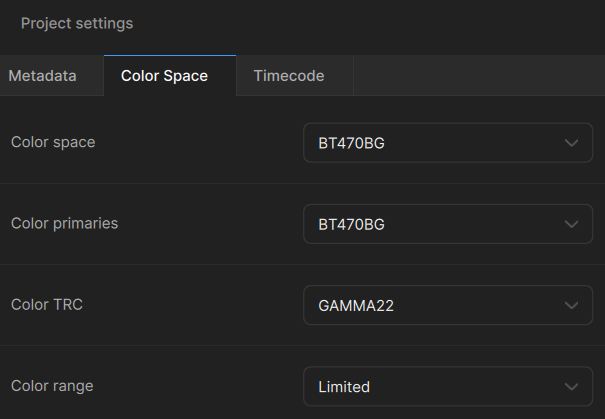
yes the big file is ok:) short pre-analysis; content is stored as interlaced MPEG-2, but content itself is progressive, so progressive video inside an interlaced container I can’t see any interlace artefacts, also BOB flag brings no frames with movements, so I recommend do not deinterlace, this worsening content here.
Yes, the content is progressive.
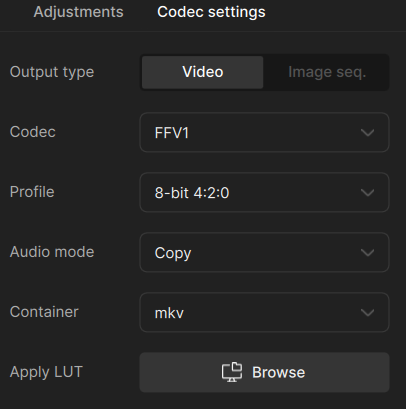
And for SLP to work you need to transcode the video as the .mkv container isn’t working in the present version of TV.
By film mastering, they added grain → which leads to distorted small-pixel faces. Pay attention—wide shots are the main problem here.
- Iris MQ 2x → medium to heavily distorted faces, forget it
- Iris LQ 2x → don’t ask

- Proteus V3 → “medium+” distorted faces
- Proteus V4 → a bit better, “medium-” distorted faces, but does more denoising; looks a bit more “polished”
- Rhea → no, I can’t show you that

- Theia → yes, this works without distorted faces, but it isn’t really an improvement
Starlight Fast 2
That was the biggest disappointment. Upscaled 2x, and near the end it said “downloading NYX”—what? FAST2 also uses NYX, and that at FHD? That’s exactly what the result looked like: glossy, dead-looking, over-sharpened, and distorted faces.
Starlight HQ
Not tested yet.
Starlight Mini
Yes sure, but not tested here. It’s slower than SLS, so I tought it’s not an option for you.
NYX only, or NYX 1x + Proteus 2x
No, this does not work. NYX 1x destroys it, and Proteus makes the worse more worser.
And the winner is… (except SLM or SLP)
Starlight Sharp, but without built-in NYX. It also produces slightly distorted faces, but it’s the best option here.
How to:
The simplest way is to stretch the source from 720×576 to 720×540, then use SLP to upscale 720×540 (now without square pixels) 2x. You must hit exactly 1080p (1440×1080), which is the model resolution without using NYX.
Optional – finishing step (after upscaling):
Gaia 1x + add Gaussian grain, values:
- amount: 55
- size: 1.2
- density: 70 (because it’s Gaia, you need to go higher as usual)
Gaia+Grain is okay, but not as good as it could be. Better results you may get using another tool, maybe Hybrid Vapoursynth “Film Grain”.
You can also do frame interpolation in the Gaia + grain step. Use Apollo 2x to go from 25 fps to 50 fps. Optional: in a second pass, go from 50 fps to 60 fps with “Chronos” (but do not go directly from 25 to 60 fps with Apollo).
My second choice
Proteus Natural → also distorts faces, but is better than other Proteus models. Less upscale gain than SLS described above.
Before/After Image Compare
It’s not breathtaking, but “film like” solid, near original, just better.
Source & Upscaled Video → click
Does anyone have experience with renting a cloud PC? I’d like to be able to use SLP with an RTX 4090, for example. It costs between €0.60 and €1.02 per hour, which would be extremely cheap compared to what Topaz’s cloud service would cost.
So, is an SL model my only option? Which I can’t use or which is too expensive? 
It depends on the compromises you are willing to accept. Here are two versions that can be created fast and easily even with your hardware. If you watch the videos on a PC monitor, you naturally spot every single flaw, no matter how small. However, i think from a normal viewing distance in front of a large-screen TV, it is definitely an improvement over the DVD source.
Video 1
Video 2
By the way, how does the grain actually work? Sometimes you can see it, and sometimes you can’t—even though all the settings are exactly the same.
So, I’ve seen a lot of examples now, and Starlight Precise 2.5 does a really good job. Thanks for your help!
I even got all the seasons in 1080p thanks to a tip. They’re remuxed from the UHD with German audio, but I’d still like to improve the quality a bit. I just don’t know how yet.
I’d like to test it myself, but my laptop is too weak. I could rent a cloud PC with that kind of spec. Would Starlight Precision run on it? Does anyone know?
Intel Xeon 4.5GHz 12vCores
↓ 1 Gb/s abwärts Bandbreite
NVIDIA Quadro RTX 6000 24GB
Windows 11 Home
41 GB RAM
C: 1.00 TB SSD
Nope. As mentioned in the similar topic, Starlight Precise requires Nvidia Compute 8.9. Your card has 7.5 version only. Basically, it’s “too old for this”.
So, your best bet will be Iris MQ - fast and reliable. Add grain to your taste.
