would be interesting project also for other content, because sometimes DVD have missing or better german audio than some new 4k discs. Sometimes they do german AC3 on 4k disc or just Atmos 2.0 while DVD has 5.1 German DTS.
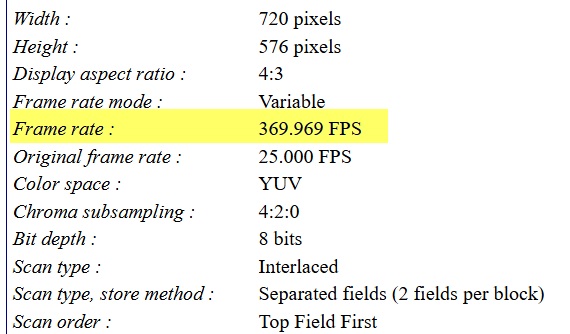
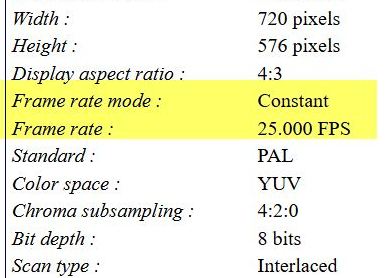
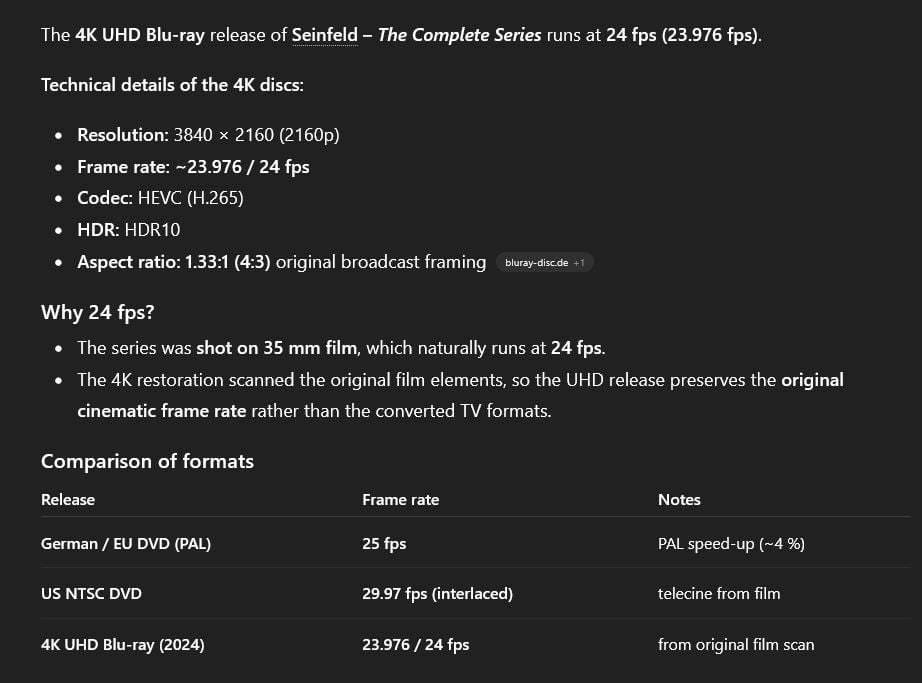
first step find out fps of the DVD, then fps of the Blu-Ray (ok you don’t have it yet but check on web) Then check film duration, must be the same.
Check if it’s PAL DVD or NTSC. When it is PAL, maybe you must slow down audio track by factor 0.95904 (23.976 fps / 25 fps). But i’m not sure, just try, or maybe some else can tell you
short; yes should be possible and it seems to be not very hard, but sure you must try around a little bit. You can do it with Dolby Surround [AC3], DTS or Atmos not, then you have to convert this into AC3 first.
Copy/paste text below or your own text into ChatGPT. Before you start, compare DVD and blu-ray video is the exactly same content, otherwise you cant adapt audio from DVD to blu-ray.
example ChatGPT ask
I have the *Seinfeld* series on PAL DVDs with German audio, and the *Seinfeld* 4K UHD Blu-ray without a German track. How can I sync the German audio from the DVDs with the 4K Blu-ray video so that I can mux them together?
Edit:Sorry I was wrong, it also works works with DTS and Atmos by using free eac3to (command line tool), it can handle TrueHD, E-AC3, AC-3, DTS Core, DTS-HD MA and DTS:X
-i represents the input file(s), here you would use 2 of them
-ccodec copy indicates ffmpeg should copy the video purely verbatim
-acodec copy indicates ffmpeg should copy the audio verbatim
-scodec copy for subtitles
-map 0:v means the video should be taken from the first file (#0)
-map 1:a means the video should be taken from the 2nd file (#1)
-map 1:s will collect subtitles from the 2nd file (not sure which one you want)
if you have a lot of files, you can write a little shell script with a for command, depends on your operating system. I have written a few for Windows and macOS a while ago, will be happy to share examples.
Hope this helps!
Edit: I haven’t experienced slowing down the audio, there should be a way by adding something like: -filter:a “atempo=0.95904” (based on Mayday’s math above). It could also be that you need 1/0.95904 as a factor.
I just discovered that there are also older models that you can unlock in the new version 1.0… Can someone briefly explain this to me, and are these perhaps better?
I always had such a soft look, like the faces and jacket, etc. And the text in the background was weird, I don’t know how else to describe it.
Now I’ve seen that there are Proteus V1, V2, V3, V4, etc. I haven’t looked at the other models yet; I’m currently testing V2.
If you are happy with the result, good for you. Or maybe not, because it probably means you have to consult an ear doctor Many people are very sensitive about the voice change that will happen without any pitch correction.
I’ve given up. Everything I’ve tried over the last few months hasn’t worked, unfortunately. SL isn’t a solution at all; it’s just extremely expensive. SeedVR2 is the same, since my laptop is simply too weak.
I was getting pretty good results, but then I kept noticing little things like faces in the background or text, etc.
Isn’t there anyone here I could send an episode to? Someone who could take a look at what’s possible, what settings, etc., so I can do it myself?
Here’s a short clip—maybe someone can help me out. I don’t have SLP myself—it’s too expensive and too slow—even though it produces awesome results. Alternatively, perhaps someone could do this for me using SLP? I’d be willing to pay for it, provided the results are good.
small note: The linked short sample MediaInfo says VFR, but it’s not, after remux it is CFR. But the episode you gave me is fine — it’s already CFR in the original header.
 that you can unlock in the new version 1.0… Can someone briefly explain this to me, and are these perhaps better?
 Many people are very sensitive about the voice change that will happen without any pitch correction.