This is for Photo v1.4.1. since there is no group for that release in community yet.
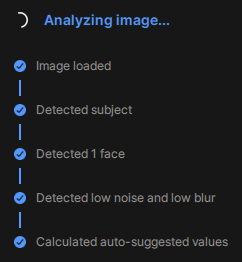
It installed okay but when trying to run it, it either sits at the end of the “Calculated auto-suggested values” then just hangs there with the Analysing image icon spinning endlessly or will get to the Calculated step then loop back to the Image loaded and just cycle through the steps over and over endlessly. either way, it renders the plugin unusable. It makes no difference if Autopilot is on or off. Please fix.
Thanks! This is the correct thread since v1.4.1 is only a patch for v1.4.0 installer issues.
To know what is happening, we will need to see your logs at support. Open the app as standalone from your desktop shortcut, then in the top right of the app, the Help button, then Contact Support and attach the logs and we can see what is happening.
You can click on the chosen version and its installer links will be at the top of the thread.
When we see your logs sent to support, it could be something we can fix right away or something to relay to the development team, but we cannot know until we see these logs.
v1.4.0 for Windows was unreleased as it is corrupted. v1.4.1 has a fix for this, and until we can troubleshoot what your issues are on it, you can revert to v1.3.3
Topaz Photo v1.3.3
Released March 11th, 2026 Windows: Download