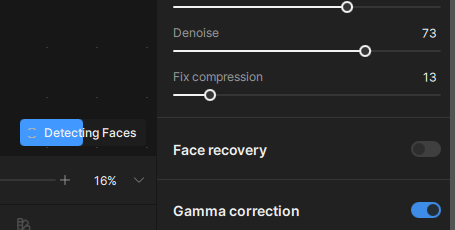
I downloaded Gigapixel 8 and when the screen to do the editing appears and I try to add one of my photos the screen stays blank and at the bottom Detecting Faces appears and a turning wheel, but the photo chosen only appears at the bottom of the screen. Using the original Topaz transferring photos for editing was instant so what am I doing wrong? Please advise.
Using version 8.03 on a landscape of a forest, I had Face Recovery disabled yet throughout the processing the progress bar indicate “Detecting Faces”.
1 Like
Same for me. Every single image output I’ve done since this update, regardless of subject, comes out one big blur. It worked fine before I updated. But now, every going back to 8.02, the outputs are one big blur.

1 Like

i have the same problem.. it takes much time and procespower to detect a face which is not there.. i disabled all settings for it.
i work with 12th Gen Intel(R) Core™ i7-12650H and nvidia rtx4060 8gb..
1 Like
I hear you. I’m on a 13th Gen Intel(R) Core™ i9-13900K and an RTX 4090.
I don’t want to make up a conspiracy, but it seems as if ALL three of my Topaz Ai apps I own are now working very slowly at the same time Topaz Labs is trying to sell us on cloud credits and offloading workloads to their cloud for a price. Coincidence? Are the new versions doing so much more than the old ones?
3 Likes
I too am having the same problem. I’m just running it on a landscape photo with no faces to detect. I have mine shut off and it is still running!
Topaz, can you please give us some suggestions as to how to avoid it! It’s annoying!
4 Likes
Exactly the same issue… on a landscape image and the sharpening is less powerfull than on old Photo AI… Topaz should give us a solution ! Thanks !
1 Like
Hi. Same here. Cringing.
What used to take 20 sec has turned into useless minutes.
Topaz, please, address the issue.
2 Likes
Same problem. Has there been any answer or suggestion from Topaz?
“Seems” to be solved in latest updates.
Yes, me too! Why does “Detecting faces” take most of the time for updating the preview? There seems to be no option to disable this in the preferences. It’s possible that this is just the preview-making process taking time, but that’s not what the progress bar says. I am apparently running the latest version (v.8.1.1).
Topaz, can we please have an option to turn this off if it’s not necessary? Or re-brand it if it is!
2 Likes
If you’re getting hammered with resource use in the preview screen because Gigapixel spends time detecting faces, yet you have no use for the feature as you don’t intend to utilise face recovery, then you can disable face detection completely for your entire Gigapixel session.
 1. Go to C:\ProgramData\Topaz Labs LLC\Topaz Gigapixel AI\models
 2. Open the following files in a text editor:
      a) face-parse-large.json
      b) face-parse-small.json
 3. For each of them:
       Change "enabled": 1, to "enabled": 0,
                              (don't forget the trailing comma!)
Done, no more face detection in preview (or recovery) until you change that 0 back to a 1. I’ve no idea if this impacts the other recovery features, try it.
5 Likes
If you’re getting random crashes in preview mode (normally when you select another pic or you’re scrolling down through the file list) then I believe the cause is Gigapixel spinning up lots of face detection chains in parallel, eventually resulting in an out-of-bounds mem write. I actually think the color correction model is causing some aggro as well, but I don’t care enough to investigate the root cause - I just want my software to work.
The below steps worked for me to completely prevent this issue occuring. Your milage may vary, please let me know how it goes.
 1. Go to C:\ProgramData\Topaz Labs LLC\Topaz Gigapixel AI\models
  2. Open the following files in a text editor:
        a) face-parse-large.json
        b) face-parse-small.json
  3. Disable face detection parallelisation:
        a) Look under "backends" - under each execution provider
                                               (e.g. openvino, onnx etc)
        a) Change "parallel": 1, to "parallel": 0,
                                         (don't forget the trailing comma!)
This is likely to come with some performance hit if you’re scrolling through lots of photos, but what does that matter if the software crashes every 3 minutes anyway…
Anyway, hopefully this works for you and you can use the software you paid good money for…
1 Like
Hi mate
Same issue here which has persisted throughout all updates, now on 8.1.1
I have just sent an email to Topaz with screenshots etc, so hopefully we’ll get this issue rectified
1 Like
Gigapixel always wants to detect faces, even if there aren’t any.
2 or 3 minutes if there are no faces and sometimes up to 7 minutes for 3 faces.
What does this “face detection” analyser do? Does it search for faces or does it already process faces to improve them?
It’s really weird and it wastes a lot of time.
Basic models is on auto pilot and the other parameters are deactivated for an image without people and face recovery is also activated for images with people and faces.
2 Likes
Gigapixel always wants to detect faces, even if there aren’t any.
2 or 3 minutes if there are no faces and sometimes up to 7 minutes for 3 faces.
What does this “face detection” analyser do? Does it search for faces or does it already process faces to improve them?
It’s really weird and it wastes a lot of time.
Basic models is on auto pilot and the other parameters are deactivated for an image without people and face recovery is also activated for images with people and faces.
2 Likes
I have just upgraded to this version and have tried with no luck to turn off detecting faces, switch is off, in preferences have unticked the 2 options but still it keeps going. Any ideas?
1 Like

