Do you have any experience with ON1 NoNoise? Maybe even compared to TPAI? I would be very interested to know more.
Hi.
I’ve compared ON1 NoNoise with Topaz DeNoise & Photo AI and I have to say you’ll be disappointed with the results in fact I’ve never seen a comparison where NoNoise come out on top even compared to the now discontinued Topaz DeNoise AI.
Yes but, no but, I hear you cry it’s a lot cheaper therefore, better value for money.
That’s true and here’s my but:
If, you purchase a years licence for Topaz Photo AI you get a whole year worth of updates including new versions until your license expires and then continue to get updates until the next version.
If you purchase ON1 NoNoise 2025 for instance, you get a year of updates including 2025.5 yes. However, if NoNoise 2026 is released you wouldn’t get that as part of your licence you’re have to purchase the product again and don’t pin your hopes on them updating the version you have isn’t going to happen.
So, not so much value for money after all and ON1 release a new version every six months
Hope this helps
1 Like
Many thanks for the information! I tried the ON1 NoNoise trial version and I wasn’t particularly impressed – I have both the old (discontinued) version from Topaz and a valid license for TPAI and I don’t think I’d get any better results with ON1. In the end, Gigapixel also reliably denoises my photos.
The most reliably predictable software that I routinely use to clean up digital noise is the legacy DeNoise 6.0.1. Everything since then (the AI versions) occasionally give me an unpleasant surprise (blur, blotches, artifacts, etc.).
6 Likes
He would have been happy with Topaz Denoise AI if it was still available. While Photo AI is quite good it has many other functions that he didn’t want to spend so much money for. My recollection is that Denoise AI used to be about $79. I didn’t check, but I think On1 NoNoise AI is something like $60-70. But Photo AI is $200.
Yes, the Topaz web apps were an option, but $480/year subscription was very uninteresting to him. Especially for what seems to be just denoise. And always need a fast internet connection to use it.
No, I don’t have On1 NoNoise AI. I have Photo AI, Gigapixel AI, Denoise AI, and Sharpen AI. I also have Lightoom Classic and it also has AI denoise, but only for raw files.
ON1 release a new version of Photo Raw every year, not every six months, and if you bought 2025 then every update since has been free, not paid for (the current version is 2025.2) and you won’t have to pay until 2026 is released. The individual apps are not always updated as often - the current version of NoNoise AI is 2024.5 and it was released well over a year ago.
1 Like
I found exactly the same.
Glitzy sales pitch and online demo but not useful in real life at the moment.
1 Like
My point was Updates are free Upgrades aren’t and Tostanica-fezanamu said his friend didn’t want the Bells and Whistles that comes with Photo AI which is the cheaper option over time and he wouldn’t be interested in the Web App Subscription because, as he mentions below
If you want the power of Topaz and you’re only a casual user and you only want to for instance, use Denoise then, you don’t have to buy a years Subscription at $480 you can save your work then, dip in to the Web Denoise version for a month with Unlimited Renders and it’s only cost you $14:99.
That’s Thirteen times you can dip in and out of the Web Apps before you reach the cost of Photo AI
Based on the info in the screenshot posted earlier you’d have to take the 16MP limitation into account though depending on what you process more regularly… For me that would be quite a hard “stopper” as both my current phone and camera shoots higher resolutions - I actually have to go back three cameras to get below that limit…
On another note - I kind of understand but at the same time don’t understand why Topaz can’t offer purchase option for older “decommissioned” apps like Denoise AI and similar - perhaps at a reduced price with a “Download and try, if it works for you the way you want you can get the license for … but we won’t take any responsibility beyond that”-agreement.
Me I had a specific case some time ago where I wanted to turn jpgs to RAW (the reason is not important for this conversation) and research led me back to Topaz Labs. Another app that they could probably squeeze a few more $ out of is ReMask which I see being mentioned from time to time as still being a good option.
Sure - offering some of these old legacy apps might risk might be “invading” the market of PAI and/or GAI but I doubt it would be that much…
You didn’t say anything like that at all.
You said that you wouldn’t get 2025.5 as part of your licence - you would.
You said that ON1 release a new version every six months - they don’t.
The monthly fee for the Premium plan ($480 annual subscription) is $49.99, not $14.99.
1 Like
Thank you Paul.
Amendment:
Apologies to everyone reading this Paul has rightly pointed out I was mistaken where I inadvertently mixed the Standard plan with the Premium Plan
The Standard Plan is as follows:
Standard plan ($14.99/mo or $89.99/annual)
- Unlimited renders
- Export images up to 16MP
- Non-commercial use only
Not $480 Annually as I originally stated that, applies to the Premium Plan.
I have also amended the information regarding ON1 about 2025.5 not being included
Love the pitching of ideas and feedback. Moved as a new Discussion conversation in General thread as we want to keep the releases thread focused on v4.0.3 flags to development team, etc.
Thanks all and any comparison is welcome to continue to be discussed here on this post!
4 Likes
Pure Raw 5 
2 Likes
Hi.
Some excellent points and suggestions.
I understand 16MP compared the latest Cameras and Phones would appear low however, 16MP is still considered a high resolution for Stock Photography where even 12MP is perfectly acceptable and 16MP is plenty good enough for printing.
In light of that, if you’re a Photographer with a Higher Resolution Camera you’re more than likely going to opt for and invest in Topaz Photo AI.
As I suggested this would be more beneficial to the casual user Artist, Graphic Designer or someone restoring family photos rather than a Keen to Pro Photographer.
It really wouldn’t be in Topaz best interest to reintroduce Topaz DeNoise or Sharpen AI as Legacy Applications even at a discounted price this would have a disastrous effect on Photo AI and the new Web Apps sales with most people choosing the cheapest option even if it was no longer supported rather than, purchase the larger ticket items.
As for Mask AI, JPEG to RAW and Studio now there’s a opportunity that will probably never happen but, if they did offer theses at a discounted price with the understanding of no further support.
I believe as you do a lot of people would jump at the chance but, how would this be a benefit for Topaz well here’s a few suggestions.
Test the market as a one-off they’ll probably bring some new customers onboard for Topaz who might purchase other Topaz Products or offer them to existing customers as a last one-off chance to own a bit of Topaz valued past.
If anything else Topaz would at least squeeze a little more revenue from them
1 Like
I own several legacy products from Topaz ( including a couple from way back such as Topaz DeJPEG). I never got far with Topaz Mask, which has been superseded by masking tools that use AI, so I believe that to be obsolete.
I don’t use them any more, but have just downloaded DeNoise and can confirm it works perfectly well on Mac OS Sequoia.
I shoot a lot in low light at up to 6400 ISO. Here is a quick sample comparison zooming to 100%.
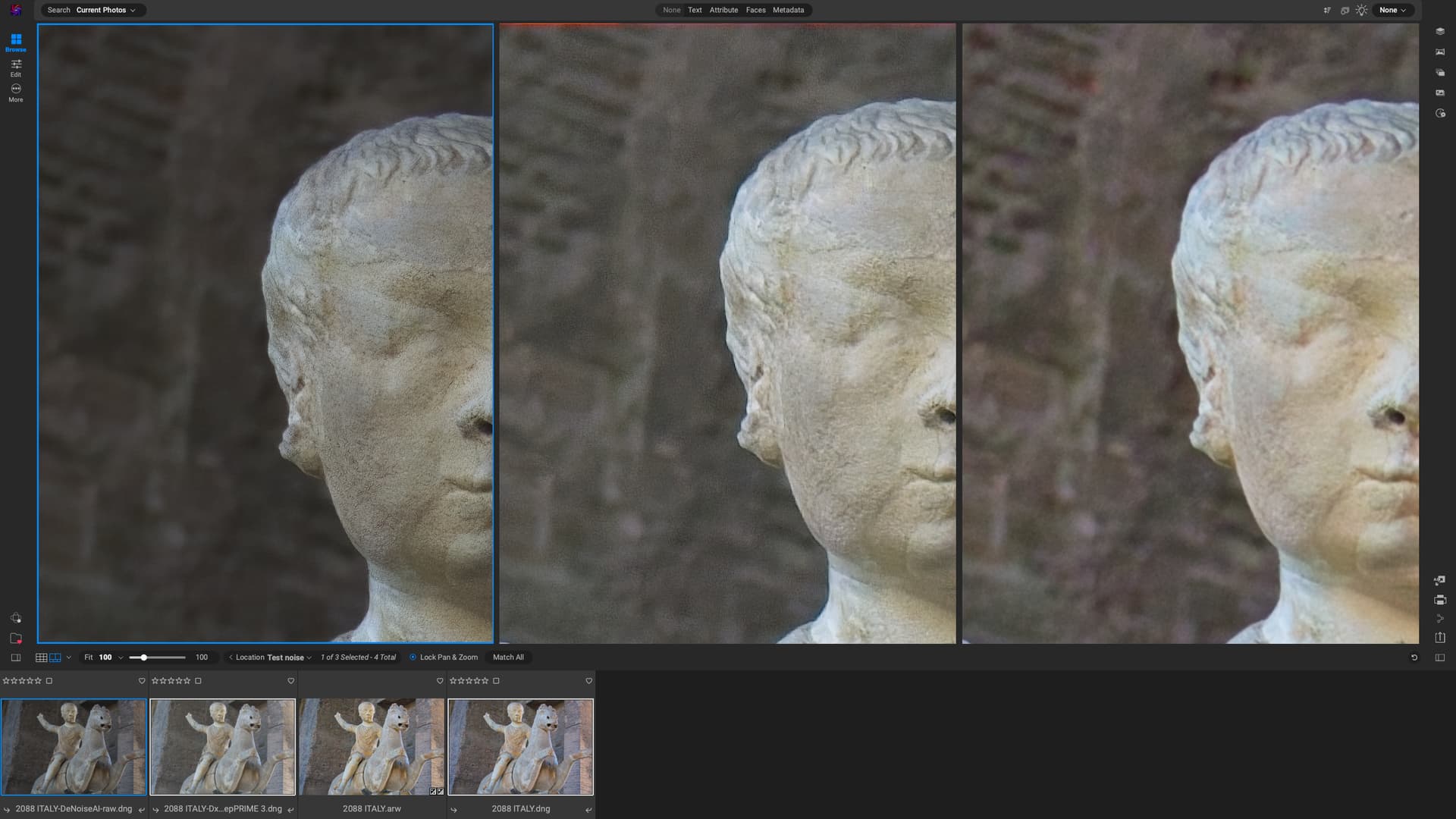
I used the auto settings in standalone for all three.
DeNoise is the least sharp and darker than the other two. As always DxO Pure Raw does the best job. I for one don’t mind a bit of noise in the background, although that could probably be tweaked out. On1 Pure Raw 2025 can never manage to get rid of colour noise
When editing in On1, I am usually content with its NoNoise function with images that have a lower ISO than this.
Note that Photo AI is very poor at addressing color noise in high ISO images, which NoNoise AI handles well. The issue with NoNoise AI is that the defaults are not good and you may need to adjust accordingly.
Which is which for those 3?
Left sculpture has most detail (but still noise), followed by middle (which loses some details), right is soft. At least based on snip.
Could you please expand it a little? I also have a trial DxO Pure Raw for a test. Is there anything essential in DxO compared to ON1 and TPAI/GPAI what should I (as an amateur) focus on?
Pure Raw 5 does reduce Chromatic Aberration in Model instead of profile.
It did even correct those from my tilt and shift lens where you cant have any profile correction.
So you will get out the best of your lenses.
Its the best denoising software out there for raw files.
1 Like
