DxO Pure RAW (equal to ADOBE AI Denoiser into Camera RAW) is the BEST denoiser out there… Topaz Photo AI Denoiser is in second place, at today!
1 Like
can anyone that mentions color noise issues with RAW Denoise of Photo AI confirm if in their preferences for it if Hot Pixels Correction option is enabled? Just to be sure!
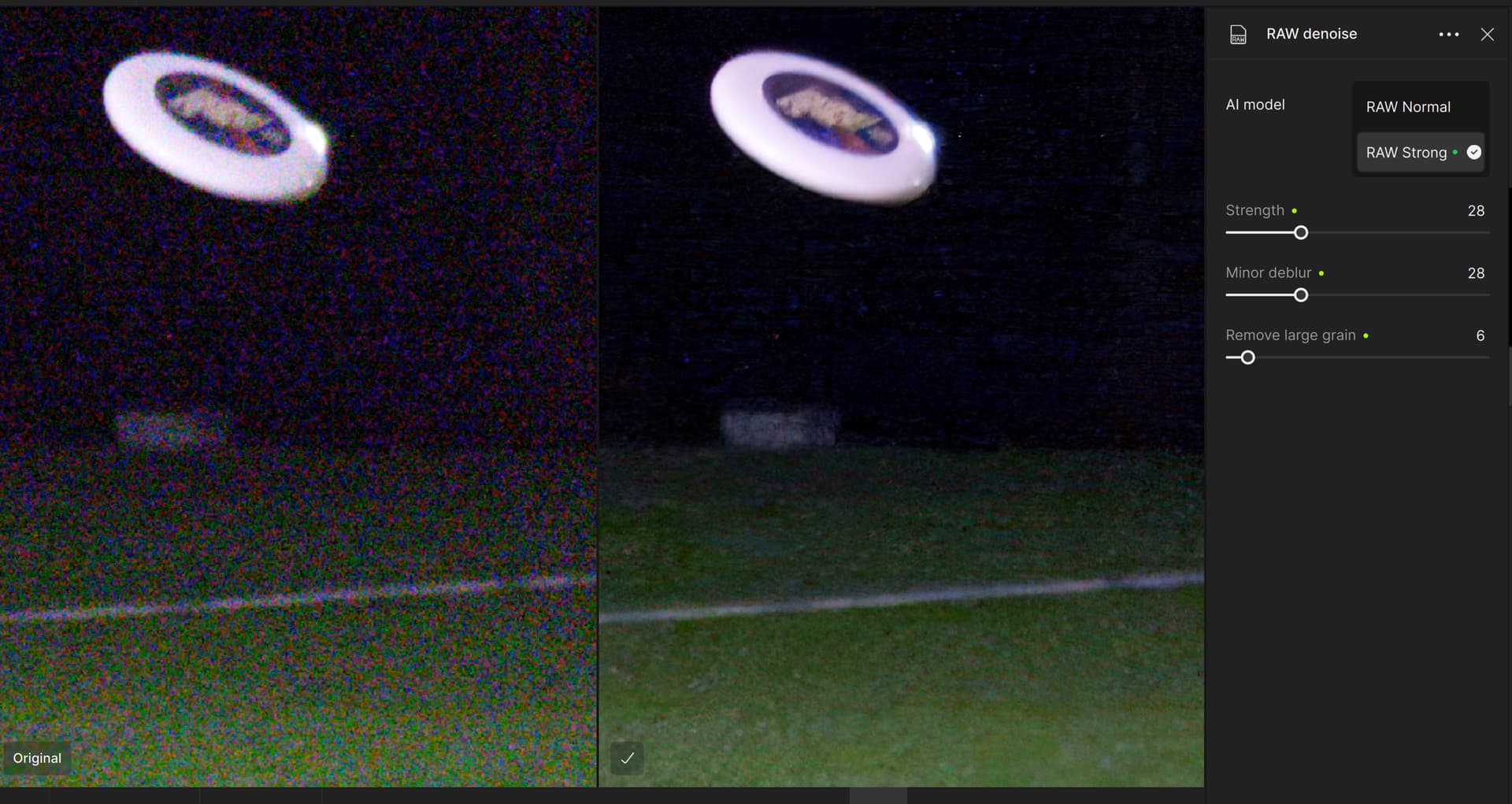
I’ve actually been impressed with really noisy recovery with TPAI - here’s an 1/500s ISO 20000 shot from an ultimate tournament (214% zoom). Using raw/strong and carefully setting remove large grain is a key thing here (this is with hot pixels off, but these aren’t what I consider hot pixels and turning it on doesn’t change this series).
1 Like
When I was originally looking for denoise software (a few years back), I did a straight test of Topaz denoise, on1, and dxo pureraw. On1 generated a huge artifact in the image, topaz was very good, dxo was even better. but back then a 2 TB SSD wasn’t cheap and I didn’t want to deal with 100MB linear dngs (vs 25 MB arws), and kept playing the “what if I buy an unsupported lens” conundrum in my head. Also back then, topaz denoise wasn’t the most expensive of the bunch. So I went with Topaz denoise, then sharpen. I picked up gigapixel because tpai had just been released and if you owned the three other packages, you got tpai free. I’ve renewed once or twice but the last time I waited to renew until they fixed the capture 1 plugin break.
If I were starting now and mainly wanted denoise+sharpen, it would be a tough call. TPAI is almost the same price as DXO Photolab elite, and a lot more than ON1 No-noise or DXO Pureraw. If I decide to dump C1, I might end up with Photolab and very possibly not have much need for a $200 denoise package (or I guess $120/y). I’m not particularly interested in face recovery (it does a remarkable job but also tends to over-smooth wrinkles and wipe out real facial features- note that C1 just introduced a blemish-protect feature for faces) and superfocus adds too much stuff that isn’t really there for wildlife/nature photography for my taste.
1 Like
Thanks for the information, it’s very useful for me. I’m also interested in DXO Photolab, but I’m not sure if I’d use it to its full potential yet. I’ll see what the trial tells me.
If you’re thinking about getting into a bigger photo processing package, I’d suggest looking at Affinity (especially when they put the whole package on sale). You can use tpai as a plugin and Affinity gives you a lot of filters and ability to edit colors/lighting/etc. with a lot of control. Also merging/blending images. Still no digital asset manager, so you’ll need one of those. But TPAI also lacks any DAM capability as well (which is why the $200 is a bit steep, imho).
I just published a YouTube video to my channel earlier this week comparing an Affinity Photo 2 workflow to a similar Photoshop workflow that was my benchmark. Using the same ARW Raw photo for both. As someone who does a lot of pixel level manipulations (in Ps) who was looking at alternatives to Ps (given their pricing increases & plan changes), Affinity was ‘clunkier’ to work with. For my type of photo processing.
I’ve been using C1 long enough that even getting going with LR is a challenge for me. I like Affinity because it’s a bargain - I did the upgrade from v1 to v2 for the whole photo/design/publisher package (win+ipad) on sale for $66. And it’s a good starter package for some one who isn’t looking to spend a lot and just get familiar with what can be done with a decent photo/raw editor.
3 Likes
I agree with that completely! That was my bottom line assessment too after trying it with various workflow steps as a potential Ps replacement option for myself. It can’t handle what I need, but for someone wanting a solid, basic Raw processor and light retouching, it would handle those things just fine!
One thing I discovered and the Affinity Spt. folks confirmed… it has a known bug that it can freeze crash when being run with an NVIDIA 50xx processor. It did that in every workflow I attempted (at different points in the workflow).
1 Like
Thanks for the advice and time – looking at the prices (not just DXO) the Affinity alternative seems to be the best (for me). Also, I have Affinity 2 for a short time but haven’t used it much yet, but I’ve now tried TPAI as a plugin and it works well. I only shoot for my own pleasure, so I wouldn’t take full advantage of those high-end (and high-price) tools.
1 Like
