Your new update keeps giving ERRORS
Hi.
Would have been helpful to know what ERRORS you’re getting as well as AI Models and Setting you were using, Local or Cloud Rendering, Topaz Video Version Number, your System Specs, CPU, RAM, GPU VRAM, and anything else you think would be helpful including Screenshots of both any ERROR Messages and Settings.
In addition, it would help if you could gather your Log Files for Topaz Support when they contact you.
Here’s a reply I’ve copied from Kyle at Topaz Support to someone else with information on how to get your Logs
Hope this helps
As AND-E mentioned, we will need more information and if you would like to send it directly to the support team via email, we can respond quickly and see what is going on.
Thanks. Soooo weird. I closed out, and re-opened. I did not see the error. That error only occurred right after updating it. But if it doesn’t show it, then “if it ain’t broke, don’t fix it.” I guess.
Thanks for your reply, if it’s working then that’s great the only thing you should have replied and let Kyle know at Topaz Support because he’s the one best equipped to get you up and running again.
Thanks again and have a good weekend
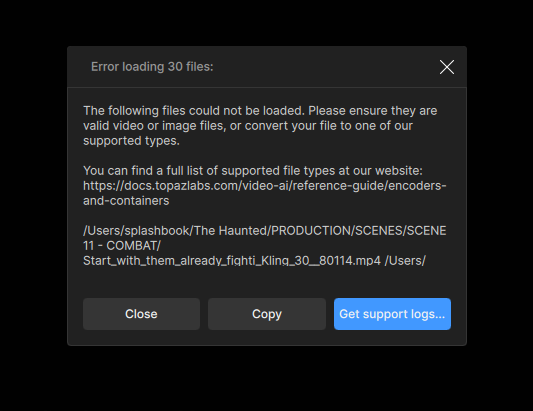
Looks like a possible issue with the file names, and formats. If you can send me the logs I can take a look at the full error message.
When working with videos generated from another AI model, it is best to go ahead and shorten the file name before bringing them into Topaz Video. There is a character limit for file names and that includes part of the file path, and if the file name is too long the app can not export it or process it.
