This is absolute BS. Why do I have to wait this long. I will NOT be renewing and telling everyone what a scam Topaz is. The video is 54s long.
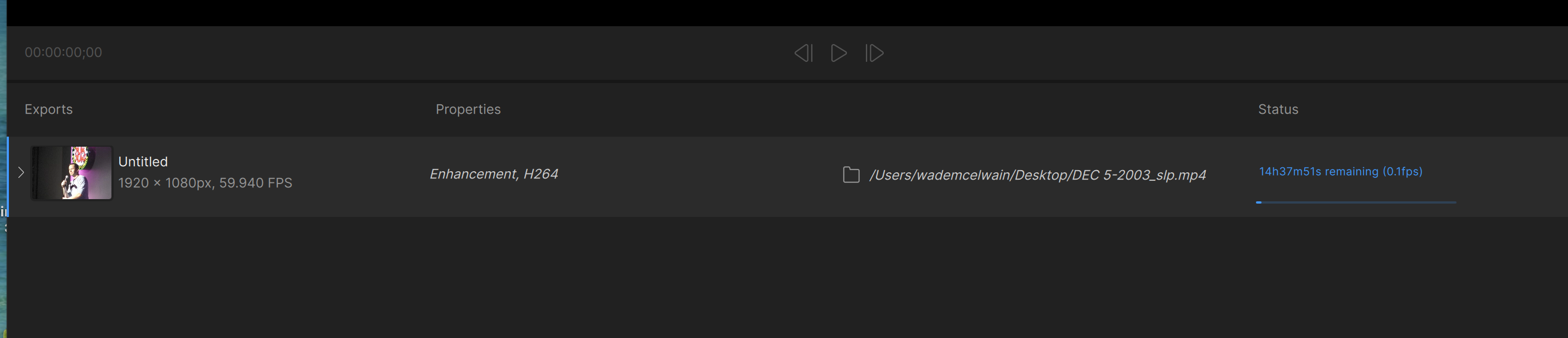
That’s Starlight Precise, and you’re getting adequate numbers. We all have roughly the same FPS depending on the hardware.
What’s your GPU?
Starlight Precise is a very heavy model. 0.1FPS may be normal for your system (although I don’t know your specs). I can tell you that even on my 9950X3D and RTX 5090 system, I only get around 0.7-0.9FPS typically.
16 core. All other models I try say ‘error uploading’. It’s happy to eat my credits though.
NO models work for me. I get an error on each one
What are your system specs? Can you post them here? Also - do you have logging turned on? Can you post logs here?
If you’re using build 1.6.1, try backing down to 1.6.0 or 1.5.0. There’s a bug in 1.6.1 and the current 1.7.0 beta that does this on some systems. Currently being worked on.
I know this doesn’t help you right now, but if the video were 29.97 fps instead of 59.94 fps, it would be finished in half the time.
As the other users mentioned, Starlight Precise will be slow on any hardware since it is a diffusion model. Regarding the other errors, can you send in your app’s logs? Feel free to email them if you prefer help@topazlabs.com
To gather logs, please open the app and select Help > Logging > Get Logs for Support and attach the zip file to your reply.
16 core what?
Indeed. I drop half the frames in 50FPS video while upscaling. Clients can’t tell the difference between 25 and 50FPS. But I tell them beforehand that the framerate will be 25, and they do agree.
I see a difference between 25 and 50 FPS. However, only for some videos I increase the FPS to 50.
Run it through frame interpolation and bring it back up to 50fps?
I do, but ordinary people don’t pay attention and don’t want to spend double time to restore old footage.
Only if it’s required. And it looks artificial anyways.
