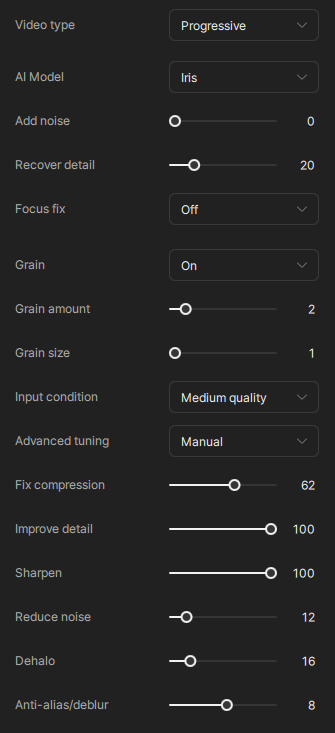
Rhea performs well, but it’s incredibly slow. In my tests, it runs at 6 fps, which is very slow. When I ran Iris at the same quality with the settings below, I got 25 fps, which is a very good result.

The Rhea model only carries out 4x upscaling, whereas the Iris model can do 1x, 2x and 4x. A spacial scaler is used to get to the final output resolution, if needed.
You’ve posted in the ideas section of the forum. So what is your idea?
2 Likes
Rhea performs best at 4x, but it also performs well at 1.5x or 2x, I’ve tested it. Its only problem is that it’s incredibly slow. 2x takes 6 fps and 4x takes 3 fps, which is a very long time for large videos.
If you look in the models folder you’ll see that the rhea models downloaded (for different tile sizes) are all 4x scaling.
That means if you carry out a 2x upscale, the video will be upscaled 4x by the Rhea model, then 50% downscaled by the spacial scaler.
Iris has 2x upscaling models, so it can directly upscale a video 2x, and doesn’t need to downscale after. This is alot faster.
But again, you’ve posted this in the ideas section of the forum, and you’ve not stated what your idea is that you want users to vote on.
EDIT: It appears this thread has been moved out of the ideas section.
3 Likes
But Iris is also faster when doing 4x compared to Rhea. After Rhea(XL) was released (and critism about RheaXL artefacts) Topaz announced new cloud based pathway..as we know at this moment, the models does net get updated anymore because Topaz had a new baby named Starlight.
Improving Rhea would have been a competitor to Starlight, which was only available online at the time, that could also have played a role. Then we made pressure they give us a local Starlight.
So I think Rhea is the early predecessor of Starlight; more reconstruction not only faces, more Vram usage, while Iris is a Proteus spin-off, the models works compeltly different and I’m sure this plays a role in case of speed.
4 Likes
