Hi, everyone! Just downloaded the new 2.6 update for VEAI. I read the models like Artemis and Proteus received some improvements. Can anyone outline what they are? Thanks!
I’m having same issue - ETA stuck at 0 when second video begins to process.
I beleive you, no problem with that, i’m using and used the iGpu of my i7-7700 since mars 2020.
We’re few to run VEAI on this. but i’ll leave soon this team, getting normally a 1050 GTx on friday. if the postman is not an a**… lol.
I also wanted to mention that the new version of Proteus seems to be over-enhancing the details in my videos. I’d like to know why. Thanks!
When using Dione DV and selecting Edit All when I want to do more than one video with the same settings VEAI crashes after it has completed the first one? The current Beta version doesn’t have this problem.
Tried to contact support about system crashes with version 2.6 but seems like their support site is down? Anyone able to open a ticket Its hard enough to find their support pages but they don’t even work.
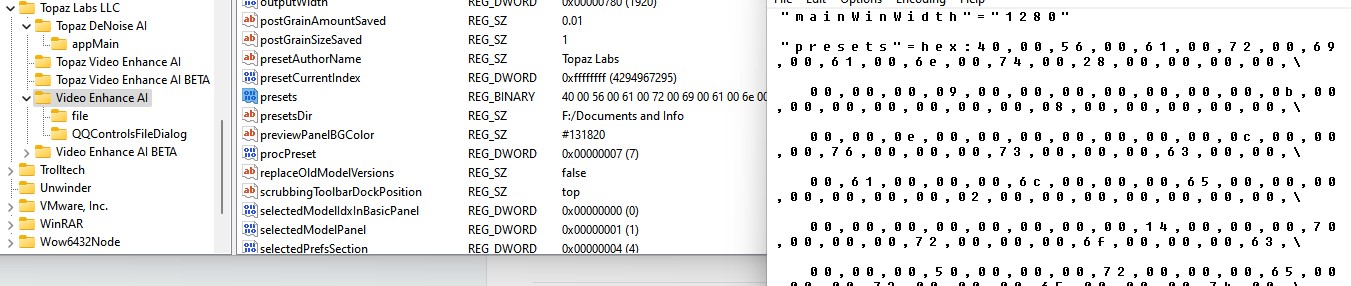
There is no tool for it, and even Revo doesn’t get everything. Stuff gets left in appdata/local, appdata/roaming, program files, and the registry. Presets also persist, but I’ve been unable to find where they are.
You have sliders to control that. If you drop all sliders to 0, nothing gets enhanced, so set it how you want it.
They’ve just had more training, and will continue to get more training in future versions.
Yes, try IObit uninstall tool, it gets both registry and AppData/program data files!
The presets are in the registry or at least they did not reinstall when I wiped the registry entries. They are not in ASCII but Binary. Here is the registry screenshot.
Pardon me but how did you get past this notice? I’m stuck having tried all kinds of installs, uninstalls and prayers…
OK…in my circumstance…what if you uninstalled previous version, installed new version…if I use that, will it find and remove files from both the previous and current version?
Yes, it should as it has a mode that monitors the programs that you install so it keeps a record of what and where the installed components are…
Also if you have any leftover bits it can find them as incomplete uninstalls, and remove them!
1 Like
Thanks! That’s it. The are stored in binary format, but you can read some of the info there.
It does look like the second entry is false…the PresetsDir one. The slashes in the path are backwards…it couldn’t work if it wanted to.
Update: I corrected my path, and turns out this is the folder where presets will be downloaded by default IF you choose to download them.
It doesn’t work. These files are not in common places and are not created during the installation, so a tracking program, or the uninstaller will find them.
What happened to the preference to keep settings when loading new videos? It’s annoying having to keep choosing again after each new video is loaded.
1 Like
Sorry, it was my mistake! Meanwhile I get it right, Chronos works fine.
Mac M1 Bug 2.6.0
Hello, I have uploaded a copy of a video. This video works fine on Windows 2.6.0 and fine on Rosetta Apple 2.6.0 but it hard crashes the application loading it on Native Apple 2.6.0. The 383MB file is located here:
1 Like
if more than one video in queue, eta shows 0 starting with second file.

2 Likes
