I don’t understand why you need to convince me that PNG is better. I said I chose it for the best quality. It’s the same as buying a bluray disc vs downloading a video on torrent. No matter what the compression method is, it’s always worse than uncompression. Even at 1%. The more compression you do, the worse image quality you get. The file is not smaller for no quality loss. Sorry but you two words are not valid for me.
You appear to be actively refusing advice you are given. I hope my replies protect others against the misinformation you’re posting as a lot of new people come here for answers to the questions you’re providing incorrect information about.
I urge you to re-examine what you think you know, because multiple people have tried to explain your misconceptions, which should prompt you to consider that you may be wrong. Your assertion that all compression causes a quality reduction is entirely false and the article I linked to even specifies an experiment to prove that. It saddens me that you are pointlessly misusing/destroying relatively expensive hardware. I will not be entering into further discussion.
4 Likes
Your false information is not welcomed by me. Especially anyone says smaller but same quality. It’s all over the torrent sites when people rather downloading heavier files than smaller files because they know what they get at the end. Smaller is easier to archive? Yes. Best quality? No.
If I were a boss and I asked my staff to use the best quality format and he threw PNG image sequence to me, I would fire him instantly.
I’m sorry, but the more you say, the more I see the world nowadays: Failure!
Compression have two kinds, one is lossy compression and the other is lossless compression.
Lossless compression means it does not lose quality during compression. The file is smaller but maintain 100% identical as the original because it use a smarter algorithm to store those data.
For example, you can compress a TIFF image to a ZIP file, which is smaller than the original file. But then you can unzip it again to restore the original TIFF file. The restored file is 100% identical to the original file without any lost in quality. Larger file size doesn’t always means better quality, the file can be large because it use a very inefficient way to store those data.
For example, a file have 1 thousand zero, you can either write ‘0’ one by one for 1 thousands times or just write 1000 zeros, the result is the same, but the first case will make the file much larger.
1 Like
I do understand all of this. I read everything about it long time ago. And I saw people compared lossless vs lossy vs uncompressed before. And some stated lossless still has losses. And LOSSLESS means visual lossless. Not the pixel or quality (real quality) lossless. You might not see the difference, but it’s always there. I favor extreme quality over size. So every bit in the video matter. You can’t see the differences doesn’t mean it’s the same. The higher bit depth, the more differences you see. I want the BEST, so I go with TIFF. I never say I need a smaller size. If anyone wants smaller size? Go for PNG. I want the best quality possible woth no compression for editing, I go with uncompressed format (TIFF). Lossless and Uncompressed are 2 different things, and it’s called lossless for a reason (“less”, not “no” ). Less compression means higher quality and easier to edit. Convince me with the lack of knowledge is… (whatever is bad you can call)
Lossless means lossless-no loss. PNG produces the same exact photo as a tiff, and since they are both lossless formats, you can convert them to each others’ respective formats and get 100% the identical photo (see: file hashes).
Where uncompressed lossless and compressed lossless deviate is when the files are being used. For comparison, look at FLAC and WAV. Both are lossless, but DJs and artists do all their work in WAV because it’s uncompressed, thus being very fast to work with. They can work with FLAC and achieve the same result, but because it’s compressed, your CPU works harder to apply any effects & modify the file because it has to work through the compression. That’s where the differences end, because at the end of the day, they are lossless.
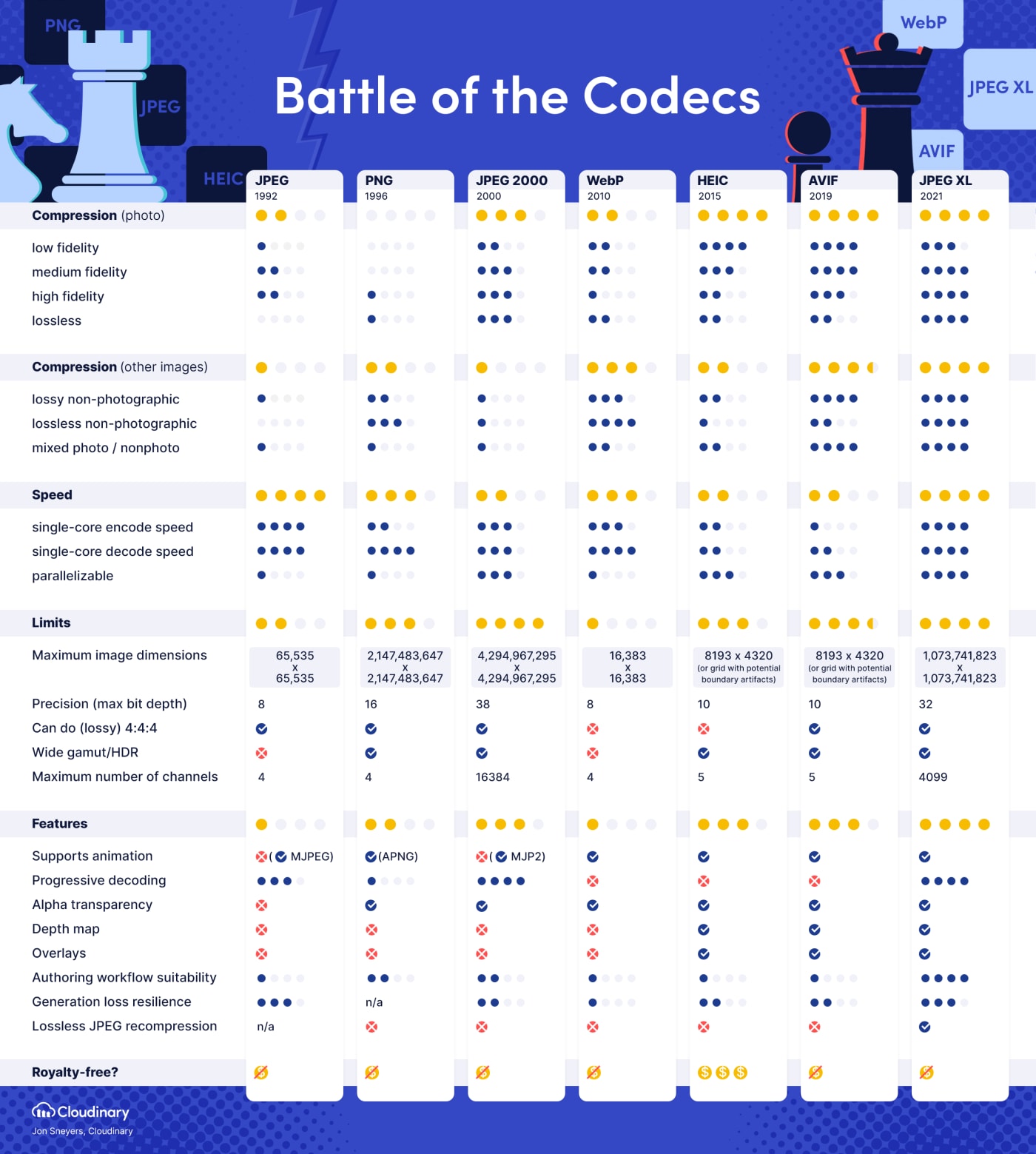
The moment you mention “an uncompressed file is higher quality” is where your reasoning fails. If image quality is reduced in any way, that means somewhere along the line, data was lost. Data can either be lost through lossy encoding OR–which I think is what you’re trying to point out–encoding a file in a format that doesn’t support a large enough bitdepth. Would you say the same thing regarding a modern image codec like JPEG-XL? which supports lossless encoding AND a bitdepth of 32 as opposed to PNG’s 16.
1 Like
jpeg - Why don’t most cameras support PNG format? - Photography Stack Exchange
People these days think lossless is really lossless  That’s why I say, people these days just read the titles and judge the whole content.
So again, uncompressed > lossless. No matter what you have inside your head, it’s not knowledge.
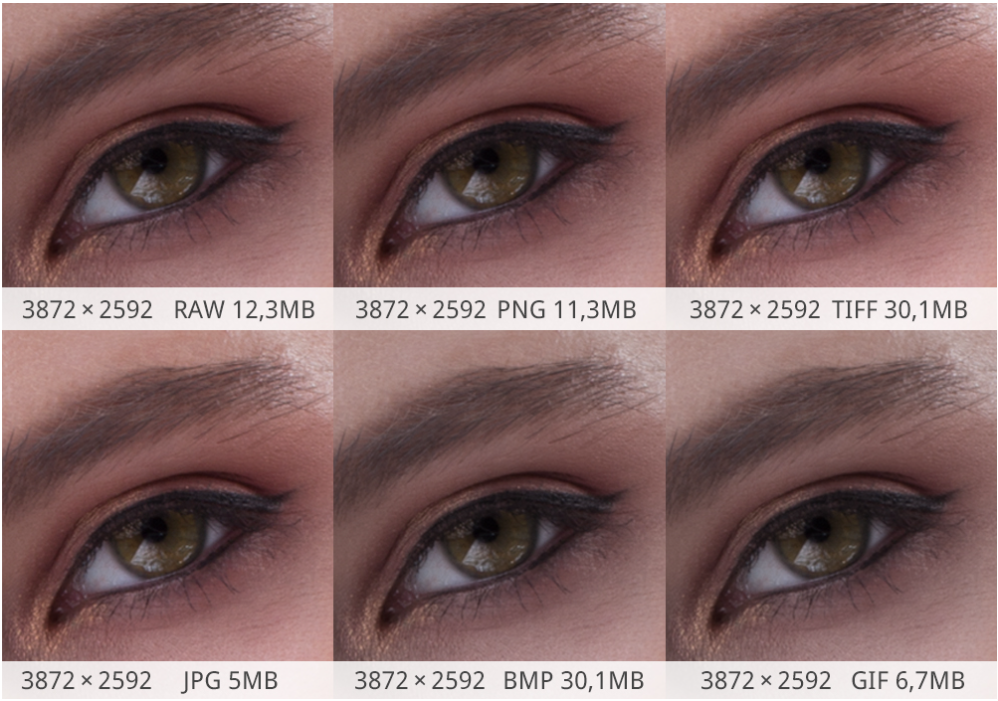
I will just drop it here and ignore people who say PNG is better than TIFF. Have fun with your “lossless”.
There are many possible factors to consider. Here are a few:
- The bit depth between the various lossless formats must be the same.
- The colorspace between the various lossless formats must be the same.
- The application must not introduce any changes to the data in the picture when saving the file.
If any of the above are not true, you will see differences between lossless formats. However, it IS possible to save to BMP, PNG, and TIF and have zero differences when all is equal and without bugs.
Also, when using a camera, RAW contains MORE data than what is contained in regular image files. This data can be interpreted a large number of ways before the data is saved to a lossless image file. Comparing RAW to PNG, etc. doesn’t make sense in this case.
Lossless=no loss.
Uncompressed=Lossless, but no file compression (bigger file, but not any better visually than lossless)
The reason for uncompressed might be for speed reasons if your disk is faster than your CPU at uncompressing images. Nowadays, everything is fast, so Lossless should be good enough speedwise.
JPG=Lossy. Much lower file size, but has different pixels than lossless/uncompressed.
4 Likes
The picture above doesn’t just compare RAW and PNG. Losing bit depth is hard to see but it’s there. The differences between PNG and TIFF are all over the internet. PNG can come close to TIFF, but it never be better or the same. Period.
Respectfully, you are wrong. If the source is higher bit depth than 8 bits per color, then PNG will lose because it is limited to 8 bits per color plus an alpha channel. However, if you start with an 8-bit per color source and keep it there, there will be no difference between PNG and TIF. If you save an 8-bit per color source into a higher bitdepth TIF file, you are not gaining anything. If you are EDITING an 8-bit source, then saving to a higher bitdepth TIF file can provide additional image quality. In this case, you can use LZW compression which is lossless and smaller than uncompressed. The picture above is meaningless because it is saved as a PNG file. If you are saying that TIF is better than PNG in the image, then how is it that you can see it from the PNG file? Also, working with video files, TIF may be superior because you may be able to save in the native YUV colorspace and not have to convert to RGB. PNG only supports RGB. In summary, TIF can be equal to PNG, but has more options that may be better than PNG. To say they can NEVER be equal is not true. If you start with a PNG, save it as a TIF, then open that and save it as a PNG, and go back and forth with the same application, you should end up with the same PNG and TIF file each time it is saved. The first time you save the PNG, the file size might be different because it is a different application writing the PNG file.
4 Likes
interesting cope. whatever you say
Ok, I’m just now learning about this. I guess you set “interlacedFrames=0” instead of “interlacedFrames=1” in order to use the Dione models without having them deinterlace your video?
Is anyone else having an issue with black frames being added to the beginning of clips?
The clip length/frame number is exactly the same on the upscaled version, so it looks like a frame is being dropped and made black. (I was upscaling from 1080p to 4K and using Artemis HQ by the way.) I’ve never had this happen on a previous version of VEAI before. I hope it gets resolved soon.
Hi guys,
upscaled 480 to 720p
When i output pro res 444 slow , the video contains blurriness and certain areas are dark compared to the same area in orginal video.
When i do a preview, the bluriness and dark areas in the output are not present.
Is this issue with output codec or my player(VLC)?.
Edit: Selecting mp4 fixed it.
I have to say…I’m disappointed in the decision to remove command-line functionality. That was a big selling point to me. My workflow is primarily scripted and I just can’t justify moving to 2.4 (and beyond) if that’s no longer possible. I hope it will be restored soon, because I’d really like to be able to take advantages of the new features that I simply can’t with this release.
1 Like
So I tried deinterlacing some old DVDs that I first ripped to mkv. I noticed on Dione TV there is ghosting and the edges of the film flicker or or “jump”…The Flickering on the edges is not present in DIONE TD…but ghosting can still be present. . I did three Movies and all with the same result… Is this a known issue .?
This is correct. I was oversimplifying.
Yes, it’s a known issue among the users, but I don’t believe it has been acknowledged by Topaz developers as an issue. To avoid the ghosting/flickering issue, I first deinterlace outside of VEAI.
Hey guys i’m using 2.3.0 version and nowadays i try to convert a video i get this error message:
“Unable to load selected model. If this error persist, try lowering your VRAM usage in the preferences”
I lowered but the problem still exist.