Oh? Did Nvidia break something in the driver?
Proteus really can do well now with this destroyed Prince of Tennis anime:


With these settings, at 225% scale:

2 Likes
Yes. Nvidia is fixing it. July update incoming.
1 Like
Thanks! Is there somewhere post about the issue and NV response?
I read on Topaz facebook page. I think only Topaz knows Nvidia’s response.
1 Like
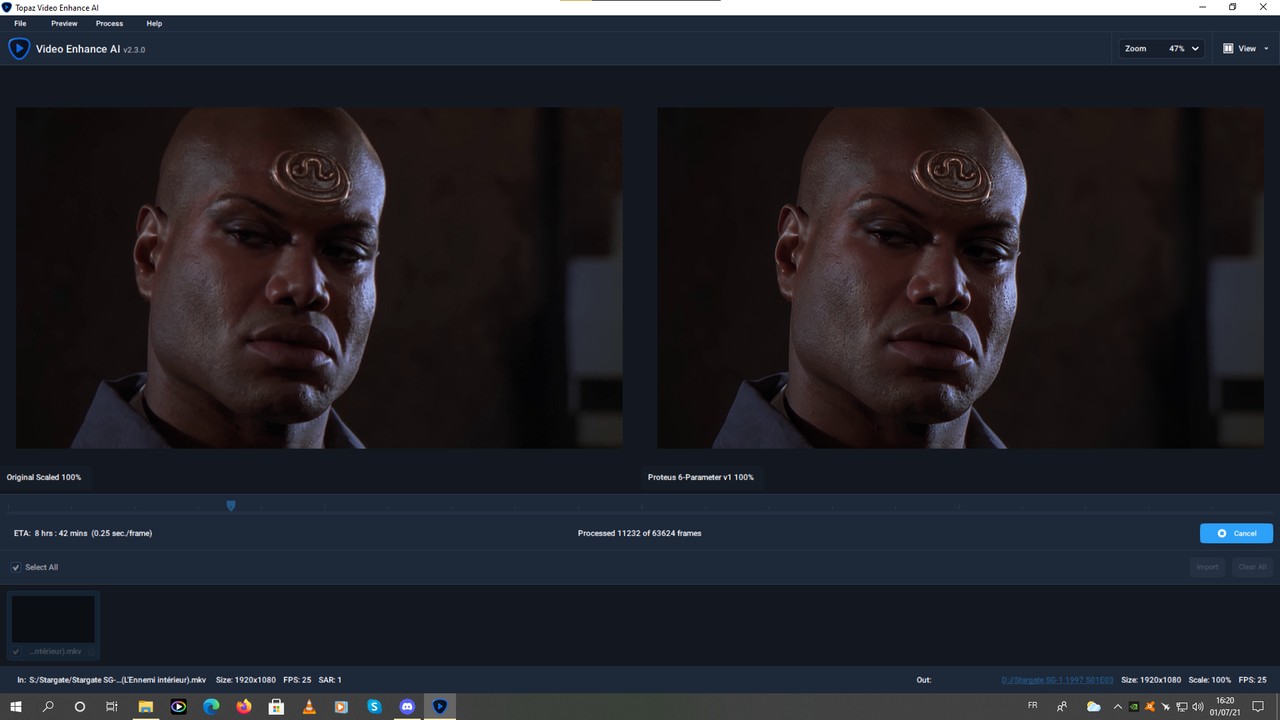
The Proteus model, and really nice with fine tuning. In any case on HD it goes very well.
Small example with an episode of Stargate SG-1 whose original version is a bit blurry.
1 Like
Proteus is my new favorite, but change framerate with variable bitrated 3GP video. I have many 3GP videos, and results quality is very good, but framerate is 3-4x lower than the original. I got a slow motion video.
Example here is original file info:
Video
ID : 1
Format : H.263
Format profile : BaseLine@4.5
Codec ID : s263
Duration : 1 min 0 s
Bit rate : 96.9 kb/s
Width : 176 pixels
Height : 144 pixels
Display aspect ratio : 4:3
Frame rate mode : Variable
Frame rate : 13.931 FPS
Minimum frame rate : 2.212 FPS
Maximum frame rate : 17.857 FPS
Color space : YUV
Chroma subsampling : 4:2:0
Bit depth : 8 bits
Compression mode : Lossy
Bits/(Pixel*Frame) : 0.275
Stream size : 721 KiB (87%)
Writing library : EMP
Language : Japanese
Encoded date : UTC 2007-06-09 14:14:42
Tagged date : UTC 2007-06-09 14:14:42
Audio
ID : 2
Format : AMR
Format/Info : Adaptive Multi-Rate
Format profile : Narrow band
Codec ID : samr
Duration : 1 min 1 s
Bit rate mode : Constant
Bit rate : 12.8 kb/s
Channel(s) : 1 channel
Sampling rate : 8 000 Hz
Bit depth : 13 bits
Stream size : 95.6 KiB (12%)
Writing library : EMP
Language : Japanese
Encoded date : UTC 2007-06-09 14:14:42
Tagged date : UTC 2007-06-09 14:14:42
And converted upscaled version:
Video
ID : 1
Format : AVC
Format/Info : Advanced Video Codec
Format profile : Baseline@L4
Format settings : 1 Ref Frames
Format settings, CABAC : No
Format settings, Reference frames : 1 frame
Format settings, GOP : M=1, N=12
Codec ID : avc1
Codec ID/Info : Advanced Video Coding
Duration : 2 min 52 s
Bit rate : 6 514 kb/s
Width : 1 440 pixels
Height : 1 080 pixels
Display aspect ratio : 4:3
Frame rate mode : Constant
Frame rate : 4.930 FPS
Color space : YUV
Chroma subsampling : 4:2:0
Bit depth : 8 bits
Scan type : Progressive
Bits/(Pixel*Frame) : 0.850
Stream size : 134 MiB (100%)
Writing library : x264 core 157 r2970 5493be8
Encoding settings : cabac=0 / ref=1 / deblock=0:0:0 / analyse=0:0 / me=dia / subme=0 / psy=1 / psy_rd=1.00:0.00 / mixed_ref=0 / me_range=16 / chroma_me=1 / trellis=0 / 8x8dct=0 / cqm=0 / deadzone=21,11 / fast_pskip=1 / chroma_qp_offset=0 / threads=8 / lookahead_threads=1 / sliced_threads=0 / nr=0 / decimate=1 / interlaced=0 / bluray_compat=0 / constrained_intra=0 / bframes=0 / weightp=0 / keyint=12 / keyint_min=1 / scenecut=0 / intra_refresh=0 / rc=crf / mbtree=0 / crf=15.0 / qcomp=0.60 / qpmin=0 / qpmax=69 / qpstep=4 / ip_ratio=1.40 / aq=0
Codec configuration box : avcC
Audio
ID : 2
Format : AAC LC
Format/Info : Advanced Audio Codec Low Complexity
Codec ID : mp4a-40-2
Duration : 1 min 0 s
Bit rate mode : Variable
Bit rate : 88.5 kb/s
Maximum bit rate : 96.0 kb/s
Channel(s) : 2 channels
Channel layout : L R
Sampling rate : 48.0 kHz
Frame rate : 46.875 FPS (1024 SPF)
Compression mode : Lossy
Stream size : 658 KiB (0%)
Default : Yes
Alternate group : 1
With Theia Fine Tune Detail v3 hasn’t any FPS problem, here is info:
Video
ID : 1
Format : AVC
Format/Info : Advanced Video Codec
Format profile : Baseline@L4
Format settings : 1 Ref Frames
Format settings, CABAC : No
Format settings, Reference frames : 1 frame
Format settings, GOP : M=1, N=12
Codec ID : avc1
Codec ID/Info : Advanced Video Coding
Duration : 1 min 0 s
Bit rate : 8 715 kb/s
Width : 1 440 pixels
Height : 1 080 pixels
Display aspect ratio : 4:3
Frame rate mode : Constant
Frame rate : 13.930 FPS
Color space : YUV
Chroma subsampling : 4:2:0
Bit depth : 8 bits
Scan type : Progressive
Bits/(Pixel*Frame) : 0.402
Stream size : 63.3 MiB (99%)
Writing library : x264 core 157 r2970 5493be8
Encoding settings : cabac=0 / ref=1 / deblock=0:0:0 / analyse=0:0 / me=dia / subme=0 / psy=1 / psy_rd=1.00:0.00 / mixed_ref=0 / me_range=16 / chroma_me=1 / trellis=0 / 8x8dct=0 / cqm=0 / deadzone=21,11 / fast_pskip=1 / chroma_qp_offset=0 / threads=8 / lookahead_threads=1 / sliced_threads=0 / nr=0 / decimate=1 / interlaced=0 / bluray_compat=0 / constrained_intra=0 / bframes=0 / weightp=0 / keyint=12 / keyint_min=1 / scenecut=0 / intra_refresh=0 / rc=crf / mbtree=0 / crf=15.0 / qcomp=0.60 / qpmin=0 / qpmax=69 / qpstep=4 / ip_ratio=1.40 / aq=0
Codec configuration box : avcC
Audio
ID : 2
Format : AAC LC
Format/Info : Advanced Audio Codec Low Complexity
Codec ID : mp4a-40-2
Duration : 1 min 0 s
Bit rate mode : Variable
Bit rate : 88.5 kb/s
Maximum bit rate : 96.0 kb/s
Channel(s) : 2 channels
Channel layout : L R
Sampling rate : 48.0 kHz
Frame rate : 46.875 FPS (1024 SPF)
Compression mode : Lossy
Stream size : 658 KiB (1%)
Default : Yes
Alternate group : 1
Update 1: very interesting… After program restart, and reencode again, then got good FPS video. Interesting.
1 Like
For next releases would be fine a option to delete repeated frames for the new fps conversion - slow motion model. Some videos has repeated frames and doesn’t work fine with this conversions.
4 Likes
For all those who want to improve the quality of the Stargate SG-1 series, I have exported my preset.
https://www.casimages.com/f/UMmnow5ndWb
3 Likes
I myself had problems with this version when Substance painter was launched. I put back the previous version “462.59 studio” and everything is fine.
Chronos doesnt seem to have Deduplication function…(ie, deleting excess repeating frames).
Deduplication is necessary for increasing the fluidity of animated content/cartoons/anime…as they use a large no of repeating frames…
So for animated content RIFE is the better option
2 Likes
So true, (Save for RIFE over chronos) ironically, I’m currently converting a video to individual frames using avidemux, found the duplicates, and deleted them within directory opus, I’m now taking it into virtuadub to both splice them together after running a deshaker, and viola!
A “smooth 20 FPS video” for conversion for Chronos! And yes, I would also love the de-dupe feature, maybe next few betas down the road?
EDIT: I’m now using XNview instead of directory opus for dupes as Dopus only checks for md5 similarities and not picture, like XNview!
1 Like
One small issue to note, when installing a new version over the old on my Windows 10 PC, the previous version(s) aren’t removed from the Windows Programs and Features section in control panel. So I’ve got 5 “Topaz Video Enhance AI” in my programs list.
You should watch this guys rant before you try using Chronos/RIFE on animated videos: Smoother animation ≠ Better animation [4K 60FPS] - YouTube
1 Like
I’d love a feature that could handle repeated frames, too. In my case, simply deleting the repeated frames would not be the correct solution as the overall frame count is correct - but if the duplicated frames could be replaced with newly-generated frames as you would see when performing a framerate conversion (based on previous and next frames), that would be extremely useful.
3 Likes
I didn’t find any mention about 471.11 Studio drivers on VEAI Facebook beta group page?
You can use Handbrake to detelecine your footage.
1 Like
It’s okay. Their answer should be as same as mine.
Thanks for responding, Viktor, but I’m talking about something very different.
Handbrake cannot detect individual duplicated frames and generate new interpolated images with which to replace those duplicated frames.
I’m not simply talking about changing footage from one framerate to another.
For example, if I have a video that has 10 frames as follows;
frame 1
frame 2
frame 3 (duplicate of 2)
frame 4
frame 5
frame 6
frame 7
frame 8 (duplicate of 7)
frame 9 (duplicate of 7)
frame 10
I want something that can detect and replace those duplicated frames as follows;
frame 1 (unchanged)
frame 2 (unchanged)
frame 3 (NEW interpolated image based on frames 2 and 4)
frame 4 (unchanged)
frame 5 (unchanged)
frame 6 (unchanged)
frame 7 (unchanged)
frames 8-9 (2x NEW interpolated images based on frames 7 and 10)
frame 10 (unchanged)
Essentially this is a combination of two functions - 1. frame interpolation (which already exists, as shown with framerate conversion), and 2. duplicate frame detection to determine which frames should be replaced (which doesn’t exist in Video Enhance AI yet, as far as I know). Hopefully that makes a little more sense. Of course, some duplicate frames still carry minor differences (unique artifacts and so on), so I wouldn’t expect this to be especially easy to implement … but I can hope, right? 
6 Likes
I’m using it and the release hasn’t crashed yet.
