Stargate blu-rays are 480i (poorly) upscaled to 1080p though.
yes. The seasons 1 to 7 are a little blurry. I did more of a first pass with Cyberlink PowerDirector for sharpness. And now I’m doing the final pass with the new Video Enhance model. And it’s much better now.
The details are still finer and they are sharper without exaggeration.
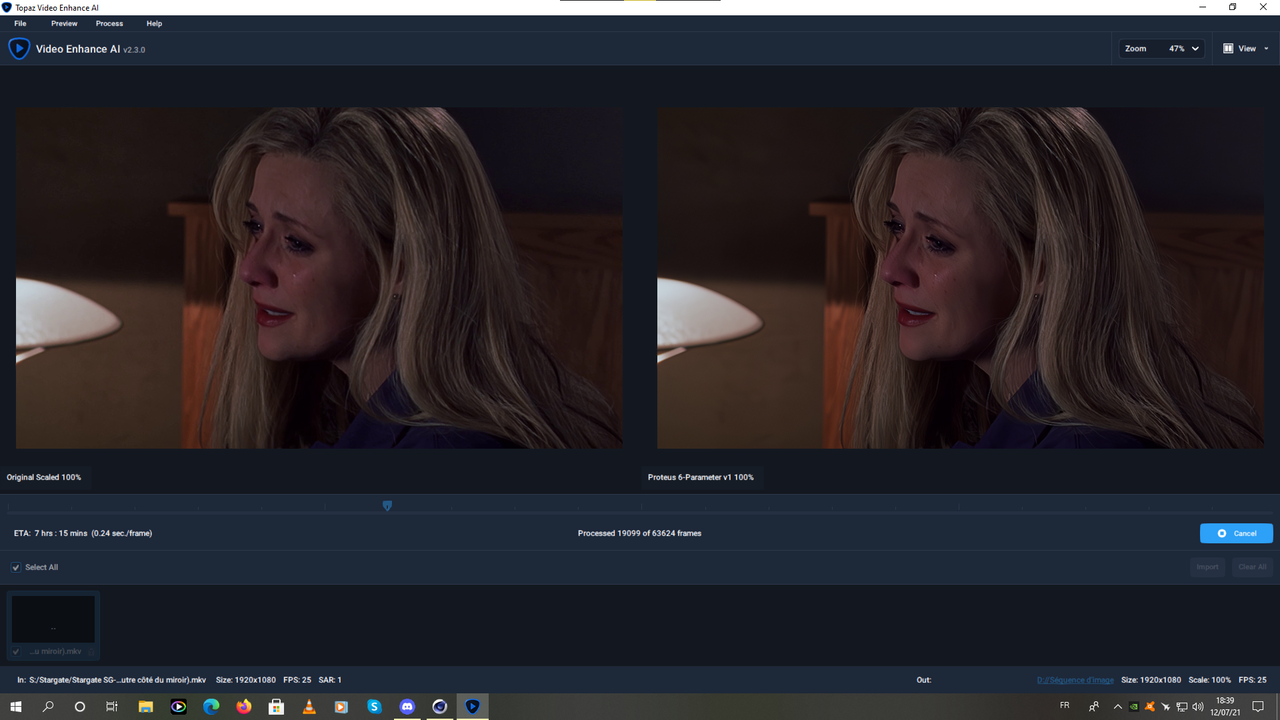
Details are okay, but her skin looks unnatural. Too much smoothing.
1 Like
Thanks, I’ll move this to the right place.

Att.
Druid®.
For best quality:
First or past Crono than the other models?
1 Like
Do the slowest one first. Quality will be the same either way.
1 Like
There is a major feature regression in the newer VEAI versions.
Now you have to use the same AI model and settings for all the items in batch.
Example:
- Import a video, set it to Artemis LQ
- Import another video, it’s interlaced so I use Dione Interlaced TV
If I click on the FIRST video, it’s now set to use Dione (the output filename suffix has dtv as well)
This is a severe feature regression. All of the settings are ‘global’ for the entire batch.
2 Likes
I already reported this issue several times, but there is a workaround (can’t tell it from memory), but by playing with the “select all” button, and with some clicks (uncheck and check each video), you can clearly have the setting you want for each videos, but it take sometimes. it’s clearly a bug or an issue, and pretty annoying i agree  ! it need to check twice that the setting of one video has not been copied to all the others.
I have a problem using Dione Interlaced DV v2, I’m wondering if anyone can offer a solution.
I’m trying to upscale an interlaced video and it’s generally doing a very good job except for one thing. The original video has a few brief sections where the picture freezes. It’s frozen deliberately, I mean, I’m not talking about undesired duplicated frames, I mean an intentional picture freeze-frame that lasts just a few seconds. But when Dione comes to process these frames it offsets every alternate output frame vertically by a certain number of pixels.
Exactly how many pixels depends on the resizing. If I’m keeping the output at 100% of source size then it’s a single pixel. At 200% it’s two pixels and at 400% it’s four pixels etc.
So where this happens you get a very fast juddering on the output as, in effect, in every even frame the freeze-frame is in one position and in every odd frame it’s in another.
Any suggestions as to what I could do?
Hello everybody,
I have recently played with my 640x480p footage and have a request, namely could anybody upscale me two files to get both 1920x1080p and 3840x2160p files? If no problem, to ProRes. Please find enclosed the two original files and two after some upscaling to get 1920x1080p. Has anybody any idea/way how to get better quality than these 1080p files? Could Proteus 6-Parameter do it better? I have played a little with it but the previous method still gives better output. Maybe I am not very knowledgeable about this model yet.
Original:
https://we.tl/t-MapXcGoMFX
Upscaled to get 1080p:
https://we.tl/t-vmVJ4YtqiU
Thank you in advance.
I don’t know the answer but here is what I would try. Consider the video has 3 parts, the beginning(A) the middle(B Frozen section) and the end( C). Upscale using DV v2 Part A and Part C separately. I would try Part B using what ever upscale model producers the best effect. After that I would put all sections together in post using whatever method you prefer. If your scaling using TIF or PNG than it’s just a renaming of files possibly. Otherwise using some other software to join the 3 sections.
1 Like
First time using this software seriously. I upscaled an mp4 that had been burned from a DVD and the file was almost 50GB! Is that normal?
Thanks for the suggestion. It’s going to have to be something like that, isn’t it? It’s made slightly more complicated by the fact that the frame rate on the majority of the output has been doubled by Dione but there are ways around it. It’s just a bit annoying having to do it.
All that said, I’m spotting a few other instances of it elsewhere in fairly static shots, although I can’t see any examples of it happening where there’s a good degree of movement - admittedly I haven’t combed the entire output frame by frame.
You have to be careful with Proteus 6-Parameter as it makes eyes look strange. Always been a problem with Ai software. Shame software can’t identify a face and use a different model for that (as you’d have a crisp picture and blurred face otherwise).
New version of software is half the speed of previous release, can’t see why. On new 2021 PC and G15 3080 Laptop.
Bro i have 1650 laptop can u please share some tricks so that i can use it to its full power so that i get less rendering time
Sorry but laptops have their limits. So you can’t get more performance on your current laptop because VEAI will squeeze the hell out of GTX 1650
Unless you work towards acquiring the knowledge, ability and hardware required to manually flash your vbios to increase the TDP limit (at the risk of bricking your whole mb), then there’s unfortunately nothing you can do beside overclocking your gpu via MSI afterburner, and maaybe installing the latest studio drivers to achieve a whooping 1-3% boost give or take.