This sounds like a very promising workflow. Could you provide any additional details such as what tools you used for edge detection and overlaying? Thanks for any help!
Here’s an example script I used recently:
function GCTM(clip input) {
input.Levels(512, 1, 1023, 0, 1023, false)
one = last
input.Levels(0, 1, 512, 1023, 0, false)
two = last
Overlay(one, two, mode="add")
}

artemis = FFVideoSource("youngones_s02e04_artemis.mov").Crop(0,0,0,-2)
gaia = FFVideoSource("youngones_s02e04_gaia.mov").Crop(0,0,0,-2)

Subtract(artemis,Blur(artemis,1))
GCTM()
Levels(20,1,96,0,1023,false)
Overlay(last,Blur(1),mode="add")
Overlay(last,Blur(1),mode="lighten")
Greyscale()
mask = last

Overlay(gaia,artemis,mask=mask)
Spline36Resize(1440,1080)

Prefetch(16)
This is assuming ProRes renders so the calls to Levels() are in 10 bit.
1 Like
You’re a legend. I’ve bookmarked your reply for future reference. Thank you.
1 Like
非常不错的软件
I tried it, it actually makes the footage sharper, sometimes better than Artemis but you won’t get the full detailed/sharp result as you would get from an interlaced source (since it reads both fields and does a lot of AI calculation).
Has anyone found a good use case for the Theia models? Even at zero sharpness they are too sharp for my taste, resulting in unnatural sharpness. And I could not see any real difference between both.
Personally I think they should just be removed tbh. At least Gaia still has a reason to exist, but Theia doesn’t do anything that Gaia or Artemis can’t do better.
1 Like
Thank you very much, I was asking so because I noticed that Dione creates many interlacing artifacts with that source so I was wondering if it could possible to deinterlace with QTGMC and then upscale using Dione to keep details and have a sharp image, I tried Artemis a couple of times but it does a too strong denoise.
version 1.9.0 was an amazing improvement (speed-wise) over the prior versions, so I’m looking forward to working with this new update.
Cheers,
-Lou
Anime.
Hi,
I used Theia Fine Tune with just Denoise = 15 and sharpen = 50 (after some visually tests).
I tried Theia Fine Tune and it’s true that visually it’s quite complicated to prove that there is a big difference.
I am trying to create a metric for myself from a test pattern to find the best results between the different models with quantified results according to a source clip.
I’m thinking of using an ISO_12233-reschart test pattern, not knowing if it’s the best. (It’s a test pattern rather for cameras / APN => Lens). Knowing that it is a test pattern rather 8k, in 4K, there is already a small loss (a little blur and some aberations (frequencies?)).
If i place the chart on a TL 4K (Davinci Resolve) and render one or 2 seconds in DNXHR 444 12b, then ask VAIE to do an 8K with different models / settings, maybe visually after i can measure to what degree VAIE encodes to recover loss without creating oversharpening.
I’m looking … but not easy.
(The original tif weighs 743 859 KB, here it is a very compressed jpg which weighs 1230 KB)
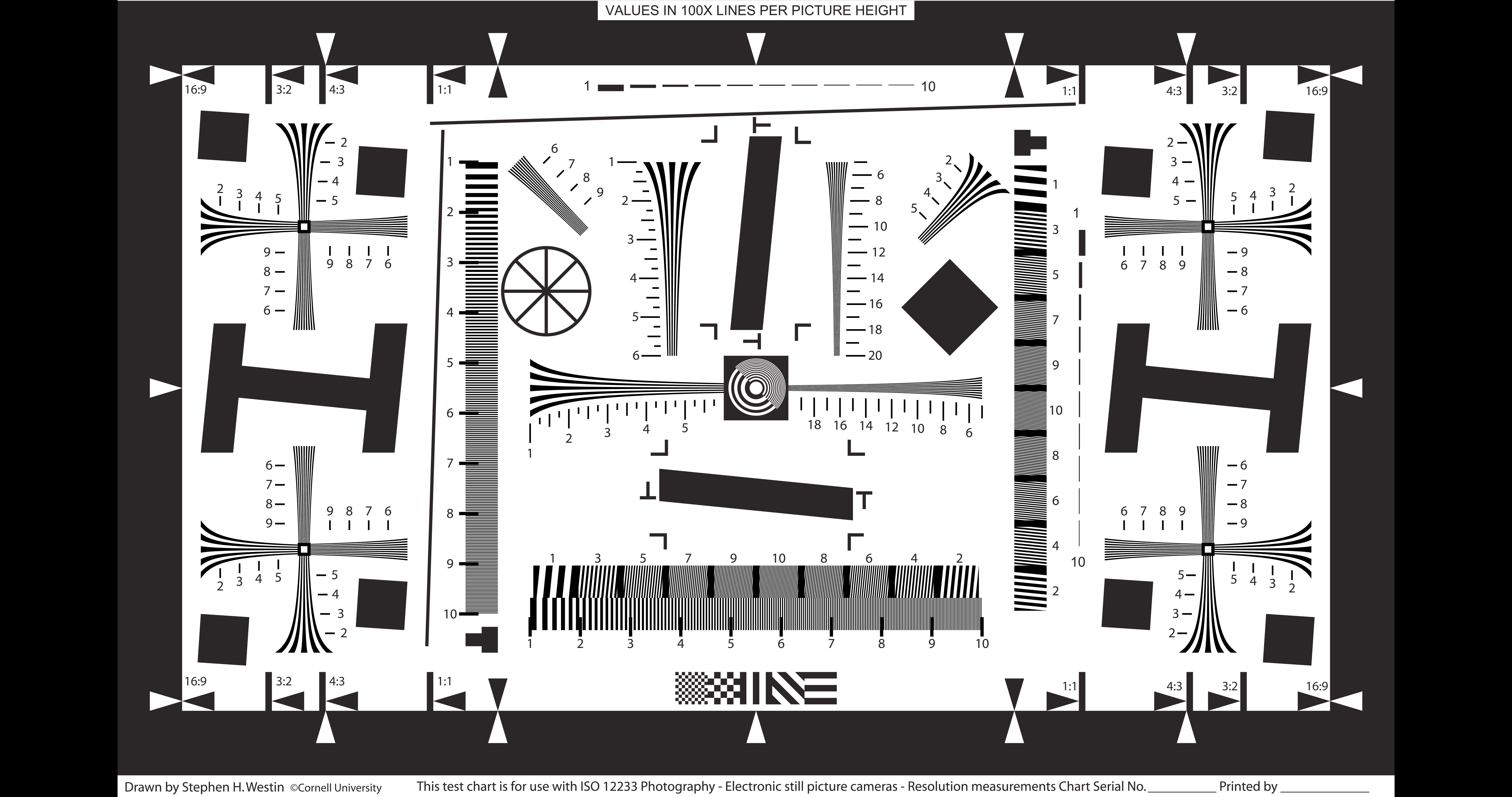
I am not sure if a lens test chart will be of any help. Normally those are created in vectors and then exposed via an imagesetter in 5080 dpi. Those patterns are designed to break camera sensor imaging and lenses for evaluation but do not resemble any real world image for which most VEAI models are trained.
In my own test I have found when using the preview the result depends on the frame I start the review in a clip. With Artemis MQ for example its de-haloing differs quite significantly on the same clip if I start the review at frame x versus maybe 50 frames at frame y later (when the content has changed a bit.
2 Likes
Thanks. I do not use VEAI with cartoons/anime, so I had no idea it works well for that kind of video.
I dont like grain. So I made it 0 and save as default. But it wont work like in v1.9.
When I open VEA 2.0 again. Grain is still there. So save as default somehow ignore grain.
And sometime even if grain look zero, output would have grain effect except first video.
Somehow second and after videos grain settings is stays even it looks zero in gui.
Probably grain settings must be change and set zero for every video.
Please look at this.
2 Likes
Please add pause function. its really required.
4 Likes
Hi,
thank you. I mainly focused on denoising options but based on my experience, Artemis LQ deforms noses and Artemis MQ introduces many artefacts to substrates like grass. To be honest now some more work is needed to improve models for 480p upscaling. Now I mainly use Artemis MQ for full HD denoising and must say it works well. I have compared with ALQ but again noses are deformed if people are in the clip. In the case of clips without people , ALQ also give good results. Great benefit is the fact it is done automatically.
In general Topaz is on good track, just upgrade some main issues. GAIA HQ is slow but effective for full hd upscaling, better than AHQ but slower, pity.
1 Like
For 480p with denoise or deblock, I recommend Gaia HQ or Gaia CG/Artemis AA. In some cases where your 480p source is too good (DVD), go for Artemis HQ. But for best results, stick with Gaia HQ for good 480p and Gaia CG/Artemis AA for bad 480p.
1 Like
How is perfomance on macbook air m1?
Hi. Just wanna ask if Topaz VEAI support AVX-512 yet? I saw Intel 11th gen processors have Intel Deep Learning boost and I hope it will help boosting the upscaling processes. Does it have major performance boost for VEAI? Or only Gigapixel for now?
That is a nice list and i appreciate the work.
It will be a good starting orientation for beginners.
And it will work for many BUT not for all.
Its a question of TASTE how we “judge” videos.
Some like it normal with grain, some like it ultrasharp and hard without grain and the next likes it soft or ultrasoft.
I also upscaled more than 1200 videos in the last 3 month.
From small 3min 320x240 videos up to 3h 1080p blockbusters and series.
Like that extrem noisy Babylon5 HD Release. After the cleaning it’s really watchable.
Before it is just “dirty crap” IMHO.
But still have to test at least 3 different AI models on every video, until i like the previewed results.
And on many videos i have to run 2 upscales.
It depends on the footage, if i start with Gaia HQ5 to sharpen and upscale SD to 1080p
and then import that “gaia upscale” to upscale it again to 4K with Artemis.
And on the next extrem noisy footage i have to start soft with Artemis and sharp it with Gaia on the 2nd run. If you don’t want to upscale to 4K due to time and hardware shortage, i suggest to upscale to 720p first and 1080p second.
Last but not least
I HATE grain, i even clean and denoise actual blockbuster movies now,
before i watch them. As it seems most directors love grain … otherwise we would not see that “dirt” on modern movies anymore.
4 Likes
