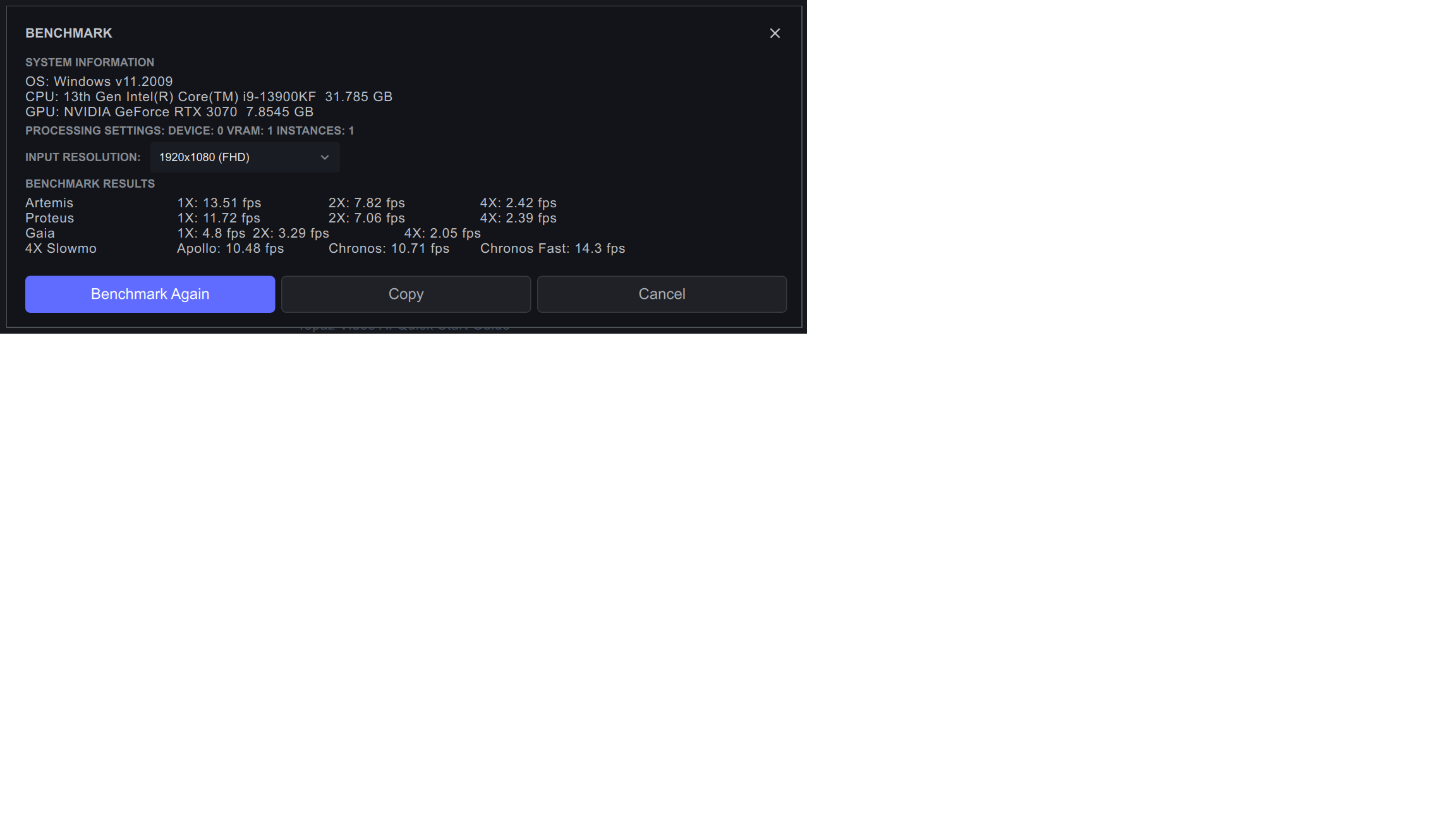
Mac Studio with max vram set to 50% followed by 100%. Note that some results are faster at 50% (sometimes significantly) so its always worth experimenting with vram settings.
Topaz Video AI  v3.1.10
System Information
OS: Mac v13.0201
CPU: Apple M1 Max  32 GB
GPU: Apple M1 Max  21.333 GB
Processing Settings: device: 0 vram: 0.5 instances: 1
Input Resolution: 1920x1080
Benchmark Results
Artemis		1X: 6.86 fps 	2X: 4.79 fps 	4X: 2.08 fps
Proteus		1X: 6.98 fps 	2X: 4.91 fps 	4X: 2.13 fps
Gaia		1X: 2.2 fps 	2X: 1.57 fps 	4X: 1.25 fps
4X Slowmo	Apollo: 7.46 fps 	Chronos: 2.34 fps 	Chronos Fast: 3.42 fps
Topaz Video AI  v3.1.10
System Information
OS: Mac v13.0201
CPU: Apple M1 Max  32 GB
GPU: Apple M1 Max  21.333 GB
Processing Settings: device: 0 vram: 1 instances: 1
Input Resolution: 1920x1080
Benchmark Results
Artemis		1X: 7.34 fps 	2X: 4.91 fps 	4X: 1.97 fps
Proteus		1X: 6.79 fps 	2X: 4.73 fps 	4X: 1.78 fps
Gaia		1X: 2.29 fps 	2X: 1.75 fps 	4X: 1.27 fps
4X Slowmo	Apollo: 4.52 fps 	Chronos: 2.34 fps 	Chronos Fast: 3.86 fps
XTX stats are excellent for the price, but are closer to (but better than) the RTX 3060 TI actually, which is of course well under half the XTX price and around 25% of the 4090 price. At SD resolutions, my benchmarks for the 3060 TI are mostly faster than the XTX. I’m now off to find some SD benchmarks posted for the 4090
The odd thing is that there are wild variations between some of the models’ performances - my 3060 TI performs badly on Gaia and one or two others, but mostly very well.
The law of diminishing returns certainly applies here for me, because I use Artemis or Proteus for 2x upscales and Apollo or Chronos Fast for slomo. And if I upgrade the GPU in my existing no. 2 PC to a 3060 TI (making 2 systems with 3060 TI), I can get more throughput at 1080p or below than a single 4090, for 25% of the price of a single 4090 upgrade.
These benchmark tables are a brilliant help in choosing what to do!
I look forward to you guys optimizing the app to leverage AMD cards better. A 7900 XTX is on-par with a 4080 (if you leave out raytracing) but in Topaz I am getting almost half the speed that people with a 4080 are getting. LOTS of room to improve for sure!
What is odd, is that my single 7900 XTX is listed twice? I tried to set settings to use ALL GPUs so it might leverage my iGPU integrated on the AMD 7900X CPU, but when I do that it actually runs slower.
Topaz Video AI v3.1.11
System Information
OS: Windows v11.2009
CPU: AMD Ryzen 7 5800X 8-Core Processor 31.915 GB
GPU: NVIDIA GeForce RTX 3060 11.845 GB
Has anyone benchmarked two equivalent GPUs in the same computer?
I notice that a few of the reported benchmarks in this thread report two identical GPUs but comments suggest that this is the benchmark falsely reporting two, when there is only one (of the same type).
If anyone is able to post comparative benchmarks with one then both equivalent GPUs enabled that would help others including me to decide on the most cost-effective way to upgrade. Specifically, while still available, I could upgrade my one 3060 ti to two of them - if the performance impovement would be worthwhile (but benchmarks of any doubled-up GPU will help to decide)…
There was one post on the version topic, I think, they posted benchmark results form a crazy system with an AMD Epyc CPU with like 96 cores or something. I think they had 4 GPUs in it.
Anyway, to me it seems like if you have enough CPU cores, another GPU will help a lot. You’ve got the Ryzen 7950X, that’s 16 cores. I think you’d benefit from another RTX 3060 ti. What don’t think you will get is faster speeds processing one video. I suppose that’s what your asking for though: Will the All GPU setting use all the GPUs and get double the speed? I think it’s safe to say you would be able to process at least two videos at the same time with no speed decrease.
Yes that’s what I’m wondering, thanks for the comments. The choice is 1) upgrade my no. 2 system from 1070 to 3060 ti (I’ve already tested by borrowing it from my newer system and speeds are similar) or 2) add a 2nd. GPU to my newer system, which would be more convenient if the overall result is similar (approaching twice the output). There’s plenty of spare capacity in the CPU. I may have to upgrade the PSU though.
This is all because I can’t justify the expense of upgrading to a 4080 or 4090 unless it would double the processing speeds on 1080p or lower resolutions, and posted benchmarks indicate that they would not. If I go ahead, I will of course post the comparative benchmarks in here.