I would find it very helpful if Video AI offered the option to export and save settings so that they could be reimported after an update/upgrade (with the same/permanent app setting structure). It is possible to edit the .plist files, but this is rather confusing and uncertain, as deeper path specifications and ffmpeg commands are partly coded.
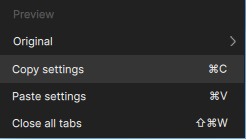
There is also a Copy Settings option in the context menu. It would be nice if clicking on “Copy Settings” did not apply to the settings in VIDEO AI (because there is a tab for saving the current settings as a new preset or update). Instead, “Copy Settings” could be used here to transfer the settings to another application or to a text file.
This could look like this, for example:
1st Enhancement
AI model: Proteus
Add noise: 10
Recover detai: 14
Focus fix: Off
Grain: On
grain amount: 2
grain size: 1
I’m guessing that you’re referring to all exported files, as the Starlight models do offer this option. While I’ve generally not done this, I can see it being a useful option!
(Right-click on the preview video window in the editing view, regardless of the selected models).
However, this process only copies the settings within the application. It is not possible to transfer them to a document in another application, such as a text application. This is because this option does not work with the operating system’s clipboard.
The purpose: You can click on “Copy settings” (Ctrl/Command+C), create a new ‘empty’ tab, and then select “Paste settings” (Ctrl/Command+V) from the same context menu. This has the same effect as right-clicking on the existing tab in the tab bar to duplicate the desired tab and all its settings.
In my opinion, this results in a useless double function, whereby the “Duplicate tab” function is much easier to use than “Copy/Paste settings.”
My suggestion is to use “Copy/Paste settings” to transfer the settings to a text document (via the system clipboard). Meanwhile, “Duplicate tab” remains unchanged.
VIDEA AI version used at the time of this post: Topaz Video 1.0.0 (New Studio Release)
My original response was limited to your 2nd suggestion about loading a just-rendered video for subsequent processing.
But I’ve read the remarks that you just posted about the first proposal, and see that as being potentially useful, as well.
In the meantime, I’m wondering if a screenshot of these setting would be better than nothing since they can’t be copied into the system clipboard? Maybe the screenshot could serve as input to OCR for conversion to text.
Cumbersome? Yep. But if it gets you where you want to be as an interim measure, it could be worth it…
I am sure that it would be no problem for the developers to convert the existing copy/paste function to the systematic clipboard, including text formatting.
I agree with you: in contrast, implementing this via OCR of a screenshot seems very inefficient to me.
I currently write everything down by hand by placing a small word processing window over the Topaz VIDEO interface. This is also very cumbersome and relatively time-consuming at first.
Maybe we should throw balloons and candy canes into the thread to distract the community a little. While we devote ourselves to the problems of humanity.