MP4,I updated FFMEPG but it didnt work
As a test I have renamed my programdata Topaz Labs model folder and then I tryed downloading Starlight mini again. What I see is the download stucks and I could not get this thing to finish. One time it downloaded 46% and stopped, I closed TVAI re-open and the model folder was empty  Starlight mini download begins again from zero.
I think many of the reported problemes comes from the model was not completly downloaded. Topaz Labs gets new customers, it must be very frustraing pay and get a none working Starlight mini.
@Toppazlabs Team, you should really correct this. Download must be resumeable, download of only missing files and integrity/verify check of the files. If the internet bandwith of Topaz is a bottle neck, there are solutions. You could implement peer to peer sharing of the model downloads packets from all TVAI Users.
This has probably been asked but is there any reason for a M Mac user to update to 7?
Not that I can see or read here with these comments (I use a PC). Personally, I’d wait until people stop posting the poor compatibility and parity problems. Unless, of course you want to pay to test.
Example comment
3 Likes
I make a backup typically. Just a copy paste the project directory to different drive.
I mean it is not a solution, but a simple thing can save you stress.
I have just bought the Topaz Video AI 7.0 after seeing locally working Starlight Mini.
This is a good direction for this software (apart from cloud if somebody wants extra feature like this). I wish to support Topaz after such significant quality jump, but please work on problems it has on consumer PCs.
Moving max VRAM slider to 80% does nothing. It still uses 31GB of VRAM.
The speed is max (depends on source) about 0.4 -0.5 fps, never more.
I have 2 GPUs in this PC and the other one is used for Windows, so 5090 has full vram free to use.
-
I wish Topaz adds some parameters to the Starlight model, like how much smoothing it adds (ideally no airbrush…). I feel there is too much smoothing of video. Grain is bad, sure, but too smooth output is not good too. Could be some parameter.
-
From my observation, the brightness of the final video made with Starlight Mini is much lower than the original video - it looks kind of dull. Totally different than the source video
I tried to upscale SD/FULLHD video to 4k with Starlight and it seems to be running out of memory. Only every few attempts it work.
-
I have 2 GPUs and just want to upscale my family videos. I will not be paying 1000 USD per year for “a seat”. This looks like a joke. I ask Topaz to rethink this marketing strategy.
The companies could pay you for seats and multigpu, but I think this software costs already A LOT. Please include multi-gpu rendering for private folks. -
Please work on speed and the ability to upscale 4k to 8k videos with Starlight on machine like mine. First step would be to make it possible to upscale to 4k without problems, because it seems to not work reliably, even on 5090.
-
Old problem from old trial still exists. If you upscale and mouse down to see the original video, often the videos jump on screen (if you zoomed out or moved the video with mouse). This should really be fixed.
-
No typical timeline from-to previews for Starlight? Or will this be implemented next?
Cheers
EDIT: I noticed I am able to generate 4k 30 fps video if I select it first, while in Proteus, then slick Starlight Mini model. Sometimes works, sometimes not.
5 Likes
Is it possible to create a preview for Starlight Mini (Local)? Can’t see the option for it with only the starlight mini selected, no other enhancements
2 Likes
Did you restart TVAI the setting takes effect? What I see is when you have nearby full VRam usage, fps drops massive and could take very long the process starts as more Vram you have.
What I also can observe is: doing 640x480 Upscale 2x then never more than about 13GB gets used with my 16GB 470Ti, set 100% into TVAI. So my conclusion is how much Vram it takes, pends on “source to upscale resolution” …but if this the case, why you have 32GB in use by doing just SD source 2x?
Ok I refer to the Beta4 which works fine for me, since I had some probleme with the Final 7 I sta there, perhaps this is the difference. I also notice with the Beta4: Lowering VRam into TVAI has effects on Vram usage
When will the bug that Frame Interpolation turns into a variable frame rate be fixed?
1 Like
You have to drop your max memory usage lower. There are thresholds. If you don’t go below them, nothing will change. For me on a 5090, 70% works and memory usage drops to around 16gb. You could try 75%, but I think I tried that and it didn’t work. If you lower it to 70% though you will get much faster speeds.
I also noticed when memory is maxed, it massively slows down. I wonder if it needs more memory, so it’s trying to use system ram, which slows everything. That’s my only guess.
With some videos taking up to 60 hours to complete, there has to be some way to pause Mini processing, shut down my PC, and then restart where I left off after I restart the app. Am I missing something? I could not find the answer in the documentation.
4 Likes
I tried it but stopped for now because it is quite slow, that’s with a 4090, it does need a pause option. using dual GPUs (or more) would be ideal but given the cost of high end ones these days that kind of sucks as well, but standard Video AI does not support multi GPU anyway. Does anyone know if slower cards with decent amount of VRAM are much slower or does the overall speed/tier of the card matter more?
If it does well with lower end cards then it would be worth having multi GPU rendering for cost effectiveness… Otherwise not.
Output file frame rate issues in TVAI 7.0.0.
Straight upscale does not seem to retain the frame rate of the original, it is less in every case.
I’m upscaling from 480p DVD to 1080p.
The model does not seem to make a difference, I tried Proteus and Nyx with the same result.
The codec does not seem to make a difference, I tried Prores 422 LT, Prores 422 proxy and h265 with same result.
The 29.97 FPS source turn in to 24p output.
I then tried adding frame interpolation with both Apollo and Chronos to force a new frame rate but with similar results.
Interpolate to 30fps turns into 24fps.
Interpolate to 60fps turns into 48fps.
It is similar to the problem that was I think was fixed in version 6, but I’m not sure it is the same.
Does anyone else see this?
When gpu use system ram what slows down
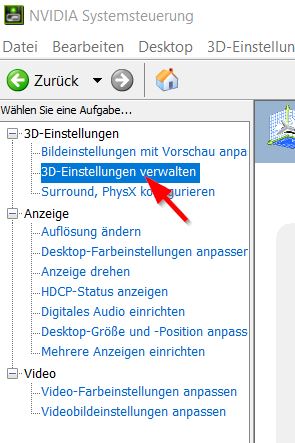
“Instructions to disable shared memory fallback for Stable Diffusion” ..ok I do it for Starlight
I can’t say it is the correct exe and if works or not, I just did it and I’m testing
NVidia Panel, sorry about german screenshots
C:\ProgramData\Topaz Labs LLC\Topaz Video AI\models\Lib\venv\scripts\nt\python.exe
C:\ProgramData\Topaz Labs LLC\Topaz Video AI\models\Lib\venv\scripts\nt\pythonw.exe
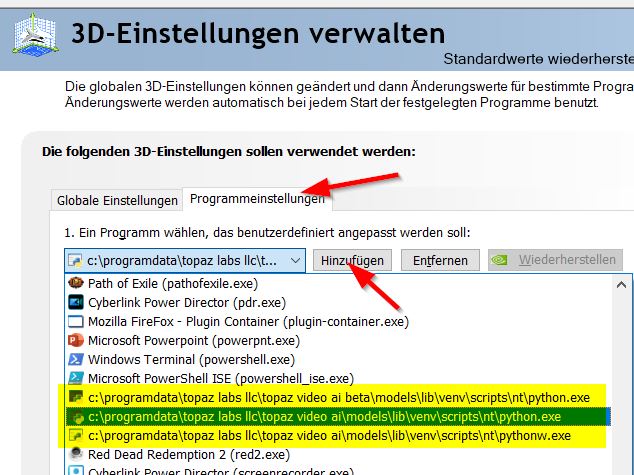
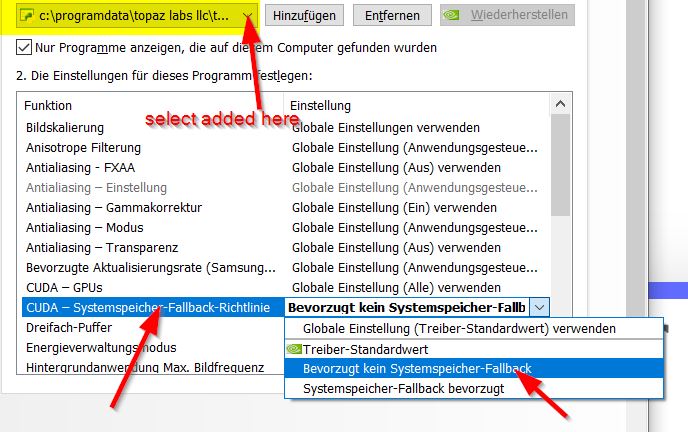
1 Like
for now the only way to have some “kind of pause” is doing an image sequence.
I’m glad to see I’m not alone. Is there supposed to be a preview button for this option? I see one for every model except Starlight Mini.
I’ve been a very loyal Topaz customer and raved about this software. But I’m more than a tad disappointed by this rollout.
Thank you for your thoughts and duly noted!
im not sure but i think if you save the project where you stop it picks up from there when u reload
I notice many of the people complaining of a dark output on the product they bought also have the words “Topaz Video AI Owner” darkened out too. Must be contagious.
1 Like
For some reason the system check for the starlight mini ai model states i only have 8 gb of ram on my GPU, but it’s a 16 gb ram card! It’s also a AMD card so i can’t use the new ai model anyway. But still, strange it finds only 8 gb.
