Topaz Video AI  v4.0.9
System Information
OS: Windows v11.23
CPU: 12th Gen Intel(R) Core(TM) i5-12500  63.745 GB
GPU: NVIDIA GeForce RTX 4060  7.7842 GB
Processing Settings
device: 0 vram: 0.95 instances: 1
Input Resolution: 1920x1080
Benchmark Results
Artemis		1X: 	10.37 fps 	2X: 	07.42 fps 	4X: 	02.30 fps
Iris		1X: 	10.91 fps 	2X: 	05.79 fps 	4X: 	01.77 fps
Proteus		1X: 	09.54 fps 	2X: 	07.08 fps 	4X: 	02.41 fps
Gaia		1X: 	03.44 fps 	2X: 	02.33 fps 	4X: 	01.57 fps
Nyx		1X: 	04.12 fps 	2X: 	03.54 fps
4X Slowmo		Apollo: 	15.86 fps 	APFast: 	40.23 fps 	Chronos: 	08.13 fps 	CHFast: 	12.53 fps
2 Likes
Thanks, I am a still photographer and optimized my build for edits in PS and LR. As I get more into video editing I will have to consider a better GPU. The cost is staggering for the high end ones… more than my entire computer build so I may lay down till the upgrade feeling goes away. Is there a mid level GPU that you might recommend without going to a 4090?
Windows 11 debloated
No Antivirus or cleaner programs
ASUS-PRIME Z790-A WIFI
i9-13900K + Kraken AIO
4090 drivers + 546.33 studio drivers
128 Gig DDR5-4800 UDIMM 1.1V CL40
Motherboard bios all auto no OC
Corsair HX1200 PS
4 onboard Nvme 4th gen drives
- Boot drive
- Cache drive
- Media drive
- Mixdown drive
Topaz Video AI  v4.0.9
System Information
OS: Windows v11.22
CPU: 13th Gen Intel(R) Core(TM) i9-13900K  127.75 GB
GPU: NVIDIA GeForce RTX 4090  23.59 GB
Processing Settings
device: 0 vram: 1 instances: 1
Input Resolution: 720x480
Benchmark Results
Artemis		1X: 	173.36 fps 	2X: 	79.42 fps 	4X: 	22.03 fps
Iris		1X: 	196.28 fps 	2X: 	108.26 fps 	4X: 	30.54 fps
Proteus		1X: 	146.53 fps 	2X: 	73.72 fps 	4X: 	21.58 fps
Gaia		1X: 	85.30 fps 	2X: 	61.88 fps 	4X: 	26.05 fps
Nyx		1X: 	56.93 fps 	2X: 	49.17 fps
4X Slowmo		Apollo: 	236.22 fps 	APFast: 	323.42 fps 	Chronos: 	168.25 fps 	CHFast: 	189.75 fps
Topaz Video AI  v4.0.9
System Information
OS: Windows v11.22
CPU: 13th Gen Intel(R) Core(TM) i9-13900K  127.75 GB
GPU: NVIDIA GeForce RTX 4090  23.59 GB
Processing Settings
device: 0 vram: 1 instances: 1
Input Resolution: 1920x1080
Benchmark Results
Artemis		1X: 	40.81 fps 	2X: 	17.67 fps 	4X: 	04.63 fps
Iris		1X: 	39.83 fps 	2X: 	18.93 fps 	4X: 	04.88 fps
Proteus		1X: 	34.92 fps 	2X: 	16.69 fps 	4X: 	04.58 fps
Gaia		1X: 	15.91 fps 	2X: 	10.84 fps 	4X: 	04.52 fps
Nyx		1X: 	17.66 fps 	2X: 	14.46 fps
4X Slowmo		Apollo: 	43.38 fps 	APFast: 	76.89 fps 	Chronos: 	33.52 fps 	CHFast: 	34.75 fps
1 Like
Topaz Video AI  v4.0.9
System Information
OS: Windows v11.23
CPU: AMD Ryzen 7 7800X3D 8-Core Processor             31.713 GB
GPU: NVIDIA GeForce RTX 4070  11.744 GB
Processing Settings
device: 0 vram: 1 instances: 1
Input Resolution: 1920x1080
Benchmark Results
Artemis		1X: 	18.85 fps 	2X: 	13.25 fps 	4X: 	04.21 fps
Iris		1X: 	20.41 fps 	2X: 	10.95 fps 	4X: 	03.40 fps
Proteus		1X: 	17.71 fps 	2X: 	12.48 fps 	4X: 	04.16 fps
Gaia		1X: 	06.41 fps 	2X: 	04.44 fps 	4X: 	03.00 fps
Nyx		1X: 	07.55 fps 	2X: 	06.55 fps
4X Slowmo		Apollo: 	28.26 fps 	APFast: 	66.52 fps 	Chronos: 	13.85 fps 	CHFast: 	22.34 fps
bro you need to upgrade your CPU it’s a bottleneck for you at this point.
What is your guys opinions on me switching from an RTX 3080 to an RTX 4070ti? Is there that much of a difference? I know the 4070ti will use about 100W less power then my 3080 but in terms of upscale fps aren’t they kind of the same? I could only find 1 poerson on here with an rtx 3080 and CPU near the spec of mine.
lol, indeed, I did consider upgrading the CPU, that build takes twice the time from my main build.
I don’t think it will be much of an improvement. The 4070Ti will pull less power / pump less heat into your room, but the 3080’s buswidth advantage seems to keep it close-enough.
The 4070 Ti has an extra 2gb of vram, but if the 3080’s 10gb buffer isn’t sufficient, I would want more than an extra 2gb if I spent ~$800 on the upgrade.
The 4070-Ti-Super (I can’t type that name with a straight face) should get announced on the 8th and, if it’s priced around the 4070 -Ti (non-super) would make for a better upgrade. (It’s rumored to have a 16gb buffer)
What CPU are you running? If you aren’t running 12/13 gen Intel CPU with DDR5, or an AMD 7000 series (only runs DDR5), I would stick with the 3080.
I’m running an R9 5900X and 64GB DDR4 3600. I said screw it and ordered the 4070Ti, lol. Even if I get around the same results the better power efficiency is worth it to me. Plus I can sell my 3080 for like $400 and then basically be only paying $450 for the rtx 4070ti. But in reality I’m actually paying even less because my lucky ass won $300 on a scratch off lottery ticket earlier today, that was a free $300, so out of pocket I’m actually going to only be paying like $170 for this 4070Ti. I ordered it on Amazon with their 5 monthly payment plan so that makes it an even easier decision to purchase it. Did I mention I’m horrible with money?
I have a 3080 ti and another system with a 4070 ti.
It’s really hard to say. I suppose I could swap the cards one day and see what it does to the numbers.
The 4070 ti system runs noticeably faster, but it’s also got the newer CPU and DDR5 RAM.
Bahaha. I think you’ll like the 4070 ti. It’s not going to be worse, I’m pretty sure.
Topaz Video AI  v4.0.9
System Information
OS: Windows v10.22
CPU: AMD Ryzen Threadripper 3970X 32-Core Processor   127.87 GB
GPU: NVIDIA GeForce RTX 3090  23.77 GB
Processing Settings
device: 0 vram: 1 instances: 0
Input Resolution: 1920x1080
Benchmark Results
Artemis		1X: 	25.78 fps 	2X: 	13.53 fps 	4X: 	03.78 fps
Iris		1X: 	24.26 fps 	2X: 	14.04 fps 	4X: 	03.91 fps
Proteus		1X: 	25.50 fps 	2X: 	14.05 fps 	4X: 	03.76 fps
Gaia		1X: 	08.65 fps 	2X: 	05.88 fps 	4X: 	03.25 fps
Nyx		1X: 	10.49 fps 	2X: 	08.67 fps
4X Slowmo		Apollo: 	34.57 fps 	APFast: 	62.26 fps 	Chronos: 	19.31 fps 	CHFast: 	28.59 fps
Topaz Video AI  v4.0.9
System Information
OS: Windows v10.22
CPU: AMD Ryzen 9 3900X 12-Core Processor              31.946 GB
GPU: NVIDIA GeForce GTX 1070  7.8916 GB
GPU: NVIDIA GeForce GTX 1070  7.8916 GB
Processing Settings
device: 0 vram: 1 instances: 1
Input Resolution: 1920x1080
Benchmark Results
Artemis		1X: 	02.48 fps 	2X: 	01.71 fps 	4X: 	00.70 fps
Iris		1X: 	02.76 fps 	2X: 	01.58 fps 	4X: 	00.51 fps
Proteus		1X: 	02.41 fps 	2X: 	01.67 fps 	4X: 	00.68 fps
Gaia		1X: 	00.89 fps 	2X: 	ERR fps 	4X: 	ERR fps
Nyx		1X: 	00.79 fps 	2X: 	00.92 fps
4X Slowmo		Apollo: 	03.24 fps 	APFast: 	12.90 fps 	Chronos: 	01.52 fps 	CHFast: 	02.41 fps
Topaz Video AI  v4.0.9
System Information
OS: Windows v11.23
CPU: 12th Gen Intel(R) Core(TM) i9-12900KF  127.78 GB
GPU: NVIDIA GeForce RTX 4060 Ti  15.745 GB
Processing Settings
device: 0 vram: 1 instances: 1
Input Resolution: 1920x1080
Benchmark Results
Artemis		1X: 	13.19 fps 	2X: 	08.96 fps 	4X: 	02.78 fps
Iris		1X: 	14.04 fps 	2X: 	07.29 fps 	4X: 	02.16 fps
Proteus		1X: 	12.01 fps 	2X: 	08.27 fps 	4X: 	03.00 fps
Gaia		1X: 	04.33 fps 	2X: 	03.00 fps 	4X: 	02.00 fps
Nyx		1X: 	05.15 fps 	2X: 	04.38 fps
4X Slowmo		Apollo: 	19.65 fps 	APFast: 	47.87 fps 	Chronos: 	10.12 fps 	CHFast: 	15.47 fps
RTX 4060ti 70%TDP
Topaz Video AI  v4.0.9
System Information
OS: Mac v14.0201
CPU: Apple M3 Max  128 GB
GPU: Apple M3 Max  96 GB
Processing Settings
device: 0 vram: 1 instances: 1
Input Resolution: 1920x1080
Benchmark Results
Artemis		1X: 	12.84 fps 	2X: 	07.65 fps 	4X: 	02.69 fps
Iris		1X: 	08.51 fps 	2X: 	02.57 fps 	4X: 	01.97 fps
Proteus		1X: 	11.61 fps 	2X: 	06.96 fps 	4X: 	02.36 fps
Gaia		1X: 	03.36 fps 	2X: 	02.39 fps 	4X: 	01.91 fps
Nyx		1X: 	05.62 fps 	2X: 	05.00 fps
4X Slowmo		Apollo: 	13.05 fps 	APFast: 	58.00 fps 	Chronos: 	04.63 fps 	CHFast: 	07.22 fps
Don’t really understand this. The activity monitor in OSX shows hardly any use of the cores and it’s looks like the SW is not utilizing the resources of the machine… Dissapointed… The new version of SW has no choices on GPU, CPU and RAM usage…
Running Video AI on a maxed out Win laptop made the laptop sound like an airplain, PSU had to be actively cooled and the machine was on a flat gaming stand with fan´s to blow air in to the laptop.
Was at least expecting all cores to be used on this new machine 
1 Like
Unfortunately on Apple hardware, TVAI simply doesn’t appear to be very optimized. I was expecting much better results on my M2 Max Macbook Pro as well (after upgrading from an older MacBook Air) but sadly that just simply isn’t the case.
Looking at all the benchmarks, only the Ultra variants of the M chips are getting high numbers.
I’ve been trying to add a good spread of benchmarks to this spreadsheet for better visual comparisons.
Not really. The Ultra chips do constantly underperform compared with the lower specced AppleSilicon variants.
As an example the M2 Ultra here in the Mac Studio often is only twice as fast as the M1 Pro in the MacBook (even though it has 60 vs. 16 GPU cores plus minor optimizations M2 vs M1).
In general performance on Apple Silicon is extremely uneven over different builds especially for all newer models (Iris, Proteus V4).
With fast older model variant the M1 can even nearly overtake the M2 Ultra, so including Apple Silicon benchmarks in your spreadsheet doesn’t really make sense as the variations between different TVAI versions on the same systems are bigger then between different hardware specs :-/
P.S.: At least they have improved the abysmal Iris 2x performance in the newest Alpha - unfortunately this only for Iris V1 (aka Iris LQ V1) and V2 (aka Iris MQ) but not for Iris V3 (aka Iris LQ V2).
Also Iris 2x could be even faster as we know from earlier versions where it was at the same speed of Proteus V3 if not slightly faster.
AND they also totally ruined Iris 4x performance in this Alpha (similar as they did before with Iris 2x.
Since I mostly use IrisLQ 2x I’
1 Like
But that’s what we want to know. How do all the variations of hardware compare?
We all expect the numbers to scale linearly with claimed hardware power. However, that spreadsheet is all over the place for everything except the oldest hardware.
Besides the explained handicap on the Iris model for Macs, all models preform about the same within run to run variance between versions of TVAI 4. Mostly because Topaz does not make changes to the models.
Yes. There is a lot of noise in the entries—a lot of variables that are not controlled for. From what I have seen on my machines, the version of TVAI 4 is the least likely to make a meaningful change in results, unless explicitly stated in the release announcement.
(It’s not my spreadsheet. Since I have edit access, I’ve been taking the time to add entries from here. Because I know Iris has an unfair handicap, I have been ignoring those numbers when comparing.)
Exactly that is the point. ATM speed varies more between different TVAI model versions than between different hardware specs.
Iris LQ is now twice as fast in TVAI 4.1.0.3.a than in 4.0.9 on the exact same system for the 2x upscale but also suddenly 2x slower for the 4x model.
That’s more of a difference than between a Max and an ultra chip.
As long as those massive fluctuations in speed (obviously due to extremely unoptimised models) aren’t “flattened” somewhat you could only really compare systems with exact same TVAI version and even there with the model files downloaded at the same date (yes, even there can be big speed differences with Apple Silicon).
Also you should note the RAM setting as this can make a huge difference as well.
This is NOT the case on windows systems where performance is quite steady over several builds.
Just one example:
2x Upscaling an SD video with Proteus in TVAI 4.0.8 and RAM set to 100%:
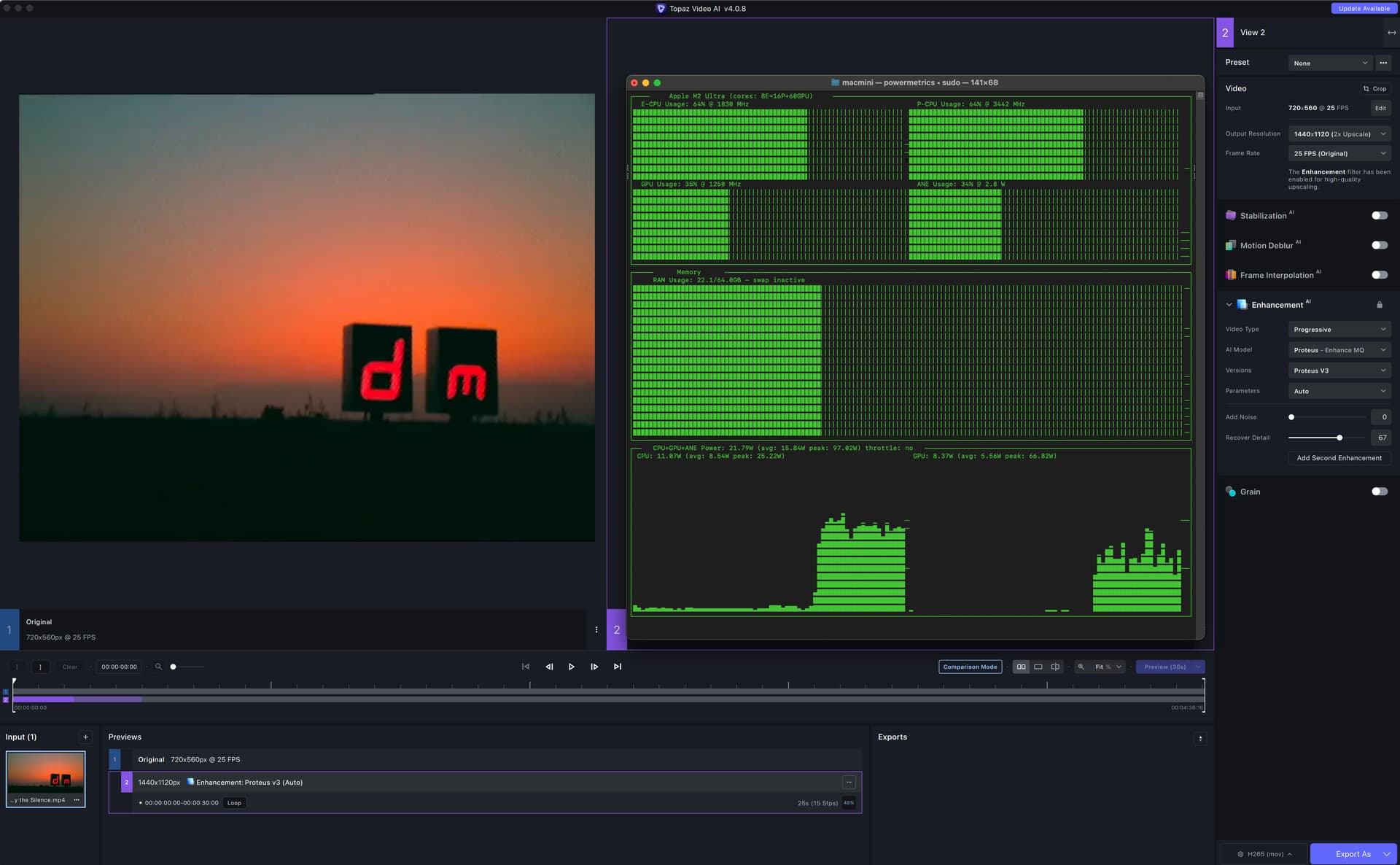
Now the exact same task on the exact same system and even the same TVAI version, done directly after the first preview, just now RAM set to 10%:
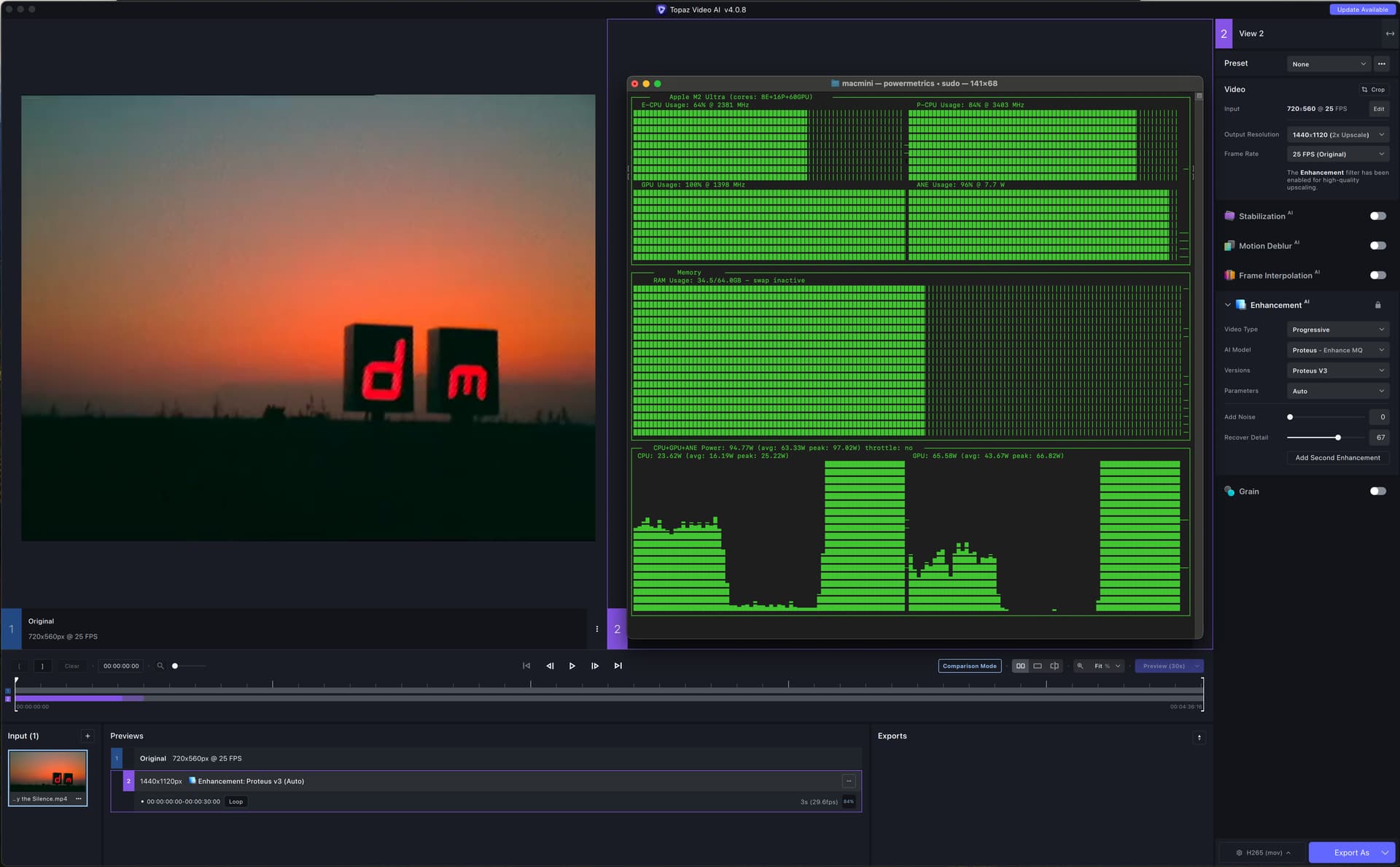
That’s nearly twice as fast. Also note the extremely different use of the hardware in both cases. With RAM set to 10% both GPU and Neural engine are nearly 100% used while with RAM set to 100% TVAI is not even using 50% of resources.
As long as such minor variations in settings cause such dramatic speed differences we cannot really compare Apple Silicon systems against each other as a M2 MAX with the right settings and/or TVAI/model version can easily overtake an obviously faster M2 Ultra system.
1 Like
