Video AI 4.0.X - User Benchmarking Results

Topaz Video AI  v4.0.8
System Information
OS: Windows v11.22
CPU: 13th Gen Intel(R) Core(TM) i9-13900HX  63.743 GB
GPU: NVIDIA GeForce RTX 4090 Laptop GPU  15.688 GB
GPU: Intel(R) UHD Graphics  0.125 GB
Processing Settings
device: 0 vram: 1 instances: 1
Input Resolution: 3840x2160
Benchmark Results
Artemis		1X: 	04.42 fps 	2X: 	03.50 fps 	4X: 	01.02 fps 	
Iris		1X: 	04.57 fps 	2X: 	02.99 fps 	4X: 	00.93 fps 	
Proteus		1X: 	04.28 fps 	2X: 	03.12 fps 	4X: 	00.98 fps 	
Gaia		1X: 	01.70 fps 	2X: 	01.18 fps 	4X: 	00.80 fps 	
Nyx		1X: 	01.59 fps 	2X: 	02.09 fps 	
4X Slowmo		Apollo: 	08.66 fps 	APFast: 	19.14 fps 	Chronos: 	03.89 fps 	CHFast: 	07.23 fps 	

Topaz Video AI  v4.0.8
System Information
OS: Windows v11.22
CPU: 13th Gen Intel(R) Core(TM) i9-13900HX  63.743 GB
GPU: NVIDIA GeForce RTX 4090 Laptop GPU  15.688 GB
GPU: Intel(R) UHD Graphics  0.125 GB
Processing Settings
device: 0 vram: 1 instances: 1
Input Resolution: 1920x1080
Benchmark Results
Artemis		1X: 	13.78 fps 	2X: 	11.07 fps 	4X: 	04.17 fps 	
Iris		1X: 	14.35 fps 	2X: 	09.31 fps 	4X: 	04.07 fps 	
Proteus		1X: 	13.34 fps 	2X: 	10.69 fps 	4X: 	04.19 fps 	
Gaia		1X: 	05.68 fps 	2X: 	04.43 fps 	4X: 	03.27 fps 	
Nyx		1X: 	07.64 fps 	2X: 	06.41 fps 	
4X Slowmo		Apollo: 	24.31 fps 	APFast: 	52.67 fps 	Chronos: 	14.01 fps 	CHFast: 	20.02 fps 	

I am a bit dissappointed with these results. Is there anything in the settings/ files I can do beyond the obvious options that are in the Topaz Video UI (preferences). I saw somewhere that there was something strange going on with Intel and how it interacts with the program?

So I found someone in Reply #165 on this thread that has almost the same specs as you. They also have a i9-13900HX but with only 32GB of RAM. Same GPU though and same OS.

Their results are very similar to yours so I think that may be normal for your setup.

I don’t know what is possible, but it would be great to see if Topaz can seek to optimise the program because I’m running the best specs you can find on a laptop. Imagine the way things go, it will only get worse as they increase the power of these AI models.

You shouldn’t be using a laptop for this. Laptops are made for portability over everything else.

If you want real performance you’ll need to get a desktop.

1 Like

Hah unfortunately I decided to move to a laptop as I’m on the move too much. System works just about ok, just will have to use sparingly! :slight_smile:

Windows 11 debloated
No Antivirus or cleaner programs
ASUS-PRIME Z790-A WIFI
i9-13900K + Kraken AIO
4090 drivers + 546.33 studio drivers
128 Gig DDR5-4800 UDIMM 1.1V CL40
Motherboard bios all auto no OC
Corsair HX1200 PS
Four onboard Nvme 4th gen drives
1)Boot drive
2)Cache drive
3)Media drive
4)Mixdown drive

Topaz Video AI  v4.0.8
System Information
OS: Windows v11.22
CPU: 13th Gen Intel(R) Core(TM) i9-13900K  127.75 GB
GPU: NVIDIA GeForce RTX 4090  23.59 GB
Processing Settings
device: 0 vram: 1 instances: 1
Input Resolution: 720x480
Benchmark Results
Artemis		1X: 	177.43 fps 	2X: 	90.42 fps 	4X: 	25.19 fps 	
Iris		1X: 	185.99 fps 	2X: 	116.36 fps 	4X: 	33.01 fps 	
Proteus		1X: 	146.88 fps 	2X: 	79.11 fps 	4X: 	24.33 fps 	
Gaia		1X: 	88.00 fps 	2X: 	62.03 fps 	4X: 	28.59 fps 	
Nyx		1X: 	51.99 fps 	2X: 	51.30 fps 	
4X Slowmo		Apollo: 	243.92 fps 	APFast: 	391.09 fps 	Chronos: 	171.36 fps 	CHFast: 	202.02 fps 	

Topaz Video AI  v4.0.8
System Information
OS: Windows v11.22
CPU: 13th Gen Intel(R) Core(TM) i9-13900K  127.75 GB
GPU: NVIDIA GeForce RTX 4090  23.59 GB
Processing Settings
device: 0 vram: 1 instances: 1
Input Resolution: 1920x1080
Benchmark Results
Artemis		1X: 	41.20 fps 	2X: 	18.52 fps 	4X: 	04.82 fps 	
Iris		1X: 	40.30 fps 	2X: 	19.81 fps 	4X: 	05.04 fps 	
Proteus		1X: 	32.53 fps 	2X: 	16.22 fps 	4X: 	04.76 fps 	
Gaia		1X: 	15.80 fps 	2X: 	10.76 fps 	4X: 	04.60 fps 	
Nyx		1X: 	17.64 fps 	2X: 	14.63 fps 	
4X Slowmo		Apollo: 	44.51 fps 	APFast: 	74.21 fps 	Chronos: 	33.51 fps 	CHFast: 	34.39 fps 	

1 Like

Interestingly, you’re 4X scores are some of the best.

Comparing your 1080p numbers to my 5950X/ 3080Ti desktop rig, your 1X numbers look low, 2X numbers look good for a laptop, and your 4X numbers are actually better than my rig.

My understanding is that more upscaling leans on the CPU more, so I think your CPU is doing very well.

The 4090 mobile variant is based on the same die used in the desktop 4080, but has a much lower power limit than the desktop 4080. So, depending on the GPU power-limit / cooling of your particular laptop, you could end up with GPU performance as low as a 4070 / 4060Ti (I think there is a range in which different laptop manufacturers can set different power limits for different laptops)

I ran the benchmark module on 4.0.8 while watching the output of Asitop. I noticed that the ANE (neural engine) was engaged in every benchmark test (to varying degrees) EXCEPT for Iris 2X! Does that explain the notoriously poor performance of Iris 2X for 1080 input file?

Is this a clue that the devs can use to address the issue on modern Mac hardware?

Topaz Video AI  v4.0.8
System Information
OS: Windows v11.22
CPU: 13th Gen Intel(R) Core(TM) i7-13700KF  63.813 GB
GPU: NVIDIA GeForce GTX 1080 Ti  10.859 GB
GPU: NVIDIA GeForce GTX 1080 Ti  10.86 GB
Processing Settings
device: 2 vram: 1 instances: 0
Input Resolution: 1920x1080
Benchmark Results
Artemis		1X: 	08.01 fps 	2X: 	05.26 fps 	4X: 	01.98 fps 	
Iris		1X: 	08.84 fps 	2X: 	04.86 fps 	4X: 	01.57 fps 	
Proteus		1X: 	07.40 fps 	2X: 	05.03 fps 	4X: 	01.88 fps 	
Gaia		1X: 	03.08 fps 	2X: 	02.08 fps 	4X: 	00.08 fps 	
Nyx		1X: 	03.54 fps 	2X: 	03.08 fps 	
4X Slowmo		Apollo: 	09.28 fps 	APFast: 	28.63 fps 	Chronos: 	05.13 fps 	CHFast: 	07.89 fps 	
2 Likes
Topaz Video AI  v4.0.8
System Information
OS: Windows v11.22
CPU: 13th Gen Intel(R) Core(TM) i7-13700KF  63.813 GB
GPU: NVIDIA GeForce GTX 1080 Ti  10.859 GB
GPU: NVIDIA GeForce GTX 1080 Ti  10.86 GB
Processing Settings
device: 2 vram: 1 instances: 0
Input Resolution: 3840x2160
Benchmark Results
Artemis		1X: 	01.71 fps 	2X: 	01.08 fps 	4X: 	00.41 fps 	
Iris		1X: 	01.86 fps 	2X: 	01.03 fps 	4X: 	00.34 fps 	
Proteus		1X: 	01.55 fps 	2X: 	01.03 fps 	4X: 	00.40 fps 	
Gaia		1X: 	00.65 fps 	2X: 	00.44 fps 	4X: 	00.02 fps 	
Nyx		1X: 	00.62 fps 	2X: 	00.78 fps 	
4X Slowmo		Apollo: 	02.69 fps 	APFast: 	09.67 fps 	Chronos: 	01.10 fps 	CHFast: 	02.00 fps 	

A few days ago, I received a warning email from CableMod about the 90-degree adapter I had purchased for my new RTX 4090 GPU. They’re doing a recall.

This is a quote from a recent article on Tom’s Hardware:

“Nvidia and its board partners do not cover damage to GPUs that use third-party power adaptors. Before the recall was announced, CableMod offered to repair affected GPUs whose RMA was refused because of their adapters. CableMod is known to send these impacted units to the repair shop NorthridgeFix.”

If you’re using a CableMod angle adapter on your RTX 40x0 you may have a problem like this.
This page CableMod Angle Adapter Recall

Aside from ensuring that the connector is properly seated and appropriate bend radius precautions are taken - you could also consider TDP limiting the card to 450W or so. It really is a disgusting situation and the 12V-2x6 situation is not going to be much better IMO.

Video by der8auer on it:

Hi I did not build my workstation for gaming or video editing, but got a drone a while back and am now getting into editing video. Recently I tried to convert a time lapse to 60 FPS so that I could slow it down for a smoother look and my processing time to export a short clip was 1 hour and 37 min. I was monitoring CPU and GPU utilization and all 10 cores were idle but GPU was maxed out at 100%

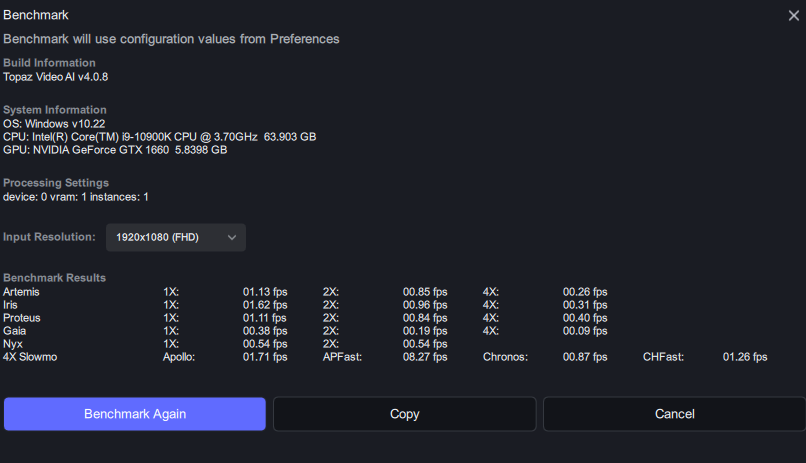
I ran the benchmark test and I don’t really know how to read it. Can someone help me understand this?
image

Benchmarking is really most useful as a speed comparison between different system configurations, or different models on the same system. The fps values it returns usually don’t correspond to performance with real exports.

Thank you
 my CPUID monitor told me that the bottleneck is the GPU. I’m just not sure what gains I might see if I upgraded
 and given that I won’t be using Video AI a lot, I’m really not sure if it would be worth it.

If you get a newer more powerful GPU, that CPU would be able to keep up with it. I agree that it wouldn’t really be worth it for you. Unless you really want to use that computer more often, and running TVAI makes it unusable.

I had a GTX 1060. It would usually take 12 hours to do a 45 minute show with the model and settings I was using. My other computer with an RTX 3080 ti would take about an hour on the same video.

From what I see people posting, GPU seems to be the most common limitation for most desktop systems. I’m running an export right now that has my GPU in the 95-100% range while my CPUs are 0-5%. Already saving my pennies for a new GPU in 2024.


1 Like
Topaz Video AI  v4.0.9
System Information
OS: Windows v11.22
CPU: AMD Ryzen 9 7950X 16-Core Processor              63.213 GB
GPU: NVIDIA GeForce RTX 4090  23.59 GB
GPU: AMD Radeon(TM) Graphics  0.47446 GB
GPU: NVIDIA GeForce RTX 4090  23.59 GB
Processing Settings
device: 0 vram: 1 instances: 1
Input Resolution: 1920x1080
Benchmark Results
Artemis		1X: 	43.21 fps 	2X: 	15.85 fps 	4X: 	04.46 fps 	
Iris		1X: 	39.55 fps 	2X: 	19.66 fps 	4X: 	05.57 fps 	
Proteus		1X: 	35.42 fps 	2X: 	15.99 fps 	4X: 	04.58 fps 	
Gaia		1X: 	15.80 fps 	2X: 	10.90 fps 	4X: 	05.05 fps 	
Nyx		1X: 	17.36 fps 	2X: 	14.86 fps 	
4X Slowmo		Apollo: 	46.13 fps 	APFast: 	83.89 fps 	Chronos: 	31.80 fps 	CHFast: 	37.57 fps 	


Topaz Video AI v4.0.8

System Information

OS: Windows v10.22

CPU: AMD EPYC 7763 64-Core Processor 63.95 GB

GPU: AMD Radeon Pro V620 MxGPU 29.558 GB

GPU: AMD Radeon Pro V620 MxGPU 29.558 GB

Processing Settings

device: 2 vram: 1 instances: 0

Input Resolution: 1920x1080

Benchmark Results

Artemis		1X: 	12.45 fps 	2X: 	07.87 fps 	4X: 	02.87 fps 	

Iris		1X: 	14.13 fps 	2X: 	07.82 fps 	4X: 	02.59 fps 	

Proteus		1X: 	12.10 fps 	2X: 	07.56 fps 	4X: 	02.71 fps 	

Gaia		1X: 	05.85 fps 	2X: 	03.87 fps 	4X: 	02.70 fps 	

Nyx		1X: 	05.29 fps 	2X: 	04.41 fps 	

4X Slowmo		Apollo: 	13.99 fps 	APFast: 	41.96 fps 	Chronos: 	08.36 fps 	CHFast: 	14.57 fps 	


2 Likes