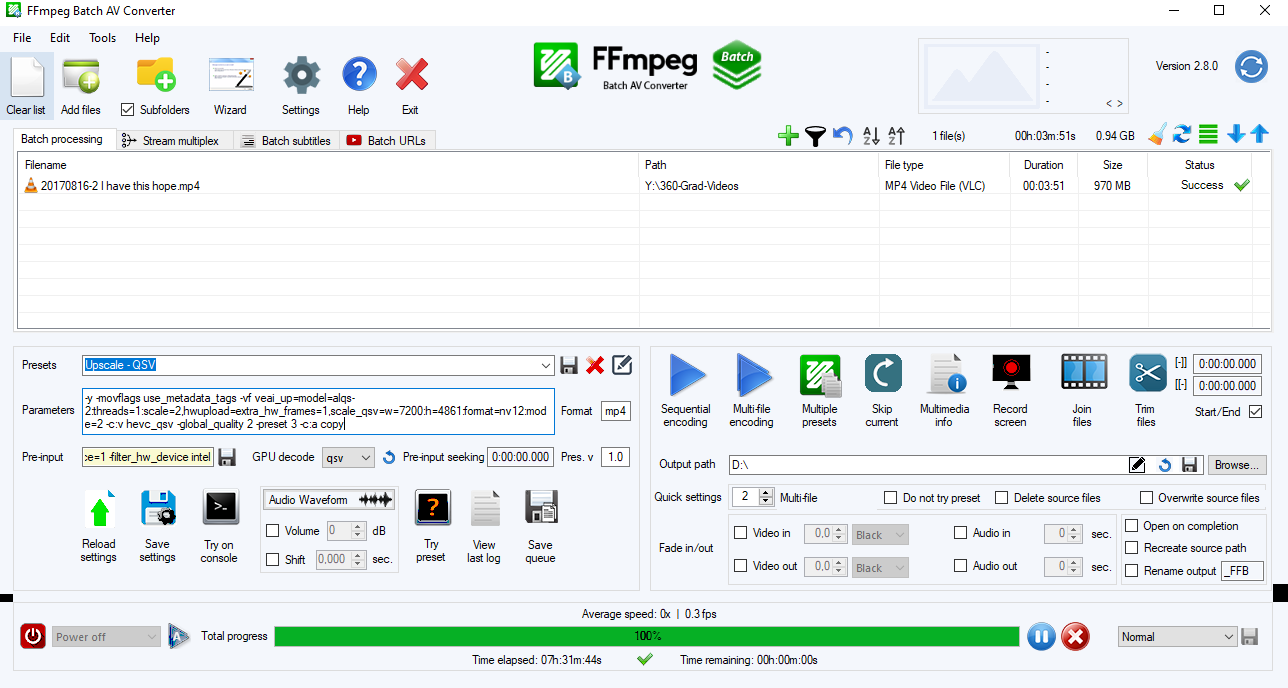
I use the ffmpeg batch converter GUI for some of my videos. I just had to replace ffmpeg.exe and the libraries in the program folder. But the newest version prints something about a library mismatch which makes that GUI crash when reloading the hardware decoder list, so I still use ffmpeg from VEAI 3.0.0.34a. This is how it looks like:
Different ffmpeg commands can also be saved and loaded on demand as presets.
If the official GUI had the option to decode, encode and scale with QSV, I’d use that one though, even though I’m not really sure if that helps so much speedwise with only a single job. The way I understood it is that the frames get transfered from NVDEC to RAM to VRAM (AI) to RAM for scaling and then back to VRAM for NVENC, so it would not be more efficient to let the eGPU do the work…
@suraj What is the -movflags frag_keyframe+empty_moov parameter for?
Thank you! Yes, that seems to match what I found out yesterday.
It would be great if it would be possible to keep everything in VRAM altogether from NVDEC to NVENC in the future and also do the scaling there. My i9-11950H consuming 45W consistently is not able to keep up with the eGPU working on 2 videos.
Assuming the preview files are written to disk, could they be written to RAM instead so jumping around in the preview is more responsive?
Also maybe the preview mode needs to automatically pause processing so the resources are available for snappy preview navigation.
Could VEAI write the preview frames more frequently so we can view the preview right up until the point where processing has progressed? Right now it seems like you can’t preview all the way to the current processing point because the preview file is written in chunks. You have to wait until the ‘next chunk’ is written to view the most recent part of the preview.
Thanks for the info, but I found the same solution a couple of days ago, and reported to the devs. Good to know that re-selecting gpu fixes the issue for you as well.
Does e drive have enough space to write the video? You should be able to play the output in e drive, can you check if it is the entire length or is it short a few seconds?
The movflags frag_keyframe+empty_moov are used to insert header information from time to time to ensure the output is readable if the program crashes or processing is stopped. It will be used later for implementing pause/resume and crash recovery.
This is interesting observation. Can you please share the logs.
How does the 1.7FPS or 0.59 SPF compare to 2.6.4 on your machine?
There are no plans to update 2.6.4 with QT6. The next official release would be 3.0
FYI the reason for performance increase in Gigapixel is not QT6 but TensorRT being used for inference.
The GUI sluggishness is due to the way the GUI is coded. Decoding video on modern machines is very fast for lower resolution video. While playback would still be slow for larger resolution, especially playing multiple at the same time, the GUI overall will be more responsive and playback glitch free.
Video codecs require many frames to be queued to improve compression quality, this is the reason why the preview right now is not instant. There are ways to achieve instant playback while processing, one of them is to write multiple outputs (TIFF sequences while processing just for instant preview) along with the preview video.
Geforce experience sets a few registry settings and environment variables to setup the app better. Nvidia has to still profile v3 and update geforce experience it would take time.
VEAI 2.6.4 has a lot of other things happening beyond colorspace conversion which slow down the processing.
How is the performance of 3.0 compared to 2.6.4 on your machine?
There will be performance optimizations done on 3.0 in the future, first we will start with higher gain items like architecture, parallelization etc. Then to hardware specific operations like the qsv, amf filters etc.
I can no longer see the ffmpeg command line without starting a preview/export, that is annoying
When running ffmpeg directly (without the GUI, for automation purposes) it now no longer prints progress/speed in a single line on macOS and seems to throw out random newlines
Thanks for the info. We tried with adding & at the end of the command, buts not a true multiprocessing. Ee are currently trying to figure out a solution of using ffmpeg in multiprocessing sceneio in python. For example if we have five cameras to go through ffmpeg command mentioned mentioned in my earlier post in python we can create process pool and would like to run ffmpeg command in the allocated pool ->`
Just converted a 23.976 frame rate video to 59.97 (not 59.94 ? at first i thought it was a labeling mistake).
for an unknow reason, my (custom) video (produced by After effects) couldn’t be processed at all by 2.6.4 on two different computer (Ai model freeze message, maybe something it doesn’t like in the picture i don’t know).
so i gave a try to the alpha and it worked but… i check the result and the final birate is 59.97 instead of 59.94.
I understand that using 23.98 is to have shorter number for 23.976, but what about 59.97 instead of 59.94 ? especially when file / mediainfo display a result of 59.97 instead of 59.94 ?
29.976, 25, 29.97, 30, 50, 59.94, 60,
not 59.97 unless i missed something ! thanks for clarification !
 unless i missed something ! thanks for clarification
  !
!