yes, i agree, but there is no indication we’re still in preview that’s why i was lost. I was expecting to be out of preview when clicking on the timeline.
for example with gigapixel, or the neat video plugin, there is always an indication about where we are or in which mode we are. “source” / “processed” etc.
2 Likes
I have been experimenting with frame rate conversion on a 10bit 4K movie using the various H264 & H265 encode settings. I’ve been doubling the frame rate of the video to achieve smooth playback.
However, when I do so with H265 Main 10 I get a very choppy playback?
Any idea why this is so, & should I be converting a video that’s already 10bit using this setting?
The export video is always with the container .mov
Never with mp4 and not mkv
2 Likes
I configured preferences to .MP4 and still got .MOV when I tried to Export As.
The only way I get .MP4 is to actually key in the .ext into the output file name.
2 Likes
cant open vob format
Hmm, I always type the extension, but mediainfo does report mine as Matroska, so I guess it’s a text problem, not an actual output problem. Someone probably needs to make a new reply, tag one of the devs in it, and state the problem accurately for it to be noticed.
I always set it in the Customise Output section in the right hand column. It works for me and appears to be sticky:
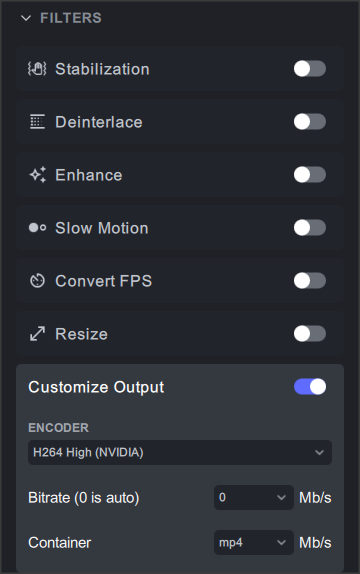
But the question is the naming. Others are saying that even if you do this, the file you get will still have a .mov extension.
Can confirm my previous comment…an export always outputs an .mov extension regardless of what container you choose.
@suraj … Just tagging you to make you aware. Extension of exports are .mov regardless of any setting. Previews seem to get the correct extension.
1 Like
I read it as them saying that even if you set e.g. mp4 in Preferences then you get a .mov output, which is true. I get a .mp4 extension.
No, I can tell you that the output is correct (via mediainfo)…but not the file extension. I tried several and all I get is .mov.
All I can say is that I always get the extension I set in the Customise Output section. Of course I can’t speak for anybody else.
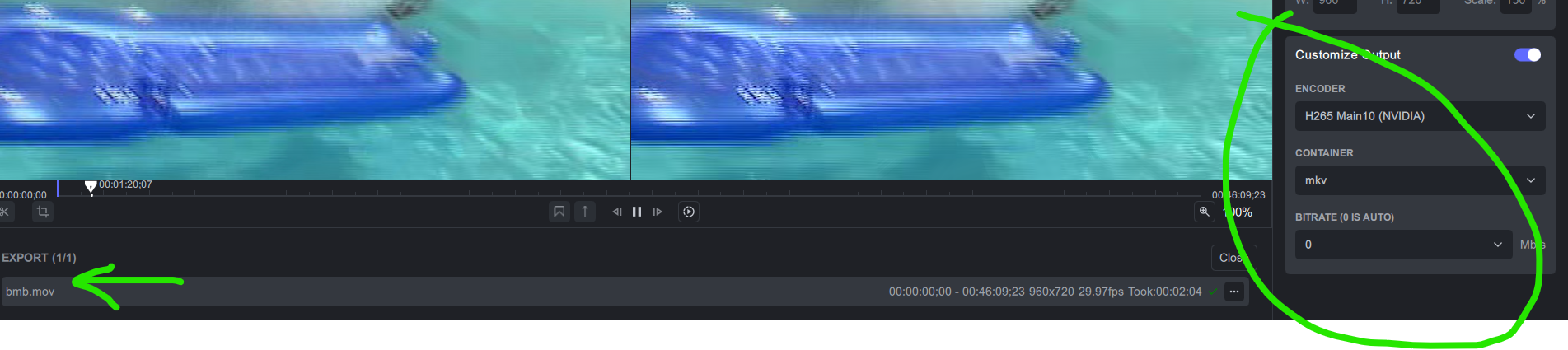
You don’t have to convince me of what you’re getting. I simply said it works fine for me.
trying on my side the same to see if i get the same (for now, if i set up mp4 or mkv, i’m getting mp4 and mkv with custom output + export (not export As).
output setting in preference is set to mp4.
but noticed that the export in Mkv transcoded the audio in AC3 , when the original track was an AAC one. (Keep audio in preference, and transcode turned off)
(if I output in Mp4, i’m getting an AAC file but not the same bitrate as the original, but at 192 (original is 320)
Found a problem: I am attempting to crop a video while deinterlacing.
I set the crop window as:

And the Export AS displayed a small delta where the checkmark would be and not rendering is happening.
This is the error window contents:
No accelerated colorspace conversion found from yuv420p to bgr48le.
No accelerated colorspace conversion found from yuv420p to bgr48le.
No accelerated colorspace conversion found from yuv420p to bgr48le.
No accelerated colorspace conversion found from yuv420p to bgr48le.
No accelerated colorspace conversion found from yuv420p to bgr48le.
No accelerated colorspace conversion found from yuv420p to bgr48le.
No accelerated colorspace conversion found from yuv420p to bgr48le.
No accelerated colorspace conversion found from yuv420p to bgr48le.
No accelerated colorspace conversion found from yuv420p to bgr48le.
No accelerated colorspace conversion found from yuv420p to bgr48le.
No accelerated colorspace conversion found from yuv420p to bgr48le.
No accelerated colorspace conversion found from yuv420p to bgr48le.
Invalid too big or non positive size for width ‘840’ or height ‘280’
Failed to configure input pad on Parsed_crop_0
Error reinitializing filters!
Failed to inject frame into filter network: Invalid argument
Error while processing the decoded data for stream #0:1
Qavg: -nan(ind)
1 frames left in the queue on closing
Conversion failed!
I then removed the crop information, and the rendering conversion is running at 10mbps is 34 fps!
Love the new sidebar scrolling fix. Works great!
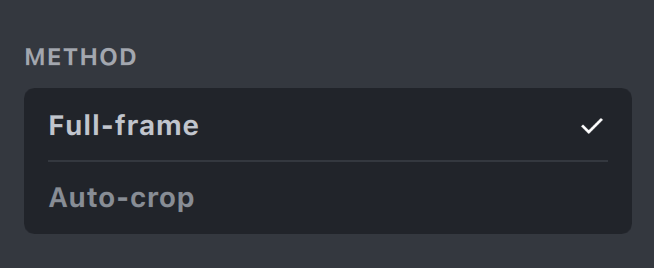
One super minor thing I noticed: the ‘Method’ section of ‘Stabilization’ is still scrollable / takes scroll focus away. I.e. if your mouse cursor is over ‘Full Frame’ or ‘Auto Crop’ then scrolling will try to scroll that element instead of the entire sidebar.
It would be a nice touch to restore the scissors and the magnifying glass as they were last time the software shuts down.
Attempting to re-process an .mp4 file originally produced (deinterlaced) in Topaz 3–.34a results in this error:
No accelerated colorspace conversion found from yuv420p to bgr48le.
No accelerated colorspace conversion found from yuv420p to bgr48le.
No accelerated colorspace conversion found from yuv420p to bgr48le.
No accelerated colorspace conversion found from yuv420p to bgr48le.
No accelerated colorspace conversion found from yuv420p to bgr48le.
No accelerated colorspace conversion found from yuv420p to bgr48le.
No accelerated colorspace conversion found from yuv420p to bgr48le.
No accelerated colorspace conversion found from yuv420p to bgr48le.
No accelerated colorspace conversion found from yuv420p to bgr48le.
No accelerated colorspace conversion found from yuv420p to bgr48le.
No accelerated colorspace conversion found from yuv420p to bgr48le.
No accelerated colorspace conversion found from yuv420p to bgr48le.
No accelerated colorspace conversion found from yuv420p to bgr48le.
No accelerated colorspace conversion found from yuv420p to bgr48le.
No accelerated colorspace conversion found from yuv420p to bgr48le.
No accelerated colorspace conversion found from yuv420p to bgr48le.
No accelerated colorspace conversion found from yuv420p to bgr48le.
Unsupported channel layout “6 channels”
Qavg: -nan(ind)
Error initializing output stream 0:1 – Error while opening encoder for output stream #0:1 - maybe incorrect parameters such as bit_rate, rate, width or height
Questions:
- What is “bgr48le”?
- Why doesn’t it recognize it’s own audio/video encoding specs? (I’ve attached a MediaInfo file from the input video.) -Somehow, when this file is loaded in Topaz, it thinks the file is larger than 720x480 - Interesting…
02-1VOB DIR.txt (3.1 KB)
- I also attempted to duplicate this using an mp4 clip generated by Topaz 3–.34a at 1920x1080 and there was no problem.
-
I would like to request ProRes LT and Proxy as the 422 files are mostly overkill.
-
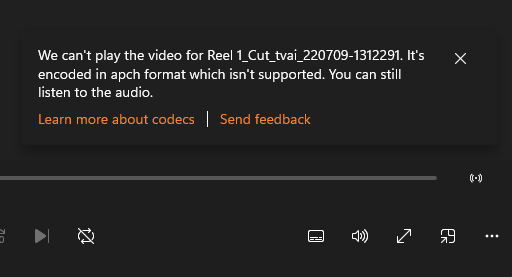
I’d like the ProRes files to work in Premiere Pro. Both from .33a and .34a the ProRes I’ve exported from TVAI (or the previews) only go into PP as audio and no video displays. Potplayer and VLC do play them. I’ve tried exporting with little change only the Enhance/Artemis/Low quality, noisy. When I export with nvida H264 High or H265 Main it works as expected.
-
It’s a problem that the most recent export or preview is at the bottom of the list as it scrolls off screen
thanks very much.
PS: Here’s the only error message any of the players displayed in case thats helpful:
1 Like
