I’m starting to sound like a broken record here but I will keep requesting these ‘quality of life’ changes until I get an acknowledgement about them:
Please add an option in the menu to view and copy the FFmpeg command for the currently selected filters/options without having to start an export job.
Please set the menu behaviour for the various filters/options on the right to collapse when you select another one. Otherwise the scrolling becomes irritating when several options are open/selected.
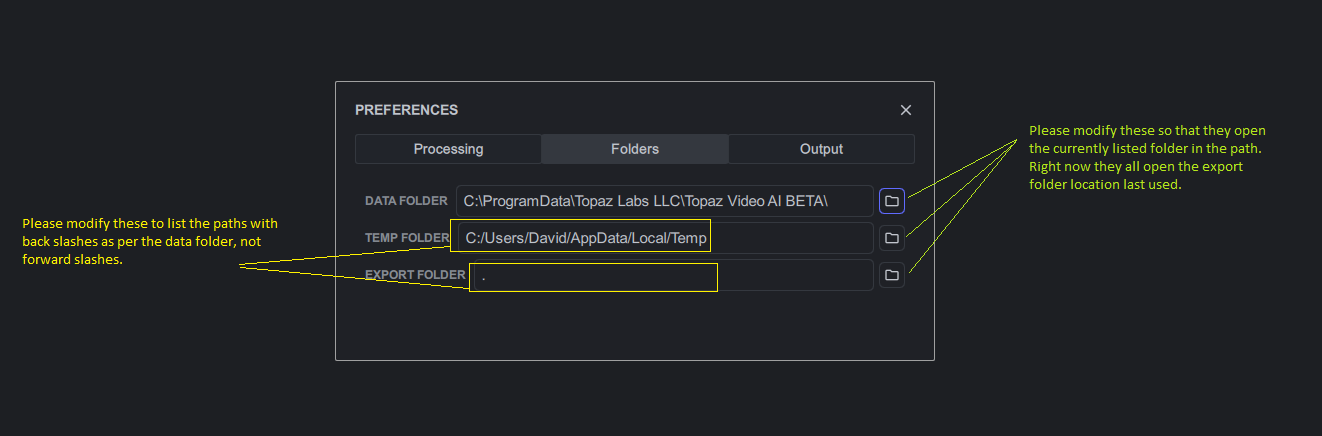
Please fix the folders options page as per the picture below, this should be an easy fix!
Also, performance is currently abysmal, I get 3.16 seconds per frame in this beta and 1.2 seconds per frame in 2.6.4 processing the same clip (tried selecting GPU and maxing memory slider, also tried auto, no difference).
Probably not a bug per se; but certainly a quality of life suggestion:
Having multiple previews with sync’d settings and positions on the timeline would be useful. In the current public release you have the option for a comparison view that’s absent in the beta. Currently when selecting a “preview” the clip auto plays (possibly an option to disable autoplay). If I run multiple previews of the same timeframe from my input video having them sync automatically or having an option to select multiple that you can flip between that are sync’d to the same timecode would be useful (currently they sync in time if you go back and forth selecting them but its not clear when they’ll do it.)
I quickly tested this release, I wanted to export file - it started proccessing, but in between GUI crashed and disappeared, but ffmpeg proccess was still working, but terminated it anyway.
I have one suggestion about processing flow - stabilize option shouldn’t be after deinterlacing? I work mostly with interlaced stuff, and when it is stabilised by this feature, output just wiggles top/bottom. IMHO stabilizing interlaced frames makes no sense:D
One thing I have noticed with the program, even going back to the earliest Alpha, is that when the program has crashed the actual converting may still be running in the background.
To find out just refresh the File Explorer page you are downloading to (if you are on Windows) to see if the size changes.
If it is still running you can normally find it in Task Manager as ffmpeg.exe. That way you can decide if you want to leave it running or not.
Has anyone noticed any difference in speeds depending on the format of the original video? For example, an MKV taken directly from a DVD, compared to one converted to H264 or H265?
did you tested with an another file or source ? i tried with an Mkv/Mpeg2/idx-sub, and Mkv /H264/PGS (bluray) subtitle, and it didn’t crashed. i don’t have many of them unfortunatly to test, and see if would make any issue. is your MKV has been done makeMkv ?
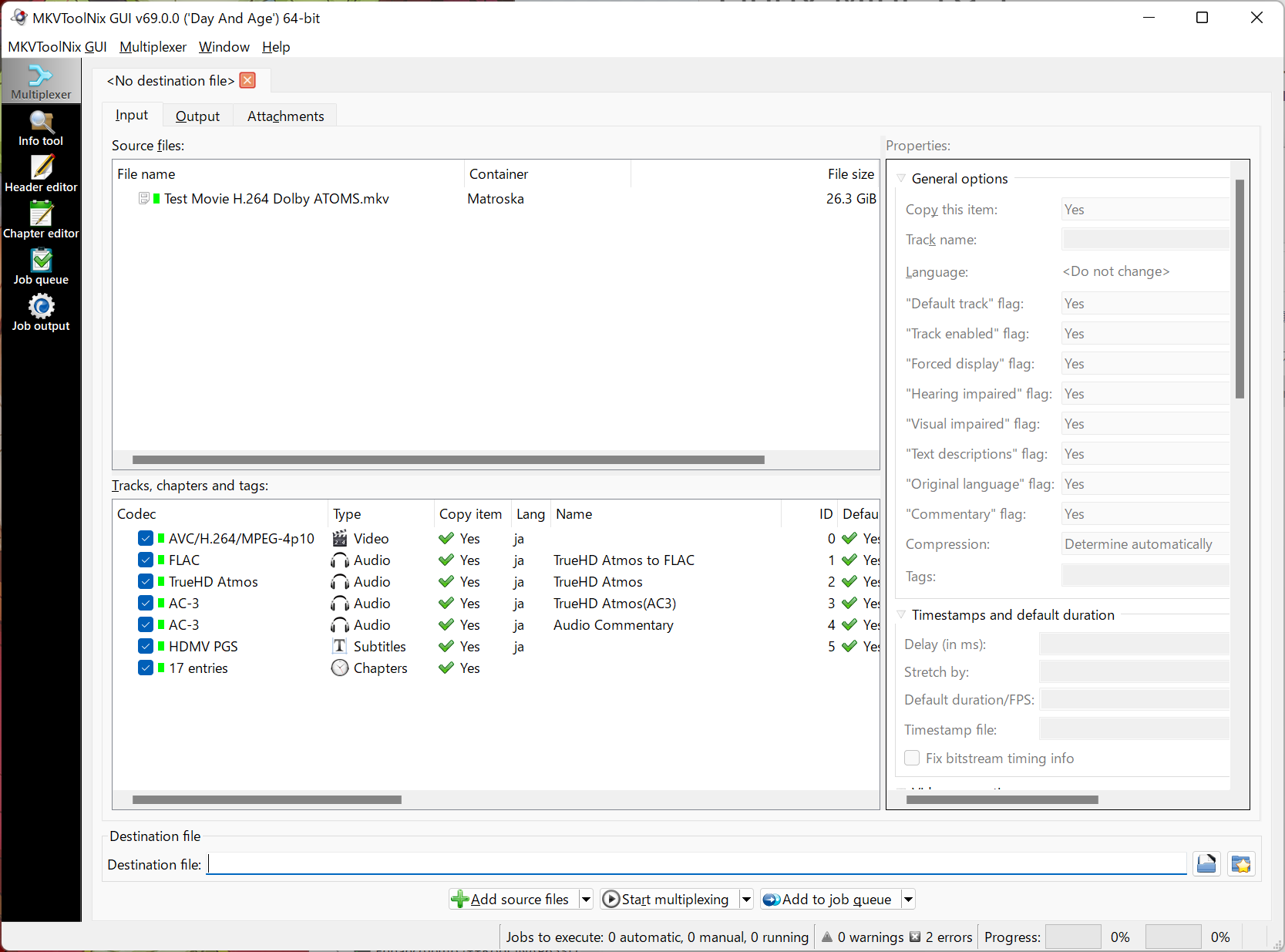
It is recommended to examine the MKVs that fail to convert with the MKVToolNix GUI.
Normally, the video should be lined up in ID0, the audio and subtitles in ID1 and after, and the respective Codecs are recognized.
If MKV is recognized by MKVToolNix GUI but not by VEAI (FFMPEG), try re-multiplexing with MKVToolNix, which may improve the situation.
Personally I’ve only been testing the stabilizer as that is the key upgrade for me.
It has improved where it seems to work with 2 out 5 clips (compared to 1 out of 5 with the previous beta) I’ve tested but still finicky where some parts of a clip will stabilize but not others. When a subject moves, the software seems to have trouble stabilizing the clip and the export looks the same as the original.
Still not sure why it works well on some and not at all on others.
Preview when stabilizing is still a black screen on the ‘after window’ until after the render.
the only thing i know for sure is that the stabilisatoin model is very recent, and will be improved certainly once 3.0 will be out, when topaz can resume their works on the models. i didn’t tried yet the stabilisation. until then i was using the one from newblueFx.
Unable to parse option value "0" as video rate
Unable to parse option value "0" as video rate
Incompatible pixel format 'yuv422p10le' for codec 'hevc_videotoolbox', auto-selecting format 'p010le'
Failed to configure output pad on Parsed_veai_stb_0
Error reinitializing filters!
Failed to inject frame into filter network: Invalid argument
Error while processing the decoded data for stream #0:1
Qavg: 161.412
2 frames left in the queue on closing
Using an M1 Macbook Pro. Encoding H265 Main 10, bitrate 0
I think it could be related to loading models. This was on a fresh install. After a few tries it started working and has worked since.
imported a 720x480 29.97 4/3 interlaced MKV with mpg2 video file. for unknown reason, VEAI tell it’s a 640x480 video.
rendering : Artemis high Quality . Resize = 1440x1080.
time result on a preview of 2 seconds : 0.58spf total : 39 seconds
Same video converted to Mp4 H264, No de interlacing so the interlacing is burned in the video, 29.97, recognized as 704x480 by VEAI (the line under the thumbnail) both are 720x480 by mediainfo). 4/3.
rendering Artemis high quality. resize 1440x1080
time result on a preview of 2 seconds : 0.58/0.59spf Total : 40 seconds
If an error occurs, the following cases are possible
The original file is corrupt or out of specification.
If only the container is wrong, redoing the multiplexing may fix it.
The container is using a codec that is not supported.
For example, when converting WMV (VC1 & WMA) to mp4, VEAI (FFMPEG) will give an error if it is set to “Copy” because mp4 does not support WMA.
In that case, you need to change the container to MKV or convert the WMA to AAC or something else.
A simple way to check to see if these are the cause is to do an Export without setting any VEAI filters.
If the error still occurs, the file may be abnormal or the output settings may be wrong.