Hi everybody, I find strange the stacking order of AI.
Why the Deinterlace AI engine is not a the top of stack ?
Stabilization should be processed after Deinterlacing !
Also why the Convert FPS Ai engine is at the bottom of the stack when you consider it could be quite interesting to modify the FPS prior to any visual enhancements!
Few questions that may be someone will be kind enough to answer…
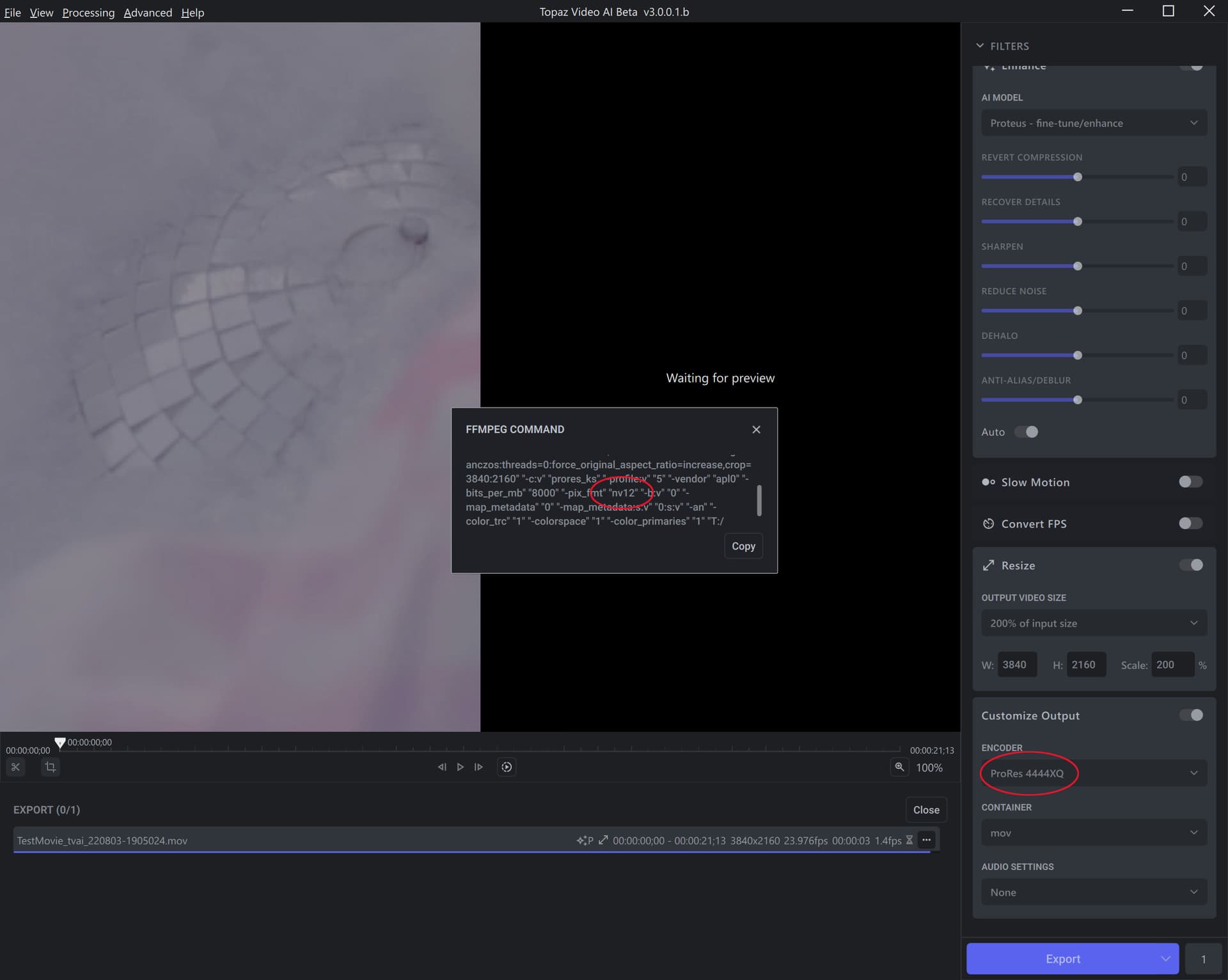
When ProRes 4444XQ is selected, the pix_fmt set for FFMPEG is set to “NV12”.
FFMPEG is converting to “yuv422p10le” with an error, but I think it is correct to set “yuv444p10le” instead of “NV12”.
(ProRes 4444XQ should be yuv444p12le, etc., since it can use 12 bits, but prores_ks only supports up to 10 bits.)
FFMPEG warning
Incompatible pixel format ‘nv12’ for codec ‘prores_ks’, auto-selecting format ‘yuv422p10le’
Hey, yesterday night, i found this message on the ffmpeg Veai Fork at Github, so i assume that your request is in progress. as it’s not present in the yesterday’s change log, it’s certainly not yet ready :
Topaz Video AI Redistributables 5.1.0.1
Pre-release
released this 14 hours ago
[ topaz-v5.1.0.1]
These redistributables correspond to the FFmpeg version used in Topaz Video AI Beta 3.0.0.1.b
New update has made the app unusable to me on my M1 Max. It’s slowed to a crawl to the point of not working at all even when just selecting the models to be used for processing a video.
Please make it possible to view and copy the FFmpeg command generated for the currently selected filters/options without having to start an export job. Right now you can only select ‘FFmpeg command’ when you click the button next to an active or finished export job.
Also thank you for implementing the aspect ratio/padding options!
Criticism: Being able to onlu run Proteus Auto in the default mode it great, but it has a few drawbacks. - IMO, the greatest one is that the default setting for Revert Compression is far too timid. Insufficient decompression can result in worse artifacts that too much does. I have a file, (one out of many,) where insufficient revert compression causes the image to ripple.
Not being able to run Proteus in (full) Auto without also being able to add or decrease emphasis on some of its parameters effectively defeats its usefulness.
Rendering scenes with actors showing sharply and clearly in rooms where the stucco walls stretch and shake like behind them like rubber is not very useful. The culprit appears to be Dione Robust Dehalo.
I miss having the ability to place a start marker in Preview mode. Sometimes making an adjustment to the filters will start a new preview from the same place and sometimes it just goes back to the beginning of the input file.
Progress bar working and export works well. Stabilization is still finicky improving some videos and doing nothing with others (super 8 film and standard def videos).
Also haven’t noticed a difference when increasing the strength of stabilization.
Preview window doesn’t work for me but I haven’t yet tried transcoding audio as suggested in the notes.
since the estimate button work on the 2.x.x version, and now this full auto, NEVER i used the estimate as a final setting. always it has been used as something to start eventually, but always modified. same with all the others topaz software, and with all software with such a setting in general. probability that an auto is right is rare.
I think it would be very useful to be able to bias some of the Auto settings. Proteus has never cranked up the decompression (or noise) factors high enough to eliminate a lot of artifacts. The problem with this is that after the fact, the unresolved rubbish becomes ‘enhanced’ with the rest of the picture.
Perhaps there is some approach to preparing video prior to running it through the current Proteus Auto that hasn’t been explained, but so far Auto has only produced mediocre results. It’s also amazingly slow.