This whole release needs to be recalled. It’s many steps backward from the previous one.
3 Likes
PNG output has returned…i guess that’s something.
Why some settings stick & some don’t i have no idea. It stays on 265 Main 10…mkv…etc.
Yet every time i open it i have to full screen it again.
2 Likes
Exactly the same for me. Two 5 second previews that took just over 3 minutes each to complete for they showed 0.0fps, 0%, no progress bar. No sign of anything happening other than GPU near 100% and after 3 minutes the preview appears.
1 Like
I have no audio set.
I poked around and see that it’s actually processing.
The output file is slowly growing in size and I can open it and see the progress.
It’s just the progress indicator in the GUI is just stuck at 0%.
2 Likes
I suspect that Topaz betas are not so much something that is ready for review, but rather whatever they have available at the time of their internally imposed deadline. So, some things are broken that were previously working and some things work differently than intended. It is a work in progress and we as beta testers have the privilege of looking over their shoulder while they go, “Oops, that’s not quite working, is it….”
1 Like
@lee.keels @toby.riding @david.123 @Martyprod @luciovids @vokhoa408 @loxiye @saxmanjc @Imo @johnnystar or anyone having an issue with the progress bar not working, please re-download the app from the same links posted above and re-install. Thanks.
5 Likes
That seems to work, thank you! Can we get some scrubbing that works next? It’s basically useless without being able to see as you scrub.
1 Like
Yeah thats got er. It now shows downloading models…etc & the progress bar.
1 Like
Thanks. Working for me too now.
1 Like
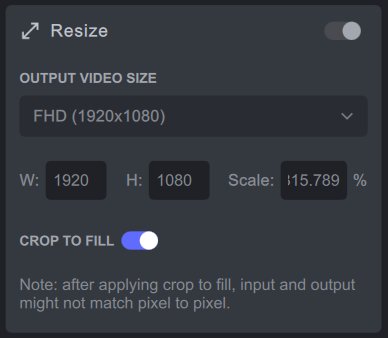
Does the resize scale perentage really need to be shown to three decimal points?
I see no practical use for that level of detail, especially since it stops the first digit of the perecntage value from showing.
Surely it would be better to allow up to three decimal points to be entered when “Custom Scale” is selected but round off the percentage for other selections. “Custom Scale” is the only option where you can mouse click in the % scale box and see the full value set there.
3 Likes
Could you please list the Changelog, Known Issues, etc. separately for the GUI and FFMPEG filter(&model)?
That way, it will be easier for testers to isolate whether GUI or the FFMPEG filter update is the cause of the new bug.
1 Like
Working now, thanks!
1 Like
I’ve read in a previous version post that they are now on a “Tuesday beta release” timing, so we’re getting new betas each Tuesday (or so), which lets us test fixes and find new bugs, even if not all feedbacks have been taken care of.
BTW I agree guys with the seek cursor that is fixed… but useless for now as we don’t see the video while moving the cursor. Maybe a fix in the next release?
2 Likes
Anyone else having problems with VOB files? Nevermind. It’s on the known issues list.
3 Likes
yes, we’ll get a new release every tuesday.
it’s clear that the cursor part is not easy to fix. so i assume the way it work like now like told before, is temporary. it’s take certainly more than one week to fix.
1 Like
suggestion :
-
available in a lot of software. Double clicking on a button or setting usually reset it. it would be good to have it on proteus fine tune. double clicking on one of the button (denoise etc…) put it back to its default/reset position (zero).
-
having a remove all videos for the previews like the input videos would be interesting too.
3 Likes
M1 Mini Mac 8GB
installed “update” worked
added data folder path to desktop folder
ran model again
No accelerated colorspace conversion found from yuv420p to bgr48le.
No accelerated colorspace conversion found from yuv420p to bgr48le.
No accelerated colorspace conversion found from yuv420p to bgr48le.
No accelerated colorspace conversion found from yuv420p to bgr48le.
No accelerated colorspace conversion found from yuv420p to bgr48le.
No accelerated colorspace conversion found from yuv420p to bgr48le.
No accelerated colorspace conversion found from yuv420p to bgr48le.
w:720 h:576 fmt:yuv420p sar:16/15 → w:720 h:576 fmt:bgr48le sar:16/15 flags:0x0
Output size set to: 720 576
Here Config props model with params: up ddv-3 1 0 0 1 720 576 0.020000 50.000000
2022-08-03 08-52-24 Thread: 0x100fdc580 Info Model: “ddv-3” Device: 0 VRAM: 1 threads: 0
Failed to configure output pad on Parsed_veai_up_1
Uninit called for prob-3 1
Uninit called for ddv-3 1
Error reinitializing filters!
Failed to inject frame into filter network: Invalid argument
Error while processing the decoded data for stream #0:0
Statistics: 0 bytes written, 0 seeks, 0 writeouts
Qavg: nan
Statistics: 2536916 bytes read, 42 seeks
a few things as well
ProRes 420 is coming out as 422
Transcode Audio is only 128kbps as aac, should be able to lift that ?
720x576 file in is reading as 768x576 https://the-aolani-project.s3.wasabisys.com/001_MADONNA_BAD_GIRL_93_99.mxf
Cant get the system to point to the right models abin and getting the red splash screen on login, cant do any testing anymore even when I point at the “2.6.2 models”
1 Like
Also doesnt seem to be cleaning up after itself and leaving a lot of files in the temp location, even after startup
1 Like
Please add the ability to choose the conversion quality for AAC audio tracks when selecting the “transcode” mode!! 
2 Likes
Hi everybody, I tried to preview 1 second of a video FHD 50fps AVC MP4 with just the Enhance AI (auto setting enabled).
The preview I’ve got was stutering.
Regards.
Vincent.
