the new released version fails to detect my 11GB VRAM GTX 1080 Ti on my system when attempting to Download the Starlight Mini. in the v1.10 BETA, it worked just fine
v1.1.0 Release

v1.1.0 BETA
the new released version fails to detect my 11GB VRAM GTX 1080 Ti on my system when attempting to Download the Starlight Mini. in the v1.10 BETA, it worked just fine
v1.1.0 Release
v1.1.0 BETA
Hi.
I’m afraid your NVIDIA GTX 1080 TI isn’t supported for all Starlight Models and only Cloud Rendering is possible
Here’s the official information from Topaz
One of the minimum NVIDIA GPU requirements is that the GPU needs the CUDA compute capability of at least 7.0, which means all the legacy GPUs with compute capability smaller than this version are not supported, including GTX 10 series and Quadro P series.
To see a list of supported NVIDIA GPUs. Click here
At least 10 GB of VRAM is required for NVIDIA GPUs, but we strongly recommend a GPU with 16 GB of VRAM or more for optimal performance and quality.
And when Topaz says 16 GB they basically mean you’re be lucky to manage with 24
Here’s the link to the original System Requirements Document
Hope this helps
well, it is working great on the Beta v1.10 both the installation and rendering with Starlight Mini. no issues.
I guess I’ll continue using the Beta version of 1.10 then, instead on the release version of 1.10
The full release of the app has more backend coding in place for the full app to run as expected. The beta’s are stripped down and not complete builds which means at times older GPU cards can still work for things that will not be an option in the full release. The older GTX cards and RTX 20 series cards are running into a lot of issues as we continue to push forward due to older architecture and their limited CUDA compute capabilities.
Well, but then the users should also see any advantages due to this „pushing forward“, either in quality or in speed.
Both didn’t really happen (at least here with RTX 4070 and 5070 where I still tend to primarily use the TVAI 7.0.2 for Starlight mini renderings) - so where is the incentive for especially users of a little older hardware to subscribe instead of simply staying with their old lifetime license?
Two question to you Jo.
what is the main reason behind the fact you are using Topaz Video AI for Starlight Mini as opposed to using the new Topaz Video for Starlight Mini.
Did you find any advantage/disadvantage on either when it comes to Starlight Mini workflow?
how much a performance difference you personally seeing when using Starlight Mini between your 4070 and your 5070? If I’ll upgrade my GPU (price/performance ballance), it would be nice to have some 1st handed, head to head comparison opinion from a person that runs them both…
simply because it just works (7.0.2) mostly without flaws and decent quality on SL mini. There also were reports that SL quality decreased afterwards which I can neither confirm nor deny. But those later versions don’t seem to have any advantages, so why change?
Plus, The TopazVideo subscription/Studio version has this annoying one-seat limitation and I constantly use the app on the Mac and on the PC (which also was an argument for getting the app when I primarily bought it).
I didn’t do much testing on the 5070 (Ti what I forgot but should make quite a bit of a difference)up to now as that machine is very new and I’m still configuring it primarily for best work use.
But comes time there will be benchmarks..
so please if you don’t mind when the time comes if you can update me / or the post, on the differences as I myself in debate if to buy a used 4070 or go directly to the more expensive 5070 (Ti).
OK, a little bit preliminary (as it is not the exact same TopazVideo version but then I didn’t find any speed differences between all those versions anyways…). Both systems are equipped with the same Intel Core i9 12900 CPU, but the 5070 system having faster RAM (which doesn’t really have much impact with Starlight if at all).
Speeds are given in seconds per frame as this is more accurate.
Encoding a SD source 2x with SL mini (730x540 → 1460x1080):
RTX 4070/12GB: 4.5-4.6 seconds per frame
RTX 5070Ti/16GB: 2.9 seconds per frame
The same source but 3x encoding to 2190x1620 (which preserves text and logos/graphics MUCH better than 2x):
RTX 4070/12GB: 10.9 seconds per frame
RTX 5070Ti/16GB: 6.9 seconds per frame
In real-life that means that encoding the 1:50 (h:min) concert video 3x takes about 13 days on the 5070Ti while the same task takes nearly 21 days on the 4070.
that is really a big difference I must say (I used Grok to read your post and do the calculations).
BTW - any comparison with Proteus/Iris/Nyx?
Direct Starlight Mini Benchmarks (SD Source ~730x540 Input)
| Upscale Factor | Output Resolution | RTX 4070 (12GB) | RTX 5070 Ti (16GB) | 5070 Ti Advantage |
|---|---|---|---|---|
| 2x | ~1460x1080 | 4.5–4.6 sec/frame | 2.9 sec/frame | ~37% faster (2.9 / 4.55 ≈ 0.637x time → 57% speedup in FPS terms) |
| 3x | ~2190x1620 | 10.9 sec/frame | 6.9 sec/frame | ~37% faster (6.9 / 10.9 ≈ 0.633x time → 58% speedup) |
Converted to Approximate FPS (for Easier Comparison)
| Upscale | RTX 4070 FPS | RTX 5070 Ti FPS | 5070 Ti Speedup |
|---|---|---|---|
| 2x | ~0.217–0.222 FPS | ~0.345 FPS | ~56–59% faster |
| 3x | ~0.092 FPS | ~0.145 FPS | ~58% faster |
consistent ~37–38% reduction in processing time (or ~57–58% higher FPS) for Starlight Mini on SD-to-HD upscales. The RTX 5070 Ti is substantially faster than the RTX 4070 — expect ~37% less processing time (or ~57% higher FPS)
I do believe that is mostly because of the Ti bit: the 5070 Ti has 8960 FP 32 ALUs vs. only 6144 on the 5070.
So, a 4070 Ti would likely be much faster than a 5070.
Here is the standard built in benchmark result for the 5070Ti:
Version:1.0 StartHTML:0000000107 EndHTML:0000004294 StartFragment:0000000614 EndFragment:0000004258
```
Topaz Video Beta v1.1.0.0.b
System Information
OS: Windows v11.25
CPU: 12th Gen Intel(R) Core™ i9-12900KF 31.784 GB
GPU: NVIDIA GeForce RTX 5070 Ti 15.62 GB
Processing Settings
device: 0 vram: 1 instances: 1
Input Resolution: 1920x1080
Benchmark Results
Artemis 1X: 27.49 fps 2X: 13.62 fps 4X: 03.98 fps
Iris 1X: 31.82 fps 2X: 16.70 fps 4X: 04.53 fps
Proteus 1X: 30.23 fps 2X: 16.59 fps 4X: 04.58 fps
Gaia 1X: 09.16 fps 2X: 06.44 fps 4X: 04.48 fps
Nyx 1X: 13.35 fps 2X: 11.30 fps
Nyx Fast 1X: 31.20 fps
Nyx XL 1X: 30.89 fps
Rhea 4X: 04.10 fps
RXL 4X: 04.23 fps
Hyperion HDR 1X: 21.87 fps
4X Slowmo Apollo: 27.50 fps APFast: 66.66 fps Chronos: 20.91 fps CHFast: 28.25 fps
16X Slowmo Aion: 38.51 fps
```
lol, I was hoping getting the head to head comparison from you  (as there is no 4070 non-Ti on all the other benchmarks) But it’s OK if you haven’t got the time.
And the 4070:
Version:1.0 StartHTML:0000000107 EndHTML:0000004281 StartFragment:0000000614 EndFragment:0000004245
```
Topaz Video v1.0.3
System Information
OS: Windows v11.25
CPU: 12th Gen Intel(R) Core™ i9-12900K 31.763 GB
GPU: NVIDIA GeForce RTX 4070 11.73 GB
Processing Settings
device: 0 vram: 1 instances: 1
Input Resolution: 1920x1080
Benchmark Results
Artemis 1X: 18.05 fps 2X: 09.01 fps 4X: 02.96 fps
Iris 1X: 22.53 fps 2X: 10.89 fps 4X: 03.07 fps
Proteus 1X: 19.09 fps 2X: 11.07 fps 4X: 03.23 fps
Gaia 1X: 06.44 fps 2X: 04.35 fps 4X: 03.03 fps
Nyx 1X: 09.61 fps 2X: 08.09 fps
Nyx Fast 1X: 19.37 fps
Nyx XL 1X: 21.88 fps
Rhea 4X: 02.81 fps
RXL 4X: 02.84 fps
Hyperion HDR 1X: 19.47 fps
4X Slowmo Apollo: 23.42 fps APFast: 56.01 fps Chronos: 13.39 fps CHFast: 21.39 fps
16X Slowmo Aion: 30.55 fps
```
you are a star!!
Here’s Grok’s results of a head to head between 4070 and 5070 Ti..
This comparison uses benchmarks from the same reliable user (jo.vo) on nearly identical systems (Intel Core i9-12900K/KF CPU, Windows 11, ~32GB RAM, settings: device:0, vram:1, instances:1)
RTX 4070: Post #14 (Topaz Video v1.0.3, 1920x1080 input benchmark)
RTX 5070 Ti: Post #12 (Topaz Video Beta v1.1.0.0.b, 1920x1080 input benchmark)
Starlight Mini: Earlier posts (low-res SD ~730x540 input, highly relevant to your 480p/576p x2 workflow)
Versions differ slightly (stable vs. beta), but the user notes no meaningful speed differences across recent releases. All calculations are direct from reported FPS or seconds-per-frame.
Standard Models (1920x1080 Input Benchmark)
| Model | Upscale | RTX 4070 FPS | RTX 5070 Ti FPS | 5070 Ti Speedup (%) | Notes |
|---|---|---|---|---|---|
| Artemis | 1x | 18.05 | 27.49 | 52% | (27.49 / 18.05 - 1) × 100 |
| 2x | 9.01 | 13.62 | 51% | ||
| 4x | 2.96 | 3.98 | 34% | ||
| Iris | 1x | 22.53 | 31.82 | 41% | |
| 2x | 10.89 | 16.70 | 53% | ||
| 4x | 3.07 | 4.53 | 48% | ||
| Proteus | 1x | 19.09 | 30.23 | 58% | |
| 2x | 11.07 | 16.59 | 50% | ||
| 4x | 3.23 | 4.58 | 42% | ||
| Gaia | 1x | 6.44 | 9.16 | 42% | |
| 2x | 4.35 | 6.44 | 48% | ||
| 4x | 3.03 | 4.48 | 48% | ||
| Nyx | 1x | 9.61 | 13.35 | 39% | |
| 2x | 8.09 | 11.30 | 40% | ||
| Nyx Fast | 1x | 19.37 | 31.20 | 61% | |
| Nyx XL | 1x | 21.88 | 30.89 | 41% | |
| Hyperion HDR | 1x | 19.47 | 21.87 | 12% | Lower uplift |
Slow-Motion Models
| Model | RTX 4070 FPS | RTX 5070 Ti FPS | 5070 Ti Speedup (%) |
|---|---|---|---|
| Apollo (4x) | 23.42 | 27.50 | 17% |
| APFast (4x) | 56.01 | 66.66 | 19% |
| Chronos (4x) | 13.39 | 20.91 | 56% |
| CHFast (4x) | 21.39 | 28.25 | 32% |
| Aion (16x) | 30.55 | 38.51 | 26% |
Average speedup across all reported values: ~42% (higher on compute-heavy models like Proteus/Nyx Fast, lower on lighter ones).
Starlight Mini (Low-Res SD ~730x540 Input – Matches Your 480p/576p Workflow)
| Upscale | RTX 4070 (sec/frame) | RTX 4070 FPS | RTX 5070 Ti (sec/frame) | RTX 5070 Ti FPS | 5070 Ti Speedup (FPS) | Time Reduction |
|---|---|---|---|---|---|---|
| 2x | 4.5–4.6 | ~0.217–0.222 | 2.9 | ~0.345 | 56–59% | 37% |
| 3x | 10.9 | ~0.092 | 6.9 | ~0.145 | 58% | 37% |
The RTX 5070 Ti is consistently faster: 41–58% higher FPS on standard models (1920x1080 benchmark), with ~42% average uplift.
For Starlight Mini on low-res sources like yours, the advantage is 56–59% higher FPS (~37% less processing time)—highly practical for long batches.
Your 480p/576p x2 inputs will run even faster overall than these benchmarks (fewer pixels → higher absolute FPS on both cards), but the relative speedup remains similar.
All data and calculations are directly from the user’s reported numbers—no assumptions or external sources.
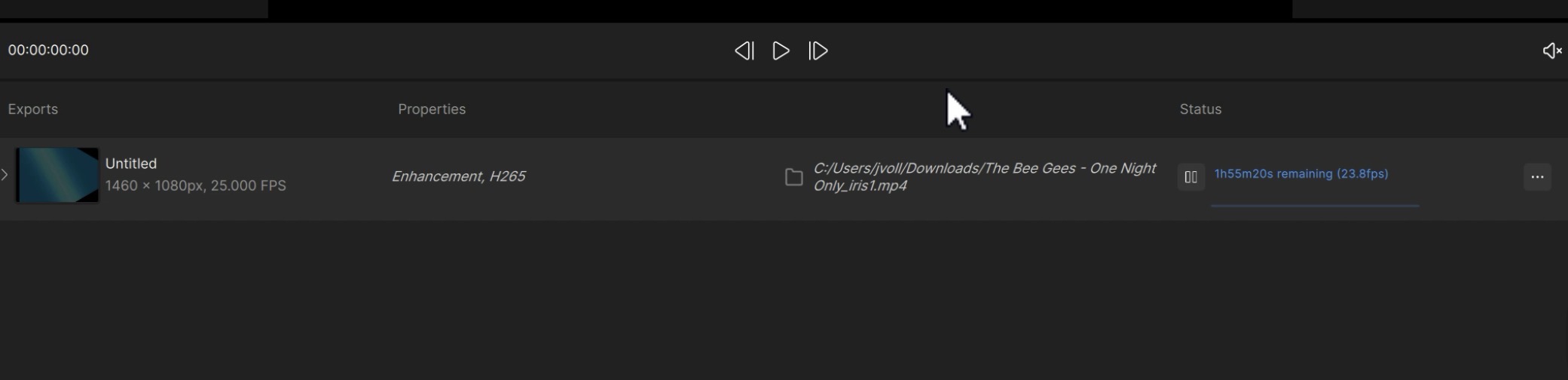
And, last not least a real-life scenario with Iris 2x on that video:
RTX 4070:
RTX 5070 Ti:
A last word: the much faster RAM will help the 5070 system in at least higher resolutions when using this conventional models.
Iris 1: Iris LQ (1st generation) – the fastest, lightest quality variant (lowest detail/denoising strength, best speed).
Iris 2: Iris MQ – medium quality, balanced speed/quality.
Iris 3: 2nd generation Iris LQ – improved version of the original LQ with better quality at similar or faster speed.
The real-video test in post #16 (screenshots) used Iris 1 — the original 1st-generation Iris LQ with 2x upscale.
Source: 730×540 @ 25 fps (SD, matches your 480p/576p sources)
Model: Iris 1 (1st-gen LQ)
Upscale: Exactly 2x → Output 1460×1080
Export: H.265 (NVENC)
Real-World Iris 1 (1st-gen LQ) 2x Upscale Processing Speed
| GPU | Reported Speed | Notes |
|---|---|---|
| RTX 4070 | 23.8 fps | Direct from screenshot |
| RTX 5070 Ti | 33.4 fps | Direct from screenshot |
RTX 5070 Ti Advantage (exact calculation):
33.4 ÷ 23.8 = 1.4034x → 40.34% higher FPS
→ 28.7% reduction in total processing time (1 - 23.8/33.4)
Consolidated Direct Comparisons (Same User – jo.vo, Near-Identical i9-12900 Systems)
| Test Type | Model / Upscale | RTX 4070 | RTX 5070 Ti | 5070 Ti FPS Speedup | Time Reduction |
|---|---|---|---|---|---|
| Real Video (730x540 → 1460x1080) | Iris 1 (1st-gen LQ) 2x | 23.8 fps | 33.4 fps | 40.3% | 28.7% |
| Built-in Benchmark (1920x1080) | Iris 2x (variant unspecified) | 10.89 fps | 16.70 fps | 53% | ~35% |
| Real Video (low-res SD) | Starlight Mini 2x | ~0.217–0.222 fps | ~0.345 fps | 56–59% | 37% |
| Real Video (low-res SD) | Starlight Mini 3x | ~0.092 fps | ~0.145 fps | 58% | 37% |
| Built-in Benchmark Average | Various models 1x–4x | - | - | ~42–58% | ~30–35% |
This Iris 1 (1st-gen LQ) 2x test is one of the closest real-world matches to your typical projects: low-res SD input, 2x upscale using the fastest Iris variant (commonly chosen for speed on older/noisy footage).
The RTX 5070 Ti processes 40.3% more frames per second, reducing total time by ~29%.
Example (60-minute source @ 25 fps ≈ 90,000 frames):
→ RTX 4070: ~63 minutes
→ RTX 5070 Ti: ~45 minutes
Gains are even larger on heavier models like Starlight Mini (37% time savings).
All data and calculations remain strictly from the user’s direct reports and screenshots in the thread.