I just noticed a frame-stuttering issue with the SLP 2.6 output on TV 1.7.0. Below is the MediaInfo for SLP 2.5 on TV 1.6.1 (left) and SLP 2.6 with Sharpness 3 on TV 1.7.0 (right), using the 5-second test clip from my previous post that I used to test the export time.
I noticed that the General section on the right is missing the frame rate information, but I’m not sure whether this is directly related to the frame stuttering during playback.
I didn’t notice the issue yesterday because the test clip was too short, so the stuttering wasn’t noticeable. I discovered the issue today while processing a 20-minute video. When playing the video in MPV, I can see some jittering and stuttering, and the issue is even more noticeable during playback in Adobe Premiere Pro. The playback symptom looks like this: https://www.youtube.com/shorts/HOa3jN9k9J0
I also tried completely uninstalling and then clean-installing TV 1.7.0, but the stuttering still persists. For now, I’ve had to roll back to TV 1.6.1 to process the longer video. With TV 1.6.1 and SLP 2.5, the stuttering no longer occurs.
I’m not sure if this is related to the Starlight 1-frame issue listed in the bug-fix list from the Topaz Video 1.7.0 release post, but when I drag the test clip into LosslessCut and select “without chapters,” I noticed that the output has 123 frames instead of the 125 frames in the original clip.
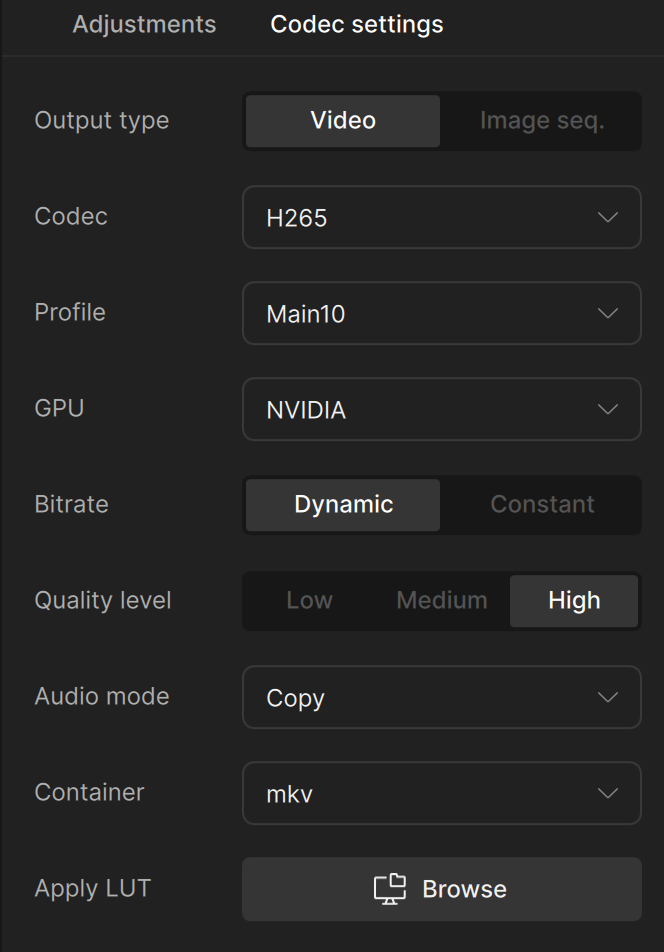
Edit: The output codec settings, using SLP 2.6 on the clip 1920x1080 x2 to 3840x2160 with Sharpness 3
I think the problem isn’t the missing frame rate info, but the fact that the Video section in the 2.6 output shows the frame rate as ‘Variable’. Something in the source material is making Topaz think the framerate is inconsistent, rather than a steady 23.976. In fact, the ‘Variable’ property is probably WHY the frame rate isn’t in the General metadata.
You might want to pass it through Handbrake to re-encode the source material.
Thanks for pointing the VFR in metadata, indeed, I found the frame rate mode says “variable” too on the 20-minute output video from SLP 2.6, whereas the frame rate mode from my previous outputs via SLP 2.5 are all “constant”.
I managed to use Hybrid to re-encode the output video, with “CFR Output” checked and set frame to 23.976; playback in MPV and Adobe Premiere Pro has no stuttering anymore.
I am not sure what causes TV 1.7.0 to export the source video to VFR on my end. I rechecked most of my source video’s metadata that I used to work with, their frame rate mode are all Constant.
Anyway, this could be the temp solution for now to use the SLP 2.6.
Would you be able to share the CFR source file that caused the output to be VFR for testing?
You can securely submit your file(s) to our Dropbox using the link below. Please be sure to send me a note to let me know you sent something and include the file name. Submit File to Dropbox
Adding another solution, I just found exporting to MOV and MP4 will output as CFR, only the MKV output as VFR and cause the playback stuttering. Should have found out earlier last week.