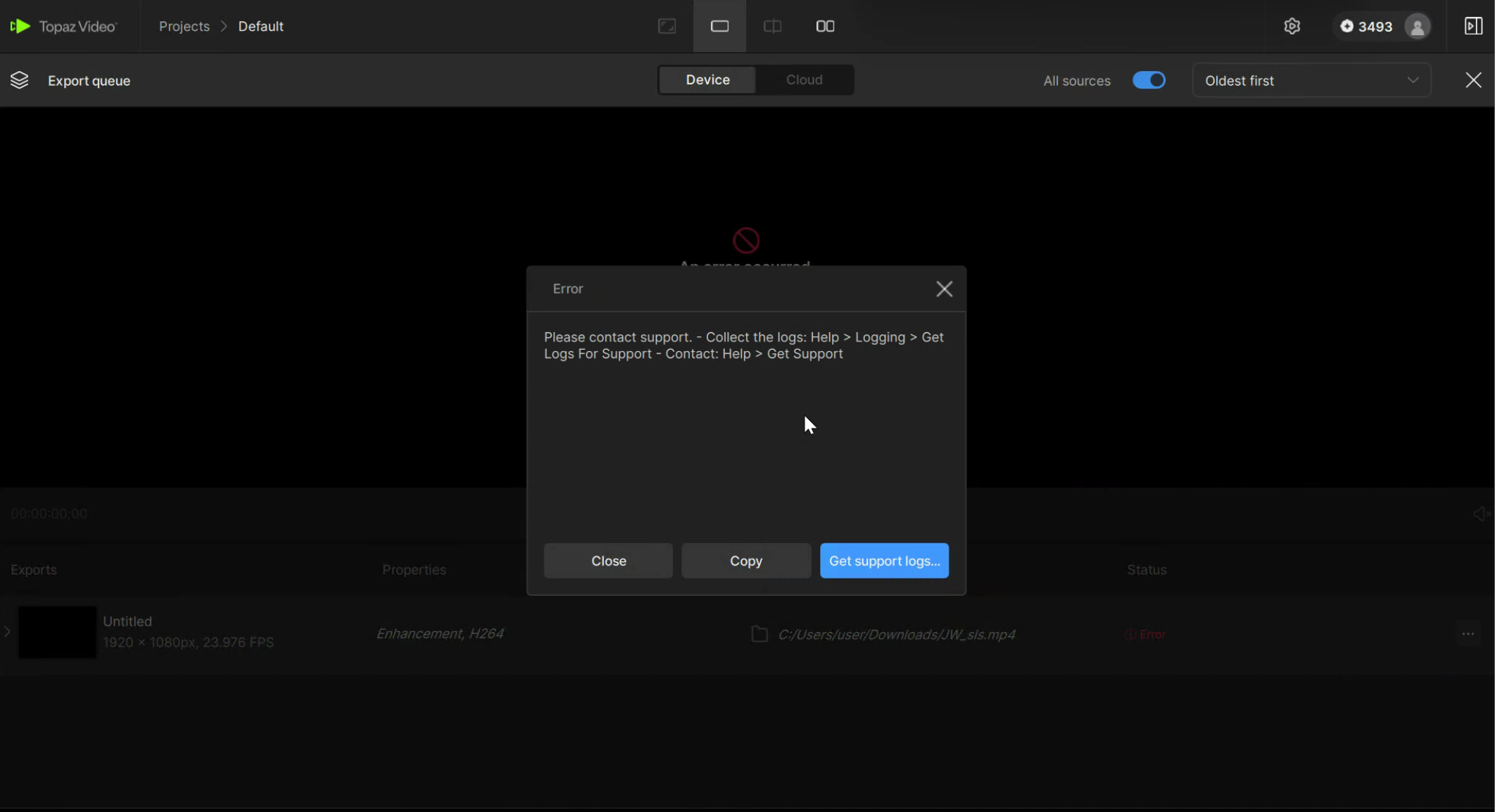
Topaz Video won't initiate Starlight/SLS but all other models work fine

I’ve installed Topaz on a new machine with a 4090 with a goal to take advantage of SLS. I’m making sure I’m not running the code on the old and new hosts concurrently. But after starting the export of either SL/SLS it fails almost immediately after “loading model”. Still works on other host except SLS as that host doesn’t meet required VRAM.

Seems like I’m getting some issue loading a module that might be auth related? Should I delete the auth file and start over

DxDiag.txt (66.2 KB)
logsForSupport.zip (20.7 KB)

I added ### to redact some of the stuff below, in the logs it’s not redacted.

2025-09-24 02-10-02.627 Thread: 5544 Info File Loaded successfully: C:/Users/user/Desktop/20221010_XBOX_EDIT_02.mkv
2025-09-24 02-10-17.085 Thread: 5544 Info FF Process Output: 6 Runner: Authenticating

2025-09-24 02-10-22.138 Thread: 5544 Info FF Process Output: 6 Traceback (most recent call last):

  File "<string>", line 260, in <module>

  File "<string>", line 246, in require_watermark

  File "<string>", line 112, in __init__

  File "<string>", line 116, in setup

  File "<string>", line 149, in parse_auth

KeyError: 'relogin'

Runner: main

2025-09-24 02-10-29.834 Thread: 5544 Info FF Process Output: 6 Runner: exit code: 1
Runner: Finalizing
module search path: ['C:\\ProgramData\\Topaz Labs LLC\\Topaz Video\\models\\DLLs', 'C:\\ProgramData\\Topaz Labs LLC\\Topaz Video\\models\\Lib', 'C:\\ProgramData\\Topaz Labs LLC\\Topaz Video\\models\\Lib\\site-packages', 'C:\\ProgramData\\Topaz Labs LLC\\Topaz Video\\models', 'C:\\ProgramData\\Topaz Labs LLC\\Topaz Video\\models\\Lib\\site-packages\\starlight_utils-0.2.0-py3.12.egg']

platform: Windows

Machine ID: 22e6b04f-94ad-4f7d-ba34-08bcab72a2d6

auth file path: C:\ProgramData\Topaz Labs LLC\Topaz Video\models\auth.tpz

platform: Windows

Contents of auth.json:

b'{"auth_studio":"eyJ###o5M","expiration_date_studio":"2026-03-15","isLegacy_studio":true,"issued_studio":"2025-09-24","pro_studio":false,"refresh_expires_studio":"2026-03-15","refresh_studio":"eyJ###vZU","relogin_studio":"2025-10-24","status_studio":"OWNED","username_studio":"dax@pamp###.com"}'

Error: Got exception while importing package

2025-09-24 02-10-29.933 Thread: 5544 Info FF Process Output: 6 Runner: Done
2025-09-24 02-10-29.950 Thread: 5544 Info process exited: 6 0 0
2025-09-24 02-10-29.950 Thread: 5544 Info 6 Preview file C:/Users/user/Desktop/20221010_XBOX_EDIT_02_502332147.mp4 not found
2025-09-24 02-10-29.952 Thread: 5544 Info "C:/Program Files/Topaz Labs LLC/Topaz Video/ffmpeg" QList("-hide_banner", "-nostdin", "-y", "-i", "C:/Users/user/Desktop/20221010_XBOX_EDIT_02_502332147.mp4", "-i", "C:/Users/user/Desktop/20221010_XBOX_EDIT_02.mkv", "-c:v", "copy", "-map", "0:v", "-map", "1:a?", "-map_metadata:s:a:0", "1:s:a:0", "-c:a", "copy", "-bsf:a:0", "aac_adtstoasc", "-map_metadata", "0", "-movflags", "use_metadata_tags", "-fps_mode", "passthrough", "C:/Users/user/Desktop/20221010_XBOX_EDIT_02_starlight_mini.mp4") true
2025-09-24 02-10-30.096 Thread: 5544 Info started process with program:  "C:/Program Files/Topaz Labs LLC/Topaz Video/ffmpeg"  ,agrs:  QList("-hide_banner", "-nostdin", "-y", "-i", "C:/Users/user/Desktop/20221010_XBOX_EDIT_02_502332147.mp4", "-i", "C:/Users/user/Desktop/20221010_XBOX_EDIT_02.mkv", "-c:v", "copy", "-map", "0:v", "-map", "1:a?", "-map_metadata:s:a:0", "1:s:a:0", "-c:a", "copy", "-bsf:a:0", "aac_adtstoasc", "-map_metadata", "0", "-movflags", "use_metadata_tags", "-fps_mode", "passthrough", "C:/Users/user/Desktop/20221010_XBOX_EDIT_02_starlight_mini.mp4")  working dir:  "C:/Program Files/Topaz Labs LLC/Topaz Video"
2025-09-24 02-10-30.096 Thread: 5544 Info FFmpeg process started 6 CMD: C:/Program Files/Topaz Labs LLC/Topaz Video/ffmpeg -hide_banner -nostdin -y -i C:/Users/user/Desktop/20221010_XBOX_EDIT_02_502332147.mp4 -i C:/Users/user/Desktop/20221010_XBOX_EDIT_02.mkv -c:v copy -map 0:v -map 1:a? -map_metadata:s:a:0 1:s:a:0 -c:a copy -bsf:a:0 aac_adtstoasc -map_metadata 0 -movflags use_metadata_tags -fps_mode passthrough C:/Users/user/Desktop/20221010_XBOX_EDIT_02_starlight_mini.mp4
2025-09-24 02-10-30.098 Thread: 5544 Info ~TProcess(): destroyed
2025-09-24 02-10-30.735 Thread: 5544 Info FF Process Output: 6 e[48;5;0me[38;5;0m[in#0 @ 0000015F5B2B5AC0] e[0me[48;5;0me[38;5;0mError opening input: No such file or directory

e[0me[48;5;0me[38;5;0mError opening input file C:/Users/user/Desktop/20221010_XBOX_EDIT_02_502332147.mp4.

e[0me[48;5;0me[38;5;0mError opening input files: No such file or directory

e[0m
2025-09-24 02-10-30.754 Thread: 5544 Info process exited: 6 -2 0
2025-09-24 02-10-30.755 Thread: 5544 Info Going to delete path: "C:/Users/user/Desktop/20221010_XBOX_EDIT_02_502332147.mp4"
2025-09-24 02-10-30.755 Thread: 5544 Info Close and delete path "C:/Users/user/Desktop/20221010_XBOX_EDIT_02_502332147.mp4"
2025-09-24 02-10-30.755 Thread: 5544 Info Going to delete path: "C:/Users/user/Desktop/20221010_XBOX_EDIT_02_starlight_mini.mp4"
2025-09-24 02-10-30.755 Thread: 5544 Info Close and delete path "C:/Users/user/Desktop/20221010_XBOX_EDIT_02_starlight_mini.mp4"
2025-09-24 02-10-31.227 Thread: 5544 Info ~TProcess(): destroyed
1 Like

Dax, just replied to your email support ticket and I appreciate the follow up there as well as for posting here on the forum.

Uninstalled and reinstalled.

I’m not sure how this would fix a Python KeyError, but … still see exact same behavior.

The error in Python “KeyError” IIRC means the object doesn’t have a key “relogin”. So the software is trying to ind a relogin key in auth?? or somewhere and can’t find it. Would it make sense to have an engineer familiar with the python code embedded in the Topaz Video windows .exe to see what’s going on here?

The runner.exe process is the one that is failing and it’s failing with:

2025-09-24 02-10-17.085 Thread: 5544 Info FF Process Output: 6 Runner: Authenticating
2025-09-24 02-10-22.138 Thread: 5544 Info FF Process Output: 6
Traceback (most recent call last):
File “”, line 260, in
File “”, line 246, in require_watermark
File “”, line 112, in _init_
File “”, line 116, in setup
File “”, line 149, in parse_auth
KeyError: ‘relogin’
Runner: main
2025-09-24 02-10-29.834 Thread: 5544 Info FF Process Output: 6 Runner: exit code: 1
Runner: Finalizing

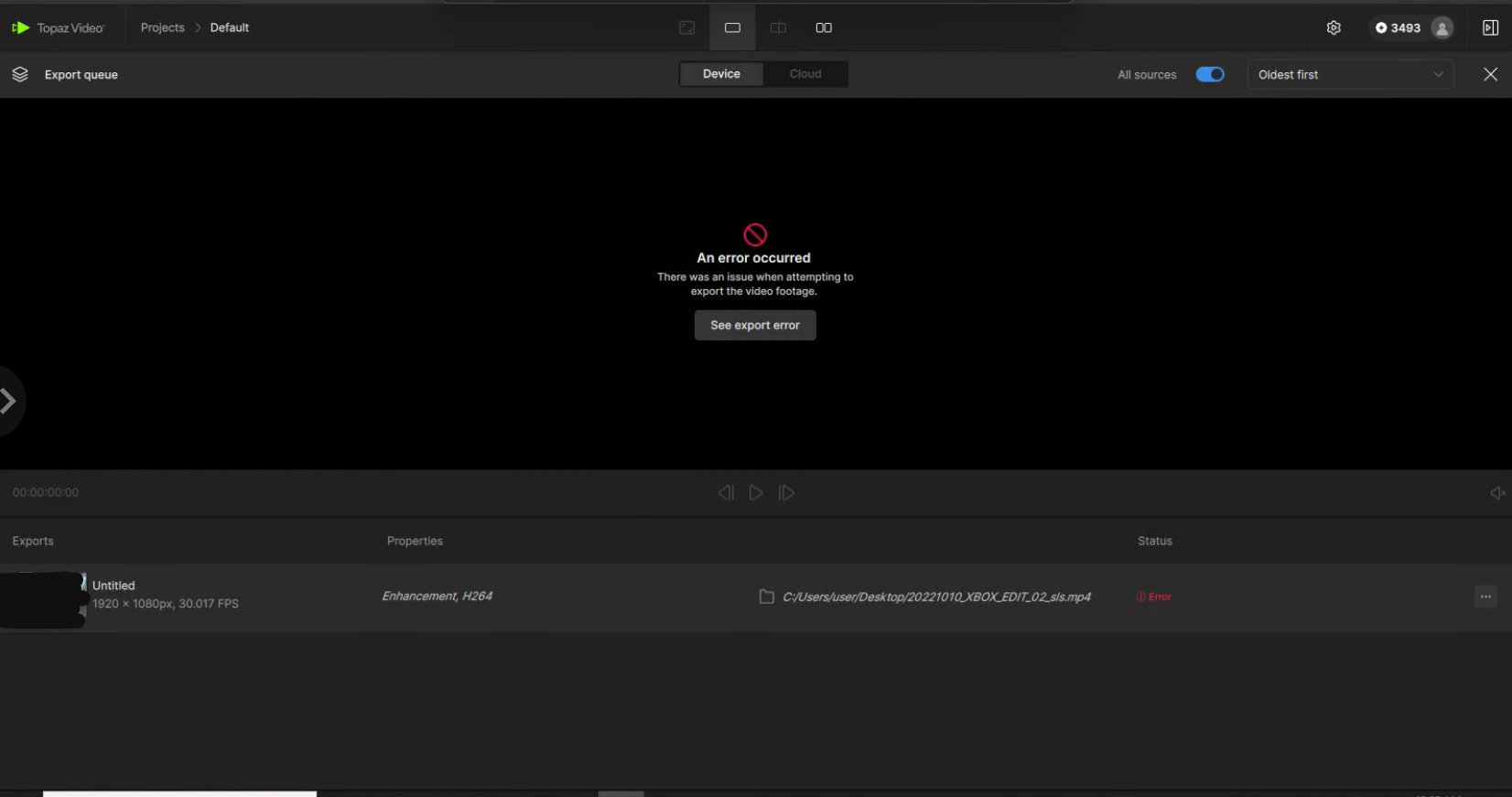
Here;s the screenshot as requested. the logs are the same as before.

I’ve attached two log files, it would seem that the relogin KeyError always occurs ( no .has ? ) , but the difference between working and non-working is what happens next. The working system takes ~30 seconds after “Runner:main” to report:
Info FF Process Output: 16 {“timestamp”: “2025-10-05 21:41:33,310”, “level”: “INFO”, “message”: {“status”: “INITIALIZING”, “frame”: 0, “progress”: 0}}

The broken system immediately after “Runner: main” reports:
2025-09-24 02-10-29.834 Thread: 5544 Info FF Process Output: 6 Runner: exit code: 1

This is then followed by a dump of debug data concerning authentication including what appears to be the decoded auth token and finally ending with

Error: Got exception while importing package

Soon after this exception, runner.exe exits. and the encode fails.

Can I get some insight into why the auth is failing on the new host?

broken_log.txt (5.8 KB)

working_log.txt (2.0 KB)

As requested in the support widget ( never got an email update )

Followed all of the uninstall , regedit and filesystem deletes.

Downloaded from the link provided and reinstalled yet again.

Selected SLS and waited for the model download to finish.

Then loaded a 20 second mp4 video and clicked Encode.

Same failure. Screenshots and logs attached. Looks to be the issue as before

logsForSupport.zip (572.6 KB) EDIT: UPDATED LOGS - didn’t have most recent

new version came out, upgraded… still fails all logs and install logs attached.

logsForSupport.zip (1.0 MB)

Topaz Video Installer Log.txt (9.6 MB)

Applied the newest update 1.0.3 and the problem still persists. As a reminder this failure only occurs with the two Starlight/Astra models but works fine with all other Topaz models I’ve tried.

To prove that the non-working host is downloading at least the astra–1.0 model correctly ( my other working system won’t download astrasharp-1.0 because it doesn’t meet the requirements ) here are the SHA256 hashes from the non-working and working systems. They are identical.

NON-WORKING
Algorithm Hash Path


SHA256 B4F121CDC19190E88701D8966E42BD1B90F032139D50E69886B9A04B97E6F8F1 C:\ProgramData\Topaz Labs LLC\Topaz Video\models\models\astra-1.0\model.part1.bin.enc
SHA256 8D8A07FAC8D412B5CB12B4E595EA49BE89430F2B2785D2A52CA8C5CFF8A6776B C:\ProgramData\Topaz Labs LLC\Topaz Video\models\models\astra-1.0\model.part2.bin.enc
SHA256 F8FF87F01A89599AA93425DE1D86757C2D55B58278EC044422E0DE43CFD14ED3 C:\ProgramData\Topaz Labs LLC\Topaz Video\models\models\astra-1.0\model.part4.bin.enc

WORKING
Algorithm Hash Path


SHA256 B4F121CDC19190E88701D8966E42BD1B90F032139D50E69886B9A04B97E6F8F1 F:\ProgramData\Topaz Labs LLC\Topaz Video\models\models\astra-1.0\model.part1.bin.enc
SHA256 8D8A07FAC8D412B5CB12B4E595EA49BE89430F2B2785D2A52CA8C5CFF8A6776B F:\ProgramData\Topaz Labs LLC\Topaz Video\models\models\astra-1.0\model.part2.bin.enc
SHA256 F8FF87F01A89599AA93425DE1D86757C2D55B58278EC044422E0DE43CFD14ED3 F:\ProgramData\Topaz Labs LLC\Topaz Video\models\models\astra-1.0\model.part4.bin.enc

I have the exact same issue on an RTX 4090…every time I restart Topaz Studio it keeps re-running the system check and re-downloading Starlight

All the other models work but not Starlight or Starlight Sharp. The new version of Topaz Video Topaz Studio seems to have serious issues with the authentication :flushed_face: :

2025-11-01 02-26-57.923 Thread: 12316 Critical [AuthService] Login error 1 [TopazAuthManager]parseAuth got detailsnull

UPDATE

It turned out the media feature pack was missing from Windows N version and the logs did not indicate this, so I was wrong after all :slightly_smiling_face:

Hello, do you happen to use Windows N version by accident? If so make sure to install the Media Feature Pack, Topaz Support helped me resolving the issue with this, now Starlights initializes and exports normally.:slightly_smiling_face:

1 Like

I don’t control the base image of my cloud instance, so it might. Thanks for the tip. I’ll update here with my findings shortly or at least soon-ish. I say soon-ish as I’m using a “cheap” provider so sometimes when I want to start my saved state VM I can’t because the resources are exhausted in the region where the saved state image lives. :person_shrugging:

1 Like

Nope not Windows N ( had never heard of that version… had to look that up ) nor Media Feature Pack. While they have EU nodes which could have been using Windows N , I’ve been testing on the the US nodes which aren’t Widows N nor do they have Media Feature Pack. So still not working.

Still failing. Log attached…

topaz_video_logs.zip (734.3 KB)

The error has now changed… or it’s just more detailed in its reporting. I’m still able to encode using any of the non SL models just fine. It seems anything related to aster fails.

Runner: main

2025-12-31 22-00-53.062 Thread: 1480 Info FF Process Output: 4 Traceback (most recent call last):

2025-12-31 22-00-53.063 Thread: 1480 Info FF Process Output: 4 File “”, line 39, in

File “C:\ProgramData\Topaz Labs LLC\Topaz Video\models\Lib\importlib_init_.py”, line 90, in import_module

return _bootstrap._gcd_import(name[level:], package, level)

       ^^^^^^^^^^^^^^^^^^^^^^^^^^^^^^^^^^^^^^^^^^^^^^^^^^^^

File “”, line 1387, in _gcd_import

File “”, line 1360, in _find_and_load

File “”, line 1331, in _find_and_load_unlocked

File “”, line 935, in _load_unlocked

2025-12-31 22-00-53.065 Thread: 1480 Info FF Process Output: 4 File “”, line 187, in exec_module

File “astradiffusion.py”, line 14, in

import cv2

File “C:\ProgramData\Topaz Labs LLC\Topaz Video\models\Lib\site-packages\cv2_init_.py”, line 181, in

bootstrap()

File “C:\ProgramData\Topaz Labs LLC\Topaz Video\models\Lib\site-packages\cv2_init_.py”, line 153, in bootstrap

native_module = importlib.import_module("cv2")

                ^^^^^^^^^^^^^^^^^^^^^^^^^^^^^^

File “C:\ProgramData\Topaz Labs LLC\Topaz Video\models\Lib\importlib_init_.py”, line 90, in import_module

return _bootstrap._gcd_import(name[level:], package, level)

       ^^^^^^^^^^^^^^^^^^^^^^^^^^^^^^^^^^^^^^^^^^^^^^^^^^^^

ImportError: DLL load failed while importing cv2: The specified module could not be found.

Apparently a more recent version of Topaz Video now reports more details in the logs. This system was on Windows 10 Version N* ( vendor claimed otherwise ). After installing the Media Libraries as explained here:

and then rebooting, the SL encoding worked as expected.

Issue RESOLVED.

* Version N is due to EU B.S. concerning MS and monopoly shenanigans which require some libraries to be missing from the default install. Manually installing the missing media files resolves the issue.

Why does it need that? Doesn’t it use FFMpeg? What about people using lite builds of Windows? What specifically does it need from the features pack in order to work properly?