Hi, when using staxrip to compress videos generated by topaz video, I noticed that the duration is shorter than the original file.
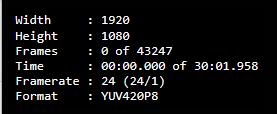
The original video is
“Duration”:“1801.959000000”
“FrameRate_Mode”:“CFR”,
“FrameRate”:“24.000”,
“FrameCount”:“43247”,
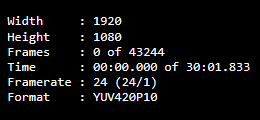
Topaz video ai(GIA 2) gives
“Duration”:“1801.957000000”,
“FrameRate_Mode”:“CFR”,
“FrameRate”:“24.000”,
“FrameRate_Num”:“24”,
“FrameRate_Den”:“1”,
“FrameCount”:“43247”,
When I use mkvtoolnix to remux the files gives
“Duration”:“1801.958000000”,
“FrameRate”:“24.000”,
“FrameRate_Num”:“24”,
“FrameRate_Den”:“1”,
“FrameCount”:“43244”,
Upon investigating the source of the missing 3 frames, I discovered it originated from the file generated by Topaz Video, as verified using timestamp and ffprobe.
- First point — ~1:47.292
Original:
107207
107250
107292 ← disappears
107332
107375
Topaz:
107208
107250
107333 ← jumps from here
107375
Here, Topaz jumped from approximately 107250 → 107333 ms, a jump of 83 ms, when the normal jump would be ~42 ms.
- Second point — ~11:44.625
Original:
704542
704582
704625 ← disappears
704666
704708
Topaz:
704541
704583
704666 ← jumps from here
704708
The exact same pattern appears again: ~83 ms between timestamps, equivalent to skipping a frame interval.
- Third point — ~20:36.375
Original:
1236292
1236332
1236375 ← disappears
1236416
Topaz:
1236291
1236333
1236416 ← jumps from here
1236458
Again: ~83 ms, meaning a gap of ~42 ms is missing.
Checking the frames in virtualdub, these are “+” frames(A drop or null frame, which repeats the previous frame to maintain frame rate per second (FPS) and synchronization)
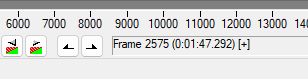
So Topaz is removing these frames and making the previous frames more durable, which is causing these errors in Staxrip (Vapoursynth).
Is there a way to prevent topaz from doing that?
Thanks in advance.
topaz_Timecodes.txt (354.1 KB)
topaz_pts.txt (2.0 MB)
original_Timecodes.txt (354.1 KB)
original_pts.txt (1.4 MB)
