Problem 2: Already tried dragging corners of crop outline only. The aspect ratio is not locked when dragging corners in Custom mode.
Ah okay, so the next series that will come out.
2 Likes
Used to be able to drop ISO file directly, but no longer being able to now. Import also doesn’t have ISO option. Noticed import VOB file is also taking much longer time, ie nothing appears for a while then suddenly appears. Tried a new install and same thing.
I don’t operate with VOB files directly anymore.
I stitch them to single MPEG file to prevent problems with lost frames.
2 Likes
I recommend using MakeMKV to convert your DVDs…definitely the best program to extract the video to the original quality without loss but having a ready and perfectly readable video file.
3 Likes
Yes, this is my tool of choice for that also 
what can i say? such a great recommendation. just tried it and works perfectly on old ISO that has frame time issue. thanks a lot.
only minor issue is it seems to not carrying subtitle tracks over, maybe future version will improve.
1 Like
hmm
Powered by generative AI.
A training process specifically designed for high-resolution and natural output, suitable for professional use cases.
Clearly not TVAI but Photo AI. Also, those pages make several ‘greater than reality’ claims. Even though those pages should be an authoritative source, that’s possibly just in there because it’s an AI ‘buzz word.’ From reading the TVAI page, I doubt the marketing team knows exact details of what they are selling.
Make sure to support the developer. I’ve been using MakeMKV for many years and it’s absolutely worth every bit of the $60 for the license. Unlike TVAI, the license is perpetual and never expires after the initial purchase.
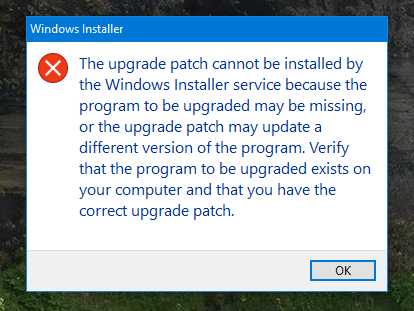
Going from 4.1.1 to 4.1.2. 4.1.1 is installed and I can use it now so what’s going on.
I noticed when i installed the 4.1.1 update it changed the folder from ‘Topaz Labs’ to ‘Topaz Labs LLC’ This was done by the previous updater, so I would hope the new updater would know it was changed by the previous.
TVAI licence is perpetual, if you don’t renew the upgrade you can in theory use what you already have indefinitely (but not get any new stuff they later add).
1 Like
And what is bad about Mkvtoolnix?
And what is bad about Mkvtoolnix?
MakeMKV and MKVToolnix are two very different apps.
1 Like
First of all, 8K has 4x as many pixels as 4K, not 2x. This means under an optimal condition it’d take you four times as long to encode the preview in 8K.
Four and a half theoretical reasons I can think of as to why you’re observing about 1/3 the speed you’d expect, depending mostly on your specific machine and clip.
- A) The upscale may cross a scaling boundary where it needs to do yet another 2x upscale before down-scaling to your requested resolution.
- B) The resolution you upscale to may not have a TensorRT model available for it, and the program falls back on the much slower ONNX FP16 variant of the model. You can check if this is the case by copying the FFMPEG command for the 8K rendition job, paste it into the terminal and add the verbose logging option (-ffmpeg -v debug or -v trace). In the wall of text being output there will be a line that says something like “loading time for model file: [model].tz”. If [model] reads something like “…-rtXXX-XXXX.tz” then tensorrt is used. If it lacks that suffix, then tensorrt is not used.
- C) The program picks a different model variant (kernel) that has more model parameters (think slower to process per pixel) because Topaz has deemed that variant optimal in terms of quality for your specific resolution. I.e. different variants being used for 4K vs 8K. You can verify this as well with the same command mentioned for B above.
- D) A combination of the above.
- E) Some bug in the app

1 Like
By perpetual I meant MakeMKV sends all program updates and enhancements at no cost for as long as you use the software. Unlike TVAI, you don’t get stuck with an application with known issues on the day your license expires. Unless you’re willing to pay a large sum to correct those known issues, your essentially stuck with them forever. It’s not the users fault and it’s not fair, but that’s the business model Topaz employs to keep users hooked and coming back for more. In my case, I just watch and read the forum, hoping for positive software fixes, enough so to justify the cost to get back in.
1 Like
Under a more traditional license, buying 4.x would get you all the updates until 5.x came out. OTOH, looking at the few remaining products that still use this business model, a license would probably be closer to $500 and upgrades more like $250. And we’d probably see 5.x come out no more than two years after 4.x. So the out of pocket would probably end up being the same.
I think the point @LowFlight is making is that Topaz stop not only development of version (say) 4.x but they also stop releasing known and ongoing bug fixes as soon as 5.x is released and, even worse, as soon as the next 4.x.x is released! They drop it. Completely. Immediately. So hard luck if your support and upgrade expires just after a buggy version.
I am not aware of any other major piece of commercial video software that does this, certainly everything that I have ever purchased over the last 20 years continues to release bug fixes in parallel to the newer version, at least for several months and that usually deals with the worst, and often all, of the bugs. Even after their support and upgrade period ends.
So whilst the TVAI license is indeed perpetual as I mentioned, they use what for me is a rogue or at least non-standard release model so it is not surprising that many purchasers will not realise this until too late.
1 Like
Parallel updates has not been my experience at all. For example, back in the days before they went subscription, once Adobe released Acrobat X, updates for Acrobat 9 ended, and X updates ended when XI came out. And the same was true for Photoshop, Illustrator, etc.
The big differences here are that TVAI has way more frequent updates. I can’t think of any SW product I’ve ever used that spit out new builds 2-4 times every month. And the 12-month renewal licensing scheme means that users can get cut off right in the middle of the current version.
Considering that TVAI 3.x ran from Oct 22-Oct 23 (12 months), 2.x from Mar 21-Oct 23 (19 months) and 1.x from April 20-Mar 21 (13 months), it probably wouldn’t make much of a difference in revenue if Topaz just renamed v1.x-v4.x to “v20-v23,” and then gave users access to all builds of whichever version they originally bought.
