I’ve been a devoted owner, user and fan of Topaz video since version 1. I am at a point now where I fail to see any rhyme or reason for the direction of the application, mainly because it is moving forward at a breakneck speed so sloppily, a never-maturing alpha/beta product, in my opinion. I still fully respect version 2 and even version 3 to some extent, but I will not be following it going forward until I see it renew its dedication to user experience. So long for now, wishing Topaz video and its customers all the best!
11 Likes
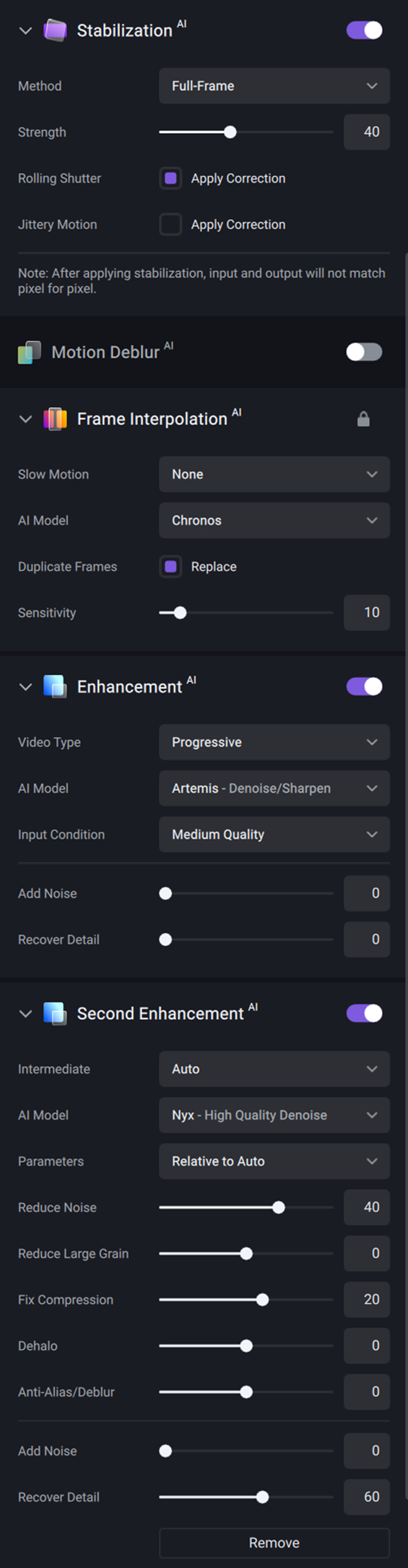
Sorry, maybe on Mac but on my PC, I have the same speed while loading the CPU+GPU much more. Here are my settings and it runs at 4FPS. I don’t complain too much.
Having an output Preview slows down nothing at all, unless you kept it running all the time. The normal procedure was to periodically press somewhere on the timeline, then spacebar to watch a bit of output, and then spacebar again to disable the output preview. Without being able to do that any more, like I said, you need to rely solely on the few preview samples you took earlier, and then just hope for the best. Often you encounter like a face in the back somewhere that gets too distorted, and you realize you need to redo the entire render. That is no longer possible. I am not sure who one day thought “Ooo, I have a great idea: let’s remove output view from our software; people will love that!” But I know I’m baffled by the decision.
4 Likes
That’s not going to be possible unfortunately. Current and future models make use of AVX2 instructions and this requirement will remain for v4.x releases of Video AI.
5 Likes
Number one complaint with TVAI 3 and TVAI 4 is that the UI is messed up some how. People have been pleading for a NLE plugin version for awhile now. Making it would reduce the amount of complaints against the UI because once it’s done, those people are never going back to the TVAI UI.
Similarly, to me, the TVAI CLI is a fully working program. It does everything I want it to. I basically only use the user interface as a reference for how to write commands for new AI models. And I’ve been doing that since TVAI 3 came out.
According to me, the CLI is in a stable state where making a plugin with it makes sense.
I’m glad you have noticed that TVAI changes the colors. Sadly no one can change the ultra complex history of digital video—to make it easy to get color conversion correct with every possible combination. TVAI works in RGBle48. Everything that goes into it must be converted to that and everything that comes out of it must be treated as being in that colorspace. What works for one video, does not always work for another. There’s always another colorspace / resolution / format / container combination that has not been accounted for.
Anyway, yes they should let us override the input colorspace. For the output colorspace, I’ll worry about that once we can override the input colorspace.
4 Likes
AVX2 is already very old. Running Video AI on a computer with a CPU that doesn’t support AVX2 should be considered a pointless endeavour to begin with.
5 Likes
Overriding the input colorspace as an input option is a good step we could take to overcome some of these RGB48 conversion issues. We will definitely look into this and see what can be done to make it visually clear how the video will look post-conversion.
4 Likes
Ceterum censeo carthaginem…
But the Iris slowness on Apple Silicon especially/extremely for the 2x upscale is still there and for higher resolutions the 1x model also - and the really bad thing here is that the 2x upscale is the most widely use scenario.
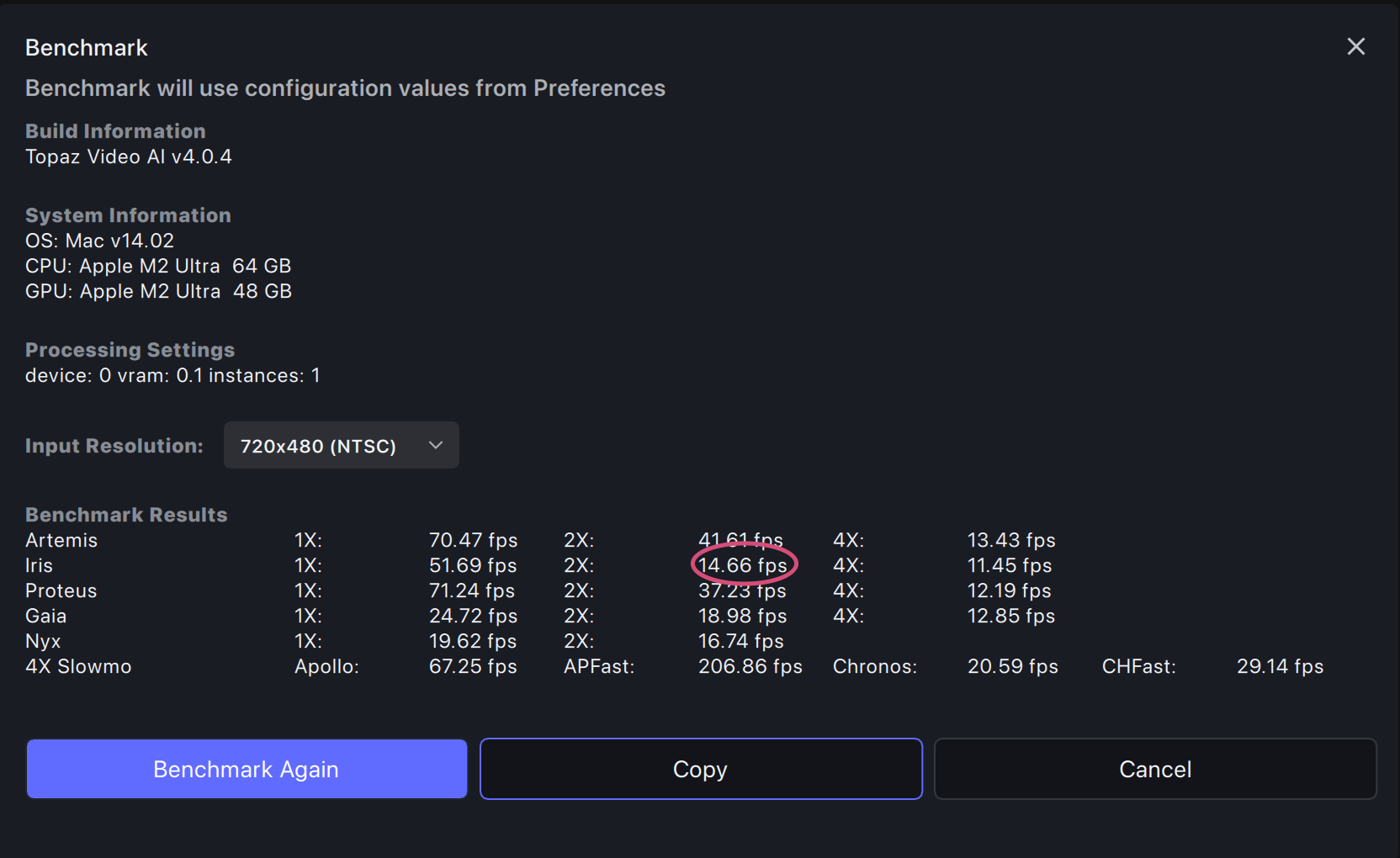
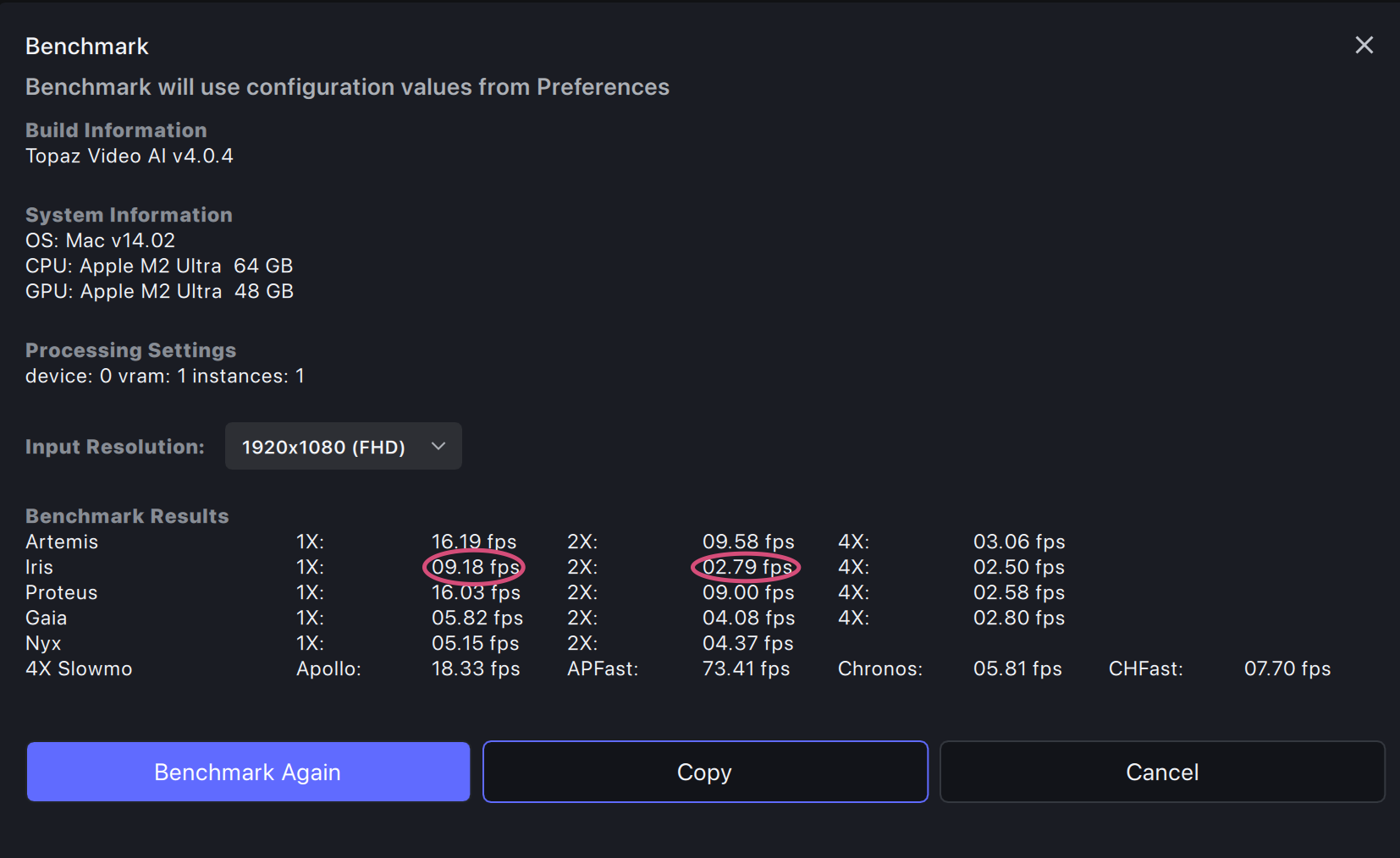
It doesn’t have to be like that as it seems. Iris was MUCH faster earlier (at the time of the 3.4.0.1.a) just then had crazy artifacts on the early Sonoma builds. The fix for those artifacts lead to that bad slowdown.
BUT: Now with Sonoma 14.2 those artifacts have gone even with the old, faster model. So Apple seems to have fixed something in between.
I tried by “patching” the 4.0.4.0.b with the old Iris1.json and respective model files from August (a big thank you to TimeMachine!) and have better speed without artifacts. Unfortunately I don’t have a copy of the fastest version and I only have the old fast model files for Iris V1 and not V2, but still this helps a bit.
SO: why don’t you just revert to the old Iris V1 model from the 3.4.0.1.a time and the Iris V2 model from 3.5.0.1 as those are really MUCH faster than what we have now. And seem to work without artifacts at least on my configurations (M1 Pro 10c/16c and M2 Ultra 24c/60c) with Sonoma 14.2.
1 Like
Is it possible to do as “PRIORITY” the Error fixing first before thinking of a new major version or any plugins ?!
It would be very nice to have a really good working version first…before thinking of anything else…
4 Likes
Added to changelog:
- Fixes full-frame stabilization missing last few frames.
4 Likes
In any case, you will certainly have to plan it when you have to treat in Ofx and Davinci Resolve and its different color spaces. No ?
If have a question:
Is it planned to be able to use Tveai with Davinci Resolve even if I use Aces in Davinci Resolve Studio ? This is what I use the most.
Thank’s.
Well having a plug in is one thing, but having a plug in to a buggy version of the program is another, not to mention that I fully expect the plug in to be buggy as well. UI is one set of complaints for people, for sure, but even if one does not mind the UI, if the host application does not do the expected job, drop frames, slower than expected rendering, crashes etc. New coat of paint with the use of plug in won’t change that.
As for color management. There is a hint in the name “color management” meaning its management of color. There are many devices and software color profiles out there, and color management is a system and protocol designed to manage those differences in a predictable and reliable manner.
TVAI can have pink colors if that is how it is designed. But I want the same colors of outputted file as the one I inputted. This is the job of color manged applications, or one compatible with existing standards . TVAI is neither and this is not an accident, its a choice. There are other AI up scaling software out there and files generated by CGI completely from scratch, but all follow color managed workflow, because its the only way to work in professional pipelines. TVAI is behaving like company that is only designed for casual users or hobbyists or for tik tok crowed, not professional workflows. And this again is no accident. They have been refusing to follow known standards for working professionals in many of their applications. So I imagine this is a problem of product managers having either zero experience in professional workflows or for some bizarre reason refusing to prioritize that and put weird UI changes and stuff as priority instead. This is the fourth official version of the program with countless point release in between. Now they published rough roadmap for future and I still see no color management anywhere. So now they expect people who work with color management projects in After Effects and Premier or OFX hosts to simply forget about it, because I don’t know. TIK TOK standards are enough. Seriously? This deserves a lot more scrutiny.
I’m not sure what would that help. What they need is proper OCIO and ACES Color Management, as well as some kind of color space in between, for seemless conversion if they don’t want to use ACES. And support for all the standard color profiles. Logs, RAW, Rec709, Rec2020 for HDR etc. You should be able to load your file in any format, have it upscaled or enhanced and delivered in the same format, or if you so choose, convert to another format, but under color-managed and reliable conditions.
Because lets say you shoot log and you want to upscale the footage or reduce noise. You will color grade it in another apps like Resolve maybe. So if you feed TVAI log now, it does not only change color of the footage visually, it also changes the color profile. So you can’t take advantage of standardized log footage, all the luts don’t work anymore, and you can’t color grade it before and than feed it to TVAI because it will change the color of the original footage. So if you put it back on the timeline of Resolve it does not match the rest of the clips. Adding plug in to resolve or After Effects or Premier Pro might change UI but it won’t change the situation that is seriously problematic. What would otherwise be useful tool in professional workflow, is now a toy one uses for tik tok or not at all. Why? Because product managers are busy with whatever they are busy with, juts not logical progression of application.
6 Likes
I have a fast computer with an AVX2-less CPU and an RTX graphics card and a slower/newer (Intel 12th gen) computer (about 50% speed per core of the fast one) with AVX2 and Intel graphics. If the routines that are done in AVX2 would be done on the GPU on my faster system I’d have liked to be able to install TVAI on it…
1 Like
Maybe he would be careful at first step that Topaz is content to do (like Voukoder) an ioplugins output module?
1 Like
Would you mind letting us know which CPU you are referring to?
I’m just curious, which powerful CPU does not support AVX2? 
1 Like
Voukoder acts as export plug in in various apps, basically it provides an easy way to include the FFmpeg encoders in other windows applications. If I’m not mistaken to some extent TVAI does the same on export with obviously its own UI, but it also has its proprietary AI models for processing files, which is where the color problems happen, since its essentially recreating original frames in a video and instead of only changing resolution , fixing compression artifacts etc, it also changes color and from what I can see its based on the statistical average of the images that were used to train to model. That is why skin color almost always has the same tone. This is not bad per se, but its bad if one has no control over that conversion. So if Topaz uses any standard methods to export its already too late in the process.
3 Likes
I think he probably was thinking of similar situation as myself, better modern GPU and older CPU, and since most of the processing is done by the GPU its a limitation imposed by Topaz that would otherwise allow that PC to still work with the Topaz VIdeo AI. Maybe not as fast as on a modern package, with CPU and GPU, but GPU can compensate for many shortcomings in CPU which is what works in many applications, which can take advantage of GPU to do most of the heavy lifting, allowing older slower CPU to do just some of the work. I assume he was thinking of that kind of configuration. Older CPU and newer GPU.
1 Like
Was my point exactly. A cpu without AVX2 support is so incredibly obsolete, there’s no point doing Video AI on, even if the GPU could do the AVX2 part.
6 Likes
You’d think that, but in reality, Video AI is still very much dependent on CPU. My i9 12900k typically runs at near 100% (for a 4k upscale). I wish my 4090 could do it all, but that is not the case. CPU is still, by far, the limiting factor.
1 Like
Perhaps. But I imagine a good company would not punish users with more limitations but unlock the power of the hardware to the fullest. As people have commented before. Despite powerful hardware some people here have, its not fully utilized. Is that the responsibility of the user or company?
1 Like
