Apart from the option of the previous models, it would be nice if you could tell us if the old models are being retrained with this new Topaz Video AI v3 or if they are being trained from scratch as well.
3 Likes
Yet other professional programs have no issues.
I continue use 3.0.0.8 because he’s very fast for exportation video. And artemis is a good quality for me, same for Proteus.
1 Like
Hi folks, when I generate a preview, it doesn’t play at normal speed. Do I need to apply an extra step/command or is this normal.
Thanks anyone 
this is normal for now. certainly it will be at some point fixed, but we don’t know when.
it’s one of the actual limitation of the software, that’s why there is the ability to read the preview in an external video player if needed.
1 Like
I found a new issue that wasn’t there before: When I click export, ffmpeg starts running in the background, but the UI doesn’t change at all until I click the ‘Exports’ tab. If I’m already on that tab, I have to click ‘Previews’ then back to ‘Exports’ to see the progression of the current processing.
Exporting to PNG, if that helps, or if anyone else is having this same thing happen.
1 Like
Thanks Marty. Just tried an enhancement/FPS doubling and very impressed with the deinterlace. Smoothness is fantastic, but as a lot have commented in here, one face in the crowd looked like The Thing from The Fantastic 4. And he wasn’t there in the original.  . Would be great if the small face issue can be rectified. This is with v.3.0.3 so shall compare results with 2.6.4.
Cheers.
For What it worth, only by testing upscaling (proteus Auto) with an RTX 4500, 3.0.3 work as expected, despite a small slow down in the processing speed, but it’s acceptable for short or not too long clip. (0.25 seconds per frame on a 720->1080 (23.976). happy with the result, but i’m not as “trickky” on this than some people here, not certainly not the best to comment on this, but just saying that at least for this it’s working ok here. (CPU : AMD EPYC + RTX A4500 + 16Gb system Ram). No issue with preview and export so far.
1 Like
Wouldn’t it be nice to have a mask feature, so that when one finds settings that do a good job – at the expense of a face or other subject developing unwanted artifacts – then some soft-edge mask could act as a zone of exclusion, or the reverse, zone to process only. Sort of like the masking features in Topaz Photo AI. And what would really be cool is if the masks used AI to track the underlying feature they are intended to mask!
I’ve had to not use certain models when it was adversely destroying the look of something else in the video; so close if not for that! I’ve actually considered exporting using two different models – one that does a great job but destroys something important, and the other to gently process everything – then layer in a video editor and use masking to let the good object cover over the underlying destroyed object. Merging like that would yield the desired result, but that is a crazy amount of effort! Intelligent masking with auto tracking would save the day.
1 Like
Mask with video tracking? Nice idea, but I would rather spend the time and resources on fixing the artifacts, as opposed to hiding them with a mask. 
2 Likes
Just set away my very first export. Using the current v.3.0.3 with a 480p upscaled with model Dione:DV 2x FPS, with added stabilization. The video is 1hr 30mins in length and is on course for completion in 23 hours, at a rate of 3.7fps.
It’s worth it if that’s the only and quickest option, as the preview looked fantastic. Does this sound like an unusually long time to anyone?
Thanks.
1 Like
I have done this with FCPX and it does the trick. Time consuming - yes - but it works.
Just use the original footage scaled up in your video editor normally and then the resulting file from Topaz.
Some Feedback on v 3.0.3 slomo. Ryzen 5 5800x, RTX 3060Ti, 32GB RAM, NVMe storage.
On 1080p progressive video at 59.94 fps, export on NVIDIA h264 high, 24Mbps v 3.0.3/CRF 15 v 2.6.4
Chronos High v3
0.15 spf on v 2.6.4
0.23 spf on v 3.0.3 (153% vs 2.6.4)
Apollo
0.81 spf on 3.0.3 (540% vs Chronos 2.6.4).
(N/A on 2.6.4).
There was at least 30% spare capacity on GPU and far more than spare that on the CPU.
OK, Apollo is new and for me, it produces fewer artifacts (e.g. static logos are now handled well so that’s the good bit) and it looks like the look-ahead and look-back feature in Apollo IIRC is why - but really, 154% time on the same Chronos model? Not acceptable.
Preview STILL needs an urgent fix too - it’s slow and cumbersome to use and badly needs a play button, frame advance and back buttons and “click to set” start/finish button/s like 2.6.4. Without this, TVAI is not really fit for anything other than processing exact length clips done first in some other piece of software.
Forget the frills and enhancements for now, devs, just get the basics right first!
4 Likes
could someone please tell me how to go back on the older version ? i dont like this one …
1 Like
-
Stabilization still doesnt work correctly when checking either additional boxes for rolling shutter or jitter. The resulting video is just a near white screen.
-
I use a remote machine to process, and the recent update now quits working or crashes when I return through remote desktop if the process is not finished. I am not entirely sure if this issue is TopazAI OR if Microsoft didnt introduce this bug in their update. Windows 11, fully updated.
EDIT: Using the same computer with version 2.6.4, the application works fine with remote desktop. I can leave and return and it works fine. The latest version of Topaz quits working and then crashes when I connect again with remote desktop.
Is anyone else experiencing complete system crashes immediately after hitting export? I have not once been able to use this product since purchasing it last week, due to this problem. It doesn’t matter what video file, format, length, etc. I import, exporting anything causes a system crash that requires a hard reboot to recover from.
I’ve already reached out to support, but maybe there are others out there in the community who are suffering the same. Any ideas or workarounds?
1 Like
There are many requests for stabilization, face recognition, etc., but the first priority should be to return to the same level of speed and image quality as 2.6.4.
The AI model should not have changed since 2.6.4, but I think the change from internal 8-bit processing to 16-bit processing is the main reason why speed and image quality have been affected.
I would like you to set priorities and solve them one at a time, without dispersing limited development resources.
8 Likes
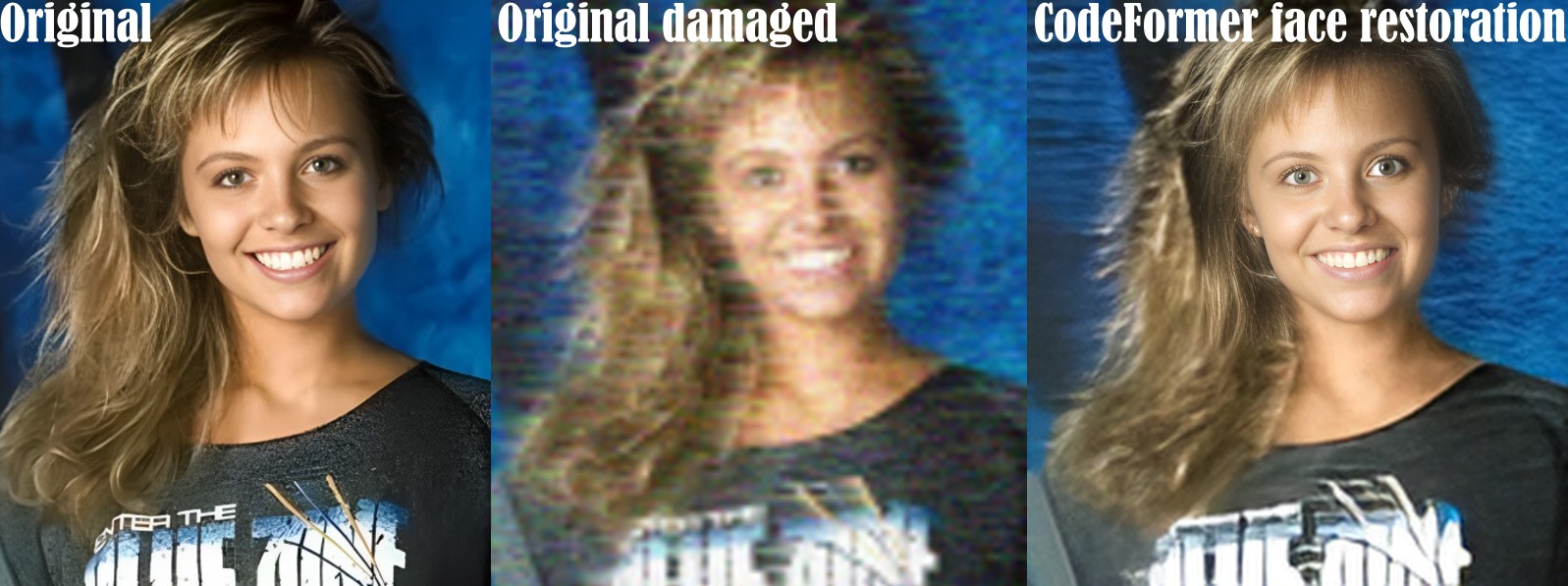
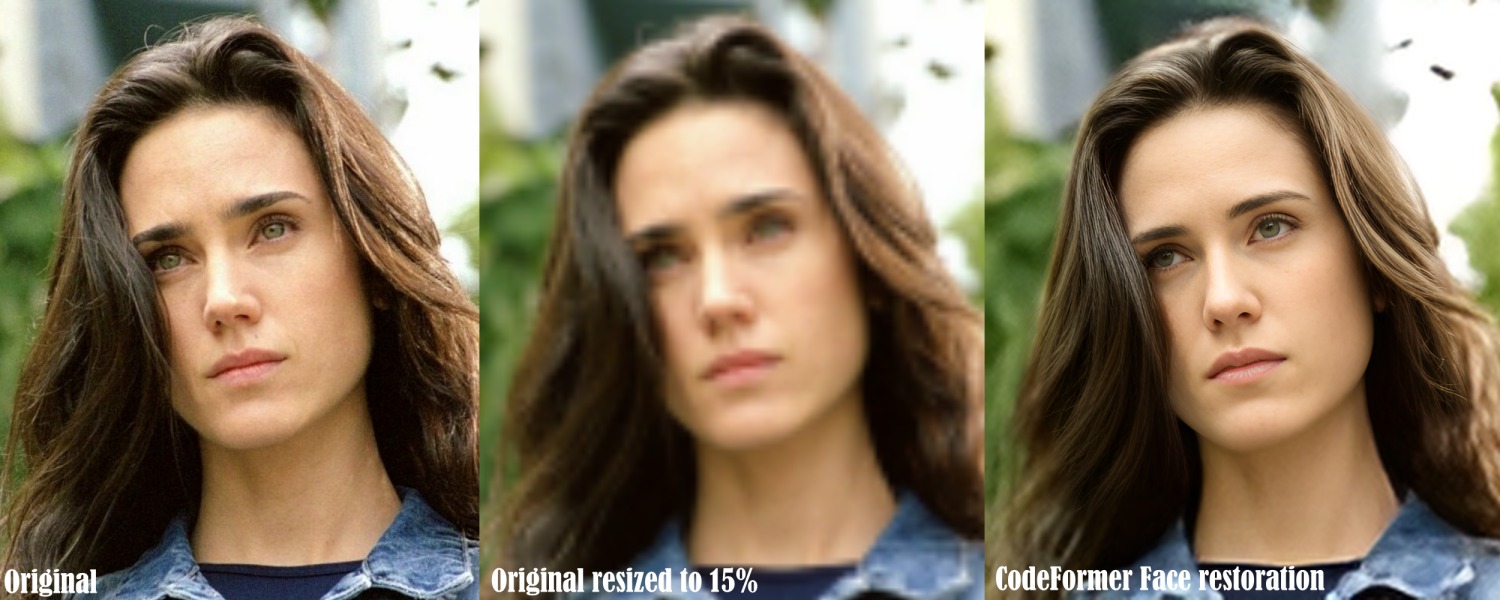
+1 to codeformer, but for video. These look amazing.
I agree with Tico. The main focus should be to get 3.+ back to the level of quality and stability as 2.6, then start improving on the product once that is done.
2 Likes
Testing 3.0.3 Version right now.
How can i show the Playhead positions (frameposition) and how do I select renderregions (Startframe and Endframe position) without trimming the Input like in 2.6.4? It doesn’t seem to be possible anymore?
CodeFormer is interesting, but I am afraid that video processing with this algorithm will take ages even on 4090 card…
PS some more examples 
5 Likes
