A post was merged into an existing topic: Topaz Video AI Beta 5.2.0.0.b
Anybody had any luck installing it on Arch?
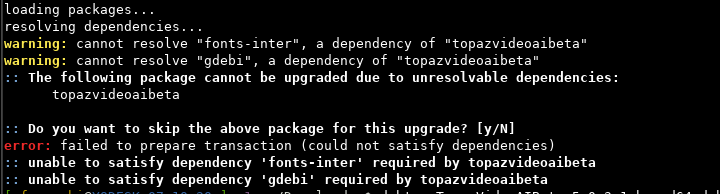
Proceeded via debtap, but cannot satisfy fonts-inter and gdebi
there’s a nerd-fonts-interon the AUR, and think should solve it, but no gdebi
An Appimage would be mostly welcomed, or flatpak instead of a deb^^
2 Likes
A post was merged into an existing topic: Topaz Video AI Beta 5.2.0.0.b
I run it on arch all the time, but I just extract the data.xz and control.xz archives inside the deb using Ark and drop their contents in place. Never had to worry about dependencies, really. I need to use LD_LIBRARY_PATH to point it at the CUDA install, and also the bin and lib folders for Topaz itself, but it runs after that without major pain.
I run Endeavour and it seems to have a newer Qt than Topaz likes, which may invite some weirdness (e.g. logging in to get the license has to be done manually - it’s not handed off to the browser properly)
1 Like
Quite mind-blowing Phil!
It is indeed working just as you suggested, plus passing the bin and lib paths as the location of the dynamic dependencies!
Would also add that the login via browser worked, and GPU encoding (nvidia open kernel drivers - 3070) is also working without pointing to the CUDA install ^^
As a little reference guide for the readers:
- extract the
.debarchive - create a directory somewhere (I use one created inside
/opt) - extract also
controlanddataand put the content into directories with the same name cdintodata/opt/TopazVideoAIBETA/bin/- mark
Topaz Video AI Betaas executable if it is not alreadychmod +x Topaz\ Video\ AI\ BETA - check if the software is missing dynamic dependencies
ldd Topaz\ Video\ AI\ BETA | grep 'not found', which in my case arelibvideoio.soandlibcloudprocessing.so - Set the
LD_LIBRARY_PATHvariable to point to their location, which would be the same directory as the program (bin) for this release withLD_LIBRARY_PATH=./ - check again for missing dependencies as in point “6” and link as in “7”, which in my case are now
libopencv_world.so.405, libavcodec.so.60, libavformat.so.60, libavutil.so.58, libswscale.so.7, all present in thelibdirectory, 1 level up the currentbin.
8.1) since we are adding another directory, we need to append it to the previous one by means of a semi-column like such:export LD_LIBRARY_PATH=./:../lib - launch the program and enjoy!
./Topaz\ Video\ AI\ BETA
9.1) to not have to repeat all the process, you can directly launch it via this command:cd /path/to/the/topaz-ai/data/opt/TopazVideoAIBETA/bin/ && LD_LIBRARY_PATH=<path-1>:<path-2>:<path-n> ./Topaz\ Video\ AI\ BETA
9.2) tip: create a variable on your shell, so you can launch it via a single simple command, i.e.TOPAZ.
I personally did it by adding this to my.bash_aliases(.bashrc, if you don’t source it)
# topaz beta
topazpath='/path/to/the/topaz-ai/data/opt/TopazVideoAIBETA/bin/'
topazld='LD_LIBRARY_PATH=./:../lib'
alias TOPAZ="cd $topazpath && $topazld ./Topaz\ Video\ AI\ BETA"
I still have to test it deeply,
at the moment have just rendered a 5 second 4K using Theia and Themis, and the only problem I got is that I needed to drag the clip into the program, as browsing it was not finding the clip, the directory was just seen as empty, as those clips were not recognized as ‘video file’…
Hope this helps someone!
Will report back things as I find them 
1 Like
Aaaaand… I just found out a problem, unfortunately.
Proteus+Themis, multi GPU.
When using a single GPU, all good, but if I select ‘All GPUs’ from the settings, I get an ‘AI error’ which from the logs would be
- Error message from AI engine: download failed.
- Error message from AI engine: model failed.
It happens e.time, but not if I select either the 3060 or the 3070 alone.
Similar thing if I use Theia+Themis, but this time tell me to send the logs, where the important bits seem to be
CRITICAL:  TRT Issue ERROR1: [reformatRunner.cpp::execute::613] Error Code 1: Cuda Runtime (an illegal memory access was encountered)
CRITICAL:  TensorRT enqueue failed
CRITICAL:  Unable to run model with index  0  it had error:  no backend available
CRITICAL:  Caught exception in tile processing thread and stopped it msg:
Info FF Process Output: 19
CRITICAL:  TRT Issue ERROR1: [reformatRunner.cpp::execute::613] Error Code 1: Cuda Runtime (an illegal memory access was encountered)
CRITICAL:  TensorRT enqueue failed
CRITICAL:  Unable to run model with index  0  it had error:  no backend available
CRITICAL:  Caught exception in tile processing thread and stopped it msg:
Info FF Process Output: 19 std::exception1terminate called after throwing an instance of 'std::exception'
  what():  std::exception

Info FF Process Output: 19 std::exception1terminate called after throwing an instance of 'std::exception'
  what():  std::exception
Also, if I use Proteus+Themis, the secondary GPU (3060, no xserver, driverctl override) I do not get the before/after, just the after. While with Theia+Themis, I get the after, but a gray ‘Not Processed’ when I click and hold for the before.
1 Like
Multi-GPU is something they are moving to a separate tool / license, I think. I am not fortunate enough to have systems with multiple GPUs, other than AMD integrated + nVidia discrete.
1 Like
Same issue with 3090 and 4090, or intel iris (igpu) with nvidia, haven’t tried a AMD Nvidia combo.
1 Like
Keenly waiting for an updated build, and also have my fingers crossed for some TensorRT love.
1 Like
I just wanted to confirm (sorry it took so long!) that it is indeed a KDE issue.
I installed Gnome Core, switched over and launched Topaz Video AI, the issue with video selection went away. It’s a shame it’s limited to using Gnome natively, a lot of people use a lot of different desktops.
It’s been a little while now. Any news of an updated Linux build and/or TensorRT models?
@gregory.maddra any update on an approximate release of the next linux beta? Any news would be appreciated
4 Likes
(To sum up everything below: Problem #1: Chronos fails when changing files to 30FPS, indicating “AI error.” When this happens, it logs “FF EXITED” and syslog shows a segfault. If I select Process Again and the input FPS is less than 29.97FPS, it will eventually process the file successfully. If the input FPS is 29.97, Chronos will always fail at increasing to 30FPS. Now, I think it would be fair to say that there is not much reason to go from 29.97->30, but in content that has a lot of duplicate frames, I still like to do it. Problem #2: Once it has failed to process a file once, it will fail to delete the preview file in any future attempts. Problem #3: It appears that VEAI is also trying to download some model files with incorrect names, but that is unrelated.)
…
Has anyone else noticed that Chronos chokes on certain files? I have some some that will consistently generate “AI error.” The logs seem to indicate that it is failing to download the model file:
2024-08-04 21:41:20 139894397997056 CRITICAL: Attempt 0 failed for https://veai-models.topazlabs.com/chf-v3-fp16-576x416-rt806-8517.tz
I tried popping the URL in my web browser and got a 404.
It does this for other resolutions as well, like chf-v3-fp16-576x384-rt806-8517.tz and chf-v3-fp16-384x672-rt806-8517.tz.
…
I also find these messages a bit confusing because the resolutions indicated in these file names do not match the resolutions of any of the files that I am working on.
…
FWIW, I noticed that the naming convention for the model files seems to have changed and that VEAI was successfully downloading files with an -ox suffix, so I tried manually downloading that file and symlinking it to the missing model name chf-v3-fp16-576x416-rt806-8517.tz → chf-v3-fp16-576x416-ox.tz. I did then have success with one of the files that was failing before. Whether that actually fixed it or is just coincident with some intermittent problem, I can’t say. I did observe another file process to about 80% with Chronos and then AI error without leaving anything in the log file - it just moved on to the next file.
…
I also noticed that VEAI does not always delete the preview file on completion and it appears that this is repeatable with certain files. I think it may be the case that, if VEAI tried to process a file and failed and it is then run again successfully, it does not delete the preview file.
…
So, after repeated tests, it appears that Chronos just fails intermittently. I don’t think the model downloads have anything to do with it. If I keep reprocessing the files that fail with AI ERROR, they eventually succeed. When it fails, it logs “FF EXITED” with three numbers that appear to be the process count and two others, like 570 11 1, for example and that it is deleting the preview and final files. Everything before that is just it going through the file frame by frame.
Syslog shows a segfault when Chronos fails: kernel: [159935.294283] fc0[2325240]: segfault at 98 ip 00007f02d123de97 sp 00007f02617f86c0 error 4 in libvideoai.so.1.3.16[7f02d11a8000+e4000]
…
After repeated runs with diminishing returns, I noticed that increasing FPS from 29.97 to 30 fails every time.
1 Like
Here is a fairly nasty bug. Add a bunch of files to the queue, then change your mind, and select Close All. Usually, that works fine, but, sometimes, it will then start an ffmpeg process for each file as it goes to close it. If you had 50 files in the queue, you get 50 ffmpeg processes started, CPU goes to 100%, system locks up. It will also leave a zero byte file behind for every job that was in the queue. This also can happen on exiting the program. If you have a lot of files in the queue, the only safe way to exit is to close them one at a time first.
Sudden slowdown with Artemis…
I have been doing a batch of jobs all week using Artemis HQ to go from 480p to 1080p. Until last night, this was working at around 30FPS. I woke up to see that FPS was down to about 4 and VEAI is only using about 20% GPU and CPU. Normally, it would use about 80% GPU and 60% CPU. I have gone back and re-run previous jobs to confirm that the behavior has changed. Jobs that ran in about an hour, now are set to take about 9 hours. I have restarted VEAI and the computer with no change. Any ideas what I should be looking for? As far as I can tell, there is nothing unusual going on with the hardware or system - memory tests OK, GPU and CPU both appear to be working normally, nothing unusual has been logged.
It seems that this only happens with files that have already been processed through VEAI. I normally use a two step process, Proteus or Iris at 1x followed by Artemis HD to 1080p. VEAI will still run original 480p content to 1080p at about 30FPS, but 480p that came out of Iris or Proteus is now running at 3-4FPS. This is really strange.
…
And, now it is back to working normally. But the problem is that I didn’t change anything. I ran through some of the previous jobs checking to see if any of them had run slowly and I just didn’t notice, but they all ran normally. Then, I added a new job and it is back to running over 30FPS. I have no idea what is going on, but I will continue to report. If there is anything I can do to troubleshoot this better, please let me know.
3 months without any single news …
Is it worth to try it out ? Or I shall pass my way ? …
As a user of 32c/64t CPU, I would highly appreciate evolution of this porting.
1 Like
Topaz needs to step up and get the Linux release to the same state of the Win/MAC release, and release updates concurrently, not once every few months.
Well… depends.
Topaz has demonstrated with lack of attention to their linux beta that they have no intentions to put any monetary resources towards it (eg pay 2 developers to work hard on squashing linux bugs.) I can only interpret that as a company they have decided they need to devote full resources to Mac/Windows/Cloud Computing, and that leaves no developer resources for linux
Does it sort of work? Yes. Whether it is worth it to you personally will depend on your individual needs and your hardware.
There are 4 conditions that cause me to choose to keep using the linux version instead of Windows. If any 1 of these 4 were not true, then I would use Windows for now
-
My hardware is recent (Ryzen 7950x, and more importantly NVIDIA RTX4090.) My recent GPU compensates for the software deficits… for now. For Topaz speed the GPU makes a huge difference. I posted my benchmarks above.
-
Everything else I do on the computer is in linux (Davinci Resolve, blender, everything) The only reason I would even install windows would be for Topaz and nothing else
-
For nearly every Topaz job, I have needed the Chronos and Iris models, which seem to be mostly working on linux for my needs. Occasional crashes, not a deal breaker
-
The way my computer is set up, linux is given every advantage (fast NVME cache drive, lots of storage) Taking the time to boot into a separate Windows install is slow and interrupts my workflow. Then with limited storage, a no separate fast Cache drive, it becomes a much worse computer to use for Topaz. I would have to redo everything and maximize Windows performance, and basically not use linux
Your situation will be different than mine, but as I said, if any of those 4 things were no longer true, I would just use TVAI on Windows
1 Like
Wishful thinking, I’m afraid. The market dictates they will make their money from individuals using Windows or Mac or larger companies who pay for cloud computing. The percentage of revenue from linux sales is tiny. Sad. But true.
It can be done. But there is no financial incentive for them to do it
1 Like
Upscaling in two steps vs. one…
If I try to upscale a roughly 360p video to 1080p with Artemis HQ in one step, it takes 11 hours. If I instead do it in two steps, first 2x and then to 1080H, it takes four hours. Does this make sense in some way that is not immediately apparent?
