Why still working with the Beta 4.0.1.0.b when the more recent 4.0.1 Release is out ?!
1 Like
Still, the release version is more the current development state - so it would be better to deliver those logs for that version.
Sometimes i am thinking about which one is the real Release, Alpha, Beta…Banana…
Hopefully there´s someday a bugfree version before a new big version comes out…
2 Likes
Don’t bet the farm on that though, I had to hold back this beta, as all current releases, both general and beta, have serious frame duplicate issues that they fixed with 3.5.1.0b, yet reintroduced to all versions following, so I’m currently using the only beta which has the dupe fix…
There are entirely too many devs that don’t know what the others are working on, as it seems as though there is no synergy between them and their work, so, we might never get a stable beta, nor general release as this behaviour is ongoing, as speculation of management refusing to change the method of managing development teams is inevitable.
As they just keep screwing up each beta with reintroduced bugs, and broken base features that end up being “fixed” just in time for the next beta to arrive with unfixed and re-introduced bugs to again make their presence known, and this is on top of them introducing new features that cause even more bugs…
They need to coordinate the dev teams, it’s just that simple, but apparently it looks like they will not, so these issues will persist, permanently, until they change their management method as this is the company’s normal!
⇐ This is my personal observation, though, so it hasn’t been written in stone as to what their issue is, it’s simply speculation, ⇒ not proven fact ⇐ which really sucks as I’ve grown to love using, and rely heavily on this program as it’s currently the best of its type!
1 Like
The program crashes immediately upon startup. The AI model iris has really nice results. Only this takes twice as long as another AI model in both lq mode and mq mode.
1 Like
Are you on Apple Silicon?
Yes i use iMac M1
The pathetic speed of Iris is due to a change in code after problems on MacOS Sonoma and specific configurations.
Still, this must be possible to get a faster speed as Iris is roughly comparable in speed to Proteus on ALL other platforms (NVidia, AMD, even Intel integrated GPU) and it also was roughly double the speed on AppleSilicon as what we have now.
In the beginning they said that this is being looked into but the last I’ve heard sounded like if they don’t have any plans to correct this atm
I have the feeling that development currently is mostly for windows and there to the biggest part for NVidia GPUs. Macs seem very neglected.
1 Like
I hope this will still be resolved. Because the results I got with it, despite the speed, were good.
Nothing going to matter with the speed if it keeps redoing a side that is not changed while also doing the changed side. We’re getting twice the slowdown we should be getting.
I asked this back on v2? Why do the 4 options keep redoing themselves each time, even though some we’re unchanged. And I was told ‘it’s a memory thing’ too high memory usage…etc?
I thought this version would fix that. It should be automatic, don’t redo the side that’s not changed. But if you have to put a manual LOCK icon on each side so we can keep that side as is, while experimenting on the other side. That would also work. And cut the preview time in half.
I’m unable to install the new beta. Is AVX2 now a requirement?
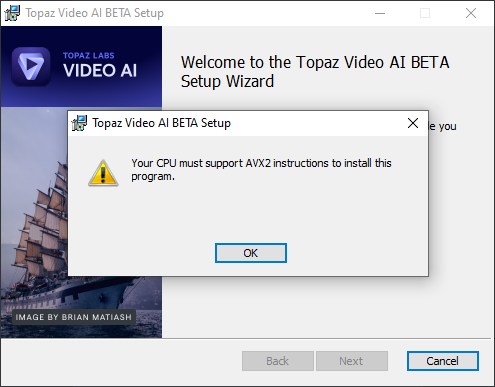
I am feeling just the same the last time when they forced me to upgrade from Windows7 to Windows10.
Also a new processor was needed some months later but mine was still able to do it.
But some versions later it just gaves suddenly errors or using some new filters leads to crashes.
Normally a program should work on all Systems like the moment where you bought it and it works.
I hated it the same way like you to be forced to buy new hardware right after buying this software and it works for some little months.
At this moment:
Yes it´s needed to upgrade the CPU to AVX2 with all those things that belong to it.
It´s better not to buy a CPU that is just able to do AVX2 it should be up to date not to have the same issues next years…i got one with extra KI features and more command sets to be sure…
So new Windows, new Motherboard, new RAM(last version), new Case(maybe), Monitor(maybe but Adapter was needed), Powersupply and maybe also at least an RTX 3xxx GFX Card or best 4xxx Card.
I got through all this already here…
It´s the second time now that Topaz is forcing Hardware Upgrades right after a big version change since i am here…seems to me that is happening every year…
After all it´s worth upgrading…things go much faster…
People have been experiencing the AVX2 requirements over on the Premiere Pro forum - with version 2024. Time to upgrade. I was OK with my system till a few months ago with VAI (12th gen 12900k, 64gb, 3-m.2s, but a lowly gtx1070. So, I got a RTX4070, got to stay somewhat up to date on hardware.
@Danitis5 @michele.meschke , this is not unique for this beta, it was since v4.0 was released.
in the meantime if you wish you can use the manual installation workaround to install v4.x
It wasn’t, I’ve installed many 4.X betas and they didn’t require avx2 until now. Probably it’s a recent addition (or a bug?)
Quote from Topaz staff.
1 Like
not beta of v4.0, the release of v4.0. beta v4.01 (that is where you posted the issue) is after the release v4.0. so it is not new to Beta v4.01, but already existed on v4.0 RTM.
Yeah the crop thing is really screwed up. I can’t tell if it works or not cuz the preview shows it uncropped. Half the time, if I hit the preview button on a cropped video it throws 2 preview clips in the queue, one is the uncropped resolution, the other is the cropped resolution. No idea which is even which since neither of them appear cropped.
Now that I think about it the “export crop” thing doesn’t make any sense, how did that even get in there? As an example there are plenty of DVDs that are 4:3 that have an actual image of somewhere around 16:9 with massive black bars top and bottom. Using the input resolution for the preview will have it use the wrong scale model for the export. I’m sure this was done as a concession to this crazy new UI but you Topaz guys gotta get this thing together, it’s really taking a dive now.
No idea if anyone @ Topaz looks at these threads but I figured I’d make a plea here regarding the Linux versions…
The last Linux Version V3 was basically unusable because of the ONNX model issues. I recieved a beta for v4.0.1.0b from one of the software engineers. The V4 UI is still pretty messed up, leading to crashes and failed videos but the Models seem to load and run better than the last V3.
I requested a version of V3 with the fixed models but he mentioned it wasn’t possible due to Topaz moving on to V4, and I should beta test V4 and report back on this thread so they can get fixed. Here is the problem…
There is no recent Linux V3 version that works OK, V4 UI is a mess even in Windows. In order to get some use out of the product I paid for I need to swap SSDs to run a V3 on Windows to actually get stuff done. I can’t run Windows to use TVAI, swap SSDs to boot Ubuntu just to test and see if things are working now in Linux V4. So I think what you Topaz guys should do if you actually want to get TVAI ironed out on Linux is release a V3 Alpha for Linux with the fixed ONNX models. That is the only way I can actually use the software and keep this machine on Linux so I can beta test the next V4. The current UI bugs are dealbreaker for Linux V4 and I’m not going to swap SSDs once a week so if you want some help on Linux testing, release a good V3 alpha I can install alongside beta
This crop behaviour looks like a new bad feature but the current v4.0.2 release version has this “known issue”;
Cropped videos will show the full input dimensions during Preview, but the applied Crop setting will be applied to Exports
So, hopefully by “known issue” they mean it is not a new feature and they will fix it.
1 Like
