The issue with the error out at the end is related to audio. Use the transcode option.
I’m still not sure why it is crashing after install, from the previous logs it seemed like an issue writing the model file to disk.
Recover original details will be available for interlaced videos while using Iris in the release version.
Hi - can you please send us your logs from Help > Open Log Folder?
I uploaded an example problem file when this all started, but these issues affect all files encoded using NVENC since v3.2.10.b. I will upload the clips again - labelled as source clip, good output from 3.2.9 and bad beta output.
The suggested VLC4 fix does not work as the first 3 seconds of every ‘beta’ video I’ve tried are frozen, and then the video plays. I’d also prefer not to be running pre-release versions of VLC on my rig.
Is it possible to roll back to the same FFmpeg build as used in v3.2.9 when this problem was not present and I didn’t have to jump through hoops to try and make my content play?
Thanks
I had those black boxes when i had a more aggressive RAM OC active. Had no obvious other problems with that OC.
Files uploaded for NVENC issue:
david.123.source.mkv
david.123.beta.3.3.0.1.bad.mp4
david.123.v3.2.9.good.mp4
Hi,
from my Threadripper
logsForSupport.tar.gz (16.1 KB)
from my Ryzen 9
logsForSupport.tar.gz (15.3 KB)
Thanks! Can you please send us one of the NTSC videos that are causing the issue for you?
Done 
Sounds like you need to reset your bios.
In v3.3.0.1b I’ve been experiencing this weird emboss-type effect, it only occurs once every 5 or so previews and seems to happen more with Proteus but it has also happened with Iris:
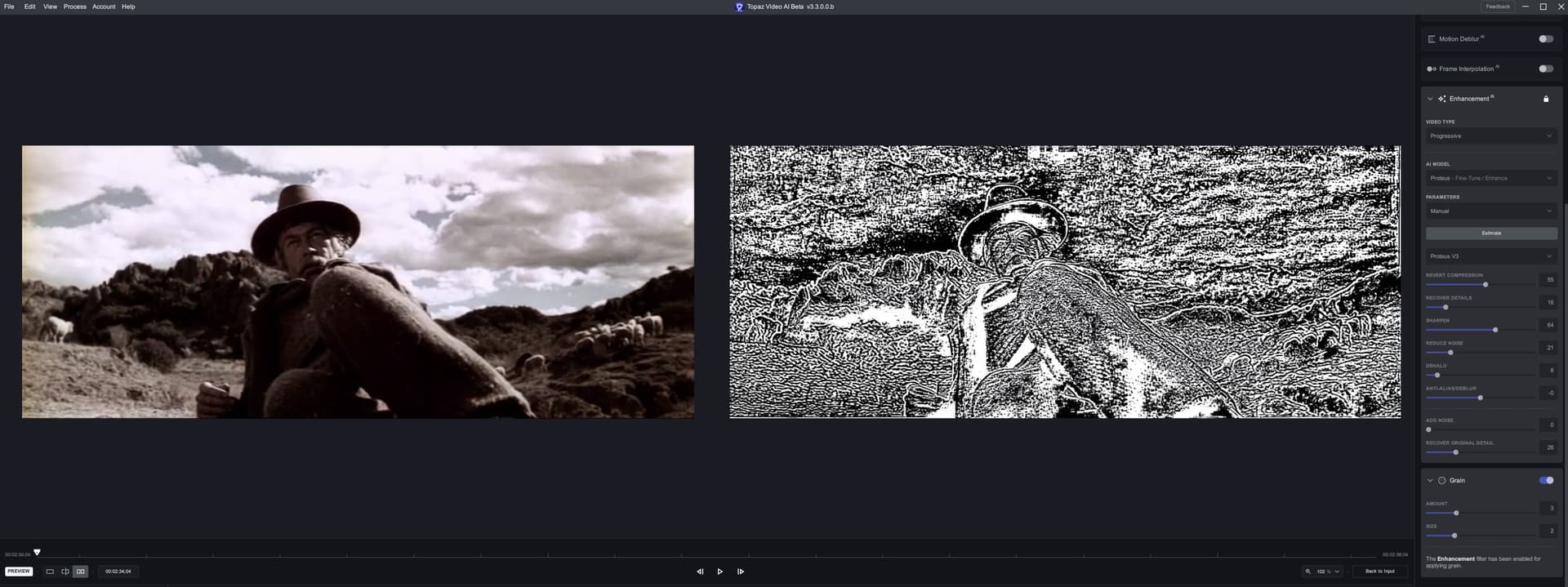
After it occurs, I preview again and its normal. Happy to provide any more info if needed.
Topaz Video AI Beta  v3.3.0.0.b
System Information
OS: Windows v10.22
CPU: 12th Gen Intel(R) Core(TM) i9-12900KF  63.797 GB
GPU: NVIDIA GeForce RTX 3090  23.77 GB
Processing Settings
device: -2 vram: 1 instances: 0
Input Resolution: 640x480
Benchmark Results
Artemis		1X: 	124.71 fps 	2X: 	61.82 fps 	4X: 	18.95 fps
Proteus		1X: 	103.99 fps 	2X: 	35.73 fps 	4X: 	18.28 fps
Gaia		1X: 	44.87 fps 	2X: 	32.64 fps 	4X: 	21.35 fps
4X Slowmo		Apollo: 	107.41 fps 	APFast: 	222.38 fps 	Chronos: 	91.30 fps 	CHFast: 	118.54 fps
This was an issue with 3.3.0.0.b but was fixed in 3.3.0.1.b it happens only with proteus v3. Update to 3.3.0.1.b or 3.3 release version.
2 Likes
Thank you for testing, the v3.3 release should fix the FFmpeg related issues:
- Running out of memory on windows
- Output not playing correctly in VLC
- Mac crashing or needing to be restarted after installing app
Please let us know if you are still facing issues after installing the release version.
2 Likes
I must say that for my use case (old TV shows recorded over the air), the Beta V3.3.0.0b with Iris was very good and I had no issues throughout. But then I do have a simple use case. My FIRST, short test of V3.3.0.1b is even better. Very clear faces, with only mild over-softening in my 1st go. I’ll tweak the settings more tomorrow, after I record another show in the early morning. So far = GREAT! (for me, anyway). Keep it up!
2 Likes
Currently testing, an issue with the program actually adding duplicate frames with inputs that had the duped frames removed, after the frames were removed, the videos ended up with a non-standard frame rate, such as 9.96 fps, 16 fps, and 24.27 fps, and in all cases they end up having duped frames generated within the program, with barely any interpolation, so the result is a *120 fps choppy mess with duped frames!
*(I always test/encode jobs with 120 frames as it illustrates frame issues/attribute much better than 60)
Tools used to successfully upscale/interpolate the 9.96 fps video:
- Virtuadub2 with an insanely fast/powerful de-duping plugin: Remove Frames
- RIFE 4.6
- Topaz Video AI beta vers: 3.3.0b
Will resume testing when I un/install the current beta, it usually takes a while for the un/installation as I still have the permanent deleting shortcut bug which makes it impossible to do without using windows Un/Install troubleshooter… will upload the video/logs when testing with the new beta as soon as the troubleshooter/tests finishes
OK, done testing, I added the original’s/de-duped version’s resulting output files and tested them using all the recent interpolation models.
- MY SPECS:
- WIN 10 64 PRO 21H2
- RYZEN 9 3900x
- NVIDIA RTX 3090
- 64GB GSKILL DDR4
I interpolated the original/de-duped input at 120 fps using all models, yet only the orig files were tested with and without the “replace dupe frame” at default settings, I also uploaded the proper info using a 3rd-party prog as I noticed that some that had incorrect/missing info from the log.
Hi suraj, I can confirm the Running out of memory issue has been fixed with the realease version  .
.
Thank You
2 Likes
So seems like the beta AND the official release, now has the CROP tool broken. I chose “square pixel” output and “letterbox” as I usually do, and it cropped the hell out of my video (which is a super wide 2.35:1) to fit the 16:9 frame… And if i choose “Crop to Fill”, it actually does the opposite, letterboxing. hahaha. But still can’t compare properly as the videos are out of sync…
Hmmm, but you are cropping the file. The setting you are adjusting would only add letter and pillar boxing if necessary based on the output resolution which in this case it does not appear to be necessary.
I may be missing something here, if that is the case, please fill me in  (pun intended)
Hi! Maybe I didn’t explain myself properly. Basically I’ve noticed that the option “Crop to Fill” and “Letterbox” are inverted. Because afaik, when I crop an image, with the “Letterbox”, it would just add black bars around to retain all the image info, whereas the “crop to fill” would crop either horizontally or vertically to fit the output (16:9 in this case).
And as you can see on the photo, even though I’m cropping out the source black area to leave the image, the output is cutting the side images (which is what Crop to Fill is supposed to do, but instead it’s doing it in the Letterbox option; inverse happens when I select Crop to fill, then it adds black bars to fit the output size -not in this case though, because also for some reason it’s stretches the image).
P.S.: speaking of, is there any preference as to which should we choose: original pixel ratio or square? I always choose Square pixel output (I think that’s the HD standard), when all my DVD inputs have ratio pixels.
Thanks!
