Thanks for confirming – this is likely related to Recover Original Detail being a CPU-bound process while the AI model is running on the GPU. We will look into a fix
2 Likes
The whole TEMP folder, defined in SET TEMP or TMP environment variable.
Also, the preview file is being created next to the source file, instead of ‘VEAI Workspaces’ folder, as VEAI 6.0.1 does. v6.0.1 ‘behaves’ correctly - puts previews inside the ‘VEAI Workspaces’ folder (or any other defined), and only clears the insides of that folder at the exit.
If it helps, I don’t know what version this was introduced in, but it’s in the current main release.
If it helps, this bug was already mentioned by me on previous v6 betas and was, apparently, associated with the UI.
1 Like
This release, as I have also experienced in the prod release, has a major issue:
When simply pressing ‘play’ on the player controls, if there is a finished export listed in the queue from the same source, instead of playing the clip, we getting a spinning circle where the play arrow is, and a runaway FFMpeg process that needs to be killed from task manager…
Why is it trying to render when all I am doing is press play? It’s like some live render code got left in there.
EDIT: Ok, now I get it, if you have a tab open with any previous enhancements, attempting to play the clip starts a live render based on the enhancement settings. Extremely confusing interface.
5 Likes
I would actually prefer to be able to play in normal mode at anytime I press
2 Likes
Very much this. For me its a constant “quick export > click on original tab > make a new trim selection > back to enhance tab > quick export” rinse and repeat… want to play 2 seconds of the video just to see it ? back to original tab we go…
Only hack i found is having “crop” interface open. Then it plays the original. But thats kinda same amount of extra click anyway.
2 Likes
They removed the ‘live’ render toggle, now it’s just confused the eff out of everyone including seasoned users like me.
I really am starting to lose my enthusiasm for Topaz products.
Their fixation with overhauling the GUI needs to stop!
9 Likes
When scrolling, the timeline zooms in too much.
And my Beta license needs to be renewed
3 Likes

4 Likes
A checkbox next to the play/rewind (and stop, please!) buttons, to indicate, if user wants to process or just play in real-time would be nice. 
5 Likes


2 Likes
That first emote… It’s not ‘pointing out’. 
1 Like
OMG so sorry! Changing it now!
2 Likes
MacOS
Importing multiple files does not work with Option-A in the import window, I have to select first and then with shift the last to import all
Settings:
After import, choosing the settings (Iris with manual parameters ie) and copy them, its not possible to paste them on all other sources. Have to select each file, paste, then export file by file
There is no genreal pause button for export to pause all files
Cant select multiple export files for ie deleting finished tasks, or selecting multiple files to pause/resume
For some reason, this isn’t working for me. The model loads, but video processing doesn’t start. The GPU shows high utilization, but in reality, the graphics card isn’t even heating up.
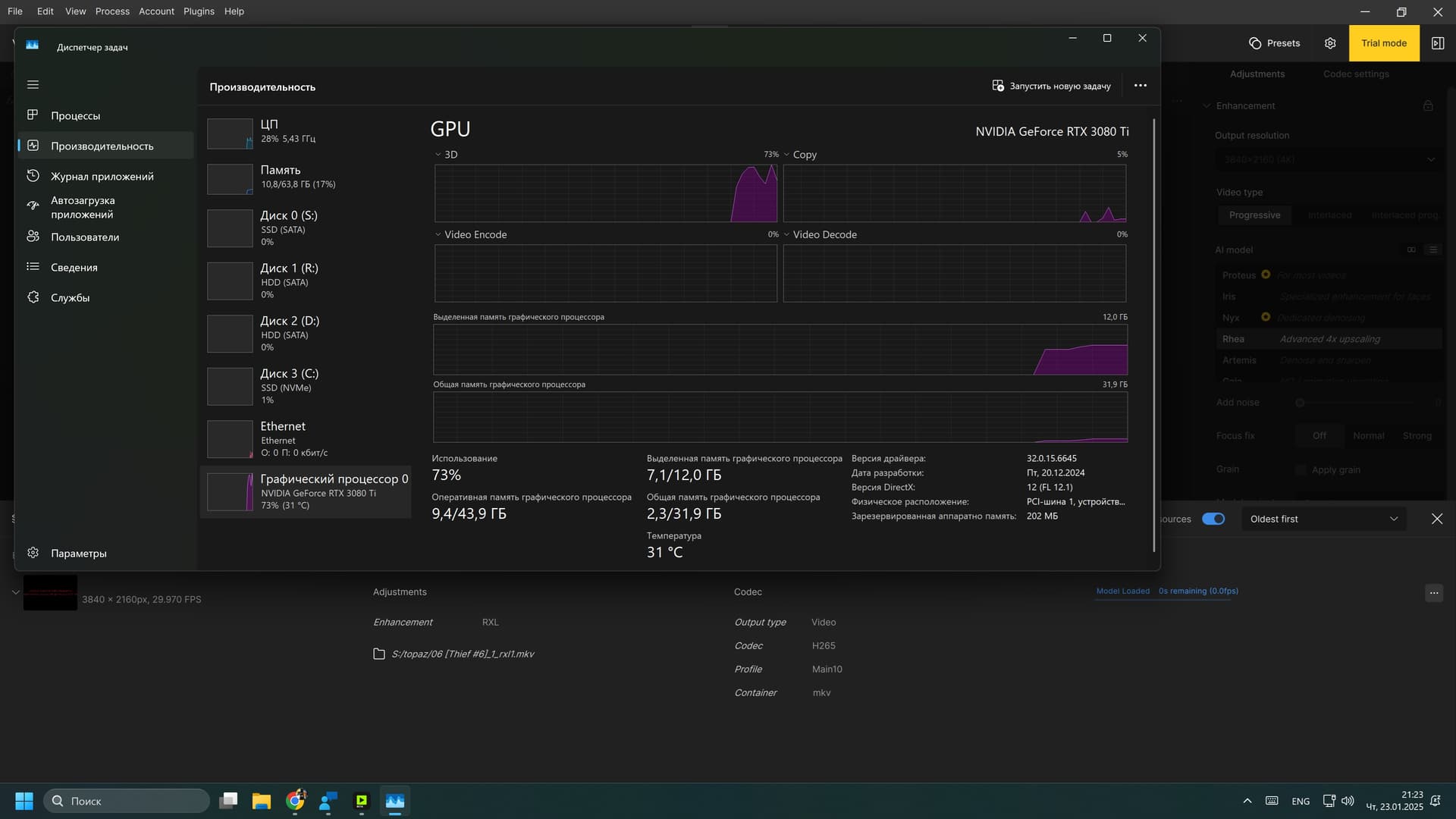
I don’t know what the issue could be. Could it be because my Asus 3080 Ti TUF OC is flashed with a BIOS from another model? It’s the official XOC BIOS from the GALAX RTX 3080 Ti, which removes power limits.
(Board power limit. Target: 1000.0 W Limit: 1000.0 W)
I can assure you that in all other tasks and games, my GPU has been working flawlessly and without overheating for a whole year.
I’m interested in getting the program to work on my system.
I remember that a few years ago, you (Topaz) faced a lack of variety in GPUs for testing your software. Back then, we (users) downloaded several gigabytes of test files prepared by you, ran them on our machines, and then sent you the data.
I’m willing to do the same now if it’s needed to help you debug Topaz Video AI. And I think many others would also be willing to participate.
And how do I renew my Beta license?
There is no special Beta license. If you don’t want watermarks in the beta, you have to buy another year of the normal license.
I wouldn’t bother doing that yet since 5.3.6 is still the least buggy.
2 Likes
6.0.2.1.b always crashes on close. Steps: (1) open app; (2) open video file (or not, crash happens whether or not the app has opened a file; (3) quit app (either by key command or from FILE menu dropdown. App closes and immediately throws an Apple crash report.
System: MacBook Air M2, 24GB, 2TB, Sequoia 15.2 with all updates. Gathered logs attached.
logsForSupport.zip (989.4 KB)
