Topaz Video AI Alpha 4.1.0.3.a (Aion Frame Interpolation, Iris LQ v2, Proteus v4)

Yep, that I did, I usually just look for the Windows installer and habitually ignore anything to do with Mac, as I don’t own any apple products, but you can bet I’ll be on the lookout for Mac-related features from here on.

Thanks for letting me know!

With these settings, it never starts working.
DVD footage, cropped, upscaled, deinterlaced and finally proteus.
I have been waiting for almost 10min and prosec does not start.
Ryzen 7950, RTX4090.

After some additional testing:
The app becomes unresponsive (on MacOS / Apple Silicon) after some time where every mouse click/action does take several seconds to finish. We already had similar behavior with Betas earlier in the 3.4 times I think.

Is Iris LQ V2 currently for progressive video only?
I can’t see Iris LQ V2 for Interlaced Footage…

Overall Iris LQ v2 still is looking very “artificial”…
The Textures are often not looking really realistic, Proteus v4 is looking a little bit better

Yeah I have the same and was Protheus v4 not the Model to solve Protheus 3 and Iris artificial issues for sloppy videos

I have Protheus v4 wither interlaced now but In combination with Iris v2 LQ it looks terrible again

Even setting Protheus v4 to progressive and Iris LQ v2 not good the best artifact removal is for me protheus interlaced v4 so yes I might need an iris LQ interlaced for stamp post VHS mp4 videos from the 90’s Happy with protheus v4 interlaced by the way this is how our VHS recorders PAL TV’s were designed till the converters hardware software made everything progressive…

Ok updated Iris V2 LQ works well I am happy actually pretty impressed
search the worst part of my video
set to manual
estimate
set relative to auto

faces are much better no craqualee the output is less sharp a bit more noisy but a second enhancement has potential since objects are not as sharp as in protheus v4

Hopefully a merge between Iris LQ v2 and protheus v4 hopefully around the corner so we need not to discuss different models

Agreed, having this with Apollo + Proteus in this version. Just says “model loaded”

1 Like

Can’t test the new FI since it is apple only.
Iris LQ seems to be QUITE decent at noise removal now, but it is lacking in the sharpening or de-bluring dept. Faces look great, but can be a little blurry during motion.

Here’s an actual issue, looping is broken. If you preview something, it will not loop. Go click the time to put it in loop mode, then it goes back to the start of the clip, but the second it gets to the end, it just keeps on going and LOOP text disappears. Click once again to loop, and it goes back to start, and does the same thing again.

Preview isn’t auto-playing here, but once I start it, it loops ok.

I can’t get Apollo to do anything either, which is odd because it works fine in the 4.0.9 release. Maybe there’s some stuff turned off in the alpha.

Topaz Video AI Alpha  v4.1.0.3.a
System Information
OS: Windows v11.23
CPU: AMD Ryzen 9 5950X 16-Core Processor              63.923 GB
GPU: AMD Radeon RX 7900 XTX  23.937 GB
Processing Settings
device: 0 vram: 1 instances: 1
Input Resolution: 1920x1080
Benchmark Results
Artemis		1X: 	24.08 fps 	2X: 	09.73 fps 	4X: 	02.75 fps 	
Iris		1X: 	27.00 fps 	2X: 	12.34 fps 	4X: 	04.10 fps 	
Proteus-4		1X: 	25.10 fps 	2X: 	16.62 fps 	4X: 	03.91 fps 	
Proteus		1X: 	21.91 fps 	2X: 	08.88 fps 	4X: 	02.59 fps 	
Gaia		1X: 	11.18 fps 	2X: 	07.68 fps 	4X: 	03.14 fps 	
Nyx		1X: 	10.46 fps 	2X: 	08.51 fps 	
4X Slowmo		Apollo: 	  ...    fps 	APFast: 	   -     fps 	Chronos: 	   -     fps 	CHFast: 	   -     fps 	

Proteus-4 is quite fast on RDNA3 in comparison to P3.

I encounter a curious thing. I have a 1480x1080 Progressive source clip at 16 FPS.

I try :

  • Upscale 2X
  • Full Frame Stabilization: 50
  • Frame interpolation Apollo 8: Replace: 10
  • Enhancer: Iris / LQ-MQ Relative auto: Reduce noise: 30
  • Second enhancement: Proteus: Auto

The program loads the models and remains frozen at the beginning. I waited at least 10 minutes and nothing happened. No crash, no red cross but no progress.

If I change:

  • Frame interpolation Apollo 8: Replace: 10
    by
  • Frame interpolation Chronos 2: Replace: 10

Everything works fine at 3.5 fps. Not too serious for the moment because I can continue testing and I admit that I like it.
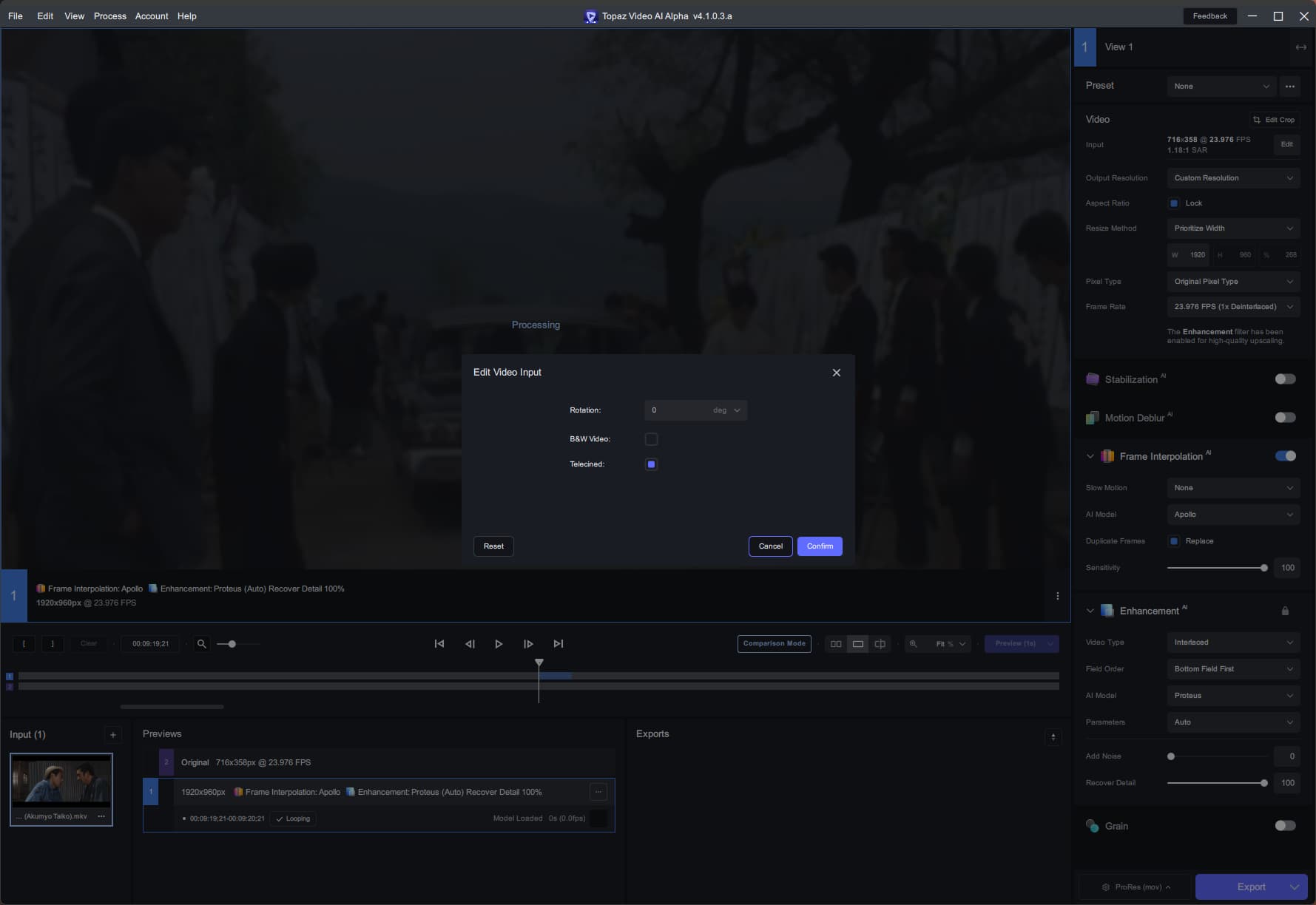
Has anyone encountered this problem?

I have not yet, but use FI a LOT, so I will keep an eye out for it!

1 Like

Frame Interpolation is also not working here…see earlier posts…

1 Like

When is Aion coming to Windows? Way too slow in combination with Iris 4x on Mac with Apple Silicon

1 Like

I think it’s Apollo. Chronos seems to be working ok.

1 Like

Thank you all for your responses. Interpolation works with Chronos. I continue with him but it’s curious (?). Maybe an incompatibility (?)

Iris 4x performance is totally hampered in this build on Apple silicon. About half the speed it was/is with 4.0.8.

Just FYI, it’s Proteus not ‘Protheus’. There is no ‘H’.

Proteus was a Greek god, ‘Protheus’ was nobody. Do you want to annoy the gods? :rofl:

3 Likes