Again - we’re aware of the quality difference here, that’s not the test we’re running for this beta. Working on it!
Your current versions continue to work of course. Starlight becomes a Pro model (except for founders) in the new Studio release.
3 Likes
You get to keep it, don’t worry! 
2 Likes
Thanks - yeah I want a Starlight Faces model…
2 Likes
correcto
correct, yeah
yeah applies to all desktop apps, yours to keep with perpetual
1 Like
Weird… I mean, are you getting correct outputs?
Thank you for this straightforward response.
Is SL Sharp supposed to work on the cloud in this build? It worked in 7.2.0.1b but is greyed out in this one.
I’m getting the issues I shared earlier, and it looks really, really bad. Is there somewhere I can check which model was downloaded?
I can’t wait! 
Going to start testing this soon. For testing nvidia speed increases, should I only test starlight sharp? It sounds like something was done to the old starlight mini model, so testing that model won’t be an apples to apples comparison.
For me it’s completely inaccessible (it downloads fine and all) since previous beta, so I’ll wait for a fix. I had to re-login in the app… Stupid me.
I’m getting some weirdness. I installed the new beta without uninstalling the old beta. It downloaded 7.9mb for starlight sharp (that can’t be right). If I click starlight mini, nothing happens. No download is triggered.
Edit: Looks like it is downloading after I tried to export.
Starlight Mini is probably just under ‘Starlight’ icon now and the devs changed the way it’s being available - it’s like all the other models now, excluding SL Sharp.
For the speed with the TensorRT SL model - it is faster on RTX 3090, by at least a factor of 2, excluding the fact the quality is not there yet.
What I mean is, when I click “Starlight” it doesn’t trigger a model download. And if I do an export, it just fails. I may need to completely uninstall the beta if it’s working for everyone else.
For me it started downloading, when I clicked ‘preview’, the TensorRT version.
The -amd version started downloading, when I used Seek Render, but then it ate all my virtual memory for some reason, and crashed the app after allocating 96GB of it (I have 64GB of RAM, which was left free, mostly).
DaVinci Resolve Studio 20.1.1 will not launch and crashes.
-
Two plug-ins are installed.
Topaz Video AI Beta.ofx.bundle
Topaz Video AI BETAframeinterpolation.ofx.bundle -
DaVinci Resolve Studio 20.1.1 launches after deleting Topaz Video AI BETAframeinterpolation.ofx.bundle.
-
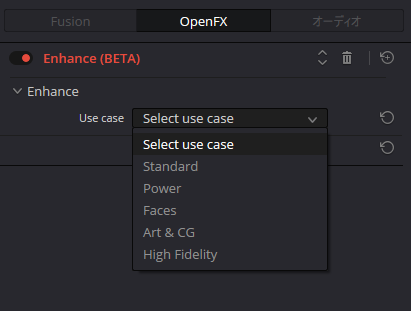
The use case selection display for Topaz Video AI Beta.ofx.bundle is incorrect.