It’s faster! look into the Beta-Forum, i have written a detailed review.
But (i am testing this since yesterday): The quality is in many cases worse, (really bad for very small videos like 240x160 from old digital cameras). Maybe i will upload some examples for this in the next time. (And a hint: to start “StarlightSharp” in the Beta, you have to press “Strg+e” - seems to be a bug)
Thats strange as its designed for low quality videos. Will have to see when out of beta.
I can complain about many things here with TVAI but not that it’s not stable.
Longest SL mini encode here was
15days, 22 hours and 59 mins (at 0.1fps) for a 3x upscale.
1 Like
I can’t seem to get it to work. I tried for a good half hour and gave up. 
I want to reaffirm some experiments I had done earlier on DVD .VOB files and MPEG-2 files from transcriptions from VHS.
“Best”….simplest…excellent results….
These caveats…Currently….this version of starlight mini on my particular old home movie media (VHS, VHS-C and .vob files from DVDs
DVD use Avidemux to combine your. VOB files starting with the file labeled zero. Ignore any .VOB-zero as it will be internal menuing on the DVD. Avidemux is free and very easy to get the final product that is lossless..
Import that file into starlight mini using the default.
Take the finished starlight mini file and make a second run through Proteus using Tommy‘s method of nothing more than focus fix normal and setting sharpness to 30-50.
The results are just excellent.
For VHS files, use the same method except you can skip Avidemux unless you want to downscale the file from your transcriber first.
I tried both ways….. my transcriber produced a 1920 x 1080 file.
I downscaled the file and ran it through starlight mini at defaults …. And the render ran faster…… .5 frames per second.
I also just took the file and ran it through starlight mini at default with the 1920 x 1080 file.
Starlight mini rendered slower .1 - .3 FPS
But I honestly could not tell the difference quality wise.
This was with a 5070 TI
Kind of a tossup….. One rendered a little faster and I wound up with a 1280 x 960 dimension file.
The other rendered slower, but I wound up with a 1920 x 1080 file….so HD.
Again, quality seemed almost identical, but may show up better on a HD television compared to the iPads and computer monitors I was using.
Dione Robust v4 + Topaz v4
It cleans up extremely corrupted videos well. I clean it first, deinterlace it, and then process it with seedvr2. You can use this preset too. Second enhancement must be enabled.
Deinterlaced Topaz.json (3.0 KB)
1 Like
With Rhea:
Issues with models loading/estimating and long loops which takes ages to actually start.
Files giving errors and not encoding when they’ve always worked fine.
If things do work, Its 8-10fps slower.
Back to 7.1.0 for me.
3 Likes
Can you send the full log folder to the support team so we can get them to the devs for review?
Can you pull the logs and send to the support team so we can look into this further? Trying to get this sorted out quickly.
“Every time the program keeps downloading the same models over and over again — does anyone else have this issue?”
5 Likes
Wow!
Amazing!
What was the length of the video?
How did it turn out?
1 Like
I am using Topaz to enhance 8K videos at 60 fps with Proteus. With version 7.1.0, I get an average of 1.4 fps, although the speed varies over time… 1.2, 1.4, 1.6, 1.7 fps…
With version 7.1.1, the average has dropped to 1.2 fps, and there aren’t as many variations. It barely changes between 1.1 and 1.2 fps.
Why is there such a difference in performance? Has Topaz changed the model? Is it slower because it is more accurate and offers better results, or because of a bug?
Topaz should explain the changes it makes to its AI models. This is very frustrating. A 0.2 fps difference doesn’t seem like much, but in 15- or 20-hour projects, we’re talking about 2 or 3 more hours of computer use… If it’s because the model has improved, I could accept it, but they don’t explain anything at all…
7 Likes
The converted was a concert video with a duration of 1:33:59 (h:m:s) and a base resolution of 688x464, 25 fps.
It turned out to be mostly very well but with the occasional altered face - especially for the 3x encode.
I also did a 2x SLmini upscale of the same vid (took about 5 days at 0.3fps) and am still unsure which one I prefer.
1 Like
Is the downloading model bug (7.1.1, Chronos etc) resolved yet? Seriously guys the bug was so crippling it should warrant a hotfix. Fortunately I did “hotfix” myself by downgrading back to 7.1.
3 Likes
I think the 3x one, higher upscale gives finer “pixel blocks structures” you can see when you zoom in. 3x may look not better is because SLm sharpens almost nothing when you scale higher up, but as higher you go as more sharpening you can give. Try resharpen the 3x upscale a little bit, then better result of the 3x should become visible. If you downscale the 1392 to 1080p, you can use Spline 8/16/32 from Hybrid, also causes a resharpening
2 Likes
I think….because my goal is to have very good views of my old home videos on mobile devices…. iPhones and iPads….I’m really not worried about display on 4K televisions..
So the SLM default resolution is just peachy for me….
And it saves me from many of those incredibly long renders when upscaling.
I surveyed my family and asked them just how they would be viewing these videos…
Television streaming
Sitting at a PC or a Mac
Or mobile from iPhones and iPads or Surface tablets
Literally, every person said mobile…. And if they really wanted to put it on a television or a bigger screen, they would use something like AirPlay and live with any loss of quality.
That fact has made it somewhat less time-consuming, given SLM’s God awful slowness.
Hey, I might be done rendering all my videos by Christmas.
Hopefully this Christmas, not next Christmas! 
The official update version 7.1.1 contains unsigned components that prevent full disk access. How can I resolve this or revert to the previous version? I have MacBook ProMax M4.
1 Like
Just a thought on Starlight-mini support on Mac:I’m primarily a Mac user, and I run Video AI on my M4. I also have an RTX 4090. For non-starlight work, the 4090 is about 40x faster than the M4. And yet the 4090 can only pull 0.7 fps on low-res video; like upscaling DVD content. I’ve noticed speed is seriously impacted by higher resolution source even if the output size is the same.
So… if they ever get Starlight-mini running on Mac, I don’t think anyone’s going to be happy about it. People are already upset at 0.1 fps on slightly older Nvidia gear… I have a feeling Topaz would get nothing but complaints with a model running at 0.02 fps. And slower if you’re working with better than SD source.
I hope there’s some magic they can perform to get it running on Macs at a somewhat usable speed. But that would require a 10x improvement in efficiency. And that seems… unlikely.
Whatever the case, I still love what Video AI is able to achieve.
1 Like
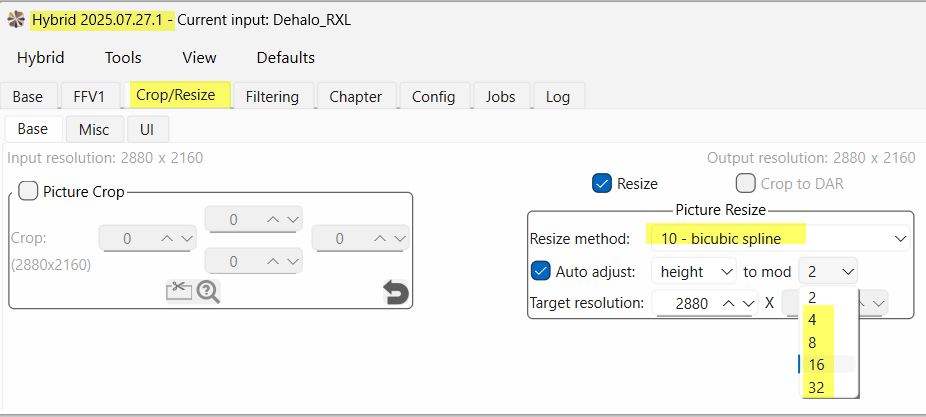
An interesting observation. Where can I find this setting in the Hybrid’s interface?
2 is neutral, 4 is low, 8 medium, 16 strong and 32 hardest, as higher you go as sharper it gets. Spline only works when no floating points happens, when you get an error this is not the case.
Of course takes only effect when you do down/upscale. For all others use “Sharpen” tab into Hybrid. Spline is neutral as scales does, takes effect overall even. It can produce Halo effects, pending on setting, as smoother your footage as higer you can get.
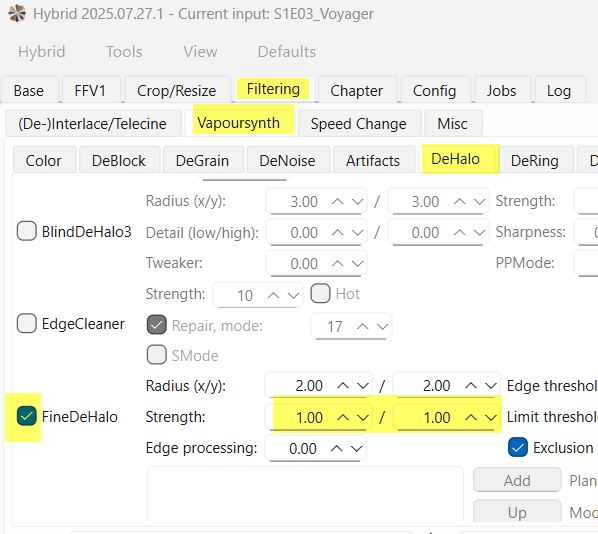
And the opposite DeHalo. This one here does not treat everything equally sensitively like all “Fine” called scripts
4 Likes
