That’s a very good overclock! Congrats
It has been said… over & over again… that today’s or tomorrow’s inference workloads… does not have a today’s hardware issue, especially for any RTX cards. That said, some folks just refuse to accept this clear fact, and it seems like they just prefer to believe their industry overlords’ deliberate fake news.
After short tests I didn’t get good results, not tested with 5070Ti which is not mine from a friend, but it did the tests with my Asus Tuf 4070Ti OC first. I really brought my gpu to crashing several times here  Seems to be It takes more time than I tought to find out where the limits are. Maybe I can increase ram Mhz more using Asus tool, Afterburner is limited here. Your 5070Ti results are very good! So I don’t think you can go higher. Can you post your voltage curve?
Now my 5090 is working live nonstop on SLm very stable. My choice was using 850mV even I loose some speed. The power drop is huge. My PC is working 24h a day so I tought it’s a good choice, because the drop is more than 150W. My card is running between 50-60°C max for now and on the 12V connector it’s keeps below 400W. I’m sure now I never get problems with melting connector, it is hand warm. I have almost 0.9fps with SLm in this setup
2 Likes
I tested this directly with a very difficult VHS footage made in the evening in San Fransisco 33 years ago at the Golden Gate Bridge.
Normally Starlight Mini “solves nerally all”…also footage made in dark rooms or outside at night  But here the results have flickering spots; I don’t no why.
With the second SLm rendering I could smoothen it; not complete, but better than the first render.
And, indeed the SLm render speed at 1280x960 is the same as input 640x480.
Thanks! 
Here’s a fun historical perspective, circa 1973:
“It was a slow business, requiring about one minute per frame, or about eight hours for a 10-second sequence.”
1 Like
I haven’t recorded my previous fps results (actually, for SLm I prefer spf), but I have documented overall time to process an episode of Star Trek DS9…
RTX3080Ti - with max overclock possible - 45 minute episode took 48 hours
RTX5070Ti - with out of the box OC configuration - 45 minute episode took 41 hours
RTX5070Ti - with tweaked OC - 45 minute episode takes 38 hours
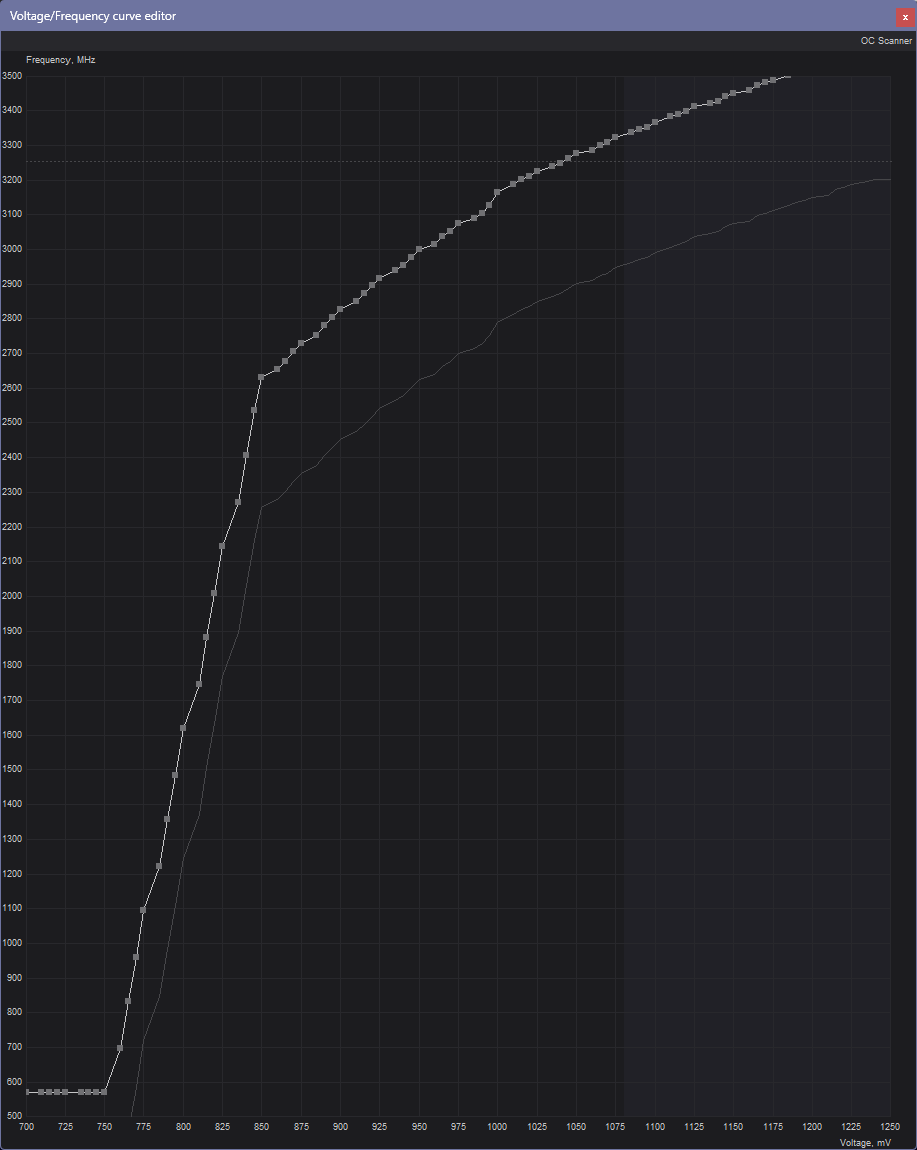
I spent a full day adjusting and stress testing various adjustments. I am now at 3.3GHz on the GPU clock and 16GHz (as shown in MSI Afterburner, with a +2000MHz boost) on the Mem Clock. Note that different tools show the Memory Clock differently. For example, GPU-Z shows the actual base clock sent to the memory controller. Most overclocking tools show the effective clock speed.
Undervolting is, IMHO, an exercise to lower temps and therefore noise - not a performance enhancement. It will generally result in roughly equal performance.
As of the last 3D Mark benchmark I ran (after getting the Speedway Stress test to 10 loops) showed my results as the fastest 5070Ti in their database
My method of overclocking with MSI Afterburner or ASUS GPUTweak:
1: set card to default settings
2: Increase GPU Clock by 200MHz
3: Run a simple stress test (I use Furmark)
4: If stable, increase the GPU Clock another 100MHz and restest
5: If still stable repeat step 4 until you get a failure.
6: Back off to your last stable GPU Clock.
7: Run a heavy stress test (I use 3D Mark’s Speedway and Steel Nomad stress tests) to confirm stability
8: Once you have a stable GPU clock, do the same process this time bumping the Memory Clock
The ASUS Tuf Gaming OC RTX5070Ti is reported to be extremely overclockable. I have found that to be VERY accurate.
ETA: Oh, and don’t forget to reboot after any errors. They often leave the video driver corrupted.
2 Likes
That is a 3 hour improvement….
In today’s world of SLM where ANY improvement is sought… that is good!
Maybe equates to a .1 increase.in FPS which some might sniff at.
But in my case…with about 200 more videos to render in SLM….your results have my attention.
My case cooling is excellent and I also have 3, 120 fans drawing cool air from UNDER the case blowing directly into the cards 3 fans.
So a high over clock might be very practical for me.
Thanks for sharing this!
That almost twice as fast as my 5070Ti - I show 0.5fps on a 480 to 960 upscale of a DS9 episode. I just can’t afford a ~$3000 upgrade! 
You may also have one of those mythical “golden samples” my friend. 
But those results are just….GOOD!
1 Like
My setup as well. I have a Lian Li O11 Dynamic case with three 120mm fans on the bottom blowing up at the GPU card. I have another fan on the back, blowing air in above the card to cover the VRMs and RAM sticks, then 3 fans on top for exhaust. I have a Corsair H150 with 6 fans (3 push, 3 pull) blowing out the far side of the case. So I have a net negative pressure in the case (with dust filters over all opeenings) so cool air is also pulled in. Ambient temp inside the case hovers around 35°C.
1 Like
Sorry guys, I just noticed my previous settings posted above have been superseded. The Core clock was bit too much for the stress tests,
I am currently running the following setting in Afterburner:
Mem Clock: +2000, Core Clock +375, Core Voltage 100%, Power Limit 116%
The voltage curve above reflects these settings, with some very minor adjustments made to the curve.
1 Like
Yes that is very impressive, this is very good job! As you can see in the voltage curve this is not undervolting  this is overclocking to the max…could work longtime because its not a 5090 “running near power limit 12V connector melting card”
The main focus for my second pc was to save power operate as healthily as possible without loosing to much. Of course, this is nothing for gamers who aim for the highest fps. I read under YT comments you can push the 5090 up to about 3100-3200Mhz (but 3200 is not for sure stable pends on sample), factory gpu clock is 2450 or 2500
1 Like
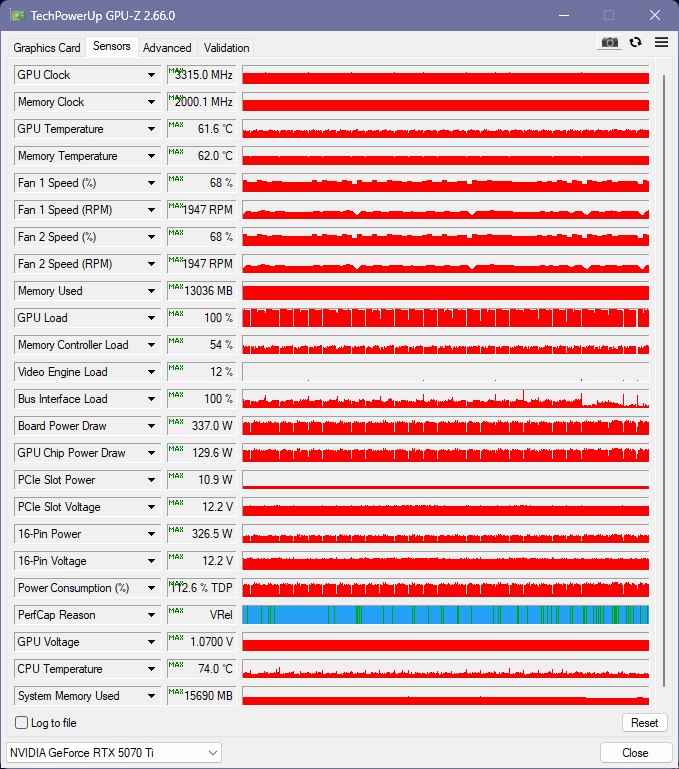
Last post on the subject…I think the key to higher performance has less to due with GPU clock speed and more to do with memory bandwidth on the GPU itself. The OOB bandwidth for my RTX5070Ti is 896 GB/s. With my overclock I am getting 1024 GB/s. Starlight Mini has to move huge amounts of data in and out of VRAM, so I think memory bandwidth in more important than processing power.
3 Likes
It’s crazy how you could push it up. So there are complete two different setups compared to mine. You increased TDP to max to get max Mhz out. I have flaten the curve to limit TDP. There is no wrong or right, the question is what you would like to have.
Here is mine limited to 850mV
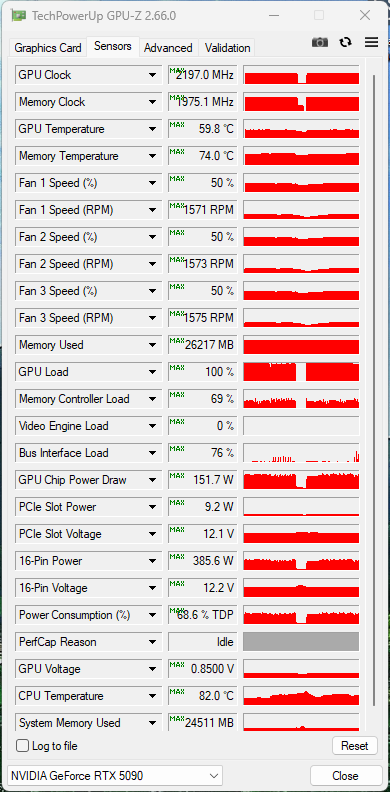
I have lost “board power draw”, i don’t know why, suddenly the sensor was gone
Further evidence to support the bandwidth theory. The 5090 has a bandwidth of 1.79 TB/s, double the base bandwidth of a 5070Ti. The 5080 has 960 GB/s of bandwidth. So I’m running my OC’ed card at 1.0 TB/s and get .6 frames per second, while your 5090, with 79% more bandwidth gets 50% better throughput in SLm. Your Bus Interface Load is maxing out at 76% while I’m banging into a 100% limit.
1 Like
yes I see, also interesting you fans are at 68% max, mine at 50%. But there is no problem you have 32% speedup reserve. should actually work even if the room gets warmer.
I am using a micro ATX case and board…
I thought I would have some issues with airflow and heat, but the exact opposite has taken place to my surprise.
Three 120 fans at the bottom of the case, blowing cool air in and that is the only inputs I put dust filters on as the floor seems to be the dustiest of the environments.
My water cooler is a cheaper model 360 that got excellent ratings from Tom’s…. But I usually use the corsair 150s like you have. I also have it arranged in push pull…. But they sit with the radiator at the top of my case and in fact is my main exhaust, although I have a 120 in the back of my case as well
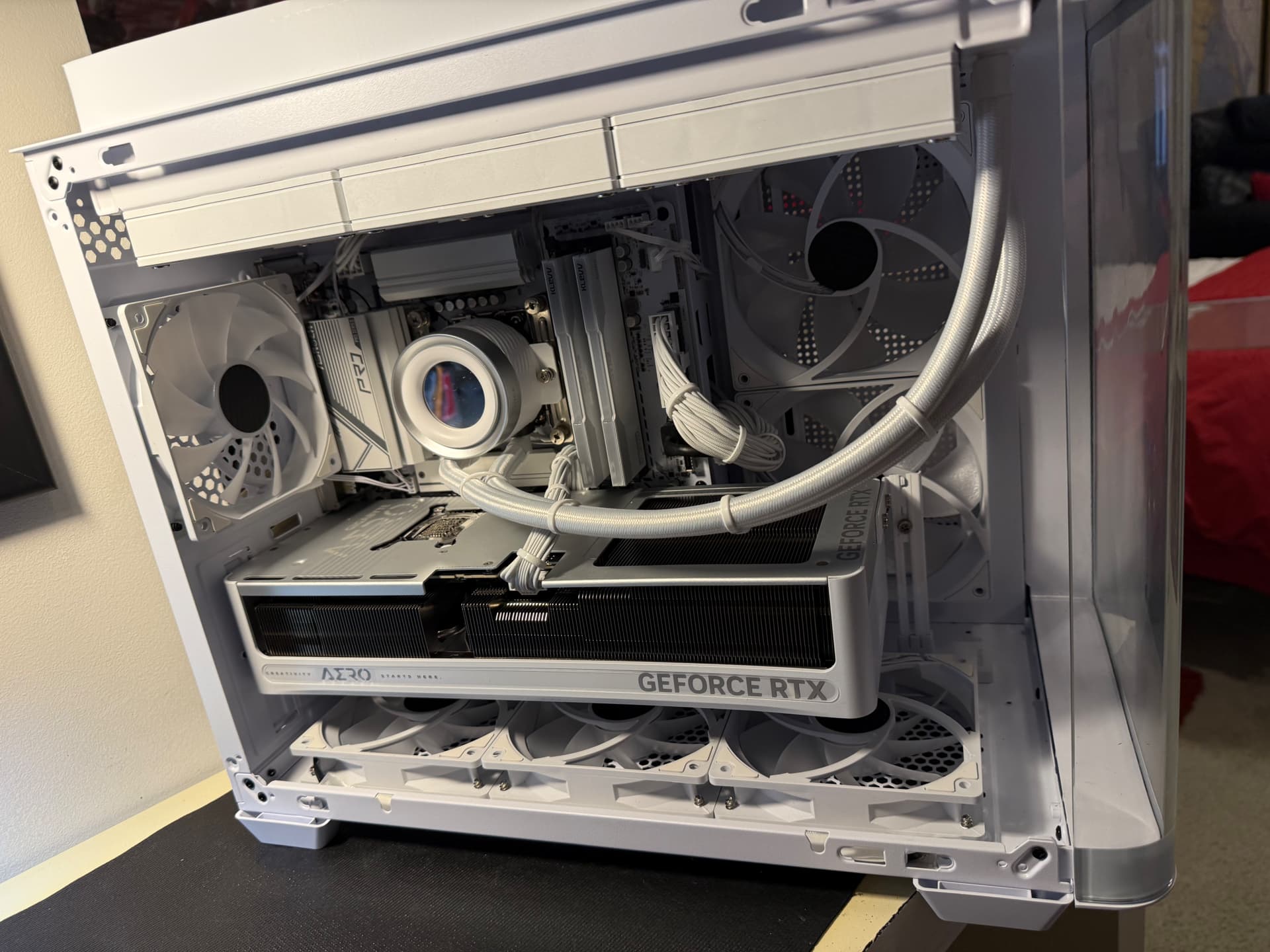
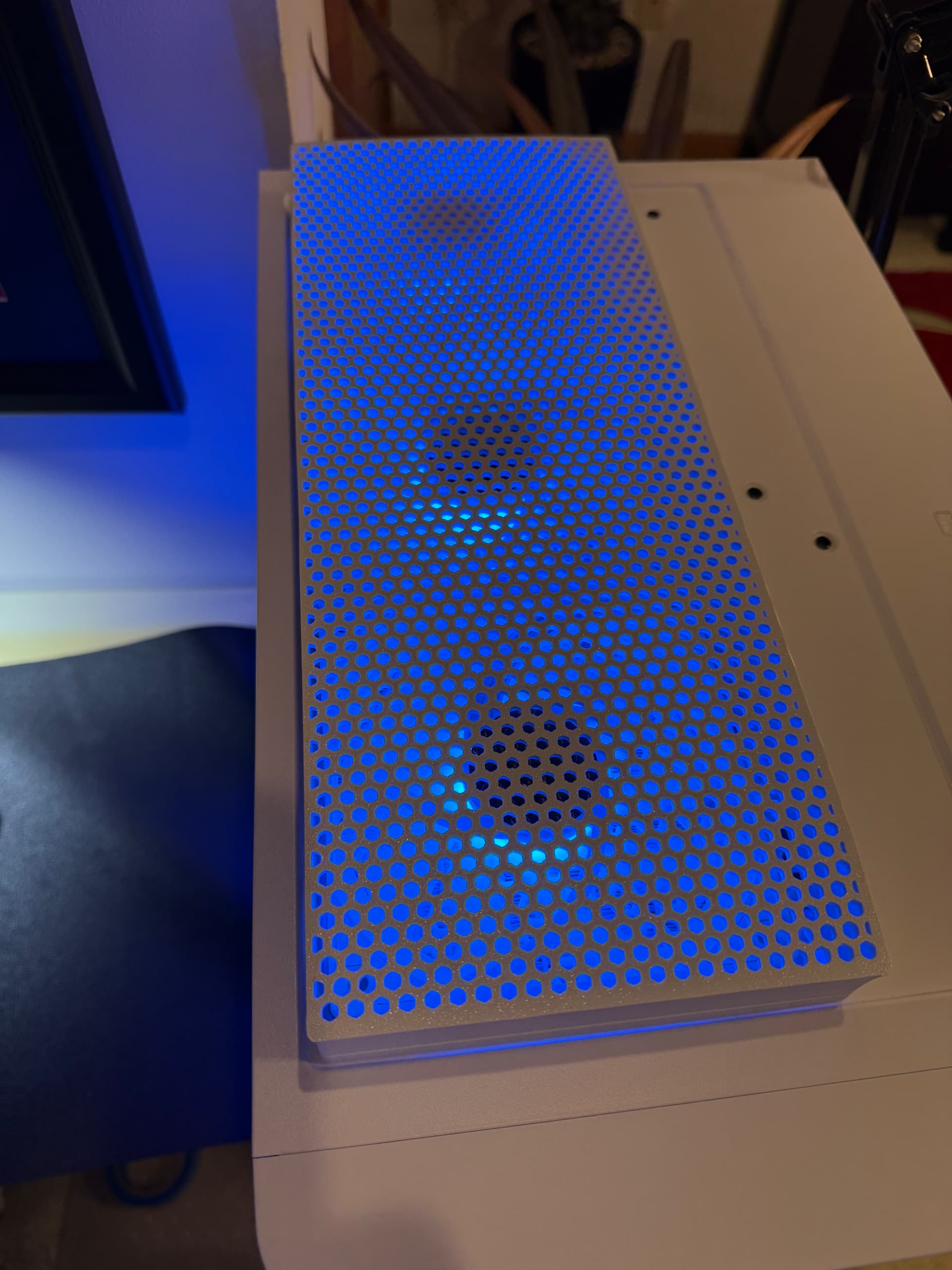
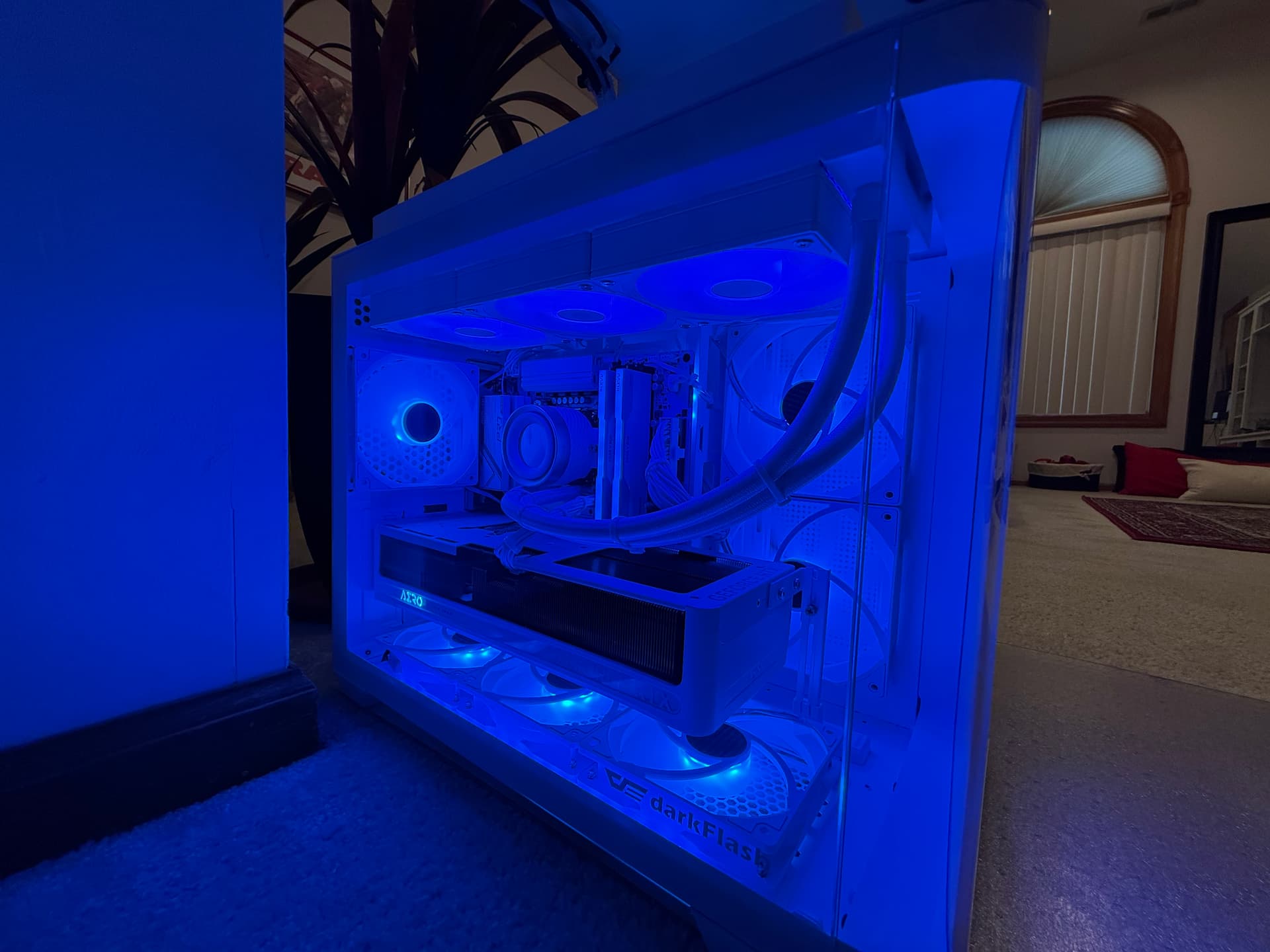
as an exhaust. For additional input, I have two 140s on the right side of my case blowing air in as well as a 120 and the PSU 120 also blow in air from the side.. This particular case design is really clever in my mind.
The external fan grill mounted on top in order to enable push pull was a design put together for 3-D printing… and a local business 3D printed it out for me. Turned out really nice.
Just for the heck of it, the entire PC is in white…. It took longer to find the parts, but I had never done anything in White before and it turned out pretty good.
Bottom line is my case average temperatures range from 28 to 32C….
But not sure how much my room conditions affect that because the PC sits in a room with good air conditioning.
2 Likes
