Hmm… thermals/temps? Are you on default frequencies… on & on!
Yep….
But what is “enough” ??
And it appears that starlight mini is the bottleneck….not hardware per se….
If “low end” gives ..3 FPS and takes 4 days instead of 2 to render 30 or so minutes of video in starlight mini…..
And the only thing I’m using that machine for is to render old video using starlight mini…..
Why spend upwards of $1000 to $2000 more.
I have toyed with this idea simply because starlight mini is so slow……yet I love the darn thing!
I also have a late model Mac that once they release starlight mini, I may be able to balance workload on one of the machines and use the other one for long rendering. The Mac will be much slower if my experience with the other topaz models holds true.
But I may not care….. fire and forget…….. come back in a couple days.
2 Likes
I can’t wrap my head around having something running 24/7 for several weeks. Maybe more if upscaling dozens and dozens of videos or old movies and shows. 400W or more. Fan blasting constantly.
1 Like
This is why I do hope for SL mini on the Mac. On my Mac Studio I really don’t notice TVAI running 24/7 (very contrary to the PC with i9/RTX4070).
Power consumption is more like 120 Watts vs. 400+ on the PC and the system stays fully responsive for other tasks without the user even noticing that TVAI is doing its thing in the background.
On the PC the system tends to get sluggish and really is heating up the whole room considerably - even though the window is open and we currently have 12-18 degrees Celsius here.
So I wouldn’t care about even longer rendering times on the Mac.
Besides at least the access to large amounts of RAM at high bandwidth (which seems quite important for Starlight) is given there.
3 Likes
You are  on that fact, not just an opinion, and the facts… again… also states that something happened to ALL Topaz’s VAi models’ performances, and it is NOT an aggression, way before SL Mini was introduced (~v4), especially a very noticeable performance hit… again… when the new player/cloud services were introduced. (see the benchmark threads v2.x - v5.x).
3 Likes
Yes to 1080p
1 Like
Could be watt/fps is better, but Notebooks don’t feel happy running them nonstop gpu & cpu at 100%, even big fat heavy “workstation” notebooks comes to a limit, have higher thermal load than a well-cooled PC.
2 Likes
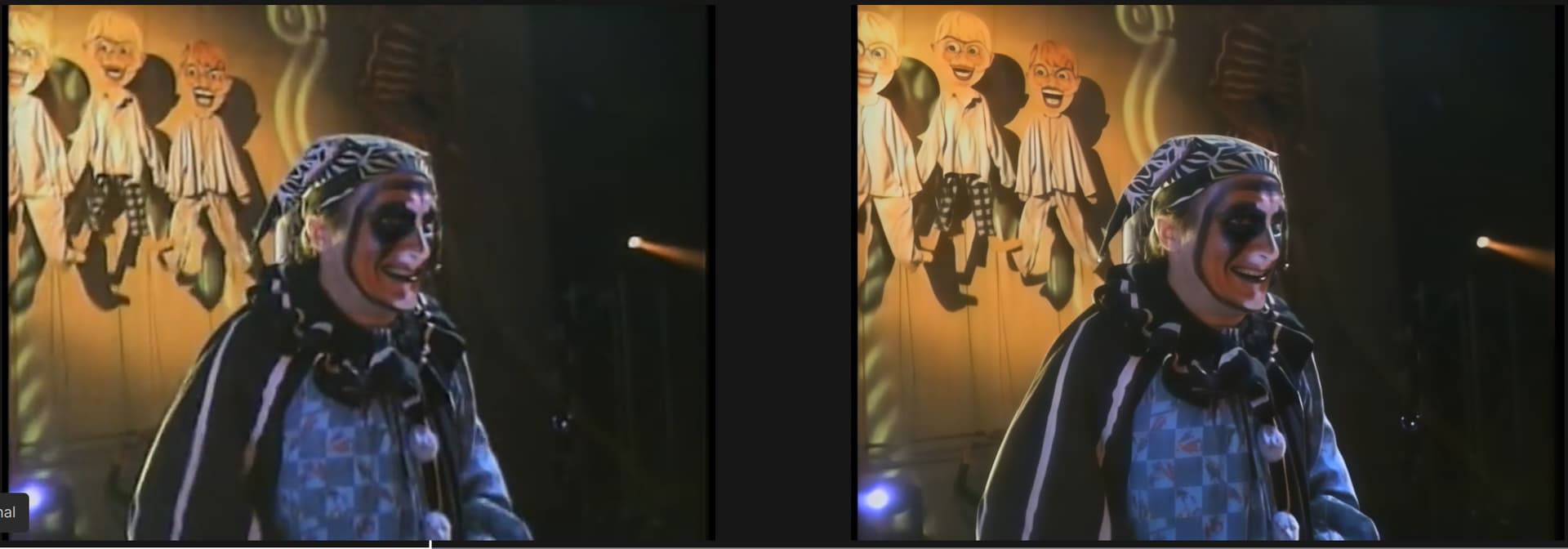
Insanity, from the Oingo Boingo farewell tour is looking quite good. This was from a 480p source.
I’d love it if the maximize preview button worked for starlight exports. The preview window is just too small and I can’t move the bottom bar low enough.
2 Likes
I divide the video being processed into segments that my computer processes for 8 hours and set the processing for the night
Rly sorry if this is wrong place to post. Only heard of Topaz, dont know what Starlight is, and am lost on the forum with all the sections.
I have a windows HTPC and want to convert 23.976 fps UHD blu-rays (MKVs) and regular blu-rays (MKVs) to higher frame rates like 48 fps, 60 fps, maybe try 30 fps and 50 fps also. What do I need to install for this and what settings to put? Also curious if any OLED TVs will do 48fps at 48fps but thats a separate question.
Would make a new topic for this but doesnt seem to let me.
I just did a 6-hour render using Starlight Mini, and after Video AI 7.0.1 finished the rendering process, it showed a Codec Error — and the result was deleted! Six hours of processing wasted. The log entry doesn’t contain anything useful either.
If anyone else is facing the same issue:
Video AI creates a temporary file in the same folder as the source file. For example, if your source is supervideo.mp4, the temporary file might be named something like supervideo_8563524.mp4.
To avoid losing everything, I now use a script that copies the temporary file every 10 minutes into a separate folder, keeping up to 5 versions. This way, if Video AI throws a Codec Error again, I still have an almost complete result — in the worst case, just missing the last few seconds.
If anyone is interested in the PowerShell script:
Configuration
$sourceFolder = “F:\SourceFolder”
$backupFolder = “F:\Backup”
$maxVersions = 5
$maxAgeDays = 1
Step 1: Find the newest valid file in source folder
$latestFile = Get-ChildItem -Path $sourceFolder -File |
Where-Object { $_.LastWriteTime -gt (Get-Date).AddDays(-$maxAgeDays) } |
Sort-Object LastWriteTime -Descending |
Select-Object -First 1
if (-not $latestFile) {
Write-Output “[$(Get-Date -Format ‘HH:mm:ss’)] No valid file found.”
return
}
Step 2: Prepare filename elements
$baseName = $latestFile.BaseName
$extension = $latestFile.Extension
$pattern = [regex]::Escape($baseName) + “_(\d+)” + [regex]::Escape($extension)
Step 3: Find existing backups
$existingBackups = Get-ChildItem $backupFolder -File |
Where-Object { $_.Name -match $pattern }
Step 4: Determine next rotation number
if ($existingBackups.Count -eq 0) {
$nextVersion = 1
} else {
$lastVersion = ($existingBackups | ForEach-Object {
if ($_ -match $pattern) { [int]$matches[1] }
}) | Sort-Object -Descending | Select-Object -First 1
$nextVersion = ($lastVersion % $maxVersions) + 1
}
Step 5: Define temporary copy name
$targetFileName = “{0}_{1}{2}” -f $baseName, $nextVersion, $extension
$targetPath = Join-Path $backupFolder $targetFileName
Step 6: Copy file (always)
Copy-Item -Path $latestFile.FullName -Destination $targetPath -Force
Start-Sleep -Milliseconds 500 # brief delay to allow write to finish
$copiedSize = (Get-Item $targetPath).Length
Step 7: Compare with latest existing backup
$lastBackup = $existingBackups | Sort-Object LastWriteTime -Descending | Select-Object -First 1
$lastBackupSize = if ($lastBackup) { $lastBackup.Length } else { 0 }
if ($copiedSize -le $lastBackupSize) {
Remove-Item $targetPath -Force
Write-Output “[$(Get-Date -Format ‘HH:mm:ss’)] Skipped: new copy not larger ($copiedSize B <= $lastBackupSize B).”
} else {
Write-Output “[$(Get-Date -Format ‘HH:mm:ss’)] Backup saved: $targetPath ($copiedSize bytes).”
}
6 Likes
Hello.
I mean… from some users reporting throttling issues to error msgs to system crashes.
Out-looking-in, there are numerous of issues (thermals, memory leaks, ect.) that could cause these behaviours; no one here, it seems, is willing to do the work to monitor these issues when they occur, though, and just relying on logs in hope that TL would correct the issue.
Help TL to HELP YOU, folks! 
Topaz is very demanding on resources and if you want your video to finish without errors never use overclocking in any form and I would advise removing the side cover of your computer for better cooling
Hello.
Topaz is very demanding on resources and if you want your video to finish without errors never use overclocking
If you’ve read my comments, you would know that I’ve been stating this for a wwwhhiiile! 
I would advise removing the side cover of your computer for better cooling
This is not a solution. Just a bandaid and it also gives TL ZERO reason to correct anything if it’s due to how TVAi coding slides across content ect. spiking irregularities, ect.
removing side cover can disturb air flow, you should only open it if your cooling is badly done. I personally prefer closed system with air filters and overpressure, becomes much less dusty
3 Likes
If all you want to do is change the frame rate, just use DaVinci Resolve. It’s free.
If you are using Windows, you can set a custom resolution with a refresh rate of 48 or 96 hz if VRR doesn’t kick in.
I suppose that many owners of even expensive cards do not think at all about the need to choose the right case and organize proper cooling in it. Based on this, I suggest simply removing the side cover. If the temperature does not change or worsens, you can put it back.
GPU: RTX 4060 8g
Intel(R) Core™ i5-11400F @ 2.60GHz 2.59 GHz
RAM: 32GB DDR4
I just did one test upscaling a 360p source to 720p with Starlight Mini and I Set memory to 70%. 1mn it took 2 h with 0.2 fps.
I got an amazing result.
Is this data normal or should I raise max memory?
