as already wroted here, Notebooks have low voltage gpus, while your Desktop card takes up to 400W. For Starlight, no don’t do it.
1 Like
Wow. So it’s literally like having an 85" or bigger TV running for several days straight. Maybe even longer when processing several videos…
More like three or more 85” OLED TVs. The CPU, RAM, Mainboard, HD are consuming power as well…
1 Like
I’m running a RTX3080 Ti with a 12th Gen i9 (top of the line four years ago…lol) and I have found that the best way to upscale 480p originals is to use Starlight to go to 960p and then either Proteus or Artemis (I prefer Artemis since Proteus does occasionally produce some small artifacts) to upscale from 960 to 4K. Just finished upscaling the first 3 episodes of ST-DS9 and the results are spectacular.
3 Likes
Unfortunately, after this update, TVAI is still unusable for processing vertical/portrait videos that include rotation metadata or require manual rotation in the input settings. I’ve tested this across three sets of vertical videos from two Android phones (2014 and 2022 models).
Set 1: No Rotation Metadata (Manual Rotation Needed)
- Source: 640x480 resolution. These are portrait videos saved in landscape orientation because the phone was held upright but registered the recording as landscape.
- TVAI Input Settings: Manually set Rotation = 90° to correct the orientation.
- Model Used: 4x Starlight Mini
- Output: 2560x1920. The orientation is correct, but the video is stretched horizontally and the aspect ratio is wrong.
- Expected Output: 1920x2560, maintaining correct portrait dimensions.
- Alternate Test: Leave Rotation = 0 and rotate the video later in a video editor.
- Output: 2560x1920. The video is sideways, but the aspect ratio is correct.
- Summary: Rotating the video inside TVAI changes the image orientation, but the resolution doesn’t update to match. This results in distortion. (Take any normal landscape video, rotate it inside TVAI to 90 or something, and you’ll get the same result, all because the output resolution doesn’t update to match.)
Set 1A: Same Videos With Rotation Metadata
- Source: Same videos as Set 1, but processed using
ffmpeg -display_rotation 90to add rotation metadata. - Effect: When imported into TVAI, Rotation = 90° is automatically selected in the input settings.
- Model Used: 4x Starlight Mini
- Output: TVAI returns an error: “Please contact support.”
- Alternate Test: Change Rotation from 90 to 0 in the input settings.
- Output: 2560x1920, but now rotated 270° (upside down) and stretched, with the same incorrect aspect ratio as in Set 1.
- Summary: Adding rotation metadata causes TVAI to return an error. Manually overriding the rotation inside TVAI gives the same warping problem.
Set 2: Modern Phone With Rotation Metadata
- Source: 1920x1080 portrait videos recorded on a 2022 phone, with 270° rotation metadata.
- TVAI Input Settings: Automatically shows Rotation = 270°.
- Model Used: 2x Starlight Mini
- Output: TVAI returns an error: “Please contact support.”
- Alternate Test: Set Rotation from 270 to 0 in TVAI Input Settings.
- Output: 3840x2160. The video is upside down and stretched into a landscape resolution.
- Summary: Rotation metadata again causes an error. Setting it to 0 inside TVAI avoids the error but leads to incorrect orientation and aspect ratio.
Conclusion
There seem to be two main problems:
- Rotating a video inside TVAI does not update the output resolution. This causes warped, stretched video due to the wrong aspect ratio.
- Videos that contain rotation metadata cause TVAI to return an error, making them unprocessable unless the metadata is removed. Removing the metadata (or setting the rotation to 0 inside TVAI) only leads back to problem 1.
Edited to add: @dakota.wixom Tagging you here since it seems like this post got buried and went unnoticed. This is a major issue and I am really hoping for it to be fixed in the next update.
1 Like
I did another test. But this time with nothing else running in the background, and I did see a small improvement in speed with StarLight Mini. On 7.0.0 I was often between “6.10”, “6.20 to 6.38 with occasional spikes to 7.xx” spf. Now with the 7.0.1, I have a more stable speed of around “6.01”, “6.02” with the occasional spike to around “6.15”, “6.18” then back to “6.01 or 6.02”.
So for this test, it took me 1h55 and 7 seconds for a 44-second sequence at a resolution of 720 x 576 to 1280 x 1024.
How long did it take you to make a 48-minute episode with StarLight Mini?
I’m also curious to see the results on a few extracts.
For my part, I scaled all the Star Trek DS9 and Star Trek Voyager series last year. I used Proteus v4 and iris.
Great job, dianac!
What you talkin’ bout, Willis? Your rig can still smash some of today’s over-bloated units that has gazillions of RAM, ect. (useless) on the market, with ease, without even sweating. ahem Apple’s stuff, ect. ahem
Just finished upscaling the first 3 episodes of ST-DS9 and the results are spectacular.
Oh… oh… oh! I just gotta know! What were your processing times?!
Hi, just installed 7.0.1 after using v.5.3.4 for quite a while. Please excuse me but can anyone help here, I just can not find the preview button. 
HHi again, and yahtzee! it’s shown up after closing down and restart. Glitchy McGlitch.
The 480 to 960 Starlight-mini upscale ran at 0.5 frames per second, taking about 1 minute per second of video. I then upscaled from 960 to 2160 using Artemis at ~24 fps, taking about 50 minutes for a 45 minute episode.
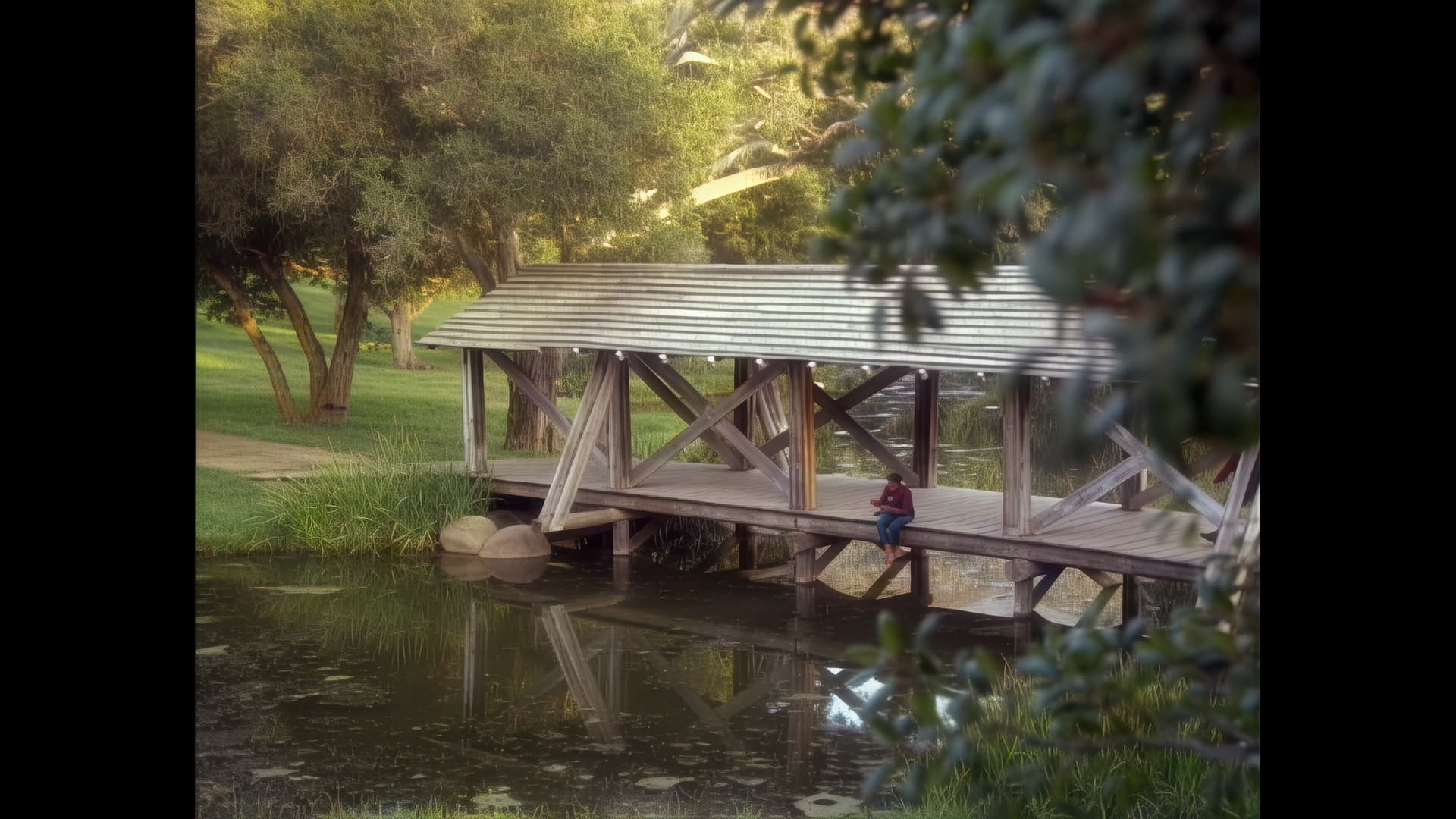
There is a scene, early in episode 1, of a covered bridge over a pond that was ALWAYS a mess. The leaves of the trees are too small for SD to capture them properly and so always upscaled as green mush. Starlight finally was able to recognize leaves and produced a vastly superior output.
1 Like
Starlight Mini upscale to 960, followed by 960 to 2160 upscale with Artemis:
Same scene upscaled with Rhea/Proteus:
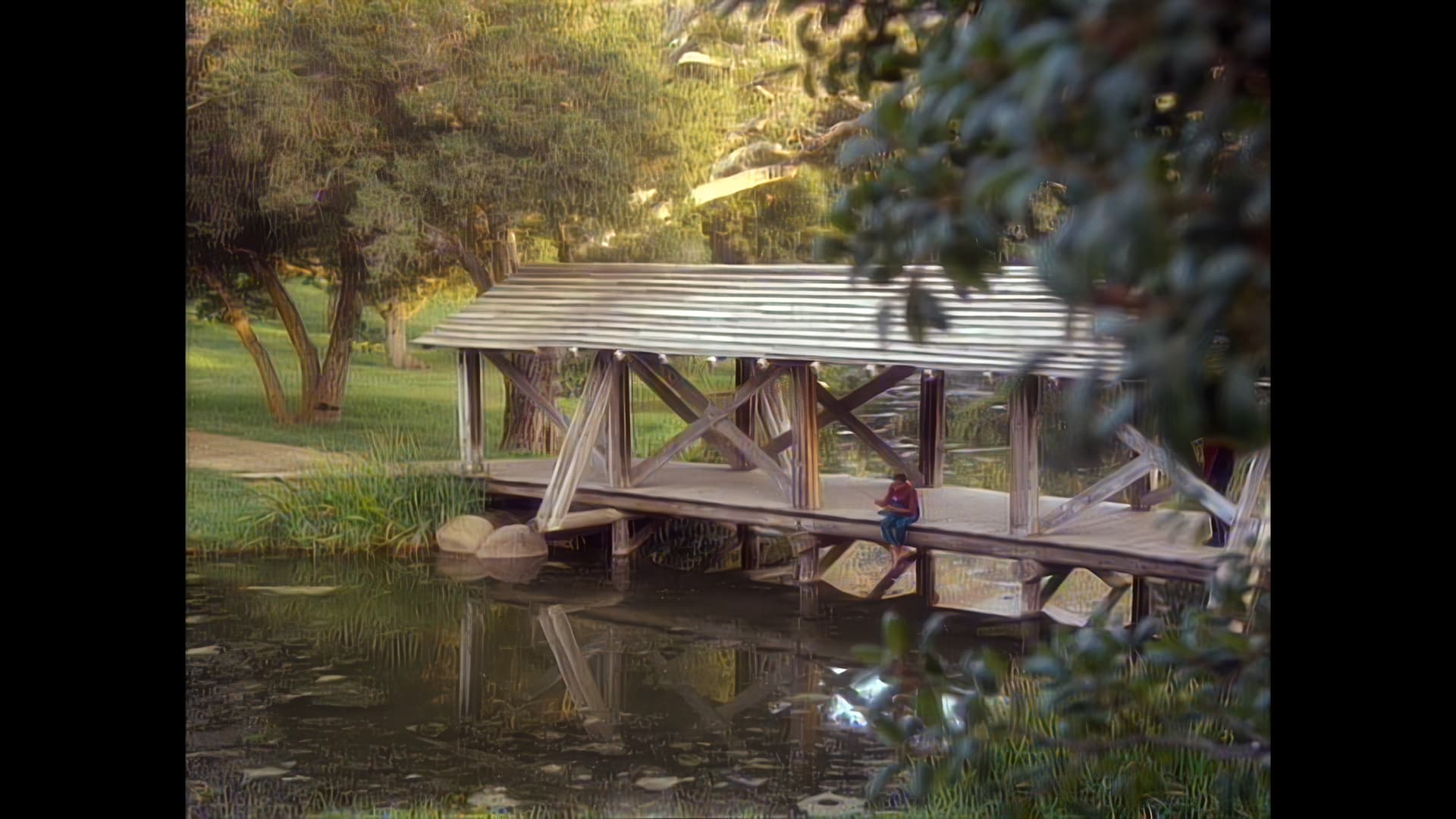
This forum limited them to 1080, apparently. The originals were screencaps at 1440p.
3 Likes
For a duration ~43-minutes (2580-seconds) per episode?
WhooA! 
I’m grateful for your findings, dianac.
Okay, I’ve used SL mini on 360p and 480p videos and upscaled them using 2x upscaling. So far I do not find the results usable.
It does a fantastic job of recovering detail in clothing. But, it is far too aggressive with pretty much everything else. The noise reduction/film grain removal does completely eliminate the grain/noise, but it also eliminates fine details in a person’s face (pores, acne, etc). This gives the face an unrealisticly smooth appearance.
Additionally, it doesn’t handle curly hair properly. The hair on Captain Sisko’s beard is curly, but TVAI tries to make it straight.
The combination of loss of facial details with improper handling of facial hair give the video the “this was upscaled by AI” look that I do not consider usable.
People have already commented about the monster faces and alien text. When it can’t make out a person’s face or what text says, it should just leave it blurry rather than trying to put something, anything there.
All of these issues were present in one degree or another with previous models. The difference is when one model would be too aggressive, I could usually find another one that would take a more restrained approach. Since SL Mini is the only diffusion model available, there is no alternative.
I would either like to see an aggressiveness slider (recover details doesn’t restrain it enough) or a different model that is less aggressive.
4 Likes
I just don’t want to spend a $3000 or more on a simple video card….or upgrades.
My 4080 currently does fine with Starlight Mini but I do have other things I’d like to do on my PC instead of just using the machine to render. Because starlight mini is just really slow….. I mean really really slow. It is superb in fact for old video….but yup….slow
So I have two questions…
The first is while rendering one of these long starlight mini rendering operations that can take up to two days…..
How viable is using your PC for virtually anything else? Does it multitask properly without a huge problem? I won’t even notice? Heat? Crashes?
My specs are fairly high end with a 4080 vid card Intel 13900K and 64 gigs of RAM. Gold standard PSU, Water cooled and well ventilated with a high number of fans.
In the past, I have actually rendered Rhea models and played a video game at the same time with no problem.
Just not sure if this is possible/advisable with starlight mini…
My second question would be what if I were to go with the route of just building a new low-cost machine that might not render hugely fast…. But I could care less….. fire and forget…. come back a couple days later.
What would be a decent low cost machine spec wise that could handle starlight mini, all be it slow?
Thanks for any suggestions.
Oh and to: Topaz Labs
I have a nice little brand new Mac mini with high-end components that runs like a top. Would really, really like that starlight mini capability on it. I know you’re working on it, but I thought I’d put my two cents in that it would be sweet!
3 Likes
Starlight is almost entirely GPU bound. My water cooled RTX 3080 Ti cruises at about 50 to 60 degrees Celsius. The CPU barely makes it to 40 degrees. The cpu load never goes above 10% or so. The PC is quite usable, but don’t expect to do anything that requires GPU muscle. But emails, word processing, web browsing are all quite doable.
The heat generated is significant- you could probably heat up your coffee if your GPU exhausts onto it! 
2 Likes
I do mostly some work during Starlight mini does it’s job, but I don’t want to run the PC 24/7. So I really would like to see a pause/resume button to do next day further working on old videos.
That really would be very helpfully.
3 Likes
Hello.
This could be a potential reason why some users have stability/performance, ect. issues; running too many jobs/background processes with TVAi.
TVAi’s processes is one of the most tasking software in the industry (even compared to aerospace stacks, ect.), but it’s mainly due to a HUGE amount of ugly issues related to poor memory management, ect.
TVAi’s jobs needs to work alone until TL ( ) correct these issues.
2 Likes
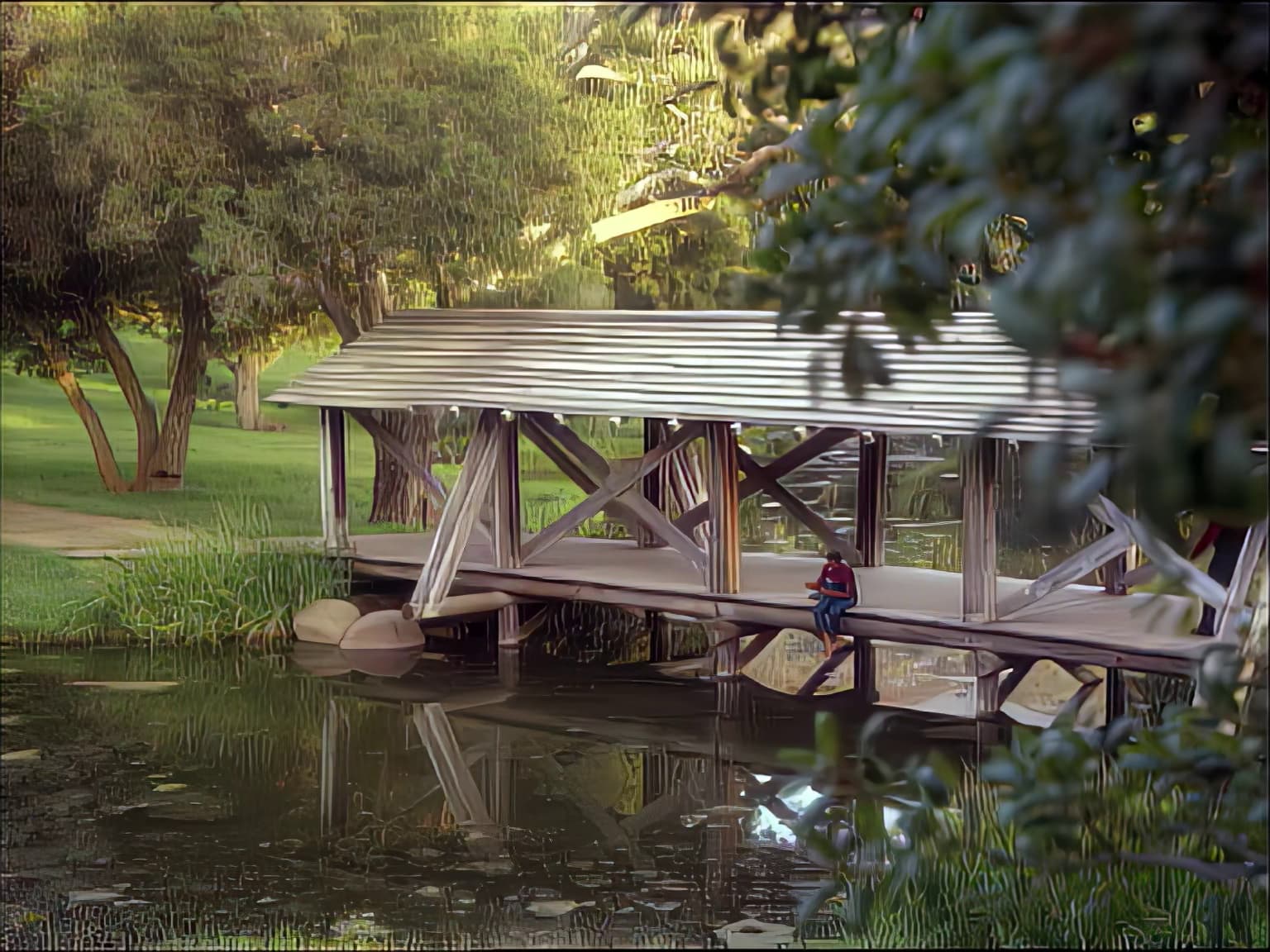
The leaves on the trees in the background still don’t look great, but it’s definitely better than with traditional models. And depth of field is much better respected. The details of the pond and the wooden structure are really well detailed.
My version from last year for comparison purposes:
2 Likes
But the problem is, if you’re using a browser or a mailbox or the photo application or whatever, you’re going to increase StarLight Mini’s rendering time. On my GPU, I’m running at around 6.01 and 6.02 SPF, with occasional spikes to 6.15 and 6.18. But if I open Microsoft’s photo application to view an image, or if I open my browser or e-mail or anything else consuming more or less the same thing, my StarLight speed quickly rises above 8 SPF, sometimes even to 9.
Consequently, when I render a piece of a sequence, I do it when I’m not in front of my PC to maximize rendering time.
