Here’s one I did for the absolute CLASSIC Mr. Rossi’s Vacation. The source quality is quite bad with color issues and a lot of dust and scratches. I had it on VHS, but they may have made dvds for the movie at a later time. Starlight did quite a good job removing a lot of the issues. But it did change the colors and made them more faded, which I don’t like. But it’s an impressive start. It also erases the black eyeball in some frames because it thinks its an anomaly. There should be a way for it to do that the eye should keep the black dot because it existed there in the other frames.
1 Like
It’s interesting how it’s fading your color but increasing color and adding contrast to mine. I prefer more muted.
Can you cancel your subscription to cloud credits? Because I don’t want to be tied down every month with it if I don’t use up my current credits or if I don’t have enough money for the following month etc.
what I wanted to say with the adobe comparison is that it’s much worse with TVAI, like when you have to pay Adobe money for every Photo in Photoshop.
Well ok, that was a bit exaggerated, but I think you know what I mean. Adobe did it because they could and annoyed a lot of people including me, but because it’s a product that appeals to a lot of people, they found enough customers. If Topaz does the same, the already small customer base gets tiny and then the cloud product must be outstanding otherwise the company does not exist anymore.
They can of course continue to develop the Base product and let it lag far behind Starlight, but the competitors are not sleeping and if there is hardly any progress with TVAI and only stupid features are added, the program remains buggy, more and more customers say good bye
The minute that happens I will renew my subscription. I’m not forking out for a cloud service if I’ve paid for a licence for the software.
3 Likes
However, the text in the bottom right-hand corner is really well caught up. It’s a pity, though, that the shading of the text is almost completely erased.
It would be nice if this application could add the ability to color b/w videos and select black and white in the starlight model.
That be cool to see in the future, but I think it’s best that the team tries to optimize one thing at a time first.
Split some of the discussion here into a new thread - Licensing discussion
To be fair, it’s not just “recompile”. They’d need to:
- Upgrade from Cuda 11.8 to 12.8
- Upgrade their ancient TensorRT version they use (and pretty much has standardized on for all their products).
- Test and tweak each new model so that it actually compiles from ONNX to TRT while behaving the same.
- Recompile all their models and host + serve them from current CDN (2x storage), though this is absolutely the tiniest of the problems.
#3 was especially a nuisance for the semi-“modern” models on linux (iris2/3, prob4 etc), and I had to change the actual model architecture to get it to compile to a trt engine that behaved the same as the source model. It was a lot of trial and error with me yelling “wtf are you doing you stupid compiler”, and this was the same version Topaz is using, with only a minor patch level difference.
1 Like
RTX 5000 alpha is now out: Topaz Video AI Alpha 6.1.1.1.a.trt (RTX 5000 Optimization)
1 Like
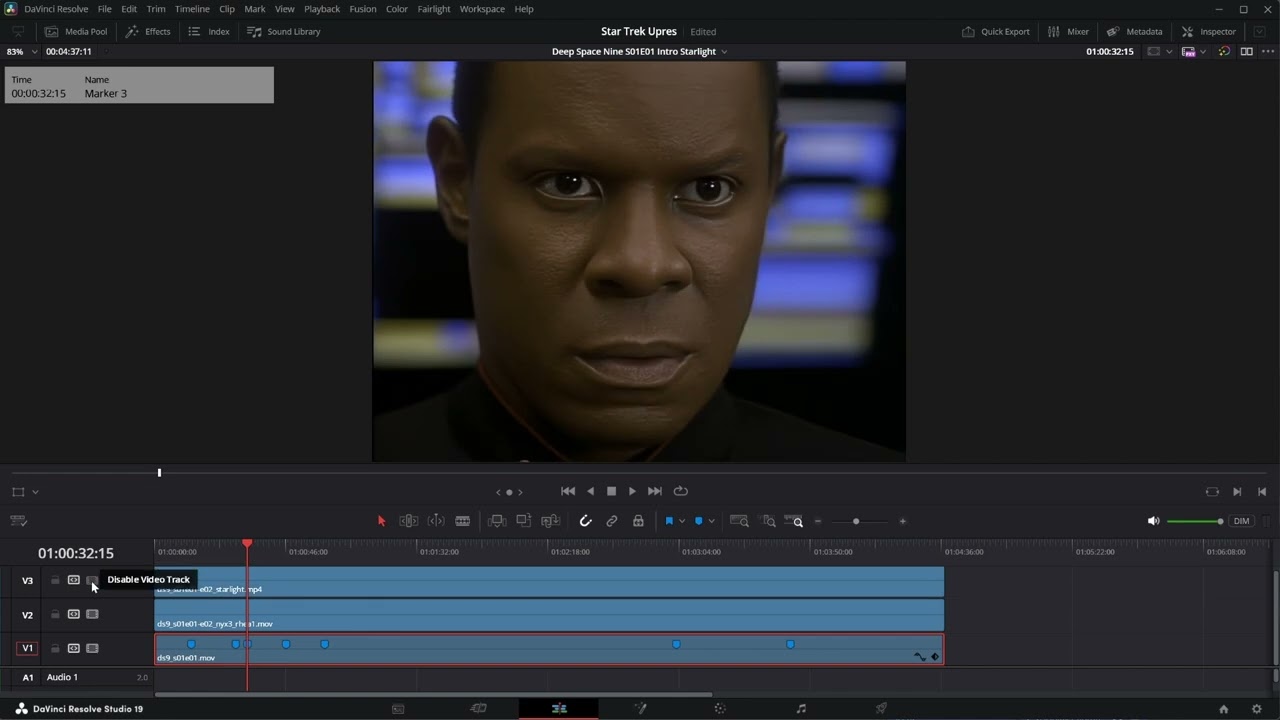
Did a comparison between my traditional Topaz AI upscaling results and Starlight on the first 4 min or so of Star Trek: Deep Space Nine, Season One, Episode One. Very interesting.
2 Likes
Thanks for sharing!
1 Like
Deepseek can also do with less hardware then Copilot ot chat gpt by using 8 bits in stead of 64 bits words. still generating the same results The same problem we see at Topaz AI
Can somebody write guide for Starlight? If i have dvd 720x480 interlaced. What to do? First deinterlace via topaz and send to starlight? Or deinterlace, upscale to 1920x1080 and then send to Starlight?
Does your cpu change the quality of the models?
Because I’ve just upgraded my cpu from 12900K to 285K Ultra with the same GPU, and the results, especially in denoise models, are very different, much better on the Ultra cpu.
I had a similar experience a year ago when I had to use my old pc with outdated cpu and Iris looked horrendous compared to the 12900k, yet I still used the same GPU. Very odd.
Here is another comparison. The eyes could be better, but overall not bad.
Command and Conquer GDI 1 Briefing
1 Like
Starlight is a upscale AI model and not a deinterlace world champion. I recommend do QTGMC deinterlace first (Hybrid, setting very slow) and check your content; does 720x480 really should played as aspect 1.5 or it is 4:3 or 16:9?
When it should be 4:3 upscale 720x480 to 720x540. If it’s 16:9 upscale 720x480 to codec friendly 864x486, because this produce no floating points and is exactly 16:9.
When you have a 720x576 source that is made for play 4:3, scale it to 768x576. When you have a 720x576 source that is made for play 16:9, scale it to 1024x576
You can do all scales/stretch without letterbox in Virtualdub2 (filter “Resize”), Avidemux, Hybrid or using Avisynth commands, and you can do crops also there, when needed
OR do no resize and check what Starlight does, leave a 720x480 source as it is and check with MediaInfo DAR (Display Aspect Ratio) flag, correct it when needed by set DAR Value and remuxe.
Sample: Set new DAR with MKVToolNix
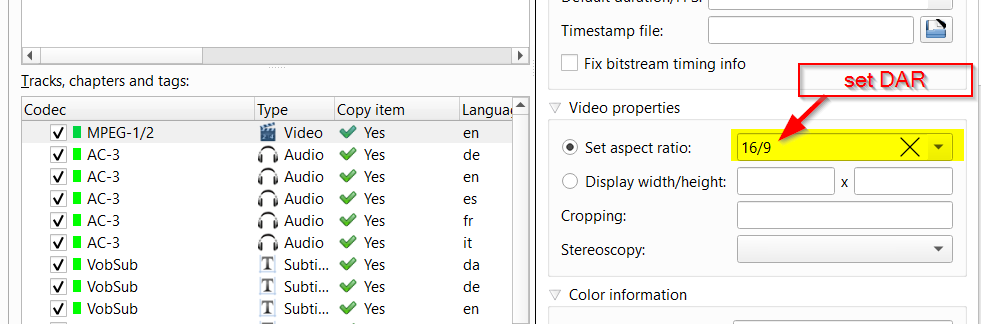
Give this Starlight and check upscale result: When you have set DAR for example to 16:9 and Starlight gives you for example 1440x1080 native pixels with a DAR Value of 16:9, then this may get correct played, but is not what I personally want, because players or TV stretchs when play and this enlarge lowers image quality, because the streched part is not AI model enhanced.
So what I want and recommend is always SAR=DAR, means native pixels fits the wanted aspect ratio, no DAR set that differs. If you don’t get this with TVAI out, I recommend do hardscale your source to the wanted aspect ratio, as I described in the first part above.
5 Likes
The results all look significantly worse than what my older Samsung TV or newer Epson projector produces from such sources in real time! You should really consider whether this is worth the time and effort! All these “enhancements” just look horrible on a big screen. If the source is very poor, then it’s simply no good! With cartoons, it’s almost always worth a try. For realistic material with people / faces in poor source material, only a high grain factor can help minimally.
1 Like
i have HD 720p Good Quality Adult videos , I want to upscale them to 4K2160p, I was advised to use the Gaia AI model for skin maintenance, others advised me to use Rhea or RheaXL For more details, which method is better ? Are there other Models that are better than them?
