Starlight is a upscale AI model and not a deinterlace world champion. I recommend do QTGMC deinterlace first (Hybrid, setting very slow) and check your content; does 720x480 really should played as aspect 1.5 or it is 4:3 or 16:9?
When it should be 4:3 upscale 720x480 to 720x540. If it’s 16:9 upscale 720x480 to codec friendly 864x486, because this produce no floating points and is exactly 16:9.
When you have a 720x576 source that is made for play 4:3, scale it to 768x576. When you have a 720x576 source that is made for play 16:9, scale it to 1024x576
You can do all scales/stretch without letterbox in Virtualdub2 (filter “Resize”), Avidemux, Hybrid or using Avisynth commands, and you can do crops also there, when needed
OR do no resize and check what Starlight does, leave a 720x480 source as it is and check with MediaInfo DAR (Display Aspect Ratio) flag, correct it when needed by set DAR Value and remuxe.
Sample: Set new DAR with MKVToolNix
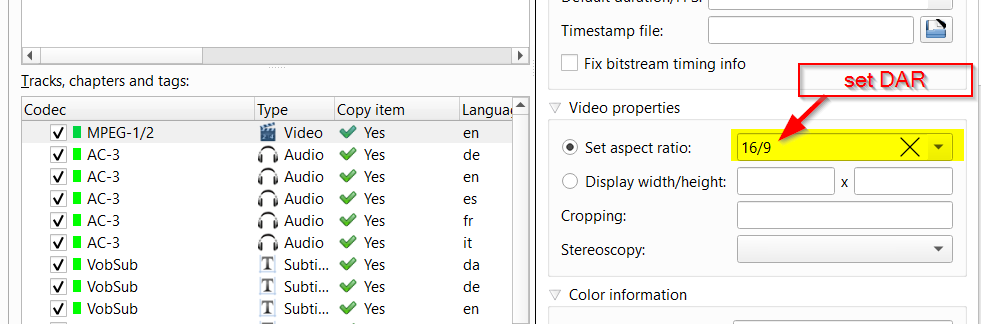
Give this Starlight and check upscale result: When you have set DAR for example to 16:9 and Starlight gives you for example 1440x1080 native pixels with a DAR Value of 16:9, then this may get correct played, but is not what I personally want, because players or TV stretchs when play and this enlarge lowers image quality, because the streched part is not AI model enhanced.
So what I want and recommend is always SAR=DAR, means native pixels fits the wanted aspect ratio, no DAR set that differs. If you don’t get this with TVAI out, I recommend do hardscale your source to the wanted aspect ratio, as I described in the first part above.
