That would be amazing!
1 Like
Give it a test on files you know have been saved as vfr and let Tony know.
My post includes a command to verify vfr or cfr
cfr will always be 0.00000 
1 Like
That won’t work as Topaz build their own customized FFMpeg to make it work with the TVAI filters.
2 Likes
Confirmed. Copy/paste my reply from the beta section.
“I did a really short test using the GUI and MediaInfo shows a CFR (test done from 25fps to 60fps). I will test more thoroughly after I finish my queue since I don’t like to pause it.”
EDIT: A little bit more extended test (500 frames). Enhanced with Rhea, x264 codec, CFR 5Mb/s → OK. Interpolated same video from 30fps to 60 fps with Chronos, x265 codec (both Main and Main10), CFR 5Mb/s → OK.
This might be the end of this headache.
EDIT 2: It looks like the CFR is fixed someway in the enhancement models in the beta version but there are still issues with the interpolation. When you interpolate an entire video it creates some weird VFR.
Video
ID : 1
Format : HEVC
Format/Info : High Efficiency Video Coding
Format profile : Main@L4.1@Main
Codec ID : hvc1
Codec ID/Info : High Efficiency Video Coding
Duration : 3 min 4 s
Source duration : 3 min 4 s
Bit rate : 5 014 kb/s
Width : 1 920 pixels
Height : 1 080 pixels
Display aspect ratio : 16:9
Original display aspect ratio : 16:9
Frame rate mode : Variable
Frame rate : 60.000 FPS
Minimum frame rate : 30.000 FPS
Maximum frame rate : 15 360.000 FPS
1 Like
I just opened up the app this morning and got an update for 6.0.3. I let it update. I don’t see the release notes here on the community forum or the standalone link to download yet. I’ll do a DVD to FHD 1st pass and Iris Low Q 2nd pass on the same DVD and see if it’s good.
6.0.3 stable released with VFR fix??? GREAT… thanks! @tony.topazlabs
1 Like
Mine will come in my Falcon Northwest system and my 285k build
5090 = 4090Ti
If you have a 4090, unless you like wasting money, I would wait for 60 series, which will be on new fab process, thinner wafer, more efficient!
3 Likes
Great, so you will betatest for me. 
That depends on what tensorRT does with Video AI and how the performance is in Gigapixel AI, Capture One and Resolve once the software has been adapted to the hardware.
But knowing the internet, I have to test almost everything myself.
Topaz never optimized anything specifically for the 4090 so don’t expect it on the 5090. All they did was release TensorRT models.
As we have learned the most important component is how much L2 cache is on the 5090? Nvidia always skimping where it actually matters.
Edit: found this:
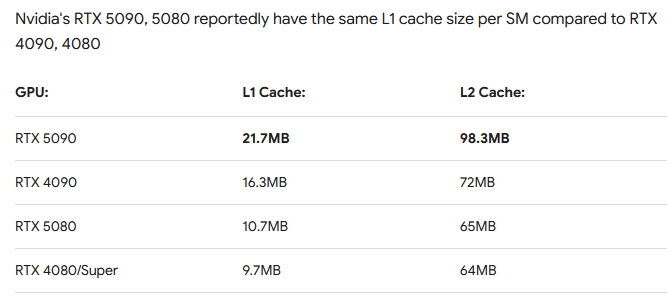
They should have doubled it to 144MB!
$5090
Anyway, if you do get a 5090 I’ll be looking forward to your benchmarks!
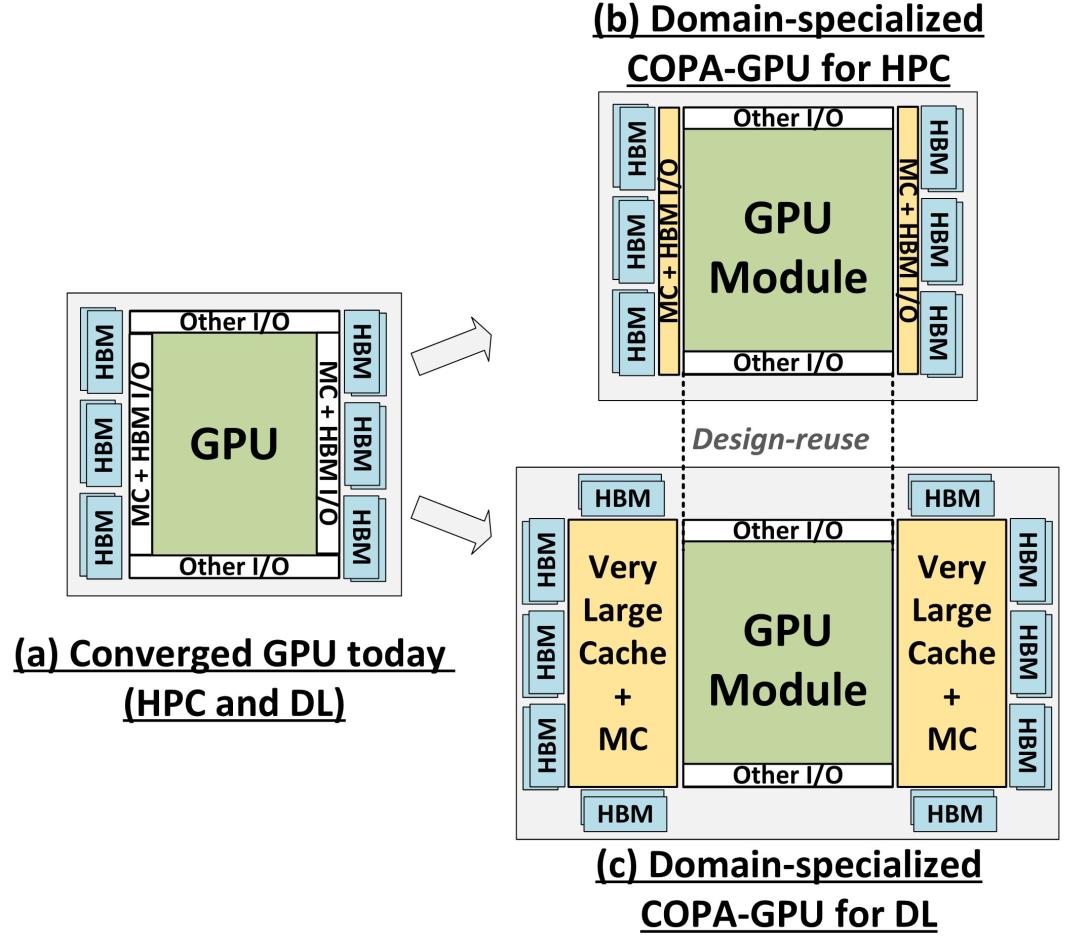
960 mb was the sweet spot for a architecture paper.
1 Like
I work offshore so i will be back in 3 months so i guess most of the testing will be done. But if not I will be doing some stuff
lol as if this is the only thing to use a 5090 on
*4090Ti
Tony, as a followup post to my other one, one which I dug up from an old post-mortem issue with an old pipeline.
The issue could stem from a timestamp quantization issue which affects non-integer frame rates (like 23.976), specifically when using containers with fixed time bases, such as milliseconds, for which integer frame rates (25, 30) don’t exhibit the problem.
here’s very simple example that shows how a CFR source can become subject to VFR interpretation.
ffmpeg -y -f lavfi -i "color=size=2x2:rate=24000/1001:duration=5" -c:v libx264 -g 30 -pix_fmt yuv420p src.mkv
Now this clip is clearly CFR. Does ffmpeg agree?
ffmpeg -i src.mkv -vf vfrdet -f null - 2>&1| grep vfrdet

[Parsed_vfrdet_0 @ 0000028923737900] VFR:nan (0/0)
[Parsed_vfrdet_0 @ 0000028924464bc0] VFR:0.579832 (69/50) min: 41 max: 42 avg: 41
Nope. Insta-fail.
Ok, does Mediainfo agree with ffmpeg?
mediainfo src.mkv | grep "Frame rate"
Frame rate mode                          : Constant
Frame rate                               : 23.976 (24000/1001) FPS
Nope. But it was right in this case.
So why are the two behaving differently? IIRC the doom9 discussion netted down to ffmpeg checking if the framerate is an even multiple of the time base or not, while mediainfo uses some other heuristic.
So
ffprobe src.mkv -show_streams 2>&1 | grep -E "(frame_rate|time_base)="

r_frame_rate=24000/1001
avg_frame_rate=24000/1001
time_base=1/1000
A frame’s presentation time can’t of course be expressed accurately when the bases differ and the time base isn’t a function of the frame rate nominator itself.
This problem doesn’t happen for even framerates such as for 25 and 30, but is a pain with the US film and “ntsc” standards.
So how about mp4 then?
ffmpeg -y -f lavfi -i "color=size=2x2:rate=24000/1001:duration=5" -c:v libx264 -g 30 -pix_fmt yuv420p src.mkv

ffmpeg -i src.mp4 -vf vfrdet -f null - 2>&1| grep vfrdet
[Parsed_vfrdet_0 @ 0000024bb13fa200] VFR:nan (0/0)
[Parsed_vfrdet_0 @ 0000024bb2397640] VFR:0.000000 (0/119)

mediainfo src.mp4 | grep "Frame rate"
Frame rate mode                          : Constant
Frame rate                               : 23.976 (24000/1001) FPS

ffprobe src.mp4 -show_streams 2>&1 | grep -E "(frame_rate|time_base)="
r_frame_rate=24000/1001
avg_frame_rate=24000/1001
time_base=1/24000
Oh, a time base derived from the frame rate, how convenient 
Same issue happens with transport streams for instance due to the same reason.
Now is ffmpeg wrong? Well Yes, in practice. But not from its own definition of what CFR means. As you know, one can easily see that a clip is CFR if there is a short repeating pts distance pattern between even and odd time deltas. And this is what many tools take into account (though apparently not this one).
fprobe -v error -show_frames src.mp4 | grep pts= | head -5
pts=0
pts=1001  # 1001 timebases since previous
pts=2002  # 1001 timebases since previous
pts=3003  # 1001
pts=4004  # 1001
...

ffprobe -v error -show_frames src.mkv|grep pts=|head -5
pts=0
pts=42    # 42 timebases since previous
pts=83    # 41 timebases since previous
pts=125   # 42
pts=167   # 42
pts=209   # 42
pts=250   # 41 4 frames since last odd
pts=292   # 42
pts=334   # 42
pts=375   # 41 3 frames since last odd
pts=417   # 42
pts=459   # 42
pts=501   # 42
pts=542   # 41 4 frames since last odd
pts=584   # 42
pts=626   # 42
pts=667   # 41 3 frames since last odd
pts=709   # 42
pts=751   # 42
pts=792   # 41 3 frames since last odd
pts=834   # 42
pts=876   # 42
pts=918   # 42
pts=959   # 41 4 frames since last odd
This looks super weird, so ffmpeg must be right? Well, it depends on one’s definition of CFR.
Since we know CFR clips can be played back smoothly with no observable time shift or judder due to screens not having a 1khz refresh rate (yet), one millisecond more or less doesn’t matter during playback. As such a CFR clip should exhibit a cycling pattern (due to rounding) when the rate and base isn’t evenly divisible, but the source is known to be constant rate.
Here are the odd (41ms) frame distances for the sec.mkv file: 4343343434334343433434343343434334
We can clearly see it’s composed by a single repeating pattern: 3343434 as in “434 3343434 3343434 3343434 3343434 334”
So an improvement to the vfr_det algorithm in ffmpeg would consider the presence of a repeating cycle throughout the clip before making a snap decision regarding VFR.
This is what other tools do after all, something a bit more sophisticated than just checking the frame rate to time base ratio.
So how does this apply to the VAI bug people keep mentioning? No idea. Perhaps format conversion is involved, such as sources not being mp4 but output is, or vice versa.
Or it might be that you do have a bug in the software where time bases and frame rates aren’t handled properly. I can see how this would be an issue regarding your framerate manipulation models and the code that wraps the inference calls. For the upscale ones though it shouldn’t matter as long as the input’s timebase and framerate is just carried over to the output stream since you just do 1:1 frame manipulation in those filters.
Let me know if this led somewhere or if I wrote all this in vain…
PS. my mentioning of split and stitch was a bit of a red herring, since I did use different container formats in such a pipeline when I first ran into this issue. My fuzzy memory just mixed the two up initially. But the above should distil my current understanding of that root cause.
5 Likes
Just wondering ,is this VFR issue everybody is talking about the same issue I’ve been experiencing since at least 6.0.0 – basically if i upscale a longer TV show (50+ mins) or a movie, the upscaled video will have seemingly random playback freezes while watching the content. I’ll have to skip past the “bad” area by a few minutes, in order to get playback to continue working.
Sometimes it happens 3-5 times per movie. But I never get the issue in shorter content upscales (like 10-15 minute cartoon episodes). Basically has made Video AI unusable for me until it’s fixed, which maybe it is now in 6.0.3?
thread i made a while back with my issue: Issues with video playback after upscaling movies/TV shows
1 Like
