I can’t seem to find how to change the A/B clips in comparison mode. In previous versions, there was an option in the top right of the application to do so, but now it’s gone. I can’t compare two different enhanced previews, I can only compare one enhanced preview to the un-enhanced original.

I would tend to agree with what a lot is said here. It seems there is often a trend of Software Companies developing Apps to start off then get them to a good point then start messing about with stuff that is not core to what you bought it for. They start adding functions that are not core to their expertise and start moving towards other territory. In time the product suffers and nasty bugs creep in which lurk for ages before they get fixed. Please don’t go down the road of messing about with the UI for too long and get back to making sure the product is steaming along with even modest GPU’s. I recently bought a 4080 Super which was a big investment believe me, but even that has a job running some stuff. I’m sure improvements can be made.
Please wear the Tee Shirt that says ‘we are getting back to the core’.
7 Likes
I think you might be confused. You see, I’m the customer here, and I pay good money to use this product as part of my business. When I pay for it, I expect it to work as advertised, because when it doesn’t work, it costs me time and sometimes money. Unlike some people, my time is valuable to me. If that makes me unreasonable, then I’m sorry about it, but that’s the deal. I’ve been patient for 2 years, and my patience has expired with this company. Why is it that I don’t have to “be patient and wait” for a version of Resolve that works like it’s supposed to? I also don’t have to wait for a working version of Nuke. I don’t have to wait for a working version of Photoshop or After Effects, either. Why is Topaz the only product in my workflow where I have to “be patient and wait” for years for a qualtity product?
I’ll tell you why: because for whatever faults they might have, those are professional, adequately capitalized companies with competent managers and developers who understand the needs of their users and have a QA process in place to make sure that broken releases don’t get out the door. I don’t see any evidence that Topaz has any of those things. What I see is a lot of hype, marketing, and broken promises. They are more interested in selling new licenses than in producing quality software. Version 3.0 pushed out nearly 2 years ago when it was half finished, and it’s been half-finished ever since. 3.0 wasn’t even beta quality. It was alpha at best. 2.x was the last quality version this product had. This is a perpetual hype machine that never delivers.
When was the last time you tried to batch export anything? It’s hasn’t worked correctly since May, and it’s almost September. I’ve made multiple posts reporting those problems, even though it’s not my responsiblity to fix this product. You want to justify that to me? And while you’re at it, can you also justify why ProRes export has been broken so that the files can’t be opened in the rest of my workflow for some time now, too? I see two possibilities for why these issues would last for weeks and months with no action: 1) they don’t have the resources to fix them, or 2) they have no interest in fixing them.
It’s clear what this company’s priorities are, and users are not anywhere near the top of the list. I’m not going to speculate as to why, but I have my suspicions.
Hope this clears things up for you.
13 Likes
I totally hate this version, why was the option to select the encoding next to Export removed!!! some videos I need them as I have on settings as .mov ProRes, while sometimes I need to export as .mp4 h264!!!
Never mind I found it on the top now! next to Adjustments, omg!
3 Likes
Here’s another vote for fixing the ProRes export problem: files cannot be read by Adobe Premiere or After Effects. This has been the case for several previous versions. 4.x was OK, so I have to stick with that.
1 Like
It might be not so bad it gives a HDR effect on my LG by the way I use a CBR of 24 H265main 10. especially on older digitzed 2X HD vhs stuff with many faces and which old VHS video has not many faces all family stuff ? For some reason a high CBR rate failed till a few months ago and it looks as if the Nvidia driver handles it better, so I shiffted from vbr to cbr my question what do others use.
Update looks good but I can’t find the manual parameter option myself. Has it been removed?
I want to fine tune the AI models manually because auto is not always that good.
Were people having problems with the old timeline? -or “understanding” the models?
This update seems like solutions in search of problems.
If I’m not having problems using the time line in my current version, what benefit will I get from “upgrading” to this version?
You now have to check this box.

1 Like
There’s probably a huge delay between when that general request was made by several users, and now when they are delivering it.
I seem to remember a number of laments during v3 and v4 about not having the little examples that were in v2. By v5 everyone has either figured out what to use the models for, or never used v2.
2 Likes
Hi Team, updated to 5.3.1 Somehow is the behavior now very strange. See Benchmark. It takes now nearly 5 times more to render. Any advise?
Topaz Video AI  v5.3.1
System Information
OS: Mac v15.01
CPU: Apple M2 Ultra  64 GB
GPU: Apple M2 Ultra  48 GB
Processing Settings
device: 0 vram: 1 instances: 1
Input Resolution: 3840x2160
Benchmark Results
Artemis		1X: 	02.36 fps 	2X: 	01.54 fps 	4X: 	00.21 fps
Iris		1X: 	01.56 fps 	2X: 	00.81 fps 	4X: 	00.20 fps
Proteus		1X: 	02.01 fps 	2X: 	01.48 fps 	4X: 	00.15 fps
Gaia		1X: 	ERR fps 	2X: 	ERR fps 	4X: 	ERR fps
Nyx		1X: 	00.60 fps 	2X: 	00.56 fps
Nyx Fast		1X: 	01.33 fps
Rhea		4X: 	00.15 fps
4X Slowmo		Apollo: 	03.63 fps 	APFast: 	13.32 fps 	Chronos: 	01.01 fps 	CHFast: 	01.44 fps
16X Slowmo		Aion: 	03.23 fps

THXAh, it has been moved.
Thanks for your quick response 
What iteration of MacOS is this? I’m running the latest public release 14.0601. How are you on 15.01? Are you on a Beta OS?
I have my benchmark posted in the benchmark thread and I have a slightly weaker setup than you have. I have an M2 Max with 32GB of RAM.
Not seeing the issues you’re seeing. What are your results at 1920x1080?
input res for benchmark is usually 1080 but yours shows 4k
I don’t think that will happen anymore…
For several versions I have been waiting for a usable version with which you can save and load projects.
But no, they only continue to work on useless things like the carousel or a worse improvement of the UI.
The new layout of the settings is completely wrong!
again - will this account be banned for a year or deleted?
developed by TVAI team from PHOTO lab. Therefore, deinterlacing, interpolation and trim do not work correctly. And the ‘resize’ and ‘1-click’ functions and ‘interface’ work well
Here is my 1080 bench:
Topaz Video AI  v5.3.1
System Information
OS: Mac v15.01
CPU: Apple M2 Ultra  64 GB
GPU: Apple M2 Ultra  48 GB
Processing Settings
device: 0 vram: 1 instances: 1
Input Resolution: 1920x1080
Benchmark Results
Artemis		1X: 	08.66 fps 	2X: 	05.43 fps 	4X: 	02.24 fps
Iris		1X: 	06.51 fps 	2X: 	03.38 fps 	4X: 	01.53 fps
Proteus		1X: 	10.19 fps 	2X: 	07.07 fps 	4X: 	02.40 fps
Gaia		1X: 	ERR fps 	2X: 	ERR fps 	4X: 	ERR fps
Nyx		1X: 	03.06 fps 	2X: 	02.53 fps
Nyx Fast		1X: 	05.78 fps
Rhea		4X: 	00.66 fps
4X Slowmo		Apollo: 	13.59 fps 	APFast: 	40.39 fps 	Chronos: 	04.11 fps 	CHFast: 	04.37 fps
16X Slowmo		Aion: 	09.61 fps
you were informed about various BUGS of functions/processing:
(1) filters
(2) codecs
(3) containers
(4) CPU/GPU
(5) OS
0 fixes on your part and only collecting money from investments and donations
1 Like
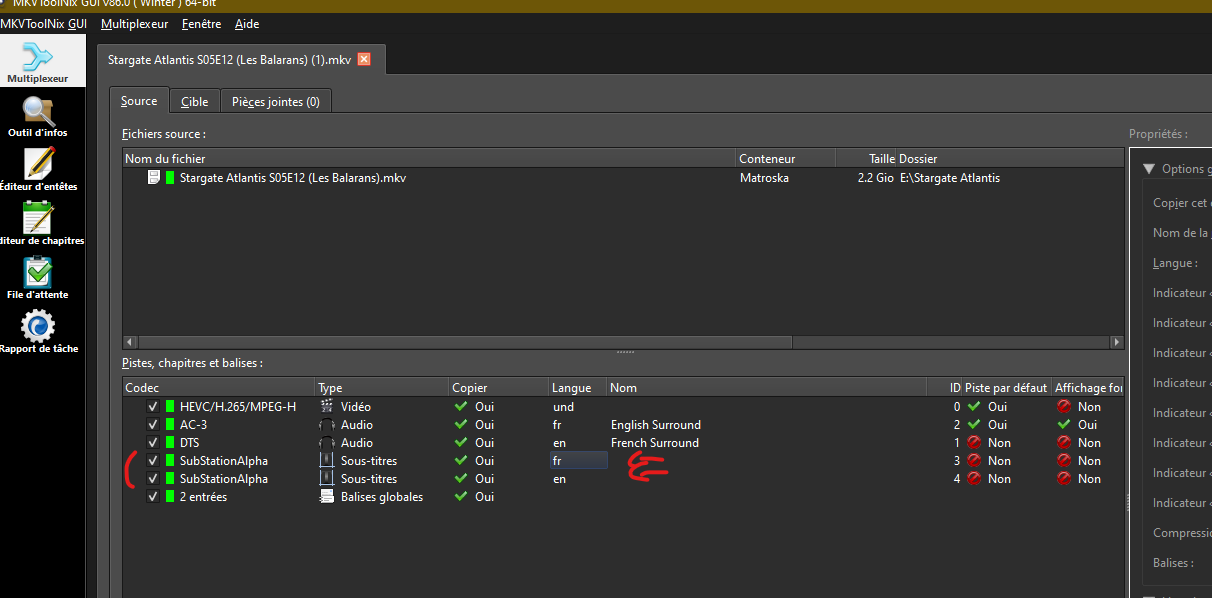
There’s always a recurring bug. On mkv files, it always removes the subtitle tags. By this I mean that it deletes the names indicating whether the subtitle is in French or English. Or any other language.
Source file:
Final file:
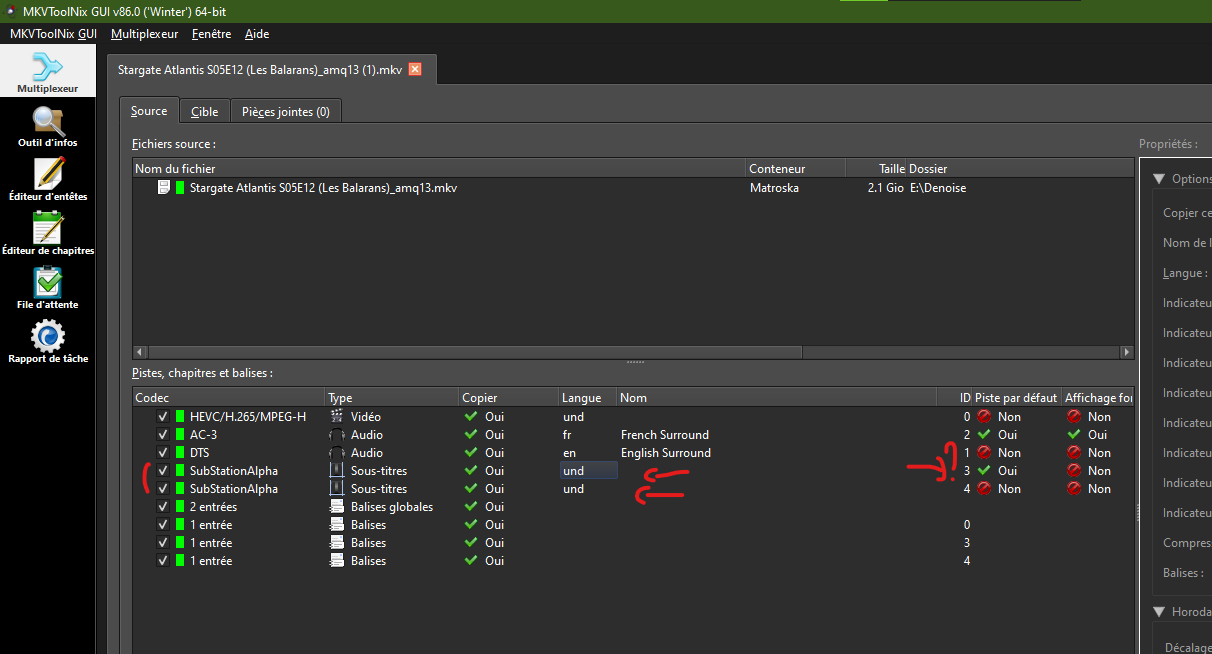
What’s more, by default it activates the first subtitle’s strength setting to force it to activate. Find out why

