Speed would go from 10 FPS to 10 SPF 
1 Like
Interesting. I wonder when it will be viable. Maybe with a 5090? A diffusion model for upscaling would be really awesome.
A quick browse of diffusion articles suggests that the upsample rates on a 4090 would be measured in frames per minute.
2 Likes
I would be very intersted with the opinion those kick firms have on the product they are supporting.
Do they endure a long time the constant crashes or bugs ?
From what I could see, their current products and services are primarily for still images and their video works are still in development phase.
Another thing to consider is that professional users mostly enhance scene by scene during production/editing and are not trying to run enhancement on whole finished works. You run into a lot fewer issues when you’re working on scenes that are a few seconds or minutes long compared to trying to process an hour or more of a previously finished work.
2 Likes
You pointed right this is done scene by scene, but not frame by frame.
The remaster chose the scene to work one, but does not work on each frame of it.
So this AI models are of full use to perform some scene, what I am trying to do, with exporting scene, then join+cut and compress it with TRUE parameters through VSDC.
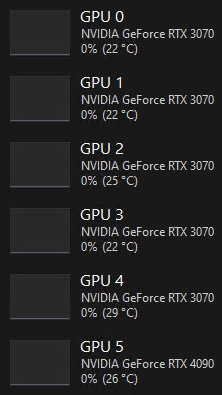
But currently focusing the “multiple GPU” behaviour that sound like a huge lying. Will prove it soon.
EDIT : I mean by lying a vastly deformation of the reality of result.
Two updates a week, is all but serious … I do code even deep learning and can’t even imagine send release without any test phase …
Just tried 5.1.2 after having serious issues on 5.1.1. These issues remain for me:
- Previous previews disappear after rendering a new preview. The only workaround for comparing two settings on a single video segment are to create one preview in panel B, selecting panel A and assigning it to the previous setting, and then having it re-render that preview. This means I have to render two previews for every possible comparison, because none are being retained after I try I new setting. Previously, every previous preview was retained.
- The software is not releasing the lock on the file when I close the input. Thus, to delete/move/edit the source file, I have to close Video AI entirely.
Neither of these issues were present on 5.0.4, so I’m reverting to that version.
1 Like
Same here since 5.0.4, th bullrun for releasing updates just lead us to majors problems.
The export list is fixed in 5.1.2 but now the preview list is borked!
Problem 1: Completed previews cannot be played back if you select a different source and then go back to the original source!
Example:
Complete a preview, ok, it’s there!:

Select the other source:

Back to the original, I can’t play the preview anymore!

Problem 2: Completed previews are removed from the preview list if you exit the application and start it again!
After completing preview:
After closing and re-opening application, where did my preview go?:


5.1.2 is still losing the user preference setting for export directory.
1 Like
As several users have already mentioned, this product was born to improve videos, not to become a video editor or complement to other products.
The models are supposed to be continuously trained to improve…where are those improvements…months and years for many models without new versions.
Now that you are going to release a PRO version… well, there you can put all the plugins for DaVinci and other editors… the interface and other stories… and for the others: models… periodically updated models… We’re fine with the interface from 2 years ago…but focus on what Topaz was born for: video improvement…trained and periodically updated models…enough of the embellishment.
12 Likes
I dont know since when or maybe it has always been a bug but. First time im trying to up the fps from 15 to 60fps without upscale/enhancement.
Apollo and Aion model destroys low res (320x240) content. When trying to interpolate only it creates half resolution something like 144p and then interpolates. If you add upscaling with Iris it is noticeably worse compared to Chronos for example. But Chronos creates a lot of jagging and artifacts…
The behaviour is actually worse. You can’t even swap between previews on a single video. The new beta has this problem too.
https://community.topazlabs.com/t/topaz-video-ai-beta-v5-1-3-0-b/70632/17
2 Likes
Maybe I was right in the first place at least it is covered now if the pro version is just with plug ins I do not need pro and separate target groups and subsequently allocate development costs to each type of software accordingly. I love proper matching of costs geared to product sales. In the end this will benefit all consumers. If there is no market for pro from a cost allocation matching regards to sales we will pay less or improve on the standard release. Amen.
1 Like
@tony.topazlabs Instant Process seems unstable more than the all GPUs was. Program crashes.
The big wrong point of these 5.X releases, is the fact that now you whant to charge an extra, for a feature that had always been included on standard subscription.
On the 4.X releases I could use both my laptop’s RTX 4060 and Radeon 780M Integrated Graphics simultaneosly in rendering, giving me a great extra boost in perfomance (FHD>4K Gaia at 3.4fps), but now I can only use one at time, giving me just 2.8fps in 4060 alone, and you wishing charge an extra for the same feature as before in a “Pro” version, in the next releases…
This is an absolute wrong business !
1 Like
Based on what has been said so far, I don’t think there is supposed to be any change to the current standard licence. You should still be able to enhance a single video with multiple gpus (whether it’s currently working correctly is a different matter). The “Pro” licence will have the feature to use multiple gpus to enhance multiple videos simultaneously.
@alanhusband-677420 That is a very important point as well, you could do all this in Topaz 4.
It could handle 2 or even 3 renders in multi GPU mode without problems, the only downside is that the computer became extremely sluggish, but you had the flexbility to set just the main GPU to do the job, and leave the integrated one to the others parallel tasks, all about youy workflow.
You can actually use multiple GPUs to process multiple videos now. You just have to open simultaneous instances of TVAI and assign each one a different GPU as AI processor. It sounds to me as if the upcoming “pro” function will just allow doing the same thing with a single instance. Not sure how that would be worth paying more for, but we’ll just have to wait and see how it works.
1 Like
Yeah, I know some users were already doing that to get better overall resource utilization and cut down on total render time. You would hope as a paid “Pro” feature it will work better than what users can already do (and Topaz don’t sabotage non-Pro users in the process).
